Compact, Gesture-Based Remote Control Over Bluetooth

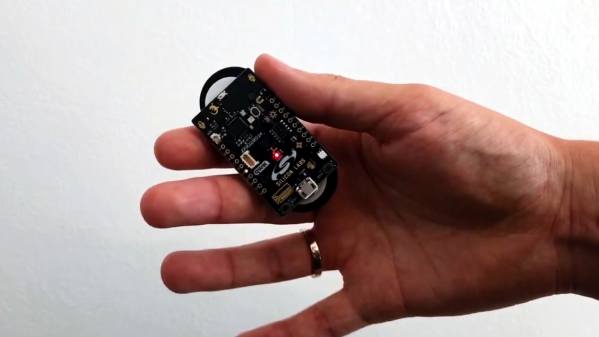
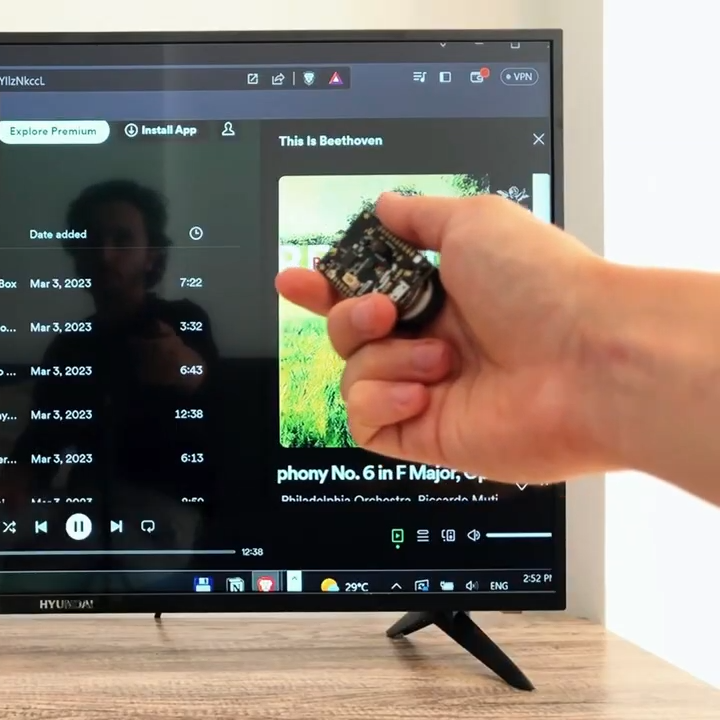
[AlexMiller11] shared a project for a DIY gesture-sensing remote control that acts like a Bluetooth keyboard, capable of controlling media and presentations on a computer with a high degree of accuracy.

The device recognizes eight different gestures and controls a host PC over Bluetooth.

The hardware is a Silicon Labs xG24 dev kit, a small IoT-focused board able to be powered by a CR2032 cell. Part of what makes it all work is the six-axis IMU sensor, but the rest is the software to interpret that data and figure out what motions the user is trying to do. That happens with a Neuton.AI model and SDK, a tiny but effective machine learning framework for small devices.

How does it actually work? The device acts as a Bluetooth HID, and gets connected to a PC in the same was as a regular Bluetooth keyboard. Once that’s done, recognized gestures are printed out the serial port as well as sent via Bluetooth to the host machine. Media can then be played, paused, volume adjusted, presentations controlled, and more. More details are on the project’s GitHub repository. There’s also a demo video that explains exactly what’s going on, embedded below the page break.

Machine learning is a way of using software to solve the kinds of problems humans are not very good at writing programs to solve, and accurate gesture recognition is a good example. Not all such applications require heaps of overheating GPUs, either. We’ve seen the concept of a neural network stripped down to its bare essentials running on an Arduino Uno, for those who would like to better appreciate the fundamentals.

Continue reading “Compact, Gesture-Based Remote Control Over Bluetooth”

AI-Powered Snore Detector Shakes The Pillow So You Won’t

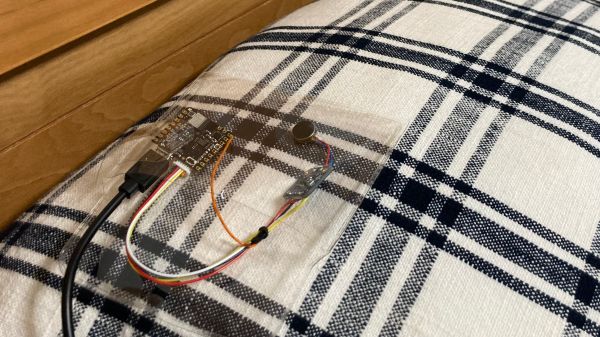
If you snore, you’ll probably find out about it from someone. An elbow to the ribs courtesy of your sleepless bedmate, the kids making fun of you at breakfast, or even the lady downstairs calling the cops might give you the clear sign that you rattle the rafters, and that it’s time to do something about it. But what if your snores are a bit more subtle, or you don’t have someone to urge you to roll over? In that case, this AI-powered haptic snore detector might be worth building.

The most distinctive characteristic of snoring is, of course, its sound, and that’s exactly what [Naveen Kumar] chose as a trigger. To differentiate between snoring and other nighttime sounds, [Naveen] chose an Arduino Nicla Voice sensor board, which sports a Syntiant NDP120 deep-learning processor and a built-in MEMS microphone. To generate a model that adequately represents the full tapestry of human snores, a publicly available snoring dataset — because of course that’s a thing — was used for training. Importantly, the training data included samples of non-snoring sounds, like sirens and thunder, as well as clips of legit snoring mixed with these other sounds. The model is trained with an online tool and downloaded onto the board; when it detects the sweet sound of sawing wood three times in a row, a haptic driver board vibrates the pillow as a gentle reminder to reposition. Watch it in action in the brief video below.

Snoring is something that’s easy to make light of, but in all seriousness, it’s not something to be taken lightly. Hats off to [Naveen] for developing a tool like this, which just might let you know you’ve got a problem that bears a closer look by a professional. Although it might work better as a wearable rather than a pillow-shaker.

Continue reading “AI-Powered Snore Detector Shakes The Pillow So You Won’t”

Helping Robots Learn By Letting Them Fail

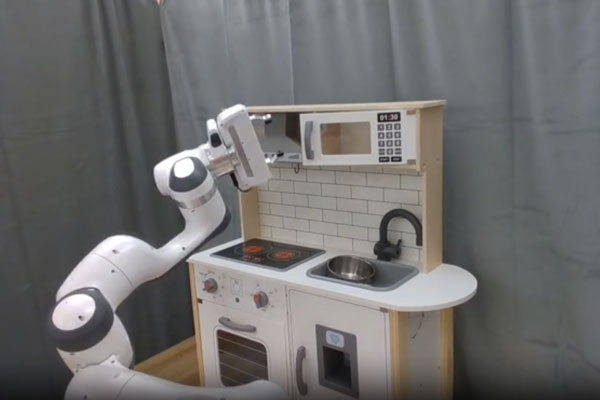
The [MIT Technology Review] has just released its annual list of the top innovators under the age of 35, and there are some interesting people on this list of the annoyingly accomplished at a young age. Like [Lerrel Pinto], an associate professor of computer science at NY University. His work focuses on teaching robots how to do things in the home by failing.

Continue reading “Helping Robots Learn By Letting Them Fail”

Teaching A Mini-Tesla To Steer Itself

At the risk of stating the obvious, even when you’ve got unlimited resources and access to the best engineering minds, self-driving cars are hard. Building a multi-ton guided missile that can handle the chaotic environment of rush-hour traffic without killing someone is a challenge, to say the least. So if you’re looking to get into the autonomous car game, perhaps it’s best to start small.

If [Austin Blake]’s fun-sized Tesla go-kart looks familiar, it’s probably because we covered the Teskart back when he whipped up this little demon of an EV from a Radio Flyer toy. Adding self-driving to the kart is a natural next step, so [Austin] set off on a journey into machine learning to make it happen. Having settled on behavioral cloning, which trains a model to replicate a behavior by showing it examples of the behavior, he built a bolt-on frame to hold a steering servo made from an electric wheelchair motor, some drive electronics, and a webcam attached to a laptop. Ten or so human-piloted laps around a walking path at a park resulted in a 48,000-image training set, along with the steering wheel angle at each point.

The first go-around wasn’t so great, with the Teskart seemingly bent on going off the track. [Austin] retooled by adding two more webcams, to get a little parallax data and hopefully improve the training data. After a bug fix, the improved model really seemed to do the trick, with the Teskart pretty much keeping in its lane around the track, no matter how fast [Austin] pushed it. Check out the video below to see the Teskart in action.

It’s important to note that this isn’t even close to “Full Self-Driving.” The only thing being controlled is the steering angle; [Austin] is controlling the throttle himself and generally acting as the safety driver should the car veer off course, which it tends to do at one particular junction. But it’s a great first step, and we’re looking forward to further development.

Continue reading “Teaching A Mini-Tesla To Steer Itself”

AI Learns To Walk In 3D Training Grounds

AI agents are learning to do all kinds of interesting jobs, even the creative ones that we quite prefer handling ourselves. Nevertheless, technology marches on. Working in this area is YouTuber [AI Warehouse], who has been teaching an AI to walk in a simulated environment.

Albert needed some specific guidance to learn how to walk upright, something that humans tend to figure out innately.

The AI controls a vaguely humanoid-like creature, albeit with a heavily-simplified body and limbs. It “lives” in a 3D environment created in the Unity engine, which provides the necessary physics engine for the work. Meanwhile, the ML-Agents package is used to provide the brain for Albert, the AI charged with learning to walk.

The video steps through a variety of “deep reinforcement learning” tasks. In these, the AI is rewarded for completing goals which are designed to teach it how to walk. Albert is given control of his limbs, and simply charged with reaching a button some distance away on the floor. After many trials, he learns to do the worm, and achieves his goal.

Getting Albert to walk upright took altogether more training. Lumpy ground and walls in between him and his goal were used to up the challenge, as well as encouragements to alternate his use of each foot and to maintain an upright attitude. Over time, he was able to progress through skipping and to something approximating a proper walk cycle.

One may argue that the teaching method required a lot of specific guidance, but it’s still a neat feat to achieve nonetheless. It’s altogether more complex than learning to play Trackmania, we’d say, and that was impressive enough in itself. Video after the break.

Continue reading “AI Learns To Walk In 3D Training Grounds”

Smart Assistants Need To Get Smarter

Science fiction has regularly portrayed smart computer assistants in a fanciful way. HAL from 2001: A Space Odyssey and J.A.R.V.I.S. from the contemporary Iron Man films are both great examples. They’re erudite, wise, and capable of doing just about any reasonable task that is asked of them, short of opening the pod bay doors.

Cut back to reality, and you’ll only be disappointed at how useless most voice assistants are. It’s been twelve long years since Siri burst onto the scene, with Alexa and Google Assistant following years later. Despite years on the market, their capabilities remain limited and uninspiring. It’s time for voice assistants to level up.

Continue reading “Smart Assistants Need To Get Smarter”

Closeup of an Apple ][ terminal program. The background is blue and the text white. The prompt says, "how are you today?" and the ChatGPT response says, "As an AI language model, I don't have feelings, but I am functioning optimally. Thank you for asking. How may I assist you?"

Apple II – Now With ChatGPT

Hackers are finding no shortage of new things to teach old retrocomputers, and [Evan Michael] has taught his Apple II how to communicate with ChatGPT.

Written in Python, iiAI lets an Apple II access everyone’s favorite large language model (LLM) through the terminal. The program lives on a more modern computer and is accessed over a serial connection. OpenAI API credentials are stored in a file invoked by iiAI when you launch it by typing python3 openai_apple.py. The program should work on any device that supports TTY serial, but so far testing has only happened on [Michael]’s Apple IIGS.

For a really clean setup, you might try running iiAI internally on an Apple II Pi. ChatGPT has also found its way onto Commodore 64 and MS-DOS, and look here if you’d like some more info on how these AI chat bots work anyway.

Continue reading “Apple II – Now With ChatGPT”