Hack Your Brain To Stop Overeating

Sometimes the easiest advice can be the hardest to follow. For example: if you want to lose weight, you must eat right and exercise. You can avoid both and still lose weight by simply eating less, but that takes willpower.

Losing weight is one of the hardest things a person can do, because we have to eat to survive. That leaves the problem of stopping when we’re full. Here in the united states of high-fat foods and huge portions, that can be really, really difficult, as evidenced by the obesity statistics. But no matter where you live, it’s easy to ignore the ‘stomach full’ signal. It’s kind of slow, anyway. So how do you get yourself tuned into the signal? All it takes is a little classical conditioning.

Slim Band is simple, but effective. Basically, it’s a pack of breath-freshening strips strapped to a timer PCB and set into a watchband. Set the five-minute timer when you start eating, and when it goes off, take out a strip and mintify your mouth. By the time the minty-ness wears off, you should feel full enough to push your plate away. The convenience factor is a big plus—there’s no getting the phone out to set an alarm, or digging for mints in your pocket or purse.

Though the idea began as a personal improvement project, [Chaz] would like to see it widely adopted as a way of fighting obesity and evening out the world’s food distribution in the longer term. We would, too.

Micropython And C Play Together Better

Python is a versatile, powerful language but sometimes it’s not the best choice, especially if you’re doing work in embedded systems with limited memory. Sometimes you can get away with MicroPython for these cases, but the best language is likely C or assembly. If you’re really stubborn, like [amirgon], and really want C and Python to play well together, you can make use of his new tool which can bring any C library to MicroPython.

As an example of how this tool is used, a “Pure MicroPython” display driver for ILI9341 on the ESP32, which means that everything was implemented in MicroPython. [amirgon] wanted to see how the Python driver would compare to one that’s already been written in C, and use it to showcase MicroPython binding. This tool also automatically converts structs, unions, enums and arrays to Python objects, and provides a means to work with pointers which is something that Python doesn’t handle in the same way that C requires.

[amirgon] hopes that this tool will encourage the adoption of Micropython by removing the obstacle of missing APIs and libraries in MicroPython. Since most libraries for systems like these are written in C, a way to implement them in Python is certainly powerful. We featured one use case for this a while back, but this is a much more generic fix for this coding obstacle.

See If Someone Has Been In Your Drawers With This Simple Alarm

There’s a spy movie – probably from the [James Bond] franchise – in which our hero is staying in a fancy hotel. It’s crawling with enemies, naturally, and eager to see if one has been snooping in his room while he’s out for martinis, he sticks a hair across the gap in the door. When he comes back and finds the hair missing, he knows the game is afoot.

This hotel safe intrusion detector is what [Q] might have thought up for such a job if he’d had access to PIC microcontrollers and SMD LEDs. [Andy]’s “LightSafer” is a silent alarm for hotel safes, drawers, closets, or even the refrigerator – anywhere where the transition from dark to light indicates an unwanted visit. It’s tiny – only 33 x 21 mm – and is powered by a CR2032 coin cell. A Broadcom APDS-9300 light sensor watches for openings while the PIC monitors a joystick control for the correct PIN entry. There’s no audible alarm; rather, an LED blinks to indicate an unauthorized intrusion and blinks once for every 15 minutes since the event.

LightSafer is simple but effective, with a clever UI that keeps the current draw low and the battery life long. [Andy] used a similar technique for this low-draw cat tracking collar that we featured a while back.

Hands-On: CCCamp2019 Badge Is A Sensor Playground Not To Be Mistaken For A Watch

Last weekend 5,000 people congregated in a field north of Berlin to camp in a meticulously-organized, hot and dusty wonderland. The optional, yet official, badge for the 2019 Chaos Communication Camp was a bit tardy to proliferate through the masses as the badge team continued assembly while the camp raged around them. But as each badge came to life, the blinkies that blossomed each dusk became even more joyful as thousands strapped on their card10s.

Yet you shouldn’t be fooled, that’s no watch… in fact the timekeeping is a tacked-on afterthought. Sure you wear it on your wrist, but two electrocardiogram (ECG) sensors for monitoring heart health are your first hint at the snoring dragon packed inside this mild-mannered form-factor. The chips in question are the MAX30001 and the MAX86150 (whose primary role is as a pulse sensor but also does ECG). We have high-res ADCs just waiting to be misused and the developers ran with that, reserving some of the extra pins on the USB-C connector for external devices.

There was a 10€ kit on offer that let you solder up some electrode pads (those white circles with gel and a snap for a solid interface with your body’s electrical signals) to a sacrificial USB-C cable. Remember, all an ECG is doing is measuring electrical impulses, and you can choose how to react to them. During the workshop, one of the badge devs placed the pads on his temples and used the card10 badge to sense left/right eye movement. Wicked! But there are a lot more sensors waiting for you on these two little PCBs.

Continue reading “Hands-On: CCCamp2019 Badge Is A Sensor Playground Not To Be Mistaken For A Watch”

Monitoring An Electric Fence With LoRaWAN

Making sure that an electric fence which is keeping one’s cattle and sheep from wandering off is still working properly seems like a fairly daunting task, especially when this fence is quite a distance from one’s home so checking up on it is time-consuming. After a friend of [kiu] got called a few times by the police because some of the sheep had pulled a prison break, the obvious technological solution was to IoT-enable the fence with LoFence.

This solution is nothing if not elegant in its simplicity. For phoning home with status data, the system uses the Microchip RN2483 IC, which handles pretty much all aspects of LoRaWAN, so that one merely has to send data to its serial interface to transmit. Because this system uses The Things Network (TTN) there are no service costs due to the low data rates. This was the easy part, aside from having to add a LoRaWAN gateway to boost the signal in the area with the electric fence.

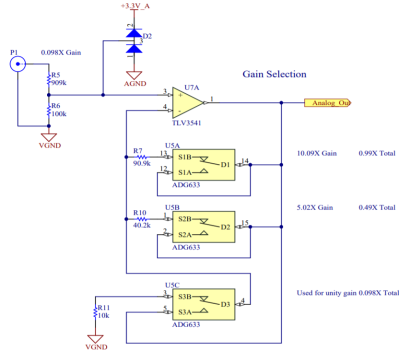
With that side covered, the rest of the build features an AVR ATmega328p MCU, a resistor divider and op-amp (TLV9062) along with some passives. The resulting circuit measures voltage, essentially to detect whether the fence is still forming a full circuit. Hacking into the little box that energizes the fence might be a possible upgrade there, but at least it is a fairly uncomplicated way to measuring things. Electric fences do work best with a voltage on them, after all.

At the other end of the LoRaWAN network, the data is parsed and analyzed by a service so that it can be displayed on a Grafana dashboard, ensuring that a single glance suffices to see the current state of the fence and whether one has to dash out in the rain at 1 AM to fix it or not.

Fixing A Cheap UPS HAT For Your Raspberry Pi With A Tiny Daemon

An uninterruptible power supply (UPS) isn’t something solely to have hooked up to your desktop PC. Your Raspberry Pi SBC might also benefit from it. Yet the available options aren’t too great, or are too expensive. This leads folk including [Joachim Baumann] to modify cheerfully cheap Chinese UPS HAT boards such as the Geekworm UPS HAT to fix its myriad of issues and missing features.

Inspired by a number of other hacks on this board which fixed things like needing to push a button on the UPS to boot the Raspberry Pi, [Joachim] set out to make a similar ATtiny-based solution that would address all issues, above all the fact that this Geekworm UPS does not detect when the connected SBC has turned off and will happily run the lithium battery pack dry. Finding a blog post by Simon who had reverse-engineered the board previously was immensely helpful. Continue reading “Fixing A Cheap UPS HAT For Your Raspberry Pi With A Tiny Daemon”

The Amazon Dash Button: A Retrospective

The Internet of Things will revolutionize everything! Manufacturing? Dog walking? Coffee bean refilling? Car driving? Food eating? Put a sensor in it! The marketing makes it pretty clear that there’s no part of our lives which isn’t enhanced with The Internet of Things. Why? Because with a simple sensor and a symphony of corporate hand waving about machine learning an iPhone-style revolution is just around the corner! Enter: Amazon Dash, circa 2014.

The first product in the Dash family was actually a barcode scanning wand which was freely given to Amazon Fresh customers and designed to hang in the kitchen or magnet to the fridge. When the Fresh customer ran out of milk they could scan the carton as it was being thrown away to add it to their cart for reorder. I suspect these devices were fairly expensive, and somewhat too complex to be as frequently used as Amazon wanted (thus the extremely limited launch). Amazon’s goal here was to allow potential customers to order with an absolute minimum of friction so they can buy as much as possible. Remember the “Buy now with 1-Click” button?

That original Dash Wand was eventually upgraded to include a push button activated Alexa (barcode scanner and fridge magnet intact) and is generally available. But Amazon had pinned its hopes on a new beau. Mid 2015 Amazon introduced the Dash Replenishment Service along with a product to be it’s exemplar – the Dash Button. The Dash Button was to be the 1-Click button of the physical world. The barcode-scanning Wands require the user to remember the Wand was nearby, find a barcode, scan it, then remember to go to their cart and order the product. Too many steps, too many places to get off Mr. Bezos’ Wild Ride of Commerce. The Dash Buttons were simple! Press the button, get the labeled product shipped to a preconfigured address. Each button was purchased (for $5, with a $5 coupon) with a particular brand affinity, then configured online to purchase a specific product when pressed. In the marketing materials, happy families put them on washing machines to buy Tide, or in a kitchen cabinet to buy paper towels. Pretty clever, it really is a Buy now with 1-Click button for the physical world.

There were two versions of the Dash button. Both have the same user interface and work in fundamentally the same way. They have a single button (the software can recognize a few click patterns), a single RGB LED (‘natch), and a microphone (no, it didn’t listen to you, but we’ll come back to this). They also had a WiFi radio. Version two (silently released in 2016) added Bluetooth and completely changed the electrical innards, though to no user facing effect.

In February 2019, Amazon stopped selling the Dash Buttons. Continue reading “The Amazon Dash Button: A Retrospective”