Educational Breadboard Synth Module

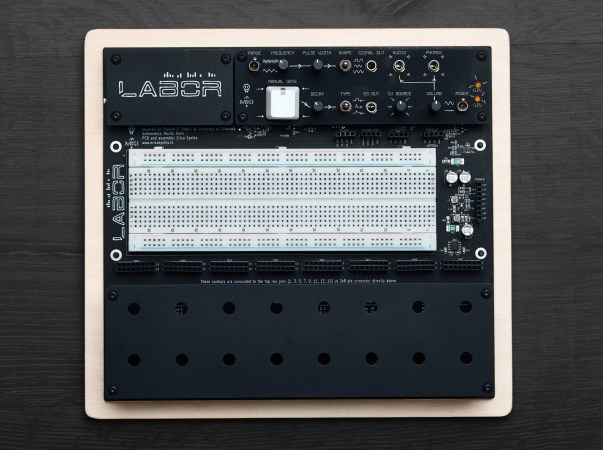
Synth designers [Erica Synths] have devised a very cool, approachable way to get started with DIY synth hacking. Designed around a breadboard, the EDU DIY LABOR is a synth module with everything you need to get started. The Basic version comes with potentiometers, switches, and jack sockets, and is aimed more at those who likely already have a decent supply of parts on hand for experimentation. The Full kit comes with all that, plus a supply of resistors, capacitors, ICs and transistors so you can get up to speed, even as a beginner.

The device is supplied as a semi-DIY kit, with some soldering and assembly required. The kit was designed in collaboration with Dr. Shalom D. Ruben, a teaching professor of engineering at the University of Colorado. So it should be approachable for those with some soldering experience under their belt. Labor includes a multi-voltage power supply which supplies all Eurorack voltages, an oscillator section for both audible ranges and LFO, a full envelope control section, an output amplifier and more! Once assembled you can quickly start making bloops, beeps, and bzzts. You can easily design filters, oscillators, amplifiers, sequencers, and whatever else you can dream up!

However, the kit is designed to be more than just a synth playground – the idea was also to create an environment where you could learn the basics of electronics at the same time, in an approachable, fun way. This is reflected in the excellent user manual, which goes beyond just assembling the device and gives some example circuits, complete with wave diagrams and detailed working explanations. Great for beginners and experienced hackers who want to learn more about fundamentals and audio synthesis!
Continue reading “Educational Breadboard Synth Module”

Marimbatron: A Digital Marimba Prototyping Project

The Marimbatron is [Leo Kuipers] ‘s final project as part of the Fab Academy program supervised by [Prof. Neil Gershenfeld] of MIT’s Center for Bits and Atoms. The course aims to teach students how to leverage all the fab lab skills to create unique prototypes using the materials at hand.

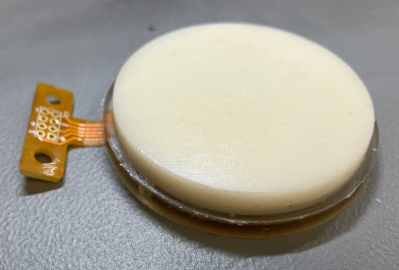
The final polyurethane/PET/Flex PCB stack-up for the sensor pad

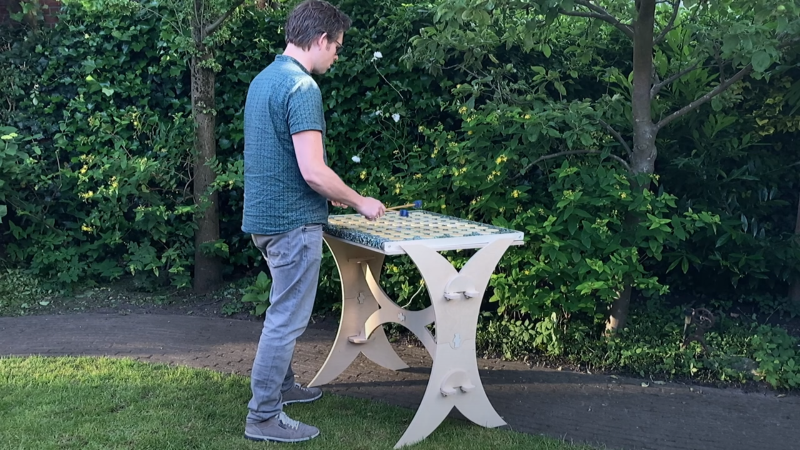
Fortunately, one of the main topics covered in the course is documentation, and [Leo] has provided ample material for review. The marimba consists of a horizontal series of wooden bars, each mounted over a metal resonator tube. It is played similarly to the xylophone, with a piano-type note arrangement, covering about five octaves but with a lower range than the xylophone. [Leo] converted this piano-type layout into a more logical grid arrangement. The individual pads are 3D printed in PETG and attached to a DIY piezoresistive pressure sensor made from a graphite-sprayed PET sheet laid upon a DIY flexible PCB. A central addressable LED was also included for indication purposes. The base layer is made of cast polyurethane, formed inside a 3D-printed rigid mould. This absorbs impact and prevents crosstalk to nearby sensors. The sensor PCB was initially prototyped by adhering a layer of copper tape to a layer of Kapton tape and cutting it out using a desktop vinyl cutter. While this method worked for the proof of concept, [Leo] ultimately outsourced the final version to a PCB manufacturer. The description of prototyping the sensor and dealing with over-moulding was particularly fascinating.

Continue reading “Marimbatron: A Digital Marimba Prototyping Project”

ESP32 Powered Crunch-E Makes Beats On The Go

There’s no shortage of devices out there for creating electronic music, but if you’re just looking to get started, the prices on things like synthesizers and drum machines could be enough to give you second thoughts on the whole idea. But if you’ve got a well stocked parts bin, there’s a good chance you’ve already got most of what you need to build your own Crunch-E.

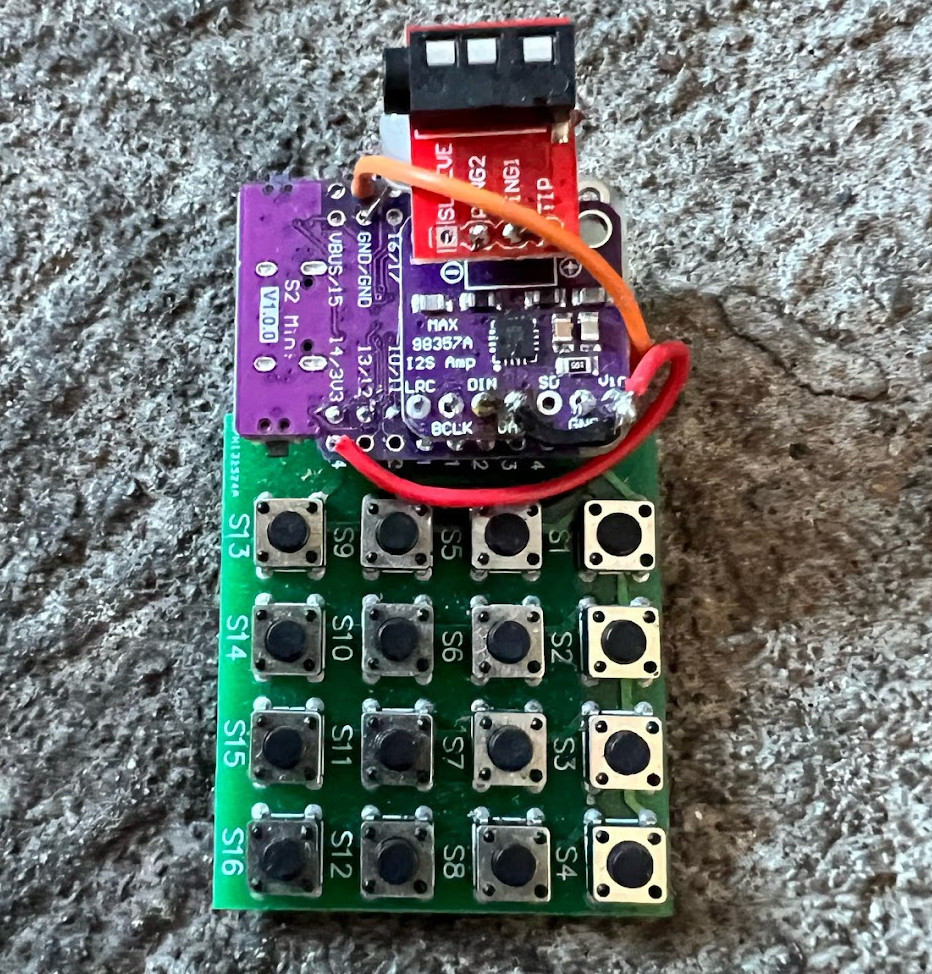
A Crunch-E built from stacked modules

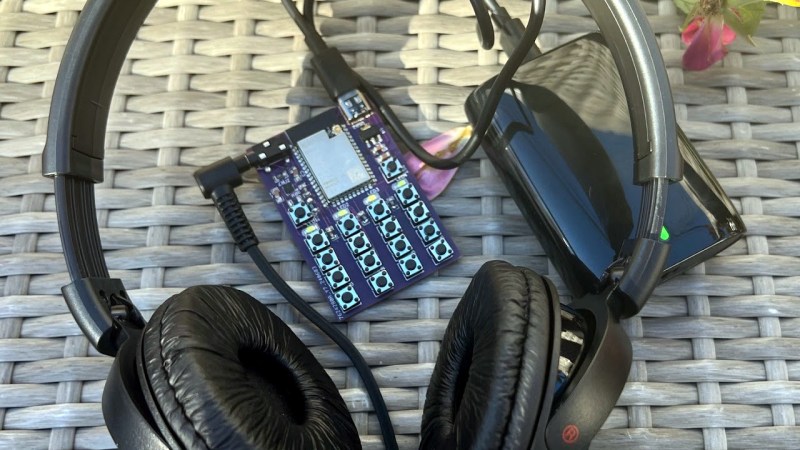
Described by creator [Roman Revzin] as a “keychain form factor music-making platform”, the Crunch-E combines an ESP32, an MAX98357 I2S audio amplifier, an array of tactile buttons, and a sprinkling of LEDs and passives. It can be built on a perfboard using off-the-shelf modules, or you can spin up a PCB if you want something a bit more professional. It sounds like there’s eventually going to be an option to purchase a pre-built Crunch-E at some point as well.

But ultimately, the hardware seems to be somewhat freeform — the implementation isn’t so important as long as you’ve got the major components and can get the provided software running on it.

The software, which [Roman] is calling CrunchOS, currently provides four tracks, ten synth instruments, and two drum machine banks. Everything can be accessed from a 4 x 4 button array, and there’s a “cheat sheet” in the documentation that shows what each key does in the default configuration. Judging by the demo video below, it’s already an impressively capable platform. But this is just the beginning. If everything goes according to plan and more folks start jamming on their own Crunch-E hardware, it’s not hard to imagine how the software side can be expanded and adapted over time.

Over the years we’ve seen plenty of homebrew projects for producing electronic music, but the low-cost, simple construction, and instant gratification nature of the Crunch-E strikes us as a particularly compelling combination. We’re eager to see where things develop from here.

Continue reading “ESP32 Powered Crunch-E Makes Beats On The Go”

Donkey Kong Bongos Ditch The GameCube, Go Mobile

Historically speaking, optional peripherals for game consoles tend not to be terribly successful. You’ll usually get a handful of games that support the thing, one of which will likely come bundled with it, and then the whole thing fades into obscurity to make way for the next new gimmick.

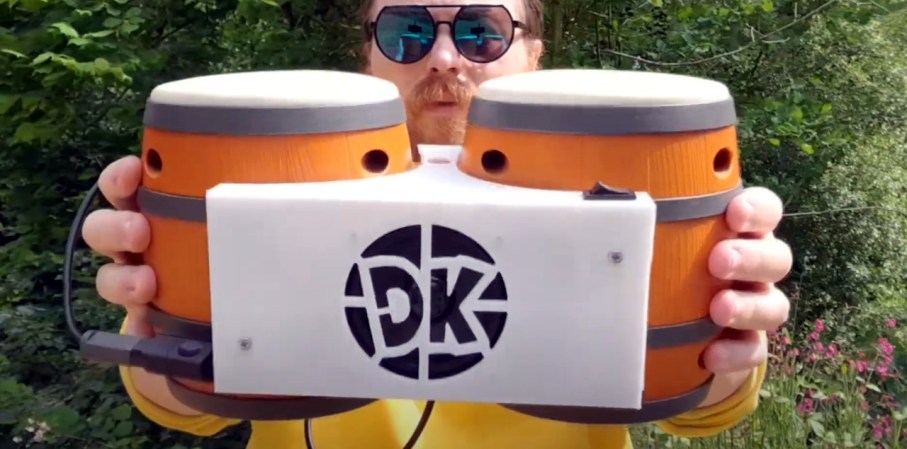
For example, did you know Nintendo offered a pair of bongos for the GameCube in 2003? They were used almost exclusively by the trio of Donkey Konga rhythm games, although only two of them were ever released outside of Japan. While the games might not have been huge hits, they were successful enough to stick in the memory of [bl3i], who wanted a way to keep the DK bongo experience alive.

The end result is, arguably, more elegant than the hokey musical controller deserves. While most people would have just gutted the plastic bongos and crammed in some new hardware, [bl3i] went through considerable effort so the original hardware would remain intact. His creation simply snaps onto the bongos and connects to them via the original cable.

Internally, the device uses an Arduino to read the output of the bongos (which appeared to the GameCube essentially as a standard controller) and play the appropriate WAV files from an SD card as hits are detected. Add in an audio amplifier module and a battery, and Nintendo’s bongos can finally go forth into the world and spread their beats.

As far as we’re able to tell, this is the first time the Donkey Kong bongos have ever graced the pages of Hackaday in any form, so congratulations to [bl3i] for getting there first. But it’s certainly not the first time we’ve covered ill-conceived game gadgets — long time readers will perhaps be familiar with Nintendo’s attempt to introduce the Robotic Operating Buddy (ROB) to households back in 1985.

Continue reading “Donkey Kong Bongos Ditch The GameCube, Go Mobile”

8-Tracks Are Back? They Are In My House

What was the worst thing about the 70s? Some might say the oil crisis, inflation, or even disco. Others might tell you it was 8-track tapes, no matter what was on them. I’ve heard that the side of the road was littered with dead 8-tracks. But for a while, they were the only practical way to have music in the car that didn’t come from the AM/FM radio.

If you know me at all, you know that I can’t live without music. I’m always trying to expand my collection by any means necessary, and that includes any format I can play at home. Until recently, that list included vinyl, cassettes, mini-discs, and CDs. I had an 8-track player about 20 years ago — a portable Toyo that stopped working or something. Since then, I’ve wanted another one so I can collect tapes again. Only this time around, I’m trying to do it right by cleaning and restoring them instead of just shoving them in the player willy-nilly.

Update: I Found a Player

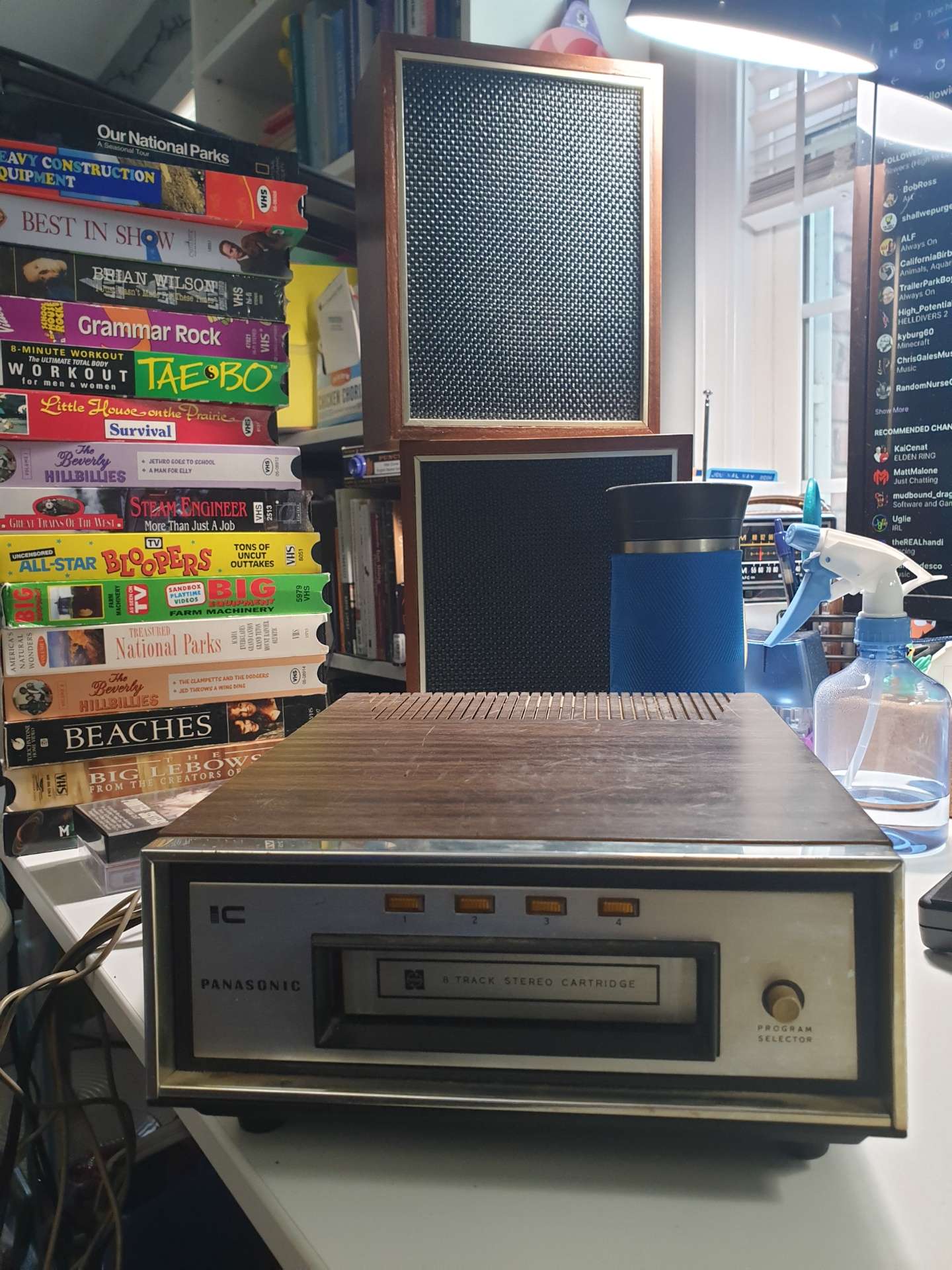
A small 8-track player and equally small speakers, plus a stack of VHS tapes.
I have since cleaned it.

A couple of weeks ago, I was at an estate sale and I found a little stereo component player and speakers. There was no receiver in sight. I tested the player with the speakers and bought them for $15 total because it was 75% off day and they were overpriced originally. While I was still at the sale, I hooked it up to the little speakers and made sure it played and changed programs.

Well, I got it home and it no longer made sound or changed programs. I thought about the play head inside and how dirty it must be, based on the smoker residue on the front plate of the player. Sure enough, I blackened a few Q-tips and it started playing sweet tunes again. This is when I figured out it wouldn’t change programs anymore.

I found I couldn’t get very far into the player, but I was able to squirt some contact cleaner into the program selector switch. After many more desperate button presses, it finally started changing programs again. Hooray!

I feel I got lucky. If you want to read about an 8-track player teardown, check out Jenny List’s awesome article. Continue reading “8-Tracks Are Back? They Are In My House”

Linamp, The IRL Winamp

Anyone who first experienced music on computers using Winamp probably shares a memory of seeing that classic UI for the first time. Everything about it was a step ahead of the clunky, chunky interfaces we were used to, and even though it was supposed to be unobtrusive, it was hard to tear your eyes off that silky-smooth spectrum analyzer bouncing out your favorite MP3s.

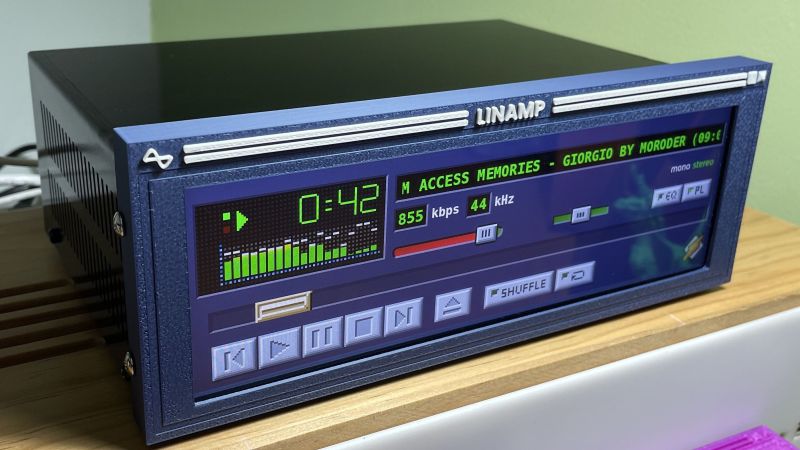
Recapturing a little of the Winamp magic is the goal of Linamp, an physical version of the classic media player. It reproduces the Winamp UI on a touchscreen LCD with a wide aspect ratio that almost perfectly matches the original layout. Behind the display is a Raspberry Pi 4 with a 32 GB SD card, with all the important connections brought out to a board on the back of the case. The case itself is a treat, as it borrows design elements from another bit of retro gear, the mini-rack audio systems that graced many a bookshelf in the 1980s — and powered many high school parties too, if memory serves.

To recreate the case, [Rodmg] designed a sheet metal case and had it custom-made from anodized aluminum by PCBWay. He also printed a bezel for the display that looks very similar to the Winamp window border, complete with control icons. Where the build really shines, though, is with the work [Rodmg] put into the software. He matched the original Winamp UI very closely, both in terms of layout and performance. The pains he went to to get the spectrum analyzer working, including a deep dive into FFT, are impressive.

The results speak for themselves on this one, and hats off to [Rodmg] for the effort and the ride on the nostalgia train. We don’t know if the recent announcement of Winamp’s impending open-sourcing will have much impact on this project, but it might result in a flood of new Winamp builds.

2024 Business Card Challenge: Tiny MIDI Keyboard

The progress for electronics over the past seven decades or so has always trended towards smaller or more dense components. Moore’s Law is the famous example of this, but even when we’re not talking about transistors specifically, technology tends to get either more power efficient or smaller. This MIDI keyboard, for example, is small enough that it will fit in the space of a standard business card which would have been an impossibility with the technology available when MIDI first became standardized, and as such is the latest entry in our Business Card Challenge.

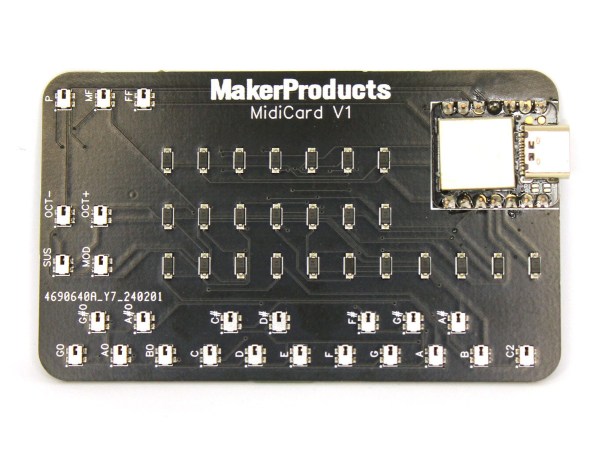
[Alana] originally built this tiny musical instrument to always have a keyboard available on the go, and the amount of features packed into this tiny board definitely fits that design goal. It has 18 keys with additional buttons to change the octave and volume, and has additional support for sustain and modulation as well. The buttons and diodes are multiplexed in order to fit the IO for the microcontroller, a Seeed Studio Xiao SAMD21, and it also meets the USB-C standards so it will work with essentially any modern computer available including most smartphones and tablets so [Alana] can easily interface it with Finale, a popular music notation software.

Additionally, the project’s GitHub page has much more detail including all of the Arduino code needed to build a MIDI controller like this one. This particular project has perhaps the best size-to-usefulness ratio we’ve seen for compact MIDI controllers thanks to the USB-C and extremely small components used on the PCB, although the Starshine controller or these high-resolution controllers are also worth investigating if you’re in the market for compact MIDI devices like this one.

Continue reading “2024 Business Card Challenge: Tiny MIDI Keyboard”