Ditch The Switch: A Soft Latching Circuit Roundup

For some of us, there are few sounds more satisfying than the deep resonant “thunk” of a high quality toggle switch slamming into position. There isn’t an overabundance of visceral experiences when working with electronics, so we like to savor them when we get the chance. But of course there’s no accounting for taste, and we suppose there are even situations where a heavy physical switch might not be the best solution. So what do you do?

Enter the latching power circuit, often referred to as a “soft” switch. [Chris Chimienti] has recently put together a fascinating video which walks the viewer through five different circuits which can be used to add one of these so-called soft power switches to your project. Each circuit is explained, diagramed, annotated, and eventually even demonstrated on a physical breadboard. The only thing you’ve got to do is pick which one you like the most.

There’s actually a number of very good reasons to abandon the classic toggle switch for one of these circuits. But the biggest one, somewhat counterintuitively, is cost. Even “cheap” toggle switches are likely to be one of the most expensive components in your bill of materials, especially at low volume. By comparison, the couple of transistors and a handful of passive components it will take to build out one of these latching circuits will only cost you a couple of cents.

Even if you aren’t in the market for a new way to turn off your projects, this roundup of circuits is a fantastic reminder of how powerful discrete components can be. In an age where most projects seem assembled from pre-fabbed modules, it’s occasionally refreshing to get back to basics.

Continue reading “Ditch The Switch: A Soft Latching Circuit Roundup”

New Part Day: This $10 Rocking Single Board Computer Does Everything You Want

Single board computers are great, but what we really need are cheap single board computers. Running Linux on anything isn’t as good as running Linux on everything, and all that. To that end, here is the Rock Pi S, a $10 single board computer with Ethernet, WiFi, and it costs $10.

This one comes from the boffins at Radxa, already behind the footnote-worthy Rock Pi 4, a single board computer that appears to be heavily derived from the Raspberry Pi but with a 4 in the name so it’s obviously better. It also has 4 GeeBees of RAM, so it’s got that going for it too. Their latest product is the Rock Pi S, a board that seems as though it’s taking inspiration from the C.H.I.P.. The biggest selling point is of course the price: $10 for the version with 256MB of RAM and without WiFi or Bluetooth. Various other incarnations exist with permutations of 256MB or 512MB of RAM, and with or without WiFi and Bluetooth. The highest spec variant costs $16, but is sold out at the moment.

This tiny little single board computer fills a need in the marketplace; the Raspberry Pi Zero is cheap and small when it’s available, but sometimes you need Ethernet for various reasons and a real USB A port is great to have. We’re looking forward to the builds this tiny board enables and all the fantastic creations that will come from a community so very interested in single board computers.

Modeling The Classic 555 Timer On A Breadboard

Over the years, readers have often commented that microcontrollers (or more specifically, the Arduino) are overkill for many of the projects they get used in. The admonition that the creator “Should have used a 555” has become something of a rallying cry for those who think modern electronic hobbyists are taking the easy way out.

But what if you think even the lowly 555 timer is overkill? In that case, perhaps you’ll be interested in a recent blog post by [TheMagicSmoke], where the reader is walked through the process of creating an analog of the classic integrated circuit on a somewhat larger scale. Finally, we can replace that cheap and handy IC with a mass of wires and components.

Alright, so you’ve probably guessed that there’s no practical reason to do this. Outside of some theoretical MacGyver situation in which you needed to create a square wave using parts salvaged from devices laying around, anyway. Rather, the project is presented as a good way to become more confident with the low-level operation of electronic circuits, which is something we think everyone can agree is a good thing.

The components used include a 74S00 quad NAND gate, a LM358 dual operational amplifier, a 2N2222A transistor, and a handful of passive components. [TheMagicSmoke] not only explains how the circuit is constructed, but shows the math behind how it all works. Finally, an oscilloscope is used to verify it’s operating as expected.

We respect a hacker on a mission, just last month [TheMagicSmoke] put together a similar “back to basics” post on how to interface with an I2C EEPROM.

Back To Basics With An Arduino And An EEPROM

There are plenty of techniques and components that we use in our everyday hardware work, for which their connection and coding is almost a done deal. We are familiar with them and have used them before, so we drop them in without a second thought. But what about the first time we used them, we had to learn somewhere, right? [TheMagicSmoke] has produced just what we’d have needed then for one component that’s ubiquitous, the I2C EEPROM.

These chips provide relatively small quantities of non-volatile memory storage, and though they are not the fastest of memory technologies they have a ready application in holding configuration or other often-read and rarely written data.

Since the ST24C04 512-byte device in question has an I2C bus it’s a straightforward add-on for an Arduino Mega, so we’re shown the wiring for which only a couple of pull-down resistors are required, and some sample code. It’s not the most complex of projects, but it succinctly shows what you need to do so that you too can incorporate an EEPROM in your work.

If learning about I2C EEPROMs piques your interest, perhaps you’d like to read a previous look we made at them.

Decap ICs Without The Peril

There can be few of us who haven’t gazed with fascination upon the work of IC decappers, whether they are showing us classic devices from the early years of mass semiconductor manufacture, or reverse-engineering the latest and greatest. But so often their work appears to require some hardcore scientific equipment or particularly dangerous chemicals. We’ve never thought we might be able to join the fun. [Generic Human] is out to change all that, by decapping chips using commonly available chemicals and easy to apply techniques. In particular, we discover through their work that rosin — the same rosin whose smell you will be familiar with from soldering flux — can be used to dissolve IC packaging.

Of course, ICs that dissolved easily in the face of soldering wouldn’t meet commercial success, so an experiment with flux meets little success. Pure rosin, however, appears to be an effective decapping agent. [Generic Human] shows us a motherboard voltage regulator boiled in the stuff. When the rosin is removed with acetone, there among the debris is the silicon die, reminding us just how tiny these things are. We’re sure you’ll all be anxious to try it for yourselves, now, so take a while to look at the video below showing their CCC Congress talk.

The master of chip decapping is of course [Ken Shirriff], whose work we’ve featured many times. Our editor [Mike Szczys] interviewed him last year, and it’s well worth a look.

Continue reading “Decap ICs Without The Peril”

Fun With Negative Resistance II: Unobtanium Russian Tunnel Diodes

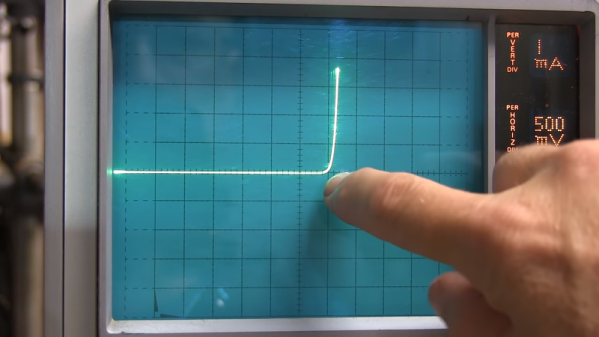
In the first part of this series, we took a look at a “toy” negative-differential-resistance circuit made from two ordinary transistors. Although this circuit allows experimentation with negative-resistance devices without the need to source rare parts, its performance is severely limited. This is not the case for actual tunnel diodes, which exploit quantum tunneling effects to create a negative differential resistance characteristic. While these two-terminal devices once ruled the fastest electronic designs, their use has fallen off dramatically with the rise of other technologies. As a result, the average electronics hacker probably has never encountered one. That ends today.

Due to the efficiencies of the modern on-line marketplace, these rare beasts of the diode world are not completely unobtainable. Although new-production diodes are difficult for individuals to get their hands on, a wide range of surplus tunnel diodes can still be found on eBay for as little as $1 each in lots of ten. While you’d be better off with any number of modern technologies for new designs, exploring the properties of these odd devices can be an interesting learning experience.

For this installment, I dug deep into my collection of semiconductor exotica for some Russian 3И306M gallium arsenide tunnel diodes that I purchased a few years ago. Let’s have a look at what you can do with just a diode — if it’s the right kind, that is.

[Note: the images are all small in the article; click them to get a full-sized version]

Continue reading “Fun With Negative Resistance II: Unobtanium Russian Tunnel Diodes”

A Datasheet Manifesto For The 21st Century

Selecting electronic components can be a frustrating process, one of trawling through the websites of distributors such as DigiKey, Mouser, or RS, and then poring over manufacturer data sheets. These documents produced as detailed guides to the technical specifications of a device contain enough to give an engineer everything they need to incorporate it into their designs.

Unfortunately many datasheets fall short of the ideal, and have instead become marketing documents designed to “win the socket”. This is a problem that vexes Boldport’s [Saar Drimer], and he has written a personal manifesto outlining his vision to make the world of datasheets a better place.

It’s a common-sense designer’s wishlist, and it’s one we could completely get behind. Chief among his desires are web-readable datasheets as well as the ubiquitous PDFs, with full data in human and machine readable forms instead of tiny printed graphs and tables. He also makes a plea for better UX testing to combat the scourge of the inaccurate pad layout, to which we’d add providing footprints ready-made for all popular CAD packages. These and the rest of his manifesto would be a game-changer, and wouldn’t displace the existing paper or PDF sheet for those who still use them. Whether or not the manufacturers will take heed is anyone’s guess, but to have such an ideal laid out is a start.

If you’re not familiar with [Saar]’s work, you’re in for a treat. Boldport produce some of the most beautiful artistic PCBs, and we’ve featured them before more than once.

Thanks to our colleague [Ted Yapo] for the header image.