EF50: The Tube That Changed Everything

From today’s perspective, vacuum tubes are pretty low tech. But for a while they were the pinnacle of high tech, and heavy research followed the promise shown by early vacuum tubes in transmission and computing. Indeed, as time progressed, tubes became very sophisticated and difficult to manufacture. After all, they were as ubiquitous as ICs are today, so it is hardly surprising that they got a lot of R&D.

Prior to 1938, for example, tubes were built as if they were light bulbs. As the demands on them grew more sophisticated, the traditional light bulb design wasn’t sufficient. For one, the wire leads’ parasitic inductance and capacitance would limit the use of the tube in high-frequency applications. Even the time it took electrons to get from one part of the tube to another was a bottleneck.

There were several attempts to speed tubes up, including RCA’s acorn tubes, lighthouse tubes, and Telefunken’s Stahlröhre designs. These generally tried to keep leads short and tubes small. The Philips company started attacking the problem in 1934 because they were anticipating demand for television receivers that would operate at higher frequencies.

Dr. Hans Jonker was the primary developer of the proposed solution and published his design in an internal technical note describing an all-glass tube that was easier to manufacture than other solutions. Now all they needed was an actual application. While they initially thought the killer app would be television, the E50 would end up helping the Allies win the war.


Continue reading “EF50: The Tube That Changed Everything”

Security Engineering: Inside The Scooter Startups

A year ago, ridesharing scooter startups were gearing up for launch. Workers at Bird, Lime, Skip, and Spin were busy improving their app, retrofitting scooters, and most importantly, figuring out the logistics of distributing thousands of electronic scooters along the sidewalks of the Bay Area. These companies were gearing up for a launch in early summer, but one company — nobody can remember exactly who — decided to launch early. First mover advantage, and all. Overnight, these scooter companies burst into overdrive, chucking scooters out of panel vans onto the sidewalk simply to keep up with the competition.

The thing about San Francisco, and California in general, is that it’s a very direct democracy masquerading as a representative government. Yes, there are city council members and a state legislature, but the will of the people will rule. No one liked tripping over the scooters littering the sidewalks, so the scooters ended up at the bottom of a lake. Or in trees. Or in the trash. In time, city permits were issued, just like a hot dog cart or any other business operating on a public sidewalk, and the piles of electric scooters disappeared. Not before hundreds of scooters were vandalized, that is.

It’s still early in the electric scooter rental startup space, but if there’s one company leading the pack, It’s Bird. they’re getting the most press, the CEO was formerly at Lyft and Uber (which explains the press), and they’ve raised nearly a half Billion dollars in funding (which explains the press). Bird is valued at two Billion dollars, and it’s one of four major ridesharing scooter startups. Pets.com had nothing on this.

Despite how overvalued you think a scooter startup might be, they’re still a business, and they’re ruled by the bottom line. Bird has grown a lot in the past year, and with that comes engineering challenges. The Bird scooters must be more resistant to vandalism. The Bird scooters must be harder to steal. Above all else, they must remain in service longer. This is the teardown of how Bird managed to improve their bottom line and engineer a better scooter.

Continue reading “Security Engineering: Inside The Scooter Startups”

Automate The Freight: Amazon Tackles The Last Mile Problem On Wheels

We’ve been occasionally exploring examples of what could be the killer application for self-driving vehicles: autonomous freight deliveries, both long-haul and local, as well as some special use cases. Some, like UAV delivery of blood and medical supplies in Kenya, have taken off and are becoming both profitable and potentially life-saving. Others, like driverless long-haul trucking, made an initial splash but appear to have gone quiet since then. This is to be expected, as the marketplace picks winners and losers in a neverending quest to maximize return on investment. But the whole field seems to have gotten a bit sleepy lately, with no big news of note for quite a while.

That changed last week with Amazon’s announcement of Scout, their autonomous delivery vehicle. Announced first on Amazon’s blog and later picked up by the popular and tech press who repeated the Amazon material almost verbatim, Scout appears at first glance to be a serious attempt by Amazon to own the “last mile” of delivery – the local routes that are currently plied by the likes of UPS, FedEx, and various postal services. Or is it?

Continue reading “Automate The Freight: Amazon Tackles The Last Mile Problem On Wheels”

Oops… Britain Launched A Satellite, But Who Remembers It?

Did you know Britain launched its first satellite after the program had already been given the axe? Me neither, until some stories of my dad’s involvement in aerospace efforts came out and I dug a little deeper into the story.

I grew up on a small farm with a workshop next to the house, that housed my dad’s blacksmith business. In front of the workshop was a yard with a greenhouse beyond it, along one edge of which there lay a long gas cylinder about a foot (300mm) in diameter. To us kids it looked like a torpedo, and I remember my dad describing the scene when a similar cylinder fell off the side of a truck and fractured its valve, setting off at speed under the force of ejected liquid across a former WW2 airfield as its pressurised contents escaped.

Everybody’s parents have a past from before their children arrived, and after leaving the RAF my dad had spent a considerable part of the 1950s as a technician, a very small cog in the huge state-financed machine working on the UK’s rocket programme for nuclear and space launches. There were other tales, of long overnight drives to the test range in the north of England, and of narrowly averted industrial accidents that seem horrific from our health-and-safety obsessed viewpoint. Sometimes they came out of the blue, such as the one about a lake of  highly dangerous liquid oxidiser-fuel mix ejected from an engine that failed to ignite and which was quietly left to evaporate, which he told me about after dealing with a cylinder spewing liquid propane when somebody reversed a tractor into a grain dryer.

Bringing Home A Piece Of History

The remains of the Black Arrow first and second stages, taken from the Skyrora promotional video.

My dad’s tales from his youth came to mind recently with the news that a privately-owned Scottish space launch company is bringing back to the UK the remains of the rocket that made the first British satellite launch from where they had lain in Australia since crashing to earth in 1971. What makes this news special is that not only was it the first successful such launch, it was also the only one. Because here in good old Blighty we hold the dubious honour of being the only country in the world to have developed a space launch capability of our own before promptly abandoning it. Behind that launch lies a fascinating succession of forgotten projects that deserve a run-through of their own, they provide a window into both the technological and geopolitical history of that period of the Cold War.

Continue reading “Oops… Britain Launched A Satellite, But Who Remembers It?”

Arduino Enters The Cloud

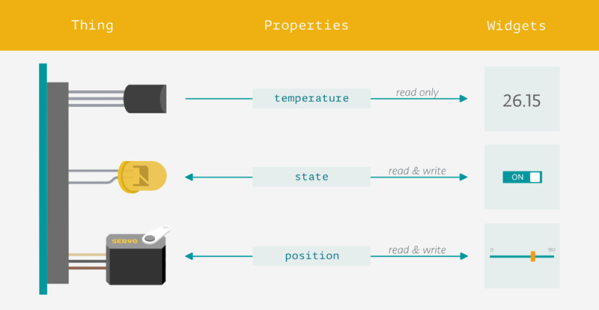
Love it or hate it, for many people embedded systems means Arduino. Now Arduino is leveraging its more powerful MKR boards and introducing a cloud service, the Arduino IoT Cloud. The goal is to make it simple for Arduino programs to record data and control actions from the cloud.

The program is in beta and features a variety of both human and machine interaction styles. At the simple end, you can assemble a dashboard of controls and have the IoT Cloud generate your code and download it to your Arduino itself with no user programming required. More advanced users can use HTTP REST, MQTT, Javascript, Websockets, or a suite of command line tools.

Continue reading “Arduino Enters The Cloud”

The Future Circular Collider: Can It Unlock Mysteries Of The Universe?

In the early 1990s, I was lucky enough to get some time on a 60 MeV linear accelerator as part of an undergraduate lab course. Having had this experience, I can feel for the scientists at CERN who have had to make do with their current 13 TeV accelerator, which only manages energies some 200,000 times larger. So, I read with great interest when they announced the publication of the initial design concept for the Future Circular Collider (FCC), which promises collisions nearly an order of magnitude more energetic. The plan, which has been in the  works since 2014, includes three proposals for accelerators which would succeed CERN’s current big iron, the LHC.

Want to know what’s on the horizon in high-energy physics?

Continue reading “The Future Circular Collider: Can It Unlock Mysteries Of The Universe?”

Hacking The Humble Roadster Bicycle

Think of bicycles, and your first mental image could be something pretty fancy. Depending on which side of the sport you favor, you could end up thinking of a road bike or an MTB, maybe DH, CX, BMX, TT, tandem or recumbent.

But for people in most parts of the World such as Asia, Africa and South America, the bicycle conjures up a very different image – that of the humble roadster. And this simple, hardy machine has spawned innumerable hacks to extend its usefulness and functionality by enterprising people with limited means. For them, it is not as much a means of transport, as a means for livelihood and survival.
Continue reading “Hacking The Humble Roadster Bicycle”