Video Of The Arduino FPGA Board Demo At Maker Faire

This week, Arduino announced a lot of new hardware including an exceptionally interesting FPGA development board aimed at anyone wanting to dip their toes into the seas of VHDL and developing with programmable logic. We think it’s the most interesting bit of hardware Arduino has released since their original dev board, and everyone is wondering what the hardware actually is, and what it can do.

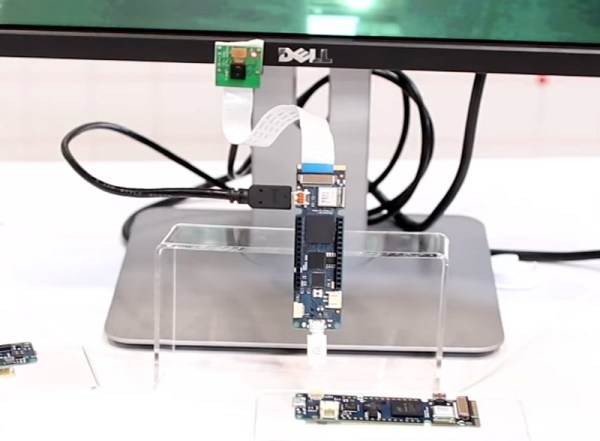
This weekend at Maker Faire Bay Area, Arduino was out giving demos for all their wares, and yes, the Arduino MKR Vidor 4000 was on hand, being shown off in a working demo. We have a release date and a price. It’ll be out next month (June 2018) for about $60 USD.

But what about the hardware, and what can it do? From the original press releases, we couldn’t even tell how many LUTs this FPGA had. There were a lot of questions about the Mini PCIe connectors, and we didn’t know how this FPGA would be useful for high-performance computation like decoding video streams. Now we have the answers.

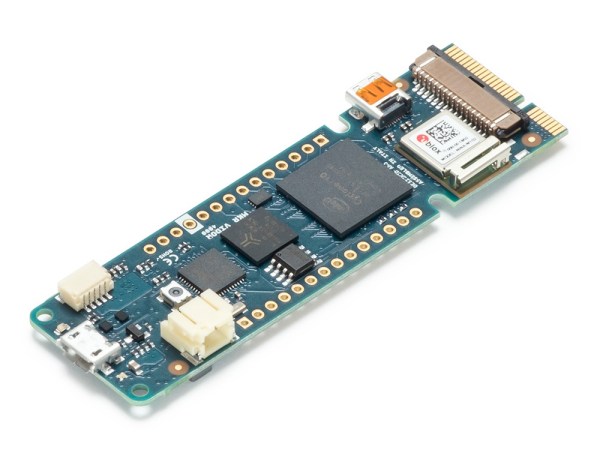
The FPGA on board the Arduino Vidor is an Altera Cyclone 10CL016. This chip has 16k logic elements, and 504 kB memory block. This is on the low end of Altera’s FPGA lineup, but it’s still no slouch. In the demo video below, it’s shown decoding video and identifying QR codes in real time. That’s pretty good for what is effectively a My First FPGA™ board.

Also on board the Vidor is a SAMD21 Cortex-M0+ microcontroller and a uBlox module housing an ESP-32 WiFi and Bluetooth module. This is a really great set of chips, and if you’re looking to get into FPGA development, this might just be the board for you. We haven’t yet seen the graphic editor that will be used to work with IP for the FPGA (for those who don’t care to write their own VHDL or Verilog), but we’re looking forward to the unveiling of that new software.


InSight Brings New Tech To Mars

Unless you’ve got your ear on the launch pad so to speak, you might not be aware that humanity just launched a new envoy towards the Red Planet. Estimated to touch down in Elysium Planitia on November 26th, the InSight lander is relatively low-key as far as interplanetary missions go. Part of the NASA’s “Discovery Program”, it operates on a considerably lower budget than Flagship missions such as the Curiosity rover; meaning niceties like a big advertising and social media campaign to get the public excited doesn’t get a line item.

Which is a shame, because not only are there much worse things to do with tax money than increase public awareness of scientific endeavours, but because InSight frankly deserves a bit more respect than that. Featuring a number of firsts, the engineers and scientists behind InSight might have been short on dollars, but ambition was in ample supply.

So in honor of the successful launch, let’s take a look at the InSight mission, the unique technology onboard, and the answers scientists hope it will be able to find out there in the black.

Continue reading “InSight Brings New Tech To Mars” →

Arduino Just Introduced An FPGA Board, Announces Debugging And Better Software

Today ahead of the Bay Area Maker Faire, Arduino has announced a bevy of new boards that bring modern features and modern chips to the Arduino ecosystem.

Most ambitious of these new offerings is a board that combines a fast ARM microcontroller, WiFi, Bluetooth, and an FPGA. All this is wrapped in a package that provides Mini HDMI out and pins for a PCIe-Express slot. They’re calling it the Arduino MKR Vidor 4000.

Bringing an FPGA to the Arduino ecosystem is on the list of the most interesting advances in DIY electronics in recent memory, and there’s a lot to unpack here. FPGA development boards aren’t new. You can find crates of them hidden in the storage closet of any University’s electronics lab. If you want to buy an FPGA dev board, the Terasic DE10 is a good starter bundle, the iCEstick has an Open Source toolchain, and this one has pink soldermask. With the release of the MKR Vidor, the goal for Arduino isn’t just to release a board with an FPGA; the goal is to release a tool that allows anyone to use an FPGA.

The key to democratizing FPGA development is Arduino’s work with the Arduino Create ecosystem. Arduino Create is the company’s online IDE that gives everyone the ability to share projects and upload code with Over-the-Air updates. The MKR Vidor will launch with integration to the Arduino Create ecosystem that includes a visual editor to work with the pre-compiled IP for the FPGA. That’s not to say you can’t just plug your own VHDL into this board and get it working; that’s still possible. But Arduino would like to create a system where anyone can move blocks of IP around with a tool that’s easy for beginners.

A Facelift for the Uno WiFi

First up is the brand new Arduino Uno WiFi. While there have been other boards bearing the name ‘Arduino Uno WiFi’ over the years, a lot has changed in the world of tiny radio modules and 8-bit microcontrollers over the past few years. The new Arduino Uno WiFi is powered by a new 8-bit AVR, the ATMega4809. The ATMega4809 is a new part announced just a few months ago, and is just about what you would expect from the next-generation 8-bit Arduino; it runs at 20MHz, has 48 kB of Flash, 6 kB of SRAM, and it comes in a 48-pin package. The ATMega4809 is taking a few lattices of silicon out of Microchip’s playbook and adds Custom Configurable Logic. The CCL in the new ATMega is a peripheral that is kinda, sorta like a CPLD on chip. If you’ve ever had something that could be more easily done with logic gates than software, the CCL is the tool for the job.

But a new 8-bit microcontroller doesn’t make a WiFi-enabled Arduino. The wireless power behind the new Arduino comes from a custom ESP-32 based module from u-blox. There’s also a tiny crypto chip (Microchip’s ATECC508A) so the Uno WiFi will work with AWS. The Arduino Uno WiFi will be available this June.

But this isn’t the only announcement from the Arduino org today. They’ve been hard at work on some killer features for a while now, and now they’re finally ready for release. What’s the big news? Debuggers. Real debuggers for the Arduino that are easy to use. There are also new boards aimed at Arduino’s IoT strategy.

Continue reading “Arduino Just Introduced An FPGA Board, Announces Debugging And Better Software” →

Open Source Calculator Teaches Us About Quality Documentation

Graphing calculators are one of those funny markets that never seem to change. Standardized testing has created a primordial stew of regulatory capture in which ancient technology thrives at modern retail prices while changing little. The NumWorks calculator certainly isn’t the first competitor to challenge the Texas Instruments dynasty with a more modern interface (and a design from this decade), but behind it’s subtle color pops and elegant lines lies the real gem; a fantastically well documented piece of open source hardware. The last time we wrote about the NumWorks, it was to demonstrate a pretty wild hack that embedded an entire Pi Zero but it’s worth drawing attention to the calculator itself.

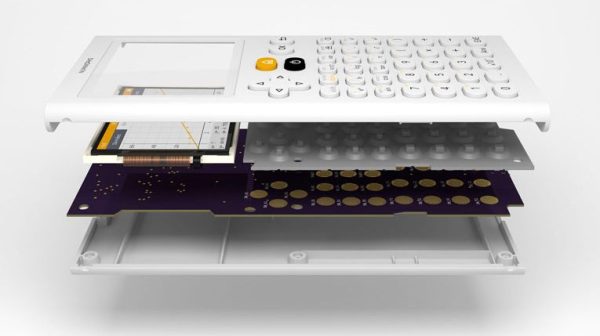
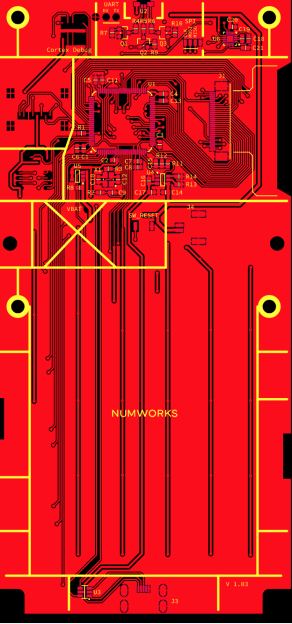
Hackaday readers traveling to the NumWorks website might spy the section at the bottom of the page titled “Developers” with tantalizing links like “Hardware,” “Software,” and “GitHub.” These lead to a wealth of knowledge about how the product is put together and sources to build the enclosure and firmware yourself (the PCB schematic and layout sources seem to be missing, though there is this handy gerber viewer). However merely posting sources is a low bar NumWorks far exceeds.

How is the firmware put together? Here’s a handy architecture guide! Why did they choose C++ and what tradeoffs were made to fit everything in a resource constrained embedded system? Here’s a design guide! How exactly does the math engine take in text, comprehend the expression contained therein, and evaluate it? There’s a document for it! There’s even a multi-platform SDK setup guide.

Firmware documentation is old hat; we’ve come to expect (or at least hope!) for it. For us the most interesting documentation is actually for the mechanical and electrical systems. The EE guides start with part selection (with datasheet links) then move on to walkthroughs of major areas of the schematic. At this point is should be no surprise that the board has pads for a completely standard 10 pin ARM debug connector and documented test points for UART, SPI, and an SD card.

The mechanical pages read like a quick primer on design for injection molding and tricks to reduce assembly errors (called “poka-yoke“). Ever wondered what that funny frame plastic models come in is called? The NumWorks calculator’s buttons are made in one, and it’s called a “sprue”. There are pages describing each piece of the housing one at a time.

Treat yourself to a reading of NumWorks’ excellent documentation. And if you need a new calculator, maybe consider the open source option.

Continue reading “Open Source Calculator Teaches Us About Quality Documentation” →

Five Steps To TensorFlow On The Raspberry Pi

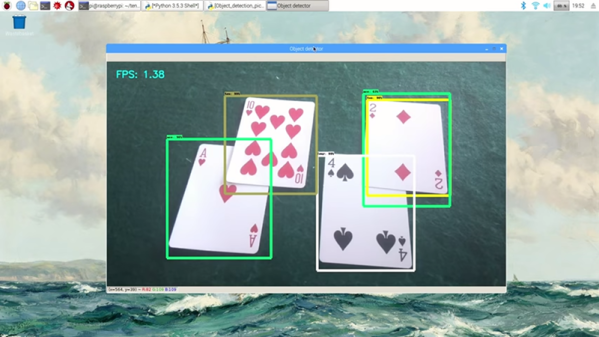
If you have about 10 hours to kill, you can use [Edje Electronics’s] instructions to install TensorFlow on a Raspberry Pi 3. In all fairness, the amount of time you’ll have to babysit is about an hour. The rest of the time is spent building things and you don’t need to watch it going. You can see a video on the steps required below.

You need the Pi with at least a 16 GB SD card and a USB drive with at least 1 GB of free space. This not only holds the software, but allows you to create a swap file so the Pi will have enough virtual memory to build everything required.

Continue reading “Five Steps To TensorFlow On The Raspberry Pi” →

Neural Networks Using Doom Level Creator Like It’s 1993

Readers of a certain vintage will remember the glee of building your own levels for DOOM. There was something magical about carefully crafting a level and then dialing up your friends for a death match session on the new map. Now computers scientists are getting in on that fun in a new way. Researchers from Politecnico di Milano are using artificial intelligence to create new levels for the classic DOOM shooter (PDF whitepaper).

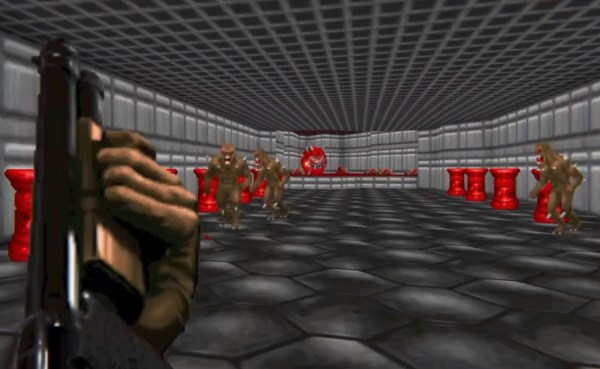
While procedural level generation has been around for decades, recent advances in machine learning to generate game content (usually levels) are different because they don’t use a human-defined algorithm. Instead, they generate new content by using existing, human-generated levels as a model. In effect they learn from what great game designers have already done and apply those lesson to new level generation. The screenshot shown above is an example of an AI generated level and the gameplay can be seen in the video below.

The idea of an AI generating levels is simple in concept but difficult in execution. The researchers used Generative Adversarial Networks (GANs) to analyze existing DOOM maps and then generate new maps similar to the originals. GANs are a type of neural network which learns from training data and then generates similar data. They considered two types of GANs when generating new levels: one that just used the appearance of the training maps, and another that used both the appearance and metrics such as the number of rooms, perimeter length, etc. If you’d like a better understanding of GANs, [Steven Dufresne] covered it in his guide to the evolving world of neural networks.

While both networks used in this project produce good levels, the one that included other metrics resulted in higher quality levels. However, while the AI-generated levels appeared similar at a high level to human-generated levels, many of the little details that humans tend to include were omitted. This is partially due to a lack of good metrics to describe levels and AI-generated data.

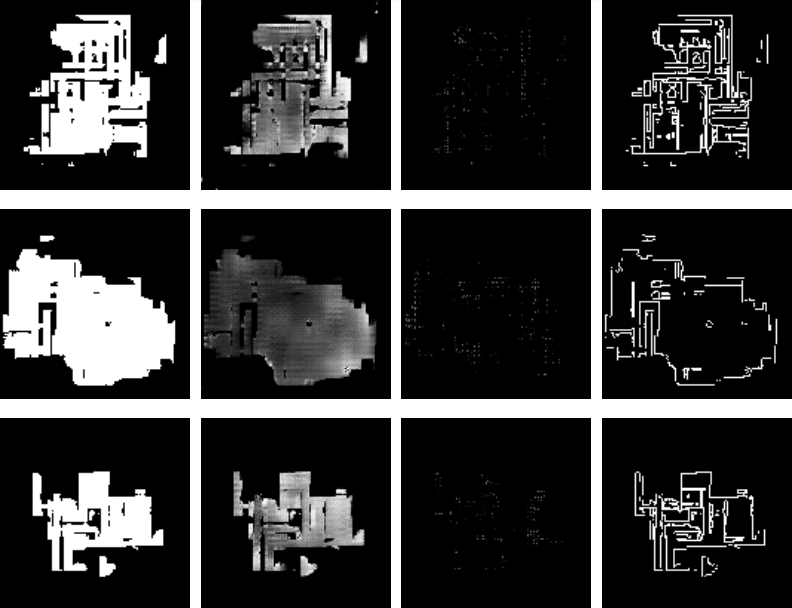
Example DOOM maps generated by AI. Each row is one map, and each image is one aspect of the map (floor, height, things, and walls, from left to right)

We can only guess that these researcher’s next step is to use similar techniques to create an entire game (levels, characters, and music) via AI. After all, how hard can it be?? Joking aside, we would love to see you take this concept and run with it. We’re dying to play through some gnarly levels whipped up by the AI from Hackaday readers!

Continue reading “Neural Networks Using Doom Level Creator Like It’s 1993” →

IKEA Lamp With Raspberry Pi As The Smartest Bulb In The House

We love to hack IKEA products, marvel at Raspberry Pi creations, and bask in the glow of video projection. [Nord Projects] combined these favorite things of ours into Lantern, a name as minimalist as the IKEA lamp it uses. But the result is nearly magic.

The key component in this build is a compact laser-illuminated video projector whose image is always in focus. Lantern’s primary user interface is moving the lamp around to switch between different channels of information projected on different surfaces. It would be a hassle if the user had to refocus after every move, but the focus-free laser projector eliminates that friction.

A user physically changing the lamp’s orientation is detected by Lantern’s software via an accelerometer. Certain channels project an information overlay on top of a real world object. Rather than expecting its human user to perform precise alignment, Lantern gets feedback from a Raspberry Pi camera to position the overlay.

Speaking of software, Lantern as presented by [Nord Projects] is a showcase project under Google’s Android Things umbrella that we’ve mentioned before. But there is nothing tying the hardware directly to Google. Since the project is open source with information on Hackster.io and GitHub, the choice is yours. Build one with Google as they did, or write your own software to tie into a different infrastructure (MQTT?), or a standalone unit with no connectivity at all.

Continue reading “IKEA Lamp With Raspberry Pi As The Smartest Bulb In The House” →