FreeCAD 1.1 Tutorial, For Beginners Who Like Clear Instructions

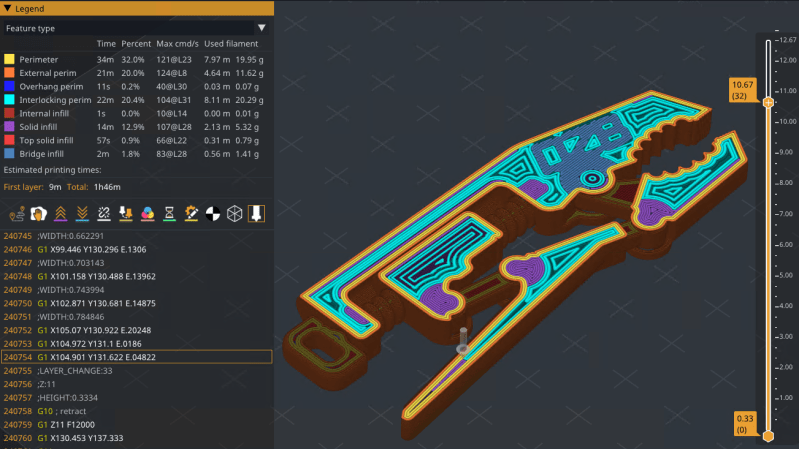
If you’ve been interested in FreeCAD but haven’t known where to start, here’s a wonderful video tutorial for FreeCAD 1.1 by [Deltahedra] aimed squarely at how to model a 3D part from scratch while also following best engineering practices for part design. It focuses on a concise and meaningful workflow that respects your time and doesn’t make assumptions about skill level. It even starts by taking a few moments to explain how to navigate the interface, a courtesy many will appreciate.

FreeCAD can do quite a lot, so a tutorial that focuses on a specific yet broadly-applicable task with a clear context is a great way to narrow the scope into something manageable, and be comprehensive without getting bogged down in minutiae. [Deltahedra] does this by exclusively using the part design workbench, demonstrating what to do to make a part step-by-step, and showing common mistakes that can happen and how to fix them if they occur. Beyond that, it’s left up to the curious hacker to delve for themselves into what else FreeCAD has to offer.

Since 1.1 is (at this writing) the latest stable release, one can also be confident that the tutorial will match the user interface and features one sees on their own screen. After all, it can be frustrating to attempt to follow a tutorial only to find out things are a few versions behind and nothing is where one expects it to be.

Best practices aren’t just fussy rules about how to do things, and [Deltahedra] demonstrates this by showing how certain procedures just plain make more sense when designing shapes. Our own Arya Voronova has also shared best practices for FreeCAD, so check that out for some added perspective. You’ll be wielding FreeCAD in confidence and comfort in no time.

Thanks for the tip, [Vik Olliver]!

Continue reading “FreeCAD 1.1 Tutorial, For Beginners Who Like Clear Instructions” →

Another Gift To The World From CERN: Their Entire Set Of KiCad Libraries

As the foremost boffins of Europe toil deep underneath the border between Switzerland and France in their never-ending quest to truly understand the fabric of the Universe, they rely on a vast amount of electronics. The PCB layout team at the particle accelerator thus work with a huge array of parts, for which of course they create KiCad libraries. Now the folks at CERN have made those libraries available as open source, so you can benefit from their work.

The libraries themselves can be found in a GitLab repository, and at the moment are offered only for KiCad version 9.x. We tried installing it in our KiCad 10.0 installation and it refused — complaining of a missing JSON file — but we’re assuming that with more time and effort we could have made it happen. We’re told official 10.x compatibility is on the way.

Browsing the repository shows what a multiplicity of parts are included, so we can see this becoming a standard install for many people and the CERN footprints turning up in many projects featured here.

Thanks [Daniel] for the tip!

Broadcasting GPS On The Local Network To Help Geoclue Find You

Rather than having users go through the inconvenience of having to punch in their current location, an increasing number of applications and websites use location services that can pin-point the current location of a user to within a certain number of meters or kilometers.

Unfortunately, [Evert Pot] found that with the demise of the Mozilla Location Service (MLS) in 2024, accuracy of the Linux Geoclue service had dropped to a resolution of about 25 km. Since a LAN tends to not move around a lot, this seemed like the perfect time to help Geoclue out with a local GPS server.

All that Geoclue looks for on the LAN is an mDNS service identifying as _nmea-0183._tcp that responds with the GPS coordinates as network packets containing an ASCII payload encoded using the NMEA 0183 standard. With this knowledge [Evert] was then able to quickly put together a Python-based server that simply blasts the static GPS coordinates of the LAN in question.

With the service running, Gnome Maps and Firefox with Google Maps both displayed the right location down to the house, as can be seen in the screenshots. With the same LAN service and a Mac system there was no such luck with Apple Maps unless Location Services was turned off, though presumably Apple uses its own equivalent to MLS.

The ESP8266 Gets An OS, And It’s Familiar

A couple weeks back we brought you news of KernelUNO, a command line shell and very simple operating system for the Arduino Uno. It’s a neat idea, so it’s hardly surprising to see someone port it to another microcontroller and add more features.

Here’s [hery-torrado], with KernelESP for the ESP8266, which takes the original idea and adds a web console, scheduled jobs, sensor rules, scripting, NTP, and a JSON API. The networking using the ESP’s built-in WiFi takes the original and makes it significantly more useful.

It’s worth suggesting that the ability to call URLs with GET data to pass things to APIs would be useful on a networked processor too, but this is already so well featured it seems rude to ask for more. Yet again though, this project has given a new life to an old chip, and we think it has a way further to go. Perhaps a port to the ESP32 would allow it to reach its full potential, or maybe for a ridiculously cheap and powerful platform, the CH32 series of chips. We look forward to see what more will come from KernelUNO.

Our original coverage can be read here.

TagTinker Lets You Hack Electronic Shelf Labels

Was there ever anything wrong with simple paper price labels? Absolutely not. And yet, the world invented the electronic price tag anyway. If you happen to come across some of these devices and want to hack them, you might like TagTinker from [i12bp8].

TagTinker is a Flipper Zero application specifically built for talking to infrared electronic shelf labels (ESLs). These are e-paper devices that receive commands and updates via an infrared interface, and they’re relatively simple to talk to. [i12bp8] built upon previous work from [furrtek] which revealed the protocols used to update these devices, and implemented it into an app that runs on the Flipper. It can do neat things like scan the NFC tags built into ESLs to ID them, deploy bitmap images to the tags, or run live-updated dashboards on the devices with the aid of a Flipper WiFi devboard.

If you’ve always wanted to play with these tags but didn’t want to do the grunt work yourself, it just got a whole lot easier to mess around. Though, it’s worth noting, [i12bp8] has strictly prohibited any illegal uses of this app, so be good out there. We’ve seen these tags repurposed before, too – who knew they could make such good conference badges? 

ReactOS Gets Unified Installer Image And A New Storage Stack

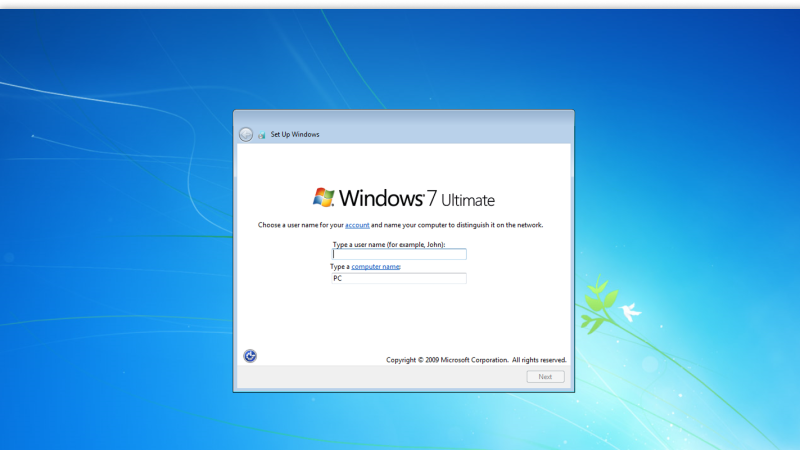
Although the ReactOS project is in no rush to dethrone Windows as the desktop operating system of choice, this doesn’t mean that some real changes aren’t happening. Most recently two big changes got merged, the first pertaining to the separate boot- and live CD images that are now merged into a single image, and the second being a new PnP-aware ATA storage stack for ATA and AHCI devices, with NT6+ compatibility.

Although there is still a separate live CD for now, this first change means that testing and installing ReactOS becomes easier, and that the old-school text-based installer may soon be on its way out as well.

Having the new ATA storage stack in place will translate into much better compatibility with real hardware, including the ability to use more hardware to install on and boot from compared to the old UniATA driver.

Combined, these two changes should bring the ReactOS installation and usage experience a lot closer to that of Windows, as well as many Linux distros. If you had issues with the OS on real hardware, this might be just the right time to give it another shake and provide detailed feedback to the developers if any remaining issues are encountered.

Thanks to [jeditobe] for the tip.

A Tool For Testing CANopen Networks

If you find yourself working with CANopen CC networks, you might find yourself in need of a tool for monitoring what’s happening on the wire. [Michael Fitzmayer] whipped up a piece of software to fulfil just that role. 

CANopenTerm might be named after the CANopen standard, but it’s really a terminal-driven tool for working with CAN buses in general. The software is built for real-time use, allowing sniffing raw frames on the wire, tracing, and probing of nodes, all from within the console. It’s also possible to add scripting via Lua or Python for more advanced work, as well as do protocol-aware inspection if that’s relevant to your use case. The key idea of the software is to be fast and scriptable to suit a given need, rather than bogging everything down with a heavy GUI interface that’s slower to work with.

If you aren’t afraid of getting into the nitty gritty with CAN and like lightweight text-based interfaces, this might be the tool for you. We’ve also explored some other CAN visualization tools lately, as well. Ultimately, there is a lot of machinery out there running on some variant of CAN or other, so it pays to know how to work with it. If you’ve got your own projects cooking up in this space, don’t hesitate to let us know on the tipsline!