Hackaday Links Column Banner

Hackaday Links: March 24, 2019

It has come to my attention that a few of you don’t know about Crystalfontz, an online store where you can find displays of all types, from USB LCD displays to I2C OLEDs, to ePaper displays. Thanks to [arthurptj] for that tip. Yes, Crystalfontz is cool, but have you ever heard of Panelook? Oh boy are there some displays at Panelook. Here’s a 1024 by 768 resolution display that’s less than half an inch across.

The comments section of Hackaday has been pretty tame as of late, so here’s why Apple is the king of design. It’s a question of fillets. There are a few ways to add a fillet to the corner of an icon or a MacBook. The first is to draw two perpendicular lines, then add a fixed radius corner. The Apple way is to make everything a squircle. The ‘squircle’ way of design is that there are no sudden jumps in curvature, and yes, you can do this in Fusion360 or any other design tool. This is also one of those things you can’t unsee once you know about it, like the arrow in the FedEx logo.

The ESP8266 simply appeared one day, and it changed everything. The ESP32, likewise, also just arrived on the Internet one day, and right now it’s the best solution for a microcontroller, with WiFi, that also does things really fast. Someone over at Espressif is dropping hints of a new microcontroller, with a possible release on April 1st (the same date that Apple released their competitor to the Raspberry Pi). Is it RISC-V? Is it 5V tolerant? Who knows! (Editor’s note: it’s not RISC-V. Though they’re saying that’s in the pipeline.)

The Verge got their hands on an original iPhone engineering validation unit. It’s a breakout board for an iPhone.

San Dimas High School Football Rules

There’s a screwdriver in your toolbox that has a cast clear handle, a blue ferrule surrounding the shaft, and red and white lettering on the side. Go check, it’s there. It’s a Craftsman screwdriver. It’s an iconic piece of design that’s so ubiquitous that it’s unnoticeable. It’s just what a screwdriver is. It’s a prototypical screwdriver. Thanks to the rise of resin and turning craftsmanship, there’s now a gigantic version of this screwdriver.

[The 8-Bit Guy] posted the following message on his Facebook on March 19th: “Just FYI – somebody hacked and totally erased my website. So, it’s going to be down for a while.” At the time of this writing, everything looks okay, which brings up the larger question of why Facebook is still a thing. We’re on a gradient of coolness here, and the sooner you delete your Facebook, the cooler you are. I, for example, deleted my Facebook during the Bush administration, and we all know how cool I am. I’ll never get to the singularity of coolness of kids who never had a Facebook in the first place, but the point remains: delete your Facebook old man.

[SirEdmar] wants to bring Fusion 360 to Linux users. Autodesk wants the same, and they tried a web-based version of Fusion 360, but… it’s a web version of Fusion 360. Right now the best solution is Wine, and thanks to [SirEdamr] 360 works in Wine.

Bing translate does Klingon! How well does it work? Not bad, it could use some work, mostly with non-standard vocabulary:

Hacker Abroad: Visiting Espressif And Surprising Subway Ads

Thursday was my final day in Shanghai. After spending all of Wednesday at Electronica Asia, I headed over to the Espressif Headquarters which is just one subway stop away. This is of course the company behind the well-known ESP8266 and its younger sibling, the ESP32. My host was Ivan Grotkothov, Director of Software Platforms. The backstory on how he found his way to the company is truly interesting, as are the stories he shared on some of the legend and lore surrounding the WiFi capable chips the company makes — and the new one whose existence just leaked out this week.

Join me below for that and few other fun things from my last day in this city of 26 million people.

Continue reading “Hacker Abroad: Visiting Espressif And Surprising Subway Ads”

Library Makes ESP Over The Air Updates Easy

Potentially, one of the great things about having a device connected to the network is that you can update it remotely. However, how do you make that happen? If you use the Arduino setup for the ESP8266 or ESP32, you might try [scottchiefbaker’s] library which promises to make the process easy.

Adding it looks to be simple. You’ll need an include, of course. If you don’t mind using port 8080 and the path /webota, you only need to call handle_webota() from your main loop. If you want to change the defaults, you’ll need to add an extra call in your setup. You also need to set up a few global variables to specify your network parameters.

Continue reading “Library Makes ESP Over The Air Updates Easy”

Mining Bitcoin On The ESP32 For Fun, Definitely Not Profit

Bitcoin’s great, if you sold at the end of 2017. If you’re still holding, your opinion might be a little more sour. The cost to compete in the great hashing race continues to rise while cryptocurrency values remain underwhelming. While getting involved at the top end is prohibitively expensive, you can still have some fun with the basic concepts – as [Jake] did, by calculating Bitcoin hashes on the ESP32.

It’s a project that is very much done for fun, rather than profit. [Jake] notes that even maxing out both cores, it would take 31 billion years to mine one block at current difficulty levels. Regardless, the underlying maths is nothing too crazy. Double-hashing the right data with the SHA256 algorithm is all that’s required, a task that is well within the ESP32’s capabilities. There’s hardware acceleration available, too – though this is weirdly slower than doing it in software.

Overall, you’re not going to get rich hashing Bitcoin on a cheap microcontroller platform. You might just learn something useful, though. If this isn’t weird enough though, you could always try the same thing on a 1970s Xerox Alto. 


RemoteDebug For ESP Platforms

Debugging tools are critical to quick and effective development. Without being able to peek under the hood at what’s really going on, it can be difficult to understand and solve problems. Those who live on the Arduino platform are probably well acquainted with using the serial port to debug, but it’s far from the only way. [JoaoLopesF] has coded the RemoteDebug tool for ESP platforms, and the results are impressive.

RemoteDebug does away with the serial interface entirely, instead using the ESP’s native wireless interface to send debug data over TCP/IP. It’s all handled over telnet, making it completely platform agnostic. By handling things over the WiFi connection, it negates issues with physical access, as well as hassles with cables and limited serial ports. It’s also of benefit to robotics projects, which no longer need a tether when debugging.

It comes with a similar set of features to [JoaoLopesF]’s earlier work, SerialDebug. Things like verbosity and timestamps are all built in, making it easy to get high-quality debug data without having to reinvent the wheel yourself. Video after the break.

Continue reading “RemoteDebug For ESP Platforms”

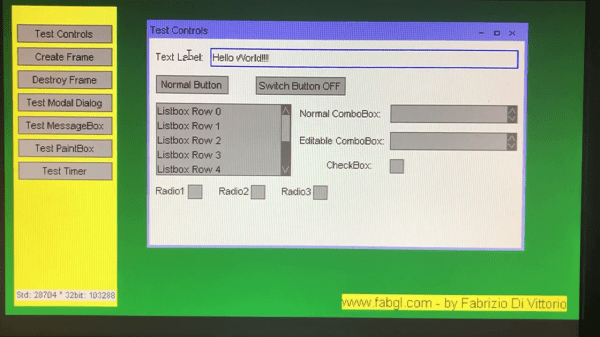
ESP32 Drives Controllerless Display Using I2S Hack

It’s possible to find surplus LCDs in all kinds of old hardware. Photocopiers, printers – you name it, there’s old junk out there with displays going to waste. Unfortunately, unlike the displays on sale at your favourite maker website, these often lack a controller and can be quite difficult to drive. [pataga] took on the challenge to drive a LCD of unknown provenance, using the power of the ESP32.

The LCD in question is a 240×160 monochrome device, that was initially being driven successfully with a Microchip PIC24 with a dedicated LCD driver peripheral. This allowed [pataga] to study the display interface under working conditions with the help of an oscilloscope. Inspiration was then taken from a project by [Sprite_tm], which used the I2S peripheral to drive a small LED display without placing load on the CPU.

Using the ESP32’s I2S peripheral in parallel mode makes it possible to shift data out in the correct format to drive the LCD without bit-banging IO pins and using up precious CPU time. This leaves processor cycles free to do interesting things, like generating 3D images using [cnlohr]’s routines from the Channel 3 project. There’s a little extra work to be done, with the frame signal being generated by an external flip flop and some fudging with the arrangement of various registers, but it’s a remarkably tidy repurposing of the I2S hardware, which seems to be the gift that keeps on giving. (Here it is spitting out VGA video through a resistor DAC.)

Code is available on Github for those looking to get at the nuts and bolts of the hack. It’s another build that goes to show, it’s not the parts in your junk box that count, but how you use them.

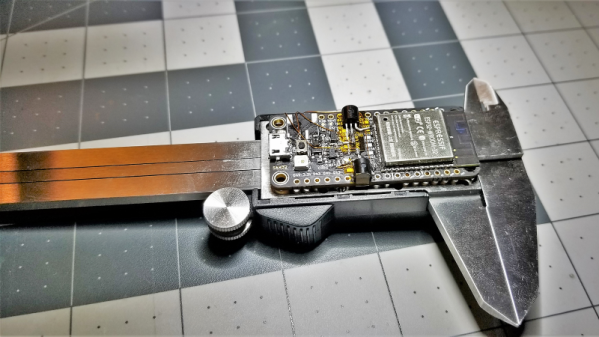
A Coin Cell Powers This Tiny ESP32 Dev Board

Just for the challenge, just for fun, just for bragging rights, and just to do a little showing off – all perfectly valid reasons to take on a project. It seems like one or more of those are behind this tiny ESP32 board that’s barely larger than the coin cell that powers it.

From the video below, [Mike Rankin] has been working down the scale in terms of powering and sizing his ESP32 builds. He recently completed a project with an ESP32 Pico D4 and an OLED display that fits exactly on an AA battery holder, which he populated with a rechargeable 14550. Not satisfied with that form factor, he designed another board, this time barely larger than the LIR2450 rechargeable coin cell in its battery holder. In addition to the Pico D4, the board sports a USB charging and programming socket, a low drop-out (LDO) voltage regulator, an accelerometer, a tiny RGB LED, and a 96×16 OLED display. Rather than claim real estate for switches, [Mike] chose to add a pair of pads to the back of the board and use them as capacitive touch sensors. We found that bit very clever.

Sadly, the board doesn’t do much – yet – but that doesn’t mean we’re not impressed. And [Mike]’s no stranger to miniaturization projects, of course; last year’s Open Hardware Summit badge was his brainchild.

Continue reading “A Coin Cell Powers This Tiny ESP32 Dev Board”