Skip to content
Logo

Hackaday

  • Home
  • Blog
  • Hackaday.io
  • Contests
  • Submit
  • About

haptic feedback

50 Articles

Watch A Steam Controller Skitter Itself To Its Charge Puck

July 1, 2026 by Donald Papp 12 Comments

Hacks don’t have to be practical but it helps if they are educational or clever or amusing, as [Ray Foss] demonstrates with his auto-docking Steam Controller.
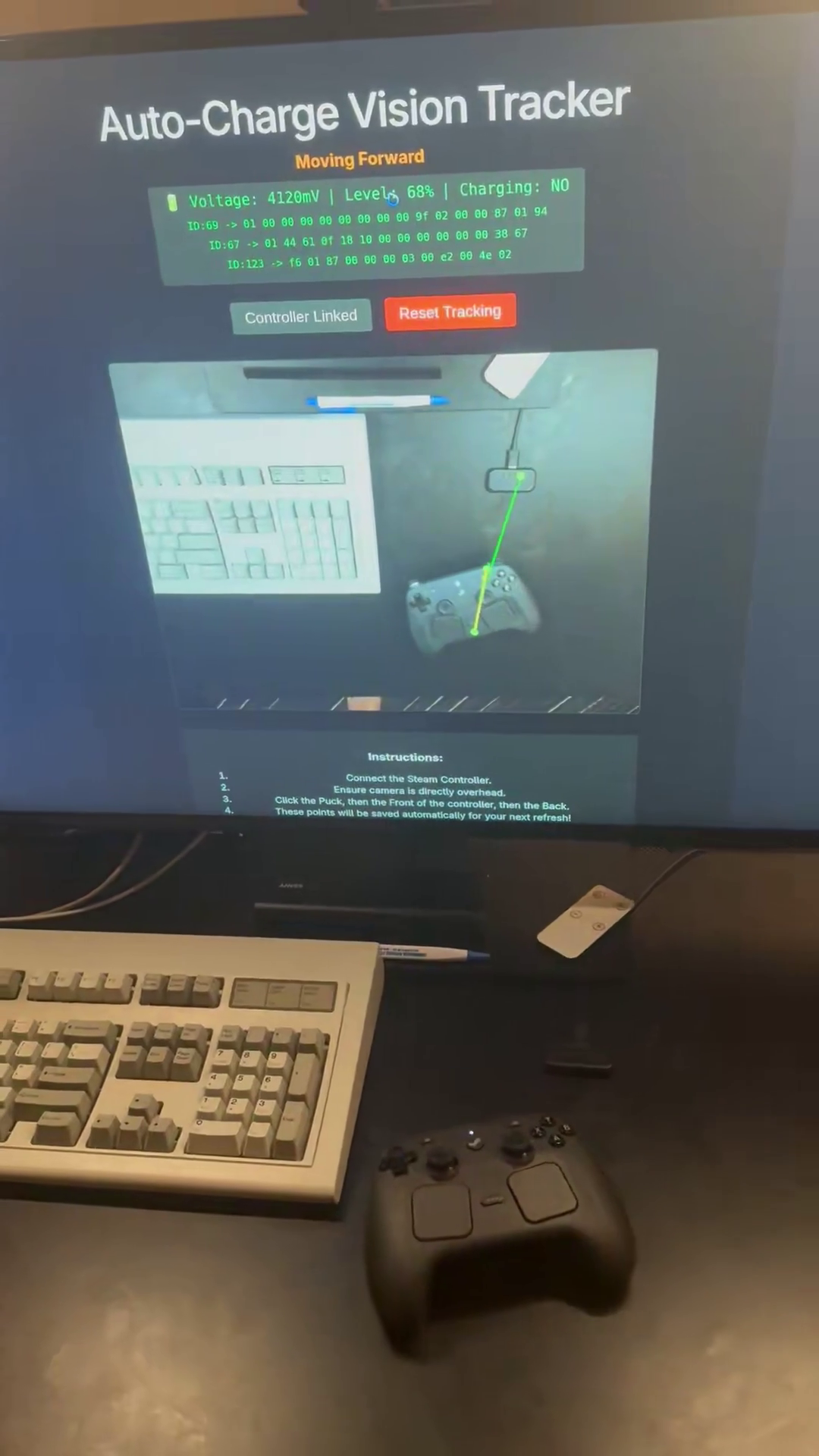
It’s an open-source web application that combines a camera, a Steam Controller, and some clever software for the sole purpose of saving the user from the tyranny of having to manually set the controller onto its magnetic charging puck. Instead, one can simply lay the controller down nearby and let the computer do the rest of the work.

First one fires up the web interface, ensures a webcam has a good top-down view of both the charging puck and the controller, connects wirelessly to the controller, then clicks a few points on the camera view to tell the system where things are.

After that, the system buzzes the controller’s haptic feedback motors to make it skitter across the desktop until — guided by the camera and implementing obstacle avoidance — it docks successfully with its magnetic charging puck.

It may not be super practical and may even seem a bit Rube Goldberg-esque, but it’s fun and demonstrates a few interesting things. One is moving a controller via slip-stick friction by asymmetrically pulsing the feedback motors. Another is automatically reducing the pulse frequency to make smaller movements when it gets close to the charging puck, for finer control.

The computer vision part also ignores anything in expected cable locations, removing the need to deal with them algorithmically. WebHID via the browser takes care of talking to the controller, and confirming a successful docking by watching messages to detect when charging has begun.

If this seems a bit familiar, it’s because this project was inspired by the work of [Very Lazy Pixels] which we covered previously.
Posted in Games, Peripherals HacksTagged computer vision, haptic feedback, rube goldberg, Steam Controller, WebHID

DIY Macropad Rocks A Haptic Feedback Wheel

February 5, 2026 by Zoe Skyforest 3 Comments

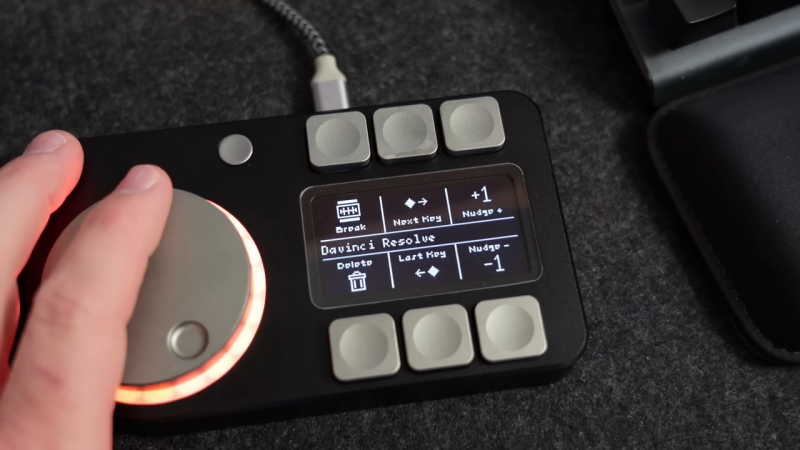
Macropads can be as simple as a few buttons hooked up to a microcontroller to do the USB HID dance and talk to a PC. However, you can go a lot further, too. [CNCDan] demonstrates this well with his sleek macropad build, which throws haptic feedback into the mix.

The build features six programmable macro buttons, which are situated either on side of a 128×64 OLED display. This setup allows the OLED screen to show icons that explain the functionality of each button. There’s also a nice large rotary knob, surrounded by 20 addressable WS2811 LEDs for visual feedback. Underneath the knob lives an an encoder, as well as a brushless motor typically used in gimbal builds, which is driven by a TMC6300 motor driver board. Everything is laced up to a Waveshare RP2040 Plus devboard which runs the show. It’s responsible for controlling the motors, reading the knob and switches, and speaking USB to the PC that it’s plugged into.

It’s a compact device that nonetheless should prove to be a good productivity booster on the bench. We’ve featured [CNCDan’s] work before, too, such as this nifty DIY VR headset.

Continue reading “DIY Macropad Rocks A Haptic Feedback Wheel” →

Posted in Peripherals HacksTagged haptic feedback, haptic wheel, knob, macropad
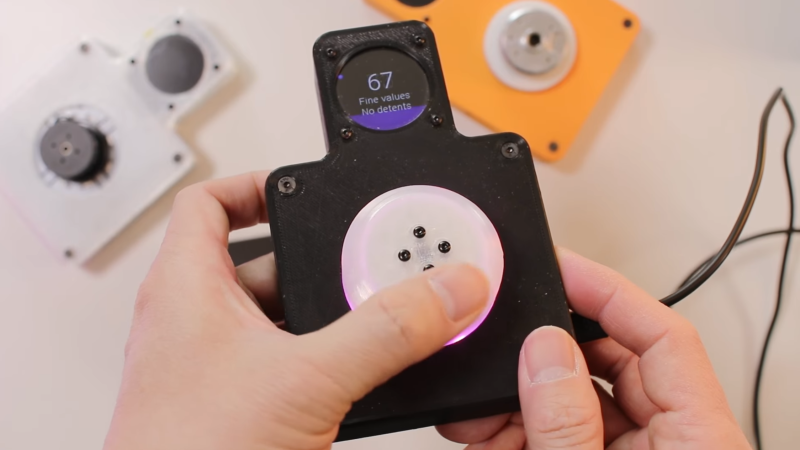
A man's hands are shown holding a black device. A white knob is in the center of the device, and above the knob in a central protrusion from the rest of the device is a small, circular LCD device.

Simplifying The SmartKnob

January 10, 2026 by Aaron Beckendorf 5 Comments

A knob can make a surprisingly versatile interface, particularly if it’s the SmartKnob, which builds a knob around a BLDC motor for programmable haptic response. It can rotate freely or with a set resistance, spring back to a fixed point when released, stick at detent points, and completely change its behavior as the interface demands. For people inexperienced in electronic assembly, though, smartknobs can be difficult to assemble. That’s why [Kokensha Tech] designed a simpler version, while at the same time letting it use a wider range of BLDC motors.

In addition to a motor, the original design used a magnetic encoder to detect position and a strain gauge to detect pressure on the knob. A circular LCD on the knob itself provided visual feedback, but it also required the motor to have a hollow center shaft. The LCD control wires running through the shaft proved tricky to assemble.  [Kokensha Tech] moved the display out of the knob and onto a separate breakout board, which plugs into the controller board. This greatly broadens the range of compatible motors, since they no longer need a hollow shaft.

The motor now fits on a separate carrier board, which makes it easier to swap out different motors. The carrier board has mounting holes sized for a wide variety of motors, and four different types of motor connectors. [Kokensha Tech] also redesigned the rest of the PCB for easier soldering, while avoiding components with narrow pin spacing whenever possible. The original design used a LILYGO T-micro32 Plus MCU. The ESP32 is both cheaper and easier to solder, so it was a no-brainer to swap it in. 

We’ve covered the original SmartKnob before, including a more in-depth look at its design. We’ve also seen another project use BLDCs and field-oriented control to make haptic knobs.

Continue reading “Simplifying The SmartKnob” →

Posted in Peripherals HacksTagged BLDC, bldc motor, circular display, field oriented control, haptic feedback, knob, smart knob, strain gauge

Kinethreads: A Low Cost Haptic Exo-Suit

September 27, 2025 by Zoe Skyforest 9 Comments

There have been lots of haptic vest devices over the years, though the vast majority have been very simple. Many existing suits pack in a few speakers or vibration motors to give feedback to the wearer. Kinethreads aims to go further, serving as a full-body haptic suit using an innovative mechanical setup.

Kinethreads is effectively an exosuit, which mounts several motorized pulley systems to the wearer’s body. These pulleys are attached to the user’s hands, feet, back, torso, and head via strings. By winding in the pulleys, it’s possible for the device to effectively tug on different parts of the body, creating rich, dynamic physical feedback that can easily be felt and interpreted by the user. The whole system weighs 4.6 kilograms—not light, but very practical. It can also run for 6 hours on a single charge. The whole suit can be donned or doffed in under a minute. Cost is stated to be under $500.

Continue reading “Kinethreads: A Low Cost Haptic Exo-Suit” →

Posted in Wearable HacksTagged exosuit, haptic, haptic feedback, research

Haptic Soft Buttons Speak(er) To Your Sense Of Touch

April 24, 2025 by Tyler August 7 Comments

There’s just something about a satisfying “click” that our world of touchscreens misses out on; the only thing that might be better than a good solid “click” when you hit a button is if device could “click” back in confirmation. [Craig Shultz] and his crew of fine researchers at the Interactive Display Lab at the University of Illinois seem to agree, because they have come up with an ingenious hack to provide haptic feedback using readily-available parts.

An array of shapes showing the different possiblities for hapticoil soft buttons.
An array of shapes showing some of the different possibilities for hapticoil soft buttons.

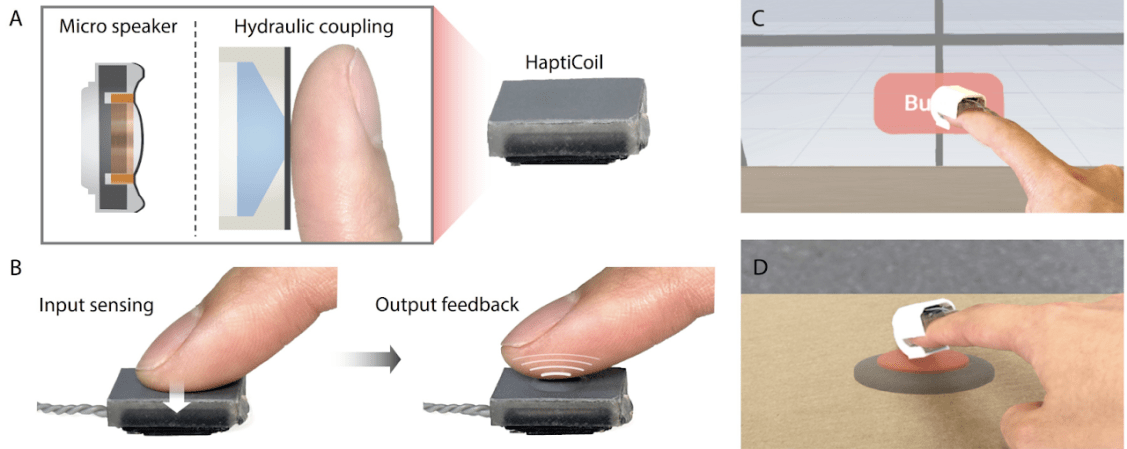
The “hapticoil”, as they call it, has a simple microspeaker at its heart. We didn’t expect a tiny tweeter to have the oomph to produce haptic feedback, and on its own it doesn’t, as finger pressure stops the vibrations easily. The secret behind the hapticoil is to couple the speaker hydraulically to a silicone membrane. In other words, stick the thing in some water, and let that handle the pressure from a smaller soft button on the silicone membrane. That button can be virtually any shape, as seen here.

Aside from the somewhat sophisticated electronics that allow the speaker coil to be both button and actuator (by measuring inductance changes when pressure is applied, while simultaneously driven as a speaker), there’s nothing here a hacker couldn’t very easily replicate: a microspeaker, a 3D printed enclosure, and a silicone membrane that serves as the face of the haptic “soft button”. That’s not to say we aren’t given enough info replicate the electronics; the researchers are kind enough to provide a circuit diagram in figure eight of their paper.

In the video below, you can see a finger-mounted version used to let a user feel pressing a button in virtual reality, which raises some intriguing possibilities. The technology is also demonstrated on a pen stylus and a remote control.

This isn’t the first time we’ve featured hydraulic haptics — [Craig] was also involved with an electroosmotic screen we covered previously, as well as a glove that used the same trick. This new microspeaker technique does seem much more accessible to the hacker set, however.

Continue reading “Haptic Soft Buttons Speak(er) To Your Sense Of Touch” →

Posted in hardware, NewsTagged haptic feedback, haptic interface, touching virtual reality

Haptic Baby Monitor Gets The Wearer’s Attention

August 11, 2022 by Tom Nardi 10 Comments

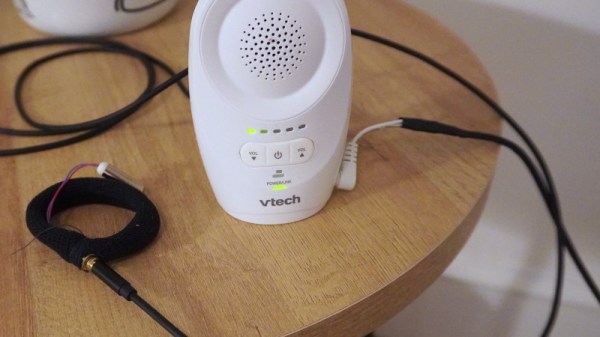
Anyone who’s ever slept through a morning’s alarm can tell you that sounds, even loud piercing ones, don’t always wake a person out of a deep sleep. Similarly, hearing a baby cry on the other side of the monitor might not always wake a parent up in the middle of the night. So what’s the solution? This haptic baby monitor created by [Guy Dupont] certainly looks like it has some promise.

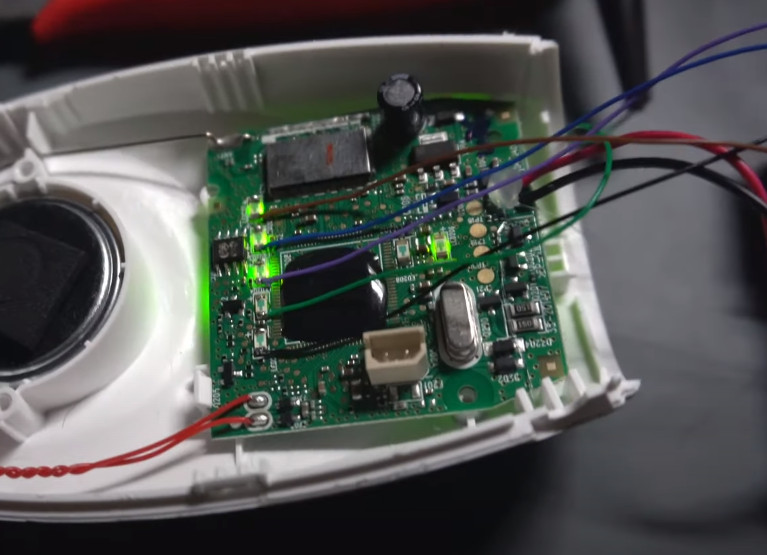
[Guy] picked up a fairly standard baby monitor from VTech and popped it open to see how he could tie a vibration motor into the original circuitry. He originally thought he’d have to do some signal processing magic to figure out the amplitude of the audio, but then he realized that the five LEDs on the front of the unit that light up to indicate the audio level were already doing the hard work for him.

Detecting audio level by reading the status of the LEDs.

So he wired each of the LEDs up to the pins of a Seeed Studio XIAO nRF52840 microcontroller, and wrote some code that would poll their status a few hundred times per second. Dividing the total number of LEDs by the count of how many are currently illuminated gives him a nice average that he can use to set the intensity of the vibration motor that he’s built into a stretchy armband.

For extra points, [Guy] is also using the Bluetooth capability of the XIAO to provide a rudimentary configuration service — just connect up to the MCU with a Bluetooth serial application on your computer or phone, and fire off a value between 0 and 10 to augment the motor’s intensity. There’s also a BLE characteristic which can be read from a client device to determine the currently detected audio amplitude, which could be used to chart how well the baby is sleeping over time. Alternately, as demonstrated at the end of the video, you could use it to play Flappy Bird.

It’s an elegant modification that could potentially hold promise for parent’s who need a bit of extra help keeping tabs on their miniature humans. This isn’t the first time we’ve seen hackers try to improve upon the classic baby monitor, but this is arguably the most approachable attempt we’ve seen to date.

Continue reading “Haptic Baby Monitor Gets The Wearer’s Attention” →

Posted in home hacks, Microcontrollers, Wearable HacksTagged baby monitor, bluetooth, haptic feedback, vibration motor
A mechanical keyboard with a haptic knob and E-ink display

Smart Modular Keyboard Sports An E-ink Display And A Haptic Feedback Knob

July 28, 2022 by Robin Kearey 19 Comments

While most people may think that a keyboard is just a board with keys, those who read Hackaday will no doubt know that there’s an infinite variety of beautiful designs to suit any use case. [Peng Zhihui] is the latest to impress us with an excellent custom keyboard that packs several unusual features (video in Chinese, with English subtitles, embedded below). What started out as a simple lockdown project turned into what [Zhihui] imagines to be the ultimate keyboard for his daily tasks. At first glance it might look like just another custom keyboard with mechanical switches, but when you look inside you’ll find it full of clever design tricks and neat features.

When he started on the design of the main key area, [Zhihui] could have used any of the open-source keyboard frameworks. Instead, he decided to do everything himself in order to obtain maximum performance and configurability. This went all the way down to the readout circuitry: rather than wiring the switches in a matrix, as most keyboards do, he used a set of shift registers. This enables the main ARM controller to read out every key separately, eliminating ghosting and allowing any number of keys to be pressed simultaneously. The shift registers are driven by a 4 MHz SPI clock, which means that a full scan of all keys takes just 40 microseconds.

A scroll wheen and E-ink display attached to the side of a keyboardThat is brilliant, but what makes this project really interesting is an extension module on the left side of the keyboard that turns it into what [Zhihui] calls a “smart keyboard”. The bottom part of this module has an E-ink display that can show a variety of useful information: current memory usage, email notifications or simply the weather forecast.

Next to the big E-ink screen is a tiny OLED display that works in tandem with a haptic feedback knob. Based on a brushless DC motor, this knob can be configured in various ways to perform several different tasks. It can be set to friction-less spinning mode, which is useful for quickly scrolling through long documents. It can become a multi-level switch to enable or disable features, or a volume knob with virtual end stops. There’s even an option to use it as a physical indicator for things like the current CPU usage.

The keyboard also houses a USB hub to attach other gadgets, as well as a lithium battery to power the haptic knob, since it uses more power than a standard USB 2.0 port can deliver. There’s even a little capacitive touch strip below the space bar, which allows you to use one of your thumbs to switch between different tabs or to use quick copy/paste functions.

If all of this sounds like your idea of a perfect keyboard, then you’ll be pleased to hear that [Zhihui] plans to open-source all hardware and software designs once he’s cleaned up his code. Until that time, you may want to read up on the working principle of a haptic smart knob, or find out what’s the most efficient way to read out a certain number of buttons with a microcontroller.

Continue reading “Smart Modular Keyboard Sports An E-ink Display And A Haptic Feedback Knob” →

Posted in Peripherals HacksTagged e-ink display, haptic feedback, mechanical keyboard, oled display

Posts navigation

← Older posts

Search

Never miss a hack

Follow on facebook Follow on twitter Follow on youtube Follow on rss Contact us

Subscribe

If you missed it

  • Know Your Food: Organic Production

    32 Comments
  • UDP Broadcasting And Easily Finding Network Services

    21 Comments
  • How Airspeed Sensors Work

    27 Comments
  • The Teenage Angst Of 3D Printing: Solidoodle, Printrbot, And Bridges

    40 Comments
  • Flying Cell Towers Are A Thing

    20 Comments
More from this category

Our Columns

  • Hackaday Europe 2026: Is Your Blood Pressure Monitor Lying To You?

    6 Comments
  • Hackaday Links: July 5, 2026

    5 Comments
  • Yesterday’s Technology, Re-engineered Today

    12 Comments
  • Hackaday Podcast Episode 376: Modern Retro Projects, Retro Modern Projects, And The Teen Years For 3D Printing

    2 Comments
  • This Week In Security: Windows 10 Gets Another Year, SmartTV Botnets, Hiding Payloads, And LastPass Customer Leak

    5 Comments
More from this category

Search

Never miss a hack

Follow on facebook Follow on twitter Follow on youtube Follow on rss Contact us

Subscribe

If you missed it

  • Know Your Food: Organic Production

    32 Comments
  • UDP Broadcasting And Easily Finding Network Services

    21 Comments
  • How Airspeed Sensors Work

    27 Comments
  • The Teenage Angst Of 3D Printing: Solidoodle, Printrbot, And Bridges

    40 Comments
  • Flying Cell Towers Are A Thing

    20 Comments
More from this category

Categories

Our Columns

  • Hackaday Europe 2026: Is Your Blood Pressure Monitor Lying To You?

    6 Comments
  • Hackaday Links: July 5, 2026

    5 Comments
  • Yesterday’s Technology, Re-engineered Today

    12 Comments
  • Hackaday Podcast Episode 376: Modern Retro Projects, Retro Modern Projects, And The Teen Years For 3D Printing

    2 Comments
  • This Week In Security: Windows 10 Gets Another Year, SmartTV Botnets, Hiding Payloads, And LastPass Customer Leak

    5 Comments
More from this category

Recent comments

  • David Pye on Hackaday Europe 2026: Is Your Blood Pressure Monitor Lying To You?
  • David Pye on Hackaday Europe 2026: Is Your Blood Pressure Monitor Lying To You?
  • Pat on He Comes To Bury Segmented Memory, Not To Praise It
  • João Pinheiro on He Comes To Bury Segmented Memory, Not To Praise It
  • Zangar the Pangarian on Homelab Gets Linksys Themed Aesthetic
  • Joshua on He Comes To Bury Segmented Memory, Not To Praise It
  • TerryMatthews on Hackaday Europe 2026: Is Your Blood Pressure Monitor Lying To You?
  • spaceminions on Five Solar Air Heating Methods Tested
  • shinsukke on Gluing 8192 MCUs Together To Make A GPU
  • Joshua on He Comes To Bury Segmented Memory, Not To Praise It
Logo
  • Home
  • Blog
  • Hackaday.io
  • Video
  • Submit A Tip
  • About
  • Contact Us

Never miss a hack

Follow on facebook Follow on twitter Follow on youtube Follow on rss Contact us

Subscribe to Newsletter

Copyright © 2026 | Hackaday, Hack A Day, and the Skull and Wrenches Logo are Trademarks of Hackaday.com | Privacy Policy | Terms of Service | Digital Services Act | Do not sell or share my personal informationCookie Management
Powered by WordPress VIP

Loading Comments...