Nixie Tube Clock Isn’t Just A Clock

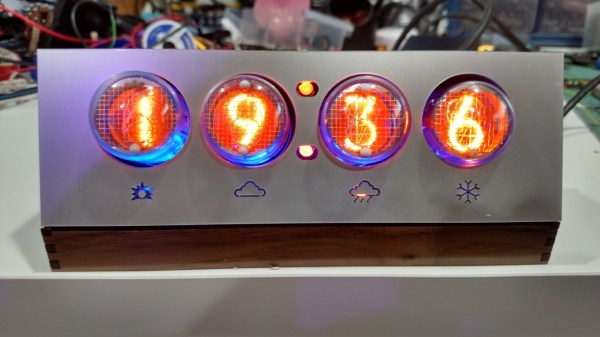
With everything that’s been happening in the news lately, [Jarek] decided it was finally time to finish up his latest project. The Internet of Things has been exploding with projects lately, and this clock that also alerts him of the weather is the latest addition. Plus it has the added bonus of using everybody’s favorite display: nixie tubes!

Of course, using high voltage for the nixies can be terror-inducing, but [Jarek] found a power supply on eBay that was able to power the tubes for not too much money. The controller is an HV5622 which can control up to 32 nixies while only using up three pins on a microcontroller which is pretty handy if you have a limited number of output pins.

The clock also has another device hidden behind all of the wires for the tubes: an ESP8266 to give it network connectivity. The clock connects to the Internet and searches for the nine-hour weather forecast. There are a few nixie lights behind the display which illuminate cutouts in the case to indicate a few different weather statuses. It’s a very polished project, and since it’s enclosed in a nice case it’s not likely to be mistaken for any movie props. Of course, other nixie projects don’t have the same comforting look.

Continue reading “Nixie Tube Clock Isn’t Just A Clock”

Embed With Elliot: Interrupts, The Good…

What’s the biggest difference between writing code for your big computer and a microcontroller? OK, the memory and limited resources, sure. But we were thinking more about the need to directly interface with hardware. And for that purpose, one of the most useful, and naturally also dangerous, tools in your embedded toolchest is the interrupt.

Interrupts do exactly what it sounds like they do — they interrupt the normal flow of your program’s operation when something happens — and run another chunk of code (an interrupt service routine, or ISR) instead. When the ISR is done, the microcontroller picks up exactly where it left off in your main flow.

Say you’ve tied your microcontroller to an accelerometer, and that accelerometer has a “data ready” pin that is set high when it has a new sample ready to read. You can wire that pin to an input on the microcontroller that’s interrupt-capable, write an ISR to handle the accelerometer data, and configure the microcontroller’s interrupt system to run that code when the accelerometer has new data ready. And from then on everything accelerometer-related happens automagically! (In theory.)

This is the first part of a three-part series: Interrupts, the Good, the Bad, and the Ugly. In this column, we’ll focus on how interrupts work and how to get the most out of them: The Good. The second column will deal with the hazards of heavyweight interrupt routines, priority mismatches, and main loop starvation: the Bad side of interrupts. Finally, we’ll cover some of the downright tricky bugs that can crop up when using interrupts, mainly due to a failure of atomicity, that can result in logical failures and corrupted data; that’s certainly Ugly.

Continue reading “Embed With Elliot: Interrupts, The Good…”

Embed With Elliot: Practical State Machines

Raindrops on roses, and whiskers on kittens. They’re ok, but state machines are absolutely on our short list of favorite things.

There are probably as many ways to implement a state machine as there are programmers. These range from the terribly complex, one-size-fits-all frameworks down to simply writing a single switch...case block. The frameworks end up being a little bit of a black box, especially if you’re just starting out, while the switch...case versions are very easy to grok, but they don’t really help you write clear, structured code.

In this extra-long edition of Embed with Elliot, we’ll try to bridge the middle ground, demonstrating a couple of state machines with an emphasis on practical coding. We’ll work through a couple of examples of the different ways that they can be implemented in code. Along the way, we’ll Goldilocks solution for a particular application I had, controlling a popcorn popper that had been hacked into a coffee roaster. Hope you enjoy.

Continue reading “Embed With Elliot: Practical State Machines”

Coffee Alarm

Alarm Notifies The Office When The Coffee Is Ready

[Stian] thought it would be nice if his coworkers could be electronically notified when the latest batch of coffee is ready. He ended up building an inexpensive coffee alarm system to do exactly that. When the coffee is done, the brewer can press a giant button to notify the rest of the office that it’s time for a cuppa joe.

[Stian’s] first project requirement was to activate the system using a big physical button. He chose a button from Sparkfun, although he ended up modifying it to better suit his needs. The original button came with a single LED built-in. This wasn’t enough for [Stian], so he added two more LEDs. All three LEDs are driven by a ULN2003A NPN transistor array. Now he can flash them in sequence to make a simple animation.

This momentary push button supplies power to a ESP8266 microcontroller using a soft latch power switch. When the momentary switch is pressed, it supplies power to the latch. The latch then powers up the main circuit and continues supplying power even when the push button is released. The reason for this power trickery is to conserve power from the 18650 li-on battery.

The core functionality of the alarm uses a combination of physical hardware and two cloud-based services. The ESP8266 was chosen because it includes a built-in WiFi chip and it only costs five dollars. The microcontroller is configured to connect to the WiFi network with the push of a button. The device also monitors the giant alarm button.

When the button is pressed, it sends an HTTP request to a custom clojure app running on a cloud service called Heroku. The clojure app then stores brewing information in a database and sends a notification to the Slack cloud service. Slack is a sort of project management app that allows multiple users to work on projects and communicate easier over the internet. [Stian] has tapped into it in order to send the actual text notification to his coworkers to let them know that the coffee is ready. Be sure to watch the demo video below. Continue reading “Alarm Notifies The Office When The Coffee Is Ready”

Homebrew ECU Increases Mazda Zoom

A big problem with most modern cars is the sheer number of parts and systems that are not user serviceable. This is a big departure from cars of just decades ago that were designed to be easily worked on by the owner. To that end, [Anthony] aka [fuzzymonkey] has tackled what is normally the hardest thing to work on in modern cars: the Engine Control Unit. (Older posts on this project can be found at [Anthony]’s old project log.)

Every sensor in any modern car is monitored by a computer called the Engine Control Unit (ECU), and the computer is responsible for taking this data and making decisions on how the car should be running. In theory a custom ECU would be able to change any behavior of the car, but in practice this is extremely difficult due to the sheer number of operations required by the computer and the very specific tolerances of a modern engine.

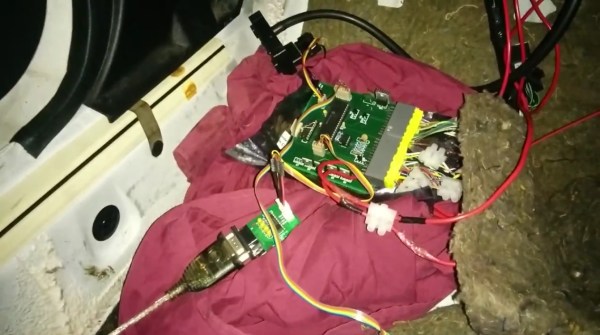
The custom ECU that Anthony has created for his Mazda MX-5 (a Miata for those in North America) is based on the PIC18F46K80 microcontroller, and there are actually two units involved. The first handles time-sensitive operations like monitoring the engine cam position and engine timing, and the other generates a clock signal for the main unit and also monitors things like cooling temperature and controlling idle speed. The two units communicate over SPI.

[Anthony]’s custom ECU is exceptional in that he’s gotten his car running pretty well. There are some kinks, but hopefully he’ll have a product that’s better than the factory ECU by allowing him to change anything from throttle response and engine timing to the air-fuel ratio. There have been a few other attempts to tame the ECU beast in the past, but so far there isn’t much out there.

Continue reading “Homebrew ECU Increases Mazda Zoom”

UController Code Profiler Debugs Your Microcontroller

When working on digital circuits that operate at high frequencies it helps to have some special tools on hand. Things like oscilloscopes and logic analyzers are priceless when something isn’t working right. Another great tool would be this hardware-based profiler that [Mike] came up with while he was working on another project.

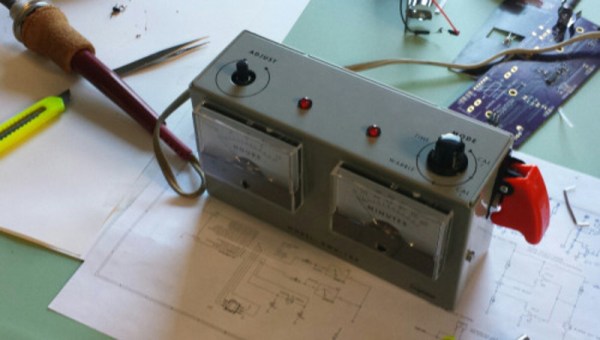
The profiler connects to USB and shows up as a serial port. Normally [Mike] used a set of LEDs to get information about how his microcontrollers work, but for this project that wasn’t enough. The uController Code Profiler can provide the main loop running time, time functions and sections of code, keep track of variables, and a few other tasks as well, all with nanosecond resolution.

The source code isn’t provided but a hex file is available, along with a schematic and an include file, if you want to try this one out on your next project. Like this homemade logic analyzer, this could be a powerful tool in your microcontroller arsenal. Simply include the file with various pieces of your code to get it up and running!

Temperature Logger

Logging Engine Temperature For RC Models

[Rui] enjoys his remote-controlled helicopter hobby and he was looking for a way to better track the temperature of the helicopter’s engine. According to [Rui], engine temperature can affect the performance of the craft, as well as the longevity and durability of the engine. He ended up building his own temperature logger from scratch.

The data logger runs from a PIC 16F88 microcontroller mounted to a circuit board. The PIC reads temperature data from a LM35 temperature sensor. This device can detect temperatures up to 140 degrees Celsius. The temperature sensor is mounted to the engine using Arctic Alumina Silver paste. The paste acts as a glue, holding the sensor in place. The circuit also contains a Microchip 24LC512 EEPROM separated into four blocks. This allows [Rui] to easily make four separate data recordings. His data logger can record up to 15 minutes of data per memory block at two samples per second.

Three buttons on the circuit allow for control over the memory. One button selects which of the four memory banks are being accessed. A second button changes modes between reading, writing, and erasing. The third button actually starts or stops the reading or writing action. The board contains an RS232 port to read the data onto a computer. The circuit is powered via two AA batteries. Combined, these batteries don’t put out the full 5V required for the circuit. [Rui] included a DC-DC converter in order to boost the voltage up high enough.