

When we last left [Wes] amidst the torn-open guts of his Logg Dogg logging robot, he had managed to revitalize the engine and dug into the hydraulics, but one big obstacle remained: the lack of the remote control unit. In today’s installment of the Logg Dogg series, [Wes] summarizes weeks of agony over creating a custom circuit based around a microcontroller, a joystick and a lot of relays and other bits and pieces to drive the solenoids inside the logging machine that control the hydraulics.
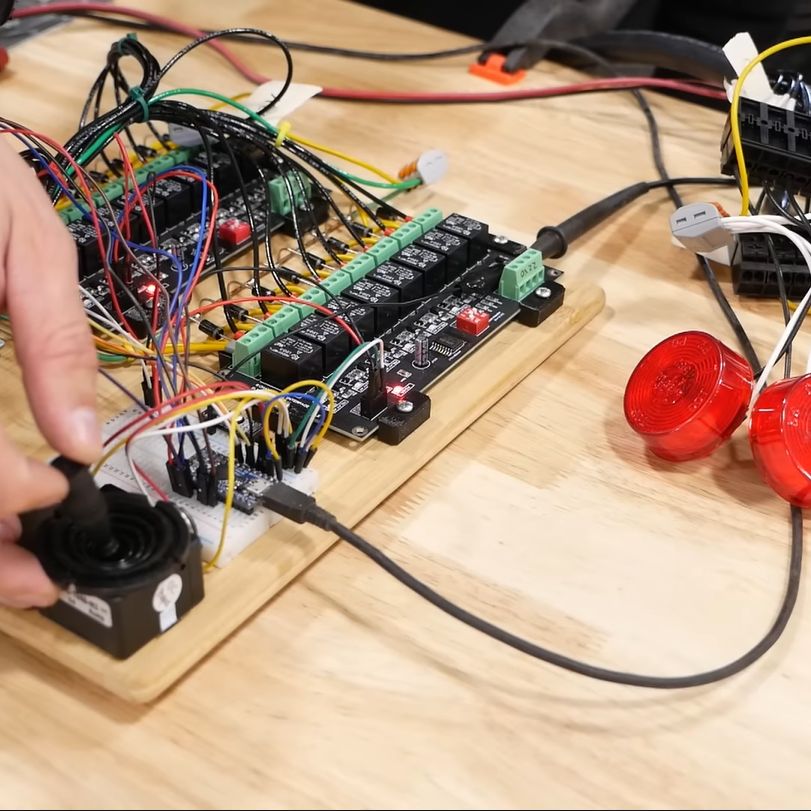
Most of the struggle was actually with the firmware, as it had to not only control the usual on/off solenoids, but also a number of proportional solenoid valves which control things like the track speed by varying the hydraulic flow to the final drives.
This requires a PWM signal, which [Wes] generated using two MOSFETs in a closed-feedback system, probably because open loop controls with multi-ton hydraulic machinery are not the kind of excitement most people look forward to.
Ultimately he did get it sorted, and was able to take the Logg Dogg for its first walk since being rescued from a barn, which both parties seemed to rather enjoy. The background details of this machine and the project can be found in our first coverage.
We’re looking anxiously forward to the next episode, where the controller goes wireless and the sketchiness gets dialed down some more.
Continue reading “Sketchy Logg Dogg Logging Robot Remote Control Hacking”


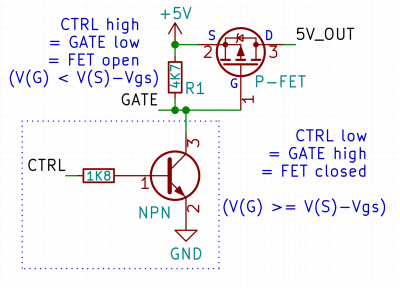 Here’s a simple FET circuit that lets you switch power to, say, a USB port, kind of like a valve that interrupts the current flow. This circuit uses a P-FET – to turn the power on, open the FET by bringing the GATE signal down to ground level, and to switch it off, close the FET by bringing the GATE back up, where the resistor holds it by default. If you want to control it from a 3.3 V MCU that can’t handle the high-side voltage on its pins, you can add a NPN transistor section as shown – this inverts the logic, making it into a more intuitive “high=on, low=off”, and, you no longer risk a GPIO!








