Hackaday Links Column Banner

Hackaday Links: November 10, 2019

In the leafy suburbs of northern Virginia, a place ruled by homeowner’s associations with tremendous power to dictate everything from the color of one’s front door to the length of grass in the lawn, something as heinous as garage doors suddenly failing to open on command is sure to cause a kerfuffle. We’ve seen this sort of thing before, where errant RF emissions cause unintentional interference, and such stories aren’t terribly interesting because the FCC usually steps in and clears things up. But this story is a little spicier given the source of the interference: Warrenton Training Center, a classified US government communications station located adjacent to the afflicted neighborhood. WTC is known to be a CIA signals intelligence station, home to spooks doing spooky stuff, including running high-power numbers stations. The interference isn’t caused by anything as cloak-and-dagger as that, though; rather, it comes from new land-mobile radios that the Department of Defense is deploying. The new radios use the 380-400 MHz band, which is allocated to the Federal Government and unlicensed Part 15 devices, like garage door remotes. But Part 15 rules, which are clearly printed on every device covered by them, state that the devices have to accept unwanted interference, even when it causes a malfunction. So the HOA members who are up in arms and demanding that the government buy them new garage door openers are likely to be disappointed.

Speaking of spooks, if you’re tired of the prying electronic eyes of facial recognition cameras spoiling your illusion of anonymity, have we got a solution for you. The Opt-Out Cap is the low-tech way to instantly change your face for a better one, or at least one that’s tied to someone else. In a move which is sure not to arouse suspicion in public, doffing the baseball cap deploys a three-piece curtain of semi-opaque fabric, upon which is printed the visage of someone who totally doesn’t look creepy or sketchy in any way. Complete instructions are provided if you want to make one before your next trip to the ATM.

It’s always a great day when a new Ken Shirriff post pops up in our feed, and his latest post is no exception. In it, Ken goes into great detail about the history of the 80×24 (or 25) line standard for displays. While that may sound a bit dry, it’s anything but. After dispelling some of the myths and questionable theories of the format’s origin – sorry, it’s not just because punch cards had 80 columns – he discusses the transition from teletypes to CRTs, focusing on the very cool IBM 2260 Display Station. This interesting beast used an acoustic delay line made of 50′ (15 m) of nickel wire. It stored data as a train of sound pulses traveling down the wire, which worked well and was far cheaper than core memory, even if it was susceptible to vibrations from people walking by it and needed a two-hour warm-up period before use. It’s a fascinating bit of retrocomputing history.

A quick mention of a contest we just heard about that might be right up your alley: the Tech To Protect coding challenge is going on now. Focused on applications for public safety and first responders, the online coding challenge addresses ten different areas, such as mapping LTE network coverage to aid first responders or using augmented reality while extricating car crash victims. It’s interesting stuff, but if you’re interested you’ll have to hurry – the deadline is November 15.

And finally, Supercon starts this week! It’s going to be a blast, and the excitement to hack all the badges and see all the talks is building rapidly. We know not everyone can go, and if you’re going to miss it, we feel for you. Don’t forget that you can still participate vicariously through our livestream. We’ll also be tweet-storming and running a continuous chat on Hackaday.io to keep everyone looped in.

Data Mining Home Water Usage; Your Water Meter Knows You A Bit Too Well

The average person has become depressingly comfortable with the surveillance dystopia we live in. For better or for worse, they’ve come to accept the fact that data about their lives is constantly being collected and analyzed. We’re at the point where a sizable chunk of people believe their smartphone is listening in on their personal conversations and tailoring advertisements to overheard keywords, yet it’s unlikely they’re troubled enough by the idea that they’d actually turn off the phone.

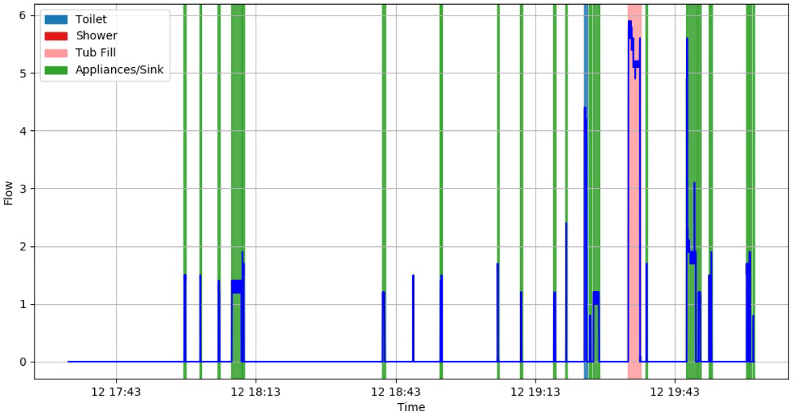
But even the most privacy-conscious among us probably wouldn’t consider our water usage to be any great secret. After all, what could anyone possibly learn from studying how much water you use? Well, as [Jason Bowling] has proven with his fascinating water-meter data research, it turns out you can learn a whole hell of a lot by watching water use patterns. By polling a whole-house water flow meter every second and running the resulting data through various machine learning algorithms, [Jason] found there is a lot of personal information hidden in this seemingly innocuous data stream.

The key is that every water-consuming device in your home has a discernible “fingerprint” that, with enough time, can be identified and tracked. Appliances that always use the same amount of water, like an ice maker or dishwasher, are obvious spikes among the noise. But [Jason] was able to pick up even more subtle differences, such as which individual toilet in the home had been flushed and when.

Further, if you watch the data long enough, you can even start to identify information about individuals within the home. Want to know how many kids are in the family? Monitoring for frequent baths that don’t fill the tub all the way would be a good start. Want to know how restful somebody’s sleep was? A count of how many times the toilet was flushed overnight could give you an idea.

In terms of the privacy implications of what [Jason] has discovered, we’re mildly horrified. Especially since we’ve already seen how utility meters can be sniffed with nothing more exotic than an RTL-SDR. But on the other hand, his write-up is a fantastic look at how you can put machine learning to work in even the most unlikely of applications. The information he’s collected on using Python to classify time series data and create visualizations will undoubtedly be of interest to anyone who’s got a big data problem they’re looking to solve.

Laser Trip Wire Hides What You’re (Not) Working On

We assume your office policy allows for reading Hackaday during work hours. But what about cruising reddit, or playing Universal Paperclips? There’s a special kind of stress experienced when attempting to keep one eye on your display and the other on the doorway; all the while convinced the boss is about to waltz into the room and be utterly disappointed in you.

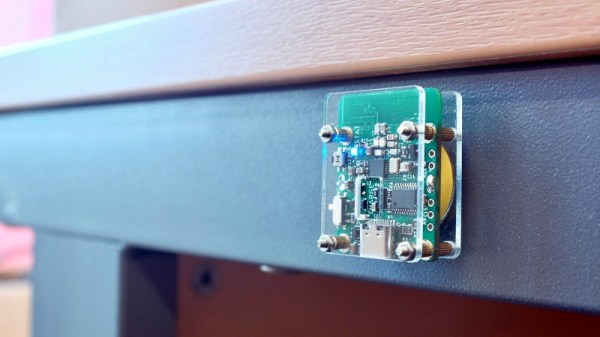
But fear not, for [dekuNukem] has found the solution with Daytripper. This wireless laser tripwire communicates back to your computer using NRF24 (2.4 Ghz on the ISM band) and can be used to invisibly cordon off a door or hallway and fire a scripted action on your computer if its beam has been broken. Nominally this is used to send the keyboard command that hides all open windows, but we’re sure the imaginative readers of Hackaday could come up with all sorts of alternate uses for this capability.

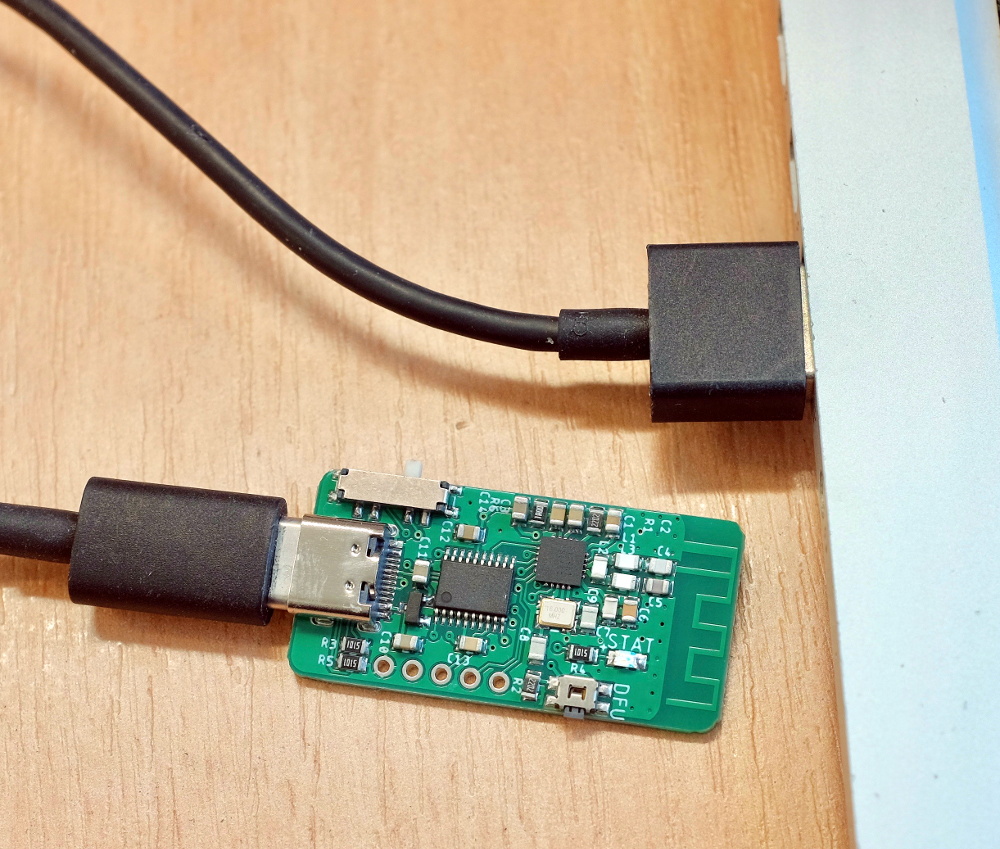
The Daytripper transmitter uses a laser time-of-flight sensor, in this case the very small VL53L0X by STMicroelectronics. It’s best situated so the laser will be bounced straight back at it. It has a range of about four feet, which is perfect for covering a door, though a wide hallway could give it some trouble. [dekuNukem] admits that the 5 Hz scan rate means a sufficiently fast moving adversary might slip past the sensor, but if they’re trying that hard to see what’s on your monitor, they probably deserve a peek.

On the receiver side, there’s a small board that plugs into your computer and mimics a USB keyboard. It has a selector switch on the side that allows the user to set what key sequence will be “typed” once the system has been tripped. It has built-in support for minimizing all windows or locking the computer, or you can set it to send ALT + Pause, which you can listen for and act on however you see fit.

If you want to build your own Daytripper, the firmware and hardware are both available on GitHub under an MIT license. For those who prefer instant gratification, [dekuNukem] is doing a small production run and offering them up on Tindie.

Chatterbox Voice Assistant Knows To Keep Quiet For Privacy

Cruising through the children’s hands-on activity zone at Maker Faire Bay Area, we see kids building a cardboard enclosure for the Chatterbox smart speaker kit. It would be tempting to dismiss the little smiling box as “just for kids” but doing so would overlook something more interesting: an alternative to data-mining corporations who dominate the smart speaker market. People are rightly concerned about Amazon Echo and Google Home, always-listening devices for online retail sending data back to their corporate data centers. In order to be appropriate for children, Chatterbox is none of those things. It only listens when a button is pressed, and its online model is designed to support the mission of CCFC (Campaign for a Commercial-Free Childhood.)

Getting started with a Chatterbox is much like other products designed to encourage young makers. The hardware — Raspberry Pi, custom HAT, speaker and button inside a cardboard enclosure — is conceptually similar to a Google AIY Voice kit but paired with an entirely different software experience. Instead of signing in to a Google developer account, children create their own voice interaction behavior with a block-based programming environment resembling MIT Scratch. Moving online, Chatterbox interactions draw upon resources of similarly privacy-minded entities like DuckDuckGo web search. Voice interaction foundation is built upon a fork of Mycroft with changes focused on education and child-friendliness. If a Chatterbox is unsure whether a query was for “Moana” or “Marijuana”, it will decide in favor of the Disney movie.

Many of these privacy-conscious pieces are open source or freely available, but Chatterbox pulls them all together into a single package that’s an appealing alternative to the big brand options. Based on conversations during Hackaday’s Maker Faire meetup, there’s a market beyond parents of young children. From technically aware adults who lack web API coding skills, to senior citizens unaware of dark corners of the web. Chatterbox Kickstarter campaign has a few more weeks to run but has already reached funding goals. We look forward to having a privacy-minded option in voice assistants.

Solar-Powered OpenWRT Router For Mobile Privacy

Let’s not pretend we aren’t all guilty of it: at some point we’ve all connected to a public WiFi network to check our email or log into some site or service. We know the risks, we know better. But in a weak moment we can let the convenience of that public network get the better of us. What if you had a small secure router that you could use as an encrypted VPN endpoint, allowing you to connect to those enticing public networks while keeping your traffic secure? That’s precisely what [David] had in mind when he built this pint-sized solar-powered OpenWRT router.

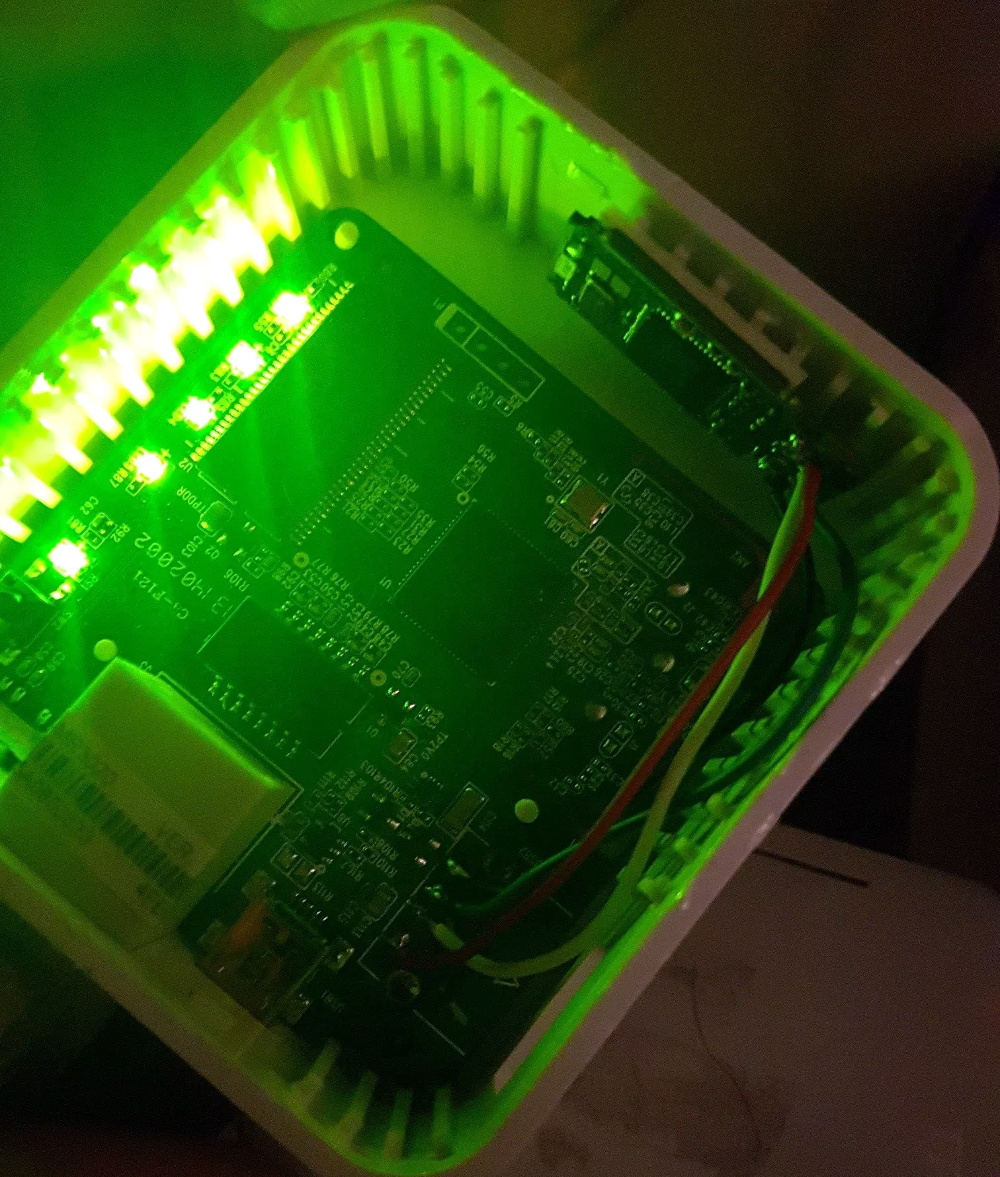
At the heart of this gadget is the TP-Link TL-MR3020, a tiny OpenWRT-compatible router that’s no stranger to the pages of Hackaday. Its small size and low cost have made it a natural choice for a wide array of projects, so it’s little surprise that [David] gravitated towards it. But simply getting OpenWRT installed on the MR3020 and configuring OpenVPN doesn’t exactly grant you entrance into the Hackaday Pantheon, so obviously there’s a bit more to the story.

For one, [David] didn’t like the idea of a USB flash drive hanging out of the side of his router. Since the flash drive would essentially be a permanent part of the router, as it is being used to expand the rather meager internal storage of the MR3020 he decided to wack the USB end off the flash drive and solder it directly to the router’s PCB. This gave him a much cleaner looking package, but it still wasn’t as portable as he’d like.

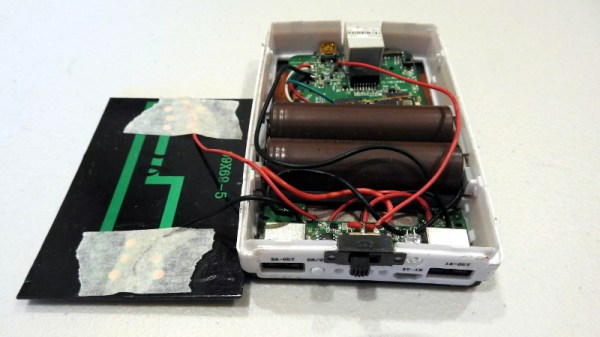
He decided to order a solar-charged USB power bank to become the new home of his hacked MR3020. He kept the solar panel and charge controller from the original gadget, and after some researched settled on a pair of LG-HG2 3000 mAh batteries as the power source. [David] went through a few charge and discharge cycles making sure everything worked as expected before buttoning up the case. In the future he says he might transplant the electronics into a 3D printed case, but for now he’s pretty pleased with the results.

If you’d like to try your hand at hacking these popular micro routers, you’ll need to start with an OpenWRT firmware. After you’ve got a full blown Linux distro running on this little fellow, the only limitation is your own imagination.

Win Back Some Privacy With A Cone Of Silence For Your Smart Speaker

To quote the greatest philosopher of the 20th century: “The future ain’t what it used to be.” Take personal assistants such as Amazon Echo and Google Home. When first predicted by sci-fi writers, the idea of instant access to the sum total of human knowledge with a few utterances seemed like a no-brainer; who wouldn’t want that? But now that such things are a reality, having something listening to you all the time and potentially reporting everything it hears back to some faceless corporate monolith is unnerving, to say the least.

There’s a fix for that, though, with this cone of silence for your smart speaker. Dubbed “Project Alias” by [BjørnKarmann], the device consists of a Raspberry Pi with a couple of microphones and speakers inside a 3D-printed case. The Pi is programmed to emit white noise from its speakers directly into the microphones of the Echo or Home over which it sits, masking out the sounds in the room while simultaneously listening for a hot-word. It then mutes the white noise, plays a clip of either “Hey Google” or “Alexa” to wake the device up, and then business proceeds as usual. The bonus here is that the hot-word is customizable, so that in addition to winning back a measure of privacy, all the [Alexas] in your life can get their names back too. The video below shows people interacting with devices named [Doris], [Marvin], [Petey], and for some reason, [Milkshake].

We really like this idea, and the fact that no modifications are needed to the smart speaker is pretty slick, as is the fact that with a few simple changes to the code and the print files it can be used with any smart speaker. And some degree of privacy from the AI that we know is always listening through these things is no small comfort either.

Continue reading “Win Back Some Privacy With A Cone Of Silence For Your Smart Speaker”

Does Library Bloat Make Your Smartphone App Look Fat?

While earlier smartphones seemed to manage well enough with individual applications that only weighed in at a few megabytes, a perusal of the modern smartphone software store uncovers some positively monstrous file sizes. The fact that we’ve become accustomed to mobile applications requiring 100+ MB downloads on what’s often a metered Internet connection in only a few short years is pretty crazy if you stop to think about it.

Seeing reports that the Nest app for iOS tipped the scales at nearly 250 MB, [Alexandre Colucci] decided to investigate. On his blog he not only documents the process of taking the application apart piece by piece to find out just what’s eating up all that space, but lists some potential fixes which could shave a bit off the top. Even if you aren’t planning a spelunking expedition into your pocket supercomputer’s particular variant of the Netflix app, the methodology and tools he uses here are fascinating in their own right and might be something worth adding to your software bag of tricks.

By passing the application’s files through a disk usage visualizer called GrandPerspective, [Alexandre] immediately identified some rather large blocks of content. The bundled Apple Watch version of the app takes up 23 MB, video and audio used to walk the user through the device setup weigh in at 22 MB, and localization files for various languages consumes a surprising 33 MB. But the biggest single contributor to the application’s heft is the assorted libraries and frameworks which total up to an incredible 67 MB.

Of course the question is, how much of it is really necessary? It’s hard to be sure from an outsider’s perspective, but [Alexandre] notes that a few of the libraries used seem to be redundant or obsolete. In some cases this could be the result of old code still lurking in the project, but the four different libraries used for user tracking probably aren’t in there by accident. It also stands to reason that the instructional videos could be offloaded to something like YouTube, so that only users who need to view them have to expend their bandwidth on it.

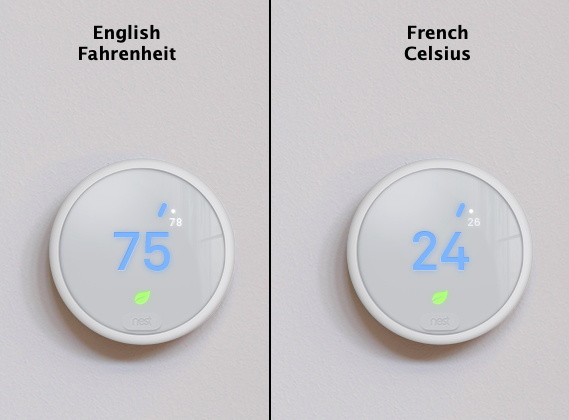
Getting a little deeper into things, [Alexandre] notes that some of the localization images appear to be redundant. As a specific example, he points to the images of the Nest itself displaying Fahrenheit and Celsius temperatures. While logically this should only be two image files, there are actually eight copies of the Celsius image, each filed away as language-specific. These redundant localization images could easily be stripped out, but with gains measured in only a few hundred kilobytes, it probably wasn’t considered worth the effort during development.

In the end there’s really not as much bloat as we might like to believe. There were some redundant files, maybe a few questionable library inclusions, and the Apple Watch version of the app could surely be separated out. All together, it might get you a savings of 30 – 40%, but still not enough to bring it down under 100 MB.

All signs point to the fact that modern smartphone software development is just a lot more burdensome than us hackers might like. Save for projects looking to put control back into the hand’s of the users, it looks like mobile operating systems aren’t going to be slimming down anytime soon.