Build A Home Automation Hub For $20

With so many WiFi home automation devices on the market, you might want to take advantage of these low cost products without having to send your data to third-party servers. This can be accomplished by running your own home automation hub on your home network.

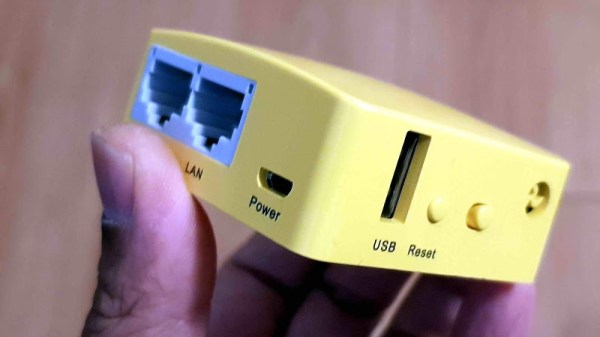
If you don’t want to use a full computer for this purpose, [Albert] has you covered. He recently wrote a guide on running Domoticz on the $20 GL-MT300Nv2 pocket router.

The setup is rather simple: just perform a firmware update on your router using the provided image and a full home automation stack is installed. Domoticz provides a web interface for configuring your devices, setting up rules, and viewing sensor data.

The pocket router is also supported by OpenWrt and provides a USB host port, making it a low-cost option for any WiFi hack you might have in mind. We’ve seen quite a few OpenWrt based hacks over the years.

Reset Your Router The Modern Way

Many Hackaday readers will be settling back into their lives after a holiday period crammed into some family matriarch’s house along with too many assorted relatives, having given up their speedy internet connection for whatever passes for broadband wherever Granny lives. The bargain-basement router supplied by the telephone company will have spent the period wilting under the pressure of a hoard of teenagers watching other teenagers inanities on YouTube, and the Christmas ritual of Resetting The Router will have been performed multiple times.

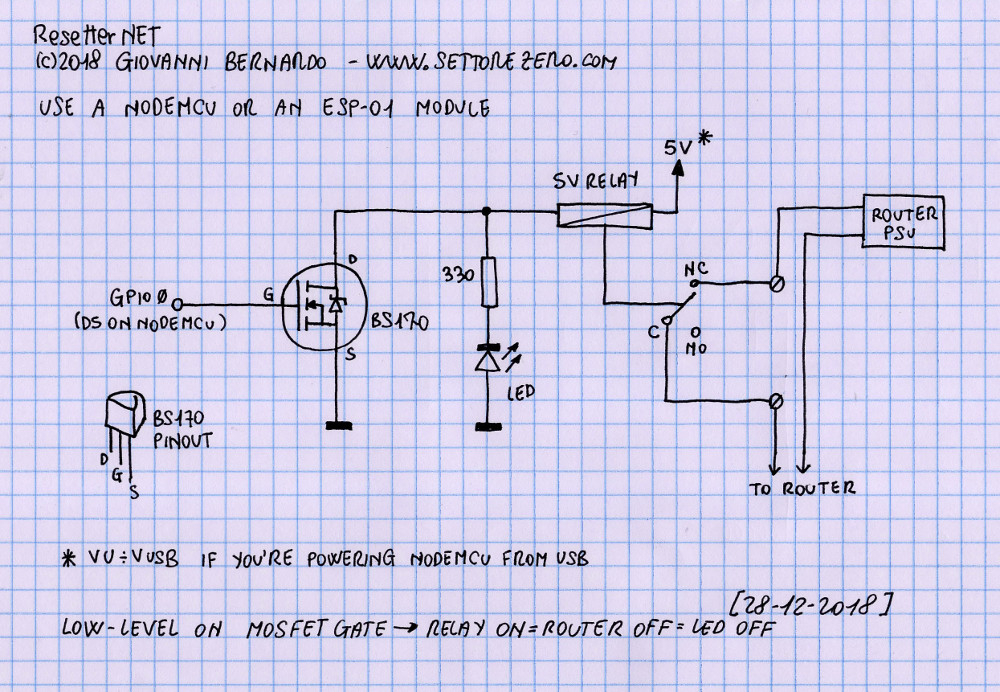
A very simple schematic for the resetter.

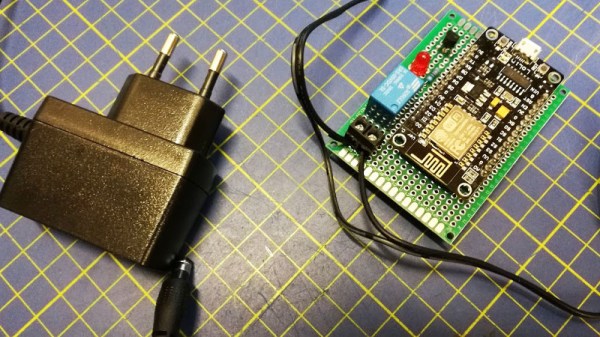
Wouldn’t it be nice if your router simply reset itself every time it crashed or the Internet connection went down? [Cyb3rn0id] has a solution (Italian original here), in the form of an ESP8266 that pings an online service every few seconds, and turns the router off and on again via a power relay in the event that the ping attempt is repeatedly unsuccessful. It’s brilliantly simple, requiring only a single GPIO and a MOSFET to fire the relay with an LED indicator for good measure, and it’s built upon a piece of prototyping board. The router power is switched on the low-voltage side for safety.

The software is pretty basic and has the WiFi credentials hard-coded into it, so we’re guessing a version with a web interface could be built. But as a personal device for easing the pain of router crashes it gets our vote despite that shortcoming.

This isn’t the first router resetter we have seen here, but a previous model still required human intervention.

Improving Router-Based Dev Boards With The Onion Omega2 Pro

Before we had Raspberry Pis and Beaglebones, the art of putting a Linux system in a small, portable project was limited to router hacking. The venerable WRT54G controlled Internet-connected robots with a careful application of a Unix-ey firmware. Now, things are different but there’s still a need for a cheap, portable Linux system that’s just good enough to get the job done. Now, there’s an upgrade to the board that follows in the footsteps of that router hacking The Onion Omega2 Pro is up on Crowd Supply, and it’s got more buttons, more switches, and it’s still smaller than a breadboard.

The Onion Omega2 Pro is a slight upgrade over the breadboard-friendly SoM launched a few years ago. The Pro version features a 580 MHz MIPS CPU, 512 MB of RAM (Update: this is 128 MB physical RAM and 384 MB flash swap file), 8 GB of storage, and connectivity with b/g/n WiFi. Unlike the previous version, this is a far more functional system with a 30-pin expansion header, support for battery charging, a micro USB for charging and serial, and a USB host port. Because this is at its heart the guts of a router on a development board, you also get all the fun of WiFi networking. The expansion header connects to various add-ons including a GPS module, OLED display, and an Ethernet port.

Now we have Raspberry Pis and other various boards based on smartphone Systems on Chip, but sometimes you don’t need that much overhead. You don’t need weird Linux distributions dealing with ARM bootloaders. Sometimes you just need something simple, and the Onion Omega2 Pro does just that.

Already Impressive CNC Router Gets An Extra Axis

The type of CNC machine within the financial reach of most DIYers is generally a three-axis affair, with a modest work envelope and a spindle that never quite seems powerful enough. That’s not to say that we don’t covet such a machine for our own shop of course, but comparing small machines with the “big boy” five-axis tools might leave the home-gamer feeling a tad inadequate.

Luckily, there’s a fix that won’t necessarily break the bank: adding a fourth axis to your CNC router. [This Old Tony] tore into his CNC router – a build we’ve featured before and greatly admire – to add a machine spindle that lets him work with the machine much as if it was a CNC lathe. The first video below covers the mechanical part of the build, which involves welding and machining a sturdy assembly to hold a spindle connecting a four-jaw chuck to a Lexium MDrive, a stepper motor with integrated driver and feedback that makes it act more like a servo. [Old Tony] covered integrating the drive into Mach4 in a previous video.

The assembled machine spindle is a beefy looking affair that can smoothly ramp up to 3000 rpm and has decent enough holding torque to allow it to act as an indexing head in addition to a lathe. The second video below shows some tests turning aluminum and steel; we were surprised by how aggressive the cuts can be before stalling the spindle.

No, it’s not a Tormach or Haas or even a Pocket NC, but it’s a great addition to an already capable machine, and we’re looking forward to what [Old Tony] cranks out with it.

Continue reading “Already Impressive CNC Router Gets An Extra Axis”

Wired Wireless Over Coax

If it’s stupid and it works, then it’s not stupid. There’s no better evidence of that than [Manawyrm]’s networking setup.

She recently had to distribute Ethernet through a building, and there are a few ways to do that. You can use regular old twisted pair, or fiber, but in this case running new cables wasn’t possible. WiFi would be the next obvious choice, but the distance was just a bit too far for ‘regular’ WiFi links. Ethernet over power lines was an option, but there are amateur radio operators in the house, and power lines put out a bunch of interference and noise. The solution was to mis-use existing 75 Ohm satellite TV coax that was just sitting around.

The correct way to do this would be to use a standard DOCSIS modem and become your own cable Internet provider. The equipment to do this is expensive, and if you’re already considering running WiFI over coax, you’re too deep down the rabbit hole to spend real money. Instead, [Manawyrm] simply made a few u.FL to F-connector adapters from u.FL to SMA, then SMA to F-connector adapters.

There are some problems with this plan. WiFi is 50 Ohms, TV coax cable is 75 Ohms. Only one MIMO channel will be available meaning the maximum theoretical bandwidth will be 433 Mbps. WiFi is also at much higher frequencies than what coax is designed for.

With two WiFi antenna to coax adapters, [Manawyrm] simply connected the coax directly to a router set up to bridge Ethernet over WiFi. The entire thing worked, although testing showed it was only getting about 60 Mbps of throughput. That’s not bad for something that was cobbled together out of old parts and unused wiring. Is it surprising that this worked? No, not really, but you’ve probably never seen anyone actually do it. Here’s the proof it does work, and if you’re ever in a bind, this is how you make WiFi wired.

Cool Tools: The Pantorouter Turns Tracing On Its Side

Not too long ago we wrote about a small CNC tool for automating certain parts of the woodworking process. At the time it seemed unusual in its intentionally limited scope but a few commenters mentioned it reminded them of another device, [Matthias]’s Pantorouter. It didn’t take much investigation to see that the commenters were right! The MatchSticks device does feel a bit like a CNC version of the Pantorouter, and it seemed like it was more than worth of a post by itself. The Pantorouter is a fascinating example of another small manual-but-automated tool for optimized for accelerating and improving certain woodworking operations.

Continue reading “Cool Tools: The Pantorouter Turns Tracing On Its Side”

ARM-Based NAS Is A Low Cost, Low Power Beauty

A NAS is always a handy addition to a home network, but they can be a little pricey. [Blake Burkhart] decided to create his own, prioritising budget and low power considerations, with a secondary objective to produce some router and IoT functionality on the side.

A Banana Pi R2 was a good choice to meet these requirements, being a router-based development board that also sports dual SATA connectors and gigabit Ethernet. [Blake] had some retrospective regrets about the performance of this particular SBC, but it does just fine when functioning purely as a NAS.

The enclosure for the device is a three bay hot-swap HDD module, with one of the bays gutted and used for the Banana Pi. It’s a simple idea, elegantly executed, which looks great. To access the ports of the Banana Pi, a custom acrylic side panel was laser cut, which also allowed LEDs to shine through – obligatory for any DIY server/computer build. When mounting this panel to the existing enclosure, [Blake] was reluctant to take his chances tapping the brittle acrylic, instead opting to melt the threads into the plastic with a pre-torched screw. We find that tapping acrylic is usually okay if you take it slow, but heat-tapping does sound fun.

The 12 V fan that came built into the hot-swap enclosure was too loud and awkwardly came in a non-standard size with a non-standard connector. What’s more, a buzzer alarm was triggered any time the fan was disconnected and 0 RPM was detected. [Blake]’s solution was to rewire the power pin of the connector to a 5 V rail; he found that running the fan at 5 V led to much quieter performance whilst keeping the HDDs sufficiently cool.

We find that when it comes to DIY network gear and routers, there are two approaches. Either create your own bespoke solution that perfectly fits your needs, like this perfect home router, or work around your current gear and build some tech to automatically reboot it for you.