TI Launchpad Adds Computer Control To A Robot Arm

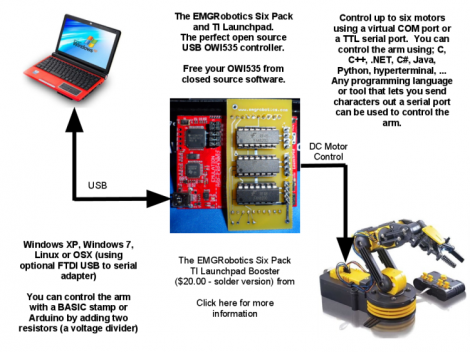
[Eric Gregori] had an OWI535 toy robotic arm. Although cheap (coming it at around $30) the arm is only set up to be used via a wired control box. [Eric] knew he could do better by adding computer control via a TI Launchpad and motor driver peripheral.

The arm has shoulder, elbow, and wrist joints, a rotating base, and a gripper. All of these are actuated by 3V DC motors and have just two control wires. [Eric’s] motor driver add-on for the Launchpad works great in this case. It’s got three FAN8200 dual motor driver chips on board so it can control up to six motors. Once he made the hardware connections it’s just a matter of sending the commands to the Launchpad via its USB interface, but you will also need to use a larger microcontroller than comes with the Launchpad. Here he’s chosen an MSP430G2553.

In order to make things a little bit more fun he also wrote a GUI for controlling the arm from the computer. He used RobotSee, a programming language that lets you use an image of the hardware, and overlay the controls on top of it. Now he just needs to make this into a web interface and he can have a smartphone controlled crane game.

Don’t forget to check out the video after the break. Continue reading “TI Launchpad Adds Computer Control To A Robot Arm”

Stylophone 5 – Modernizing The Best Of The 1968 Hardware

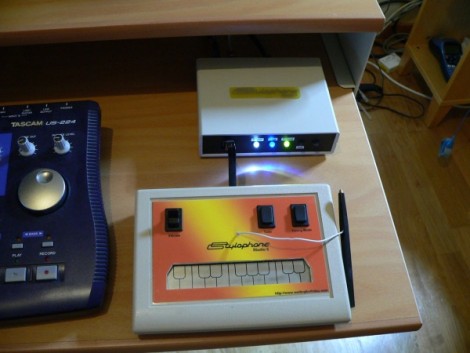
We love looking in on [Simon Inns’] projects, and this must be one of his very best. This is the fifth version of his MIDI-capable stylophone. The gist of the control system is that a conductive keyboard (made of a tinned PCB) is played by making a connection with the tip of a wired stylus — hence the name. The idea comes from the original 1968 Dubreq Stylophone hardware, but [Simon’s] not just using the idea. He has his own working original and used it to reverse engineer the circuit design.

When it first came out, the Stylophone had three flavors for Bass, Standard, and Treble audio ranges. They differed only in the choices of passive components used in the circuit. [Simon] built the variations into his design so that they are selectable on one unit. This most recent version connects via USB, allowing you to control MIDI software. But unlike his first four iterations, this also offers MIDI-In capabilities. This makes it possible to control tuning, vibrato, and to drive the Stylophone circuitry from the computer interface. Get a good look at that, and a nostalgic Portal moment, by watching the clip after the break.

If you’re looking for an easier build, you might try this analog standalone version of the Stylophone.

Continue reading “Stylophone 5 – Modernizing The Best Of The 1968 Hardware”

NES Controller Is A Slick Way To Carry Around Your Portable OS

nes-controller-linux-drive

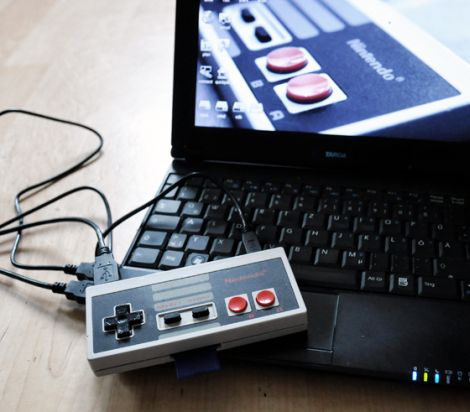
[Oliver] had an old NES controller laying around, and without any other use for it, he decided to repurpose it as a portable storage device.

He gutted most of the controller, removing the plastic standoffs, leaving the D-pad and remaining buttons intact. He crammed a 32 GB flash drive inside, along with the guts from an SD card reader. Using a Dremel he cut several openings into the controller, one for the flash drive and SD card reader’s USB ports, as well as for the SD card itself. When the physical modifications were finished, he installed a small Linux distro on the flash drive, which can be run by any PC that supports booting from USB.

While some might argue, we think it’s a neat way to reuse an old gaming peripheral that he might have otherwise thrown out. The portable OS is something that would certainly come in handy, though we can’t wait until the Raspberry Pi is finished – it would be awesome to have a complete computer packed in there too.

LUFA Open Source USB Stack Now For NXP ARM Processors

Looks like the Lightweight USB Framework for AVRs (LUFA) has just been ported for ARM microcontrollers. NXP recently released a package for their LPC Cortex M3 family of ARM controllers. You won’t find a reference to LUFA on their nxpUSBlib description page (which we think is kind of sad), but if you grab a copy of the beta code the Version.h header file shows that it is indeed a port of the project. This is further backed up by the LUFA creator, [Dean Camera], who consulted with the NXP team doing the work.

The package provides an open-source USB stack that you can use in your projects as a USB host or USB device. We’re advocates of open source packages like this one as it makes it much easier for hobbyists to get help using the tools, and it allows the community to give back through bug fixes and feature additions.

We’ve highlighted a few LUFA projects, like this keyboard remapper and this AVR programmer. We’re looking to seeing the first set of NXP LUFA projects roll through!

[Thanks Johnny]

USB And PS/2 Key Loggers And Mess With Your Grammar

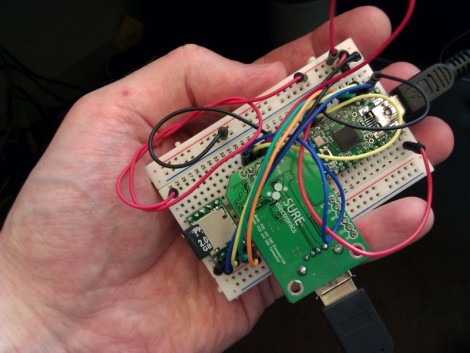
[Irongeek] is up to his old tricks once again with this new key logger prototype. It’s in the early stages, as attested by the breadboard built circuit, but [Adrian] still gives us a demo video after the break showing where he’s at right now. It comes in two flavors, the USB pass through seen above, or another that still connects to the computer via USB but functions with a PS/2 keyboard.

Aside from the obvious issue of a key logger stealing everything you type, there’s some prank value in this device too. The Teensy has more than enough processing power to watch what you typing and make changes as it goes. He shows off blatant rewrites, like changing “has” to “haz” or “you” to “U”. We think it would be better to change things like “they’re” to “their” or “it’s” to “its”. These would be very difficult to see happening and if you added randomness to how often the replacements occur, your victim would sooner come to the conclusion that they’re going crazy than that they’re the target of a little hazing. In fact, that’s probably the reason for our own grammar errors though the years; blast!

Continue reading “USB And PS/2 Key Loggers And Mess With Your Grammar”

Do You Know What You’re Doing When Integrating PC-side Apps With USB Microcontrollers?

The advent of integrated USB peripherals in microprocessors (PIC, AVR, etc.) has certainly taken a lot of the work out of developing USB devices, not to mention reducing the silicon parts in these designs. But do you know what you’re doing when it comes to controlling them with user-friendly applications? [Simon Inns] is lending a hand with this in his recent tutorial. He shows how to use USB capable AVR chips along with your own Windows applications.

After the break you can see the video from which the above screenshot was captured. That’s a development board of his own making which hosts an ATmega32U4, as well as a USB-B port, LEDs, potentiometer, and a few switches. Taking a closer look, we love the breadboard friendly headers he used on the bottom of the board to break out all of the pins.

His demo shows the Windows app turning LEDs on the board on and off, as well as ADC data displaying the current potentiometer position with the onscreen dial. His code package includes the hardware design, firmware, and app software needed to follow along with what he’s doing.

Continue reading “Do You Know What You’re Doing When Integrating PC-side Apps With USB Microcontrollers?”

Custom Flat Cables To Suit Your Needs

[Cosimo Orlando] has a Motorola Xoom tablet. It’s an Android device that works great as a tablet, but can double as a Laptop when you need it to by adding a keyboard. The problem he was having is that the USB On-The-Go cables that he tried were never the right size or orientation. So he scavenged them for parts and built his own flat cable for a custom fit.

The final product pictured here actually uses protoboard to give the body some strength. [Cosimo] first laid out the dimensions on the substrate using a felt-tipped pen. He then took connectors from his mis-sized commercial cables and affixed them to the board with a combination of hot glue and solder. From there, just connect the five data lines and ground with some jumper wire and test for continuity. He finished this off with what he calls ‘adhesive plastic glossy black’ shaped to make a decent looking case. If you have any idea what product was used here, let us know by leaving a comment.