How To Shoot A Great Project Video

Creating projects is fun, but the real value, as far as the imaginary Internet points are concerned, is how well you show them off for the clout. Taking a few snaps is fine, but if you want to produce a quality video of your project, it pays to put some thought and effort into the process.

Telling The Story

Before setting out to document your project on video, think about what you’re trying to communicate to the viewer. Are you attempting to create a step-by-step guide on how to recreate what you’ve done, or are you simply trying to show off the awesome finished product? These are two very different types of video, and will require different content and delivery entirely. It also guides how you shoot your video.

If you want to show off your build process, you’ll need to shoot as you go. This can be time consuming, but also a great way to show the reality of what goes into your work. I always like it when people convey the pitfalls and successes they faced along the way, and get people involved in the story. It also means that you’ll end up shooting a lot of footage and you’ll spend plenty of time editing it all together. Continue reading “How To Shoot A Great Project Video”

Boost Your Animation To 60 FPS Using AI

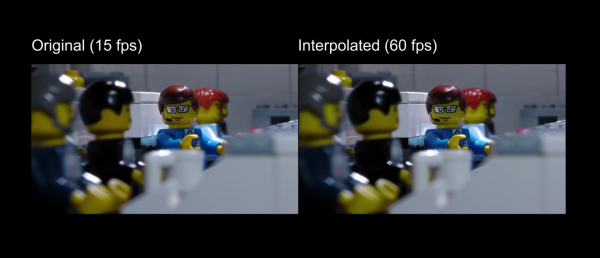
The uses of artificial intelligence and machine learning continue to expand, with one of the more recent implementations being video processing. A new method can “fill in” frames to smooth out the appearance of the video, which [LegoEddy] was able to use this in one of his animated LEGO movies with some astonishing results.

His original animation of LEGO figures and sets was created at 15 frames per second. As an animator, he notes that it’s orders of magnitude more difficult to get more frames than this with traditional methods, at least in his studio. This is where the artificial intelligence comes in. The program is able to interpolate between frames and create more frames to fill the spaces between the original. This allowed [LegoEddy] to increase his frame rate from 15 fps to 60 fps without having to actually create the additional frames.

While we’ve seen AI create art before, the improvement on traditionally produced video is a dramatic advancement. Especially since the AI is aware of depth and preserves information about the distance of objects from the camera. The software is also free, runs on any computer with an appropriate graphics card, and is available on GitHub.

Continue reading “Boost Your Animation To 60 FPS Using AI”

Commodore 64 Mini Man Makes Matching Mini Monitor

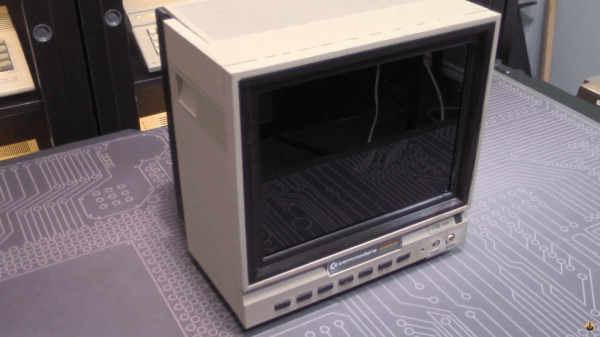
While putting together a retro computer is a great project and can teach a lot about the inner workings of electronics, hooking that 70s- or 80s-era machine up to a modern 144 Hz 1440p display tends to be a little bit anticlimactic. To really recreate the true 8-bit experience it’s important to get a CRT display of some sort, but those are in short supply now as most are in a landfill somewhere now. [Tony] decided to create a hybrid solution of sorts by 3D printing his own Commodore replica monitor for that true nostalgia feel.

This build is a matching mini scale replica of the Commodore 1702 monitor, a color monitor produced by Commodore specifically for their machines. At the time it was top-of-the-line and even included an early predecessor of the S-Video method of video signalling. This monitor was modeled in Fusion 360 and then sent to the 3D printer for assembly, then populated with a screen with a period-correct 4:3 aspect ratio, required electronics for handling the Commodore’s video signal, and even includes an upgrade over the original monitor: stereo speakers instead of the single-channel speaker that was featured in the 80s.

While this monitor doesn’t use a CRT, it’s an impressive replica nonetheless, right down to the Commodore serial number sticker on the back. If you need a Commodore 64 to go along with it, there are plenty of possibilities available to consider like this emulated C64 on a Raspberry Pi or these refurbished OEM Commodores.

Continue reading “Commodore 64 Mini Man Makes Matching Mini Monitor”

ESPFLIX Brings Streaming Video To The World Of Microcontrollers

These days, if you’ve got a TV that’s a little too old to directly access streaming services, you’ve got plenty of options. Apple TV, Chromecast, and a cavalcade of Android boxes are available to help get content on your screen. However, if you’re really stuck in the past, ESPFLIX might just be for you.

Control of the system is achieved by an Apple TV remote.

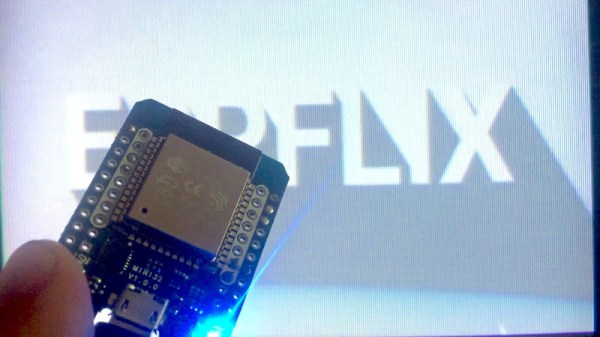
Yes, that’s right – it’s an online streaming service running on an ESP32. [rossumur] has achieved this feat through a careful use of codecs, and some efficient coding strategies to make it all come together. Video is MPEG1, at just 352×192 resolution. Audio is via the SBC codec, originally intended for use with Bluetooth devices. It’s chosen here for its tiny sample buffers, making it easier to decode in the limited RAM of the ESP32. Output is via composite video, generated on the ESP32 itself.

The titles themselves consist of public domain content, running off an Amazon Web Services instance. With limited RAM on the ESP32, there’s not much buffering to be had, so [rossumur] is bankrolling an AWS Cloudfront instance which should make it possible to use ESPFLIX from most places around the world with a solid internet connection.

We’ve seen [rossumur]’s work before, with the ESP_8_BIT serving as a prelude to this project’s capabilities. Video after the break.

Continue reading “ESPFLIX Brings Streaming Video To The World Of Microcontrollers”

Apollo Missions Get Upgraded Video

July 20th marked the anniversary of the first human setting foot on the moon. If you were alive back then, you probably remember being glued to the TV watching the high-tech images of Armstrong taking that first step. But if you go back and watch the video today, it doesn’t look the way you remember it. We’ve been spoiled by high-density video with incredible frame rates. [Dutchsteammachine] has taken a great deal of old NASA footage and used their tools to update them to higher frame rates that look a lot better, as you can see below.

The original film from the moon landing ran between 12 frames per second and as low as 1 frame per second. The new video is interpolated to 24 frames per second. Some of the later Apollo mission film is jacked up to 60 frames per second. The results are great.

Continue reading “Apollo Missions Get Upgraded Video”

Hackaday Links Column Banner

Hackaday Links: June 7, 2020

For many of us who were in college at the time, the 1989 release of Will Wright’s classic SimCity sounded the death knell of our GPAs. Being able to create virtual worlds and then smite them with a tornado or a kaiju attack was the stuff of a procrastinator’s dreams. We always liked the industrial side of the game best, and took great pains in laying out the factory zones, power plants, and seaports. Those of a similar bent will be happy to know that Maxis, the studio behind the game, had a business simulations division, and one of their products was a complete refinery simulator the studio built for Chevron called, unsurprisingly, SimRefinery. The game, which bears a striking resemblance to SimCity, has been recovered and is now available for download, which means endless procrastination by playing virtual petrochemical engineer is only a mouse click away.

Speaking of time wasters, we stumbled upon another simulation this week that sucked away a couple of hours of productivity. As RTL-SDR.com reports, YouTuber called Information Zulu has a 24/7 live stream showing arrivals and departures at Los Angeles International Airport. That may sound boring, but the cameras used to watch the runways are virtual, and the planes are animated based on ADS-B data being scooped up by an RTL-SDR dongle. We pinged Information Zulu and asked for a rundown of the gear behind the system, but never heard back. If we do, we’ll post a full article on what we learned, because the level of detail is amazing. The arriving and departing planes sport the correct livery for the airline, the current weather conditions are shown, taxiing is shown in real time, and there’s even an audio feed from air traffic control.

If you’re looking to gain back a little of the productivity lost to the last two items, Digi-Key might be able to help with their new PCB Builder service. All you have to do is upload your gerbers and select your materials, and they’ll give you options for a bunch of different quick-turn fabrication houses. Looks mighty convenient.

Steve Mould dropped a video this week about vibration analysis. That might not sound very exciting, but the fascinating bit is how companies are now using motion amplification video techniques to show how and where industrial equipment is moving, even if those motions are too subtle to be seen by the naked eye. It’s frankly terrifying to see how pipes flex and tanks expand and contract, and how pumps and motors move relative to each other. The technique used is similar to the way a person’s pulse can be detected on a video by the subtle color change as blood rushes into capillaries. We’d love to see someone tackle a homebrew version of this so we can all see what’s going on around us.

And finally, we want to remind everyone that the Hackaday Prize is back, and that you should get your entries going. What’s new this year is the Dream Team challenges, where four worthy non-profits organizations will each assemble a three-person team to work on a specific pain-point in their process. The application deadline has been extended to June 9, and there are two $3,000 microgrants, one in June and one in July, for each team member. So look through the design briefs and see if your skills match their needs.

Receive Analog Video Radio Signals From Scratch

If you’ve been on the RTL-SDR forums lately you may have seen that a lot of work has been going into the DragonOS software. This is a software-defined radio group that has seen a lot of effort put into a purpose-built Debian-based Linux distribution that can do a lot of SDR out of the box. The latest and most exciting project coming from them involves a method for using the software to receive and demodulate analog video.

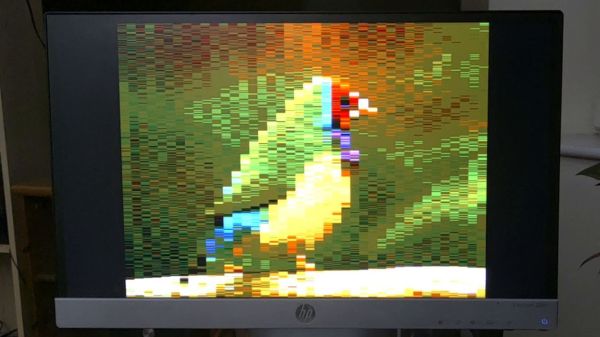
[Aaron]’s video (linked below) demonstrates using a particular piece of software called SigDigger to analyze an incoming analog video stream from a drone using a HackRF. (Of course any incoming analog signal could be used, it doesn’t need to be a drone.) The software shows the various active frequency ranges, allows a user to narrow in on one and then start demodulating it. While it has to be dialed in just right to get anything that doesn’t look like snow, [Aaron] is able to get recognizable results in just a few minutes.

Getting something like this to work completely in software is an impressive feat, especially considering that all of the software used here is free. Granted, this wouldn’t be as easy for a digital signal like most TV stations broadcast, but there’s still a lot of fun to be had. In case you missed the release of DragonOS, we covered it a few weeks ago and it’s only gotten better since then, with this project just as one example.

Continue reading “Receive Analog Video Radio Signals From Scratch”