Monitor Foot Traffic Using Radio

We talk a lot about information security around here, but in reality it’s not at the forefront of everyone’s minds. Most people are content to walk around with their phones constantly looking for WiFi or Bluetooth connections despite the dangers. But if you’re not a black hat sort of person, you can do something like [Verkehrsrot] did and use all of these phones to do something useful and harmless.

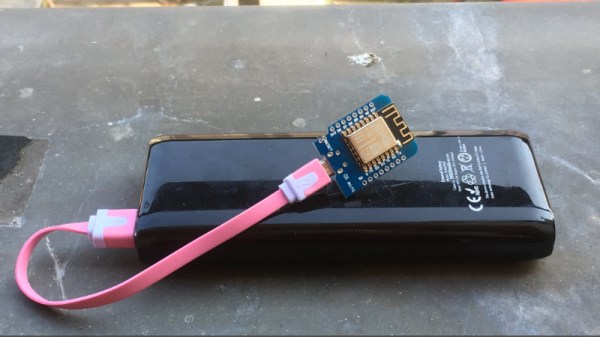
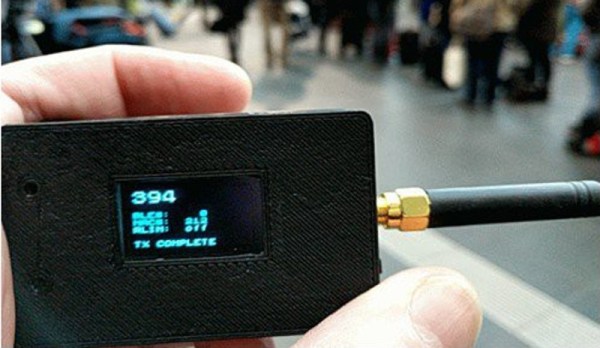
[Verkehrsrot]’s project involves building a radio listening device in order to get an estimate of the amount of traffic in a particular area. The device polls for and detects WiFi and Bluetooth devices nearby and tallies them. For the privacy-minded, it doesn’t persistently store any information about the people or the devices that it detects. The project also runs on a variety of platforms, although you can get the whole thing up and running with little more than an ESP32 and a small lithium-ion battery.

If you’re looking for a useful way to tally the number of people in a given area, this project could be the thing for you. Not everyone keeps their WiFi and Bluetooth turned on, but even so this is still a good way to estimate. But if you need to count everyone going into a room, for example, you’ll need another way to count them.

The M1 NerfBot: When Prototypes Evolve

What do you get when you cross a self-taught maker with an enthusiasm for all things Nerf? A mobile nerf gun platform capable of 15 darts per second. Obviously.

The M1 NerfBot built by [GrimSkippy] — posting in the ‘Let’s Make Robots’ community — is meant to be a constantly updating prototype as he progresses in his education. That being the case, the progress is evident; featuring two cameras — a webcam on the turret’s barrel, and another facing forward on the chassis, a trio of ultrasonic sensors, controlled by an Xbox 360 controller, and streaming video to a webpage hosted on the M1 itself, this is no mere beginner project.

Perhaps most compelling is how the M1 tracks its targets. The cameras send their feeds to the aforementioned webpage and — with a little reorganization — [GrimSkippy] accesses the the streams on an FPV headset-mounted smartphone. As he looks about, gyroscopic data from the phone is sent back to the M1, translating head movement into both turret and chassis cam movement. Check it out!

Continue reading “The M1 NerfBot: When Prototypes Evolve”

Customising A $30 IP Camera For Fun

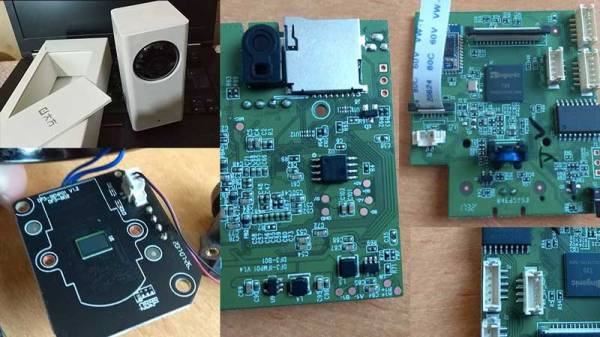
WiFi cameras like many other devices these days come equipped with some sort of Linux subsystem. This makes the life of a tinkerer easier and you know what that means. [Tomas C] saw an opportunity to mod his Xiaomi Dafang IP camera which comes configured to work only with proprietary apps and cloud.

The hack involves voiding the warranty by taking the unit apart and installing custom firmware onto it. Photos posted by [Tomas C] show the mainboard powered by an Ingenic T20 which is a popular IP Camera processor featuring some image and video processing sub-cores. Upon successful flashing of the firmware, the IP camera is now capable of a multitude of things such as remote recording and playback which can be configured using the web UI as documented by [Tomas C]

We did a little more digging on the custom firmware and discovered that the original author of the custom firmware, [EliasKotlyar] has done a lot of work on this project. There are loads of images of the teardown of a camera and an excellent set of documentation of how he made the hack. Everything from adding serial headers, getting root access, dumping the firmware and even toolchain links are given on the page. This is extremely handy for a newbie looking to get into the game.

And IP Cameras are not of the only hackable hardware out in the wild. There are other devices that are running Linux based firmware such as the Wifi SD Cards that run OpenWRT. Check out the essential guide to compiling OpenWRT from source if you are looking to get started with your next IP Camera hack.

Thanks for the tip [Orlin82]

Hands On With The Smallest Game Boy Ever Made

The PocketSprite is the tiniest fully-functional Game Boy Color and Sega Master System emulator. Not only is it small enough to fit in your pocket, it’s small enough to lose in your pocket. It’s now available as a Crowd Supply campaign, and it’s everything you could ever want in a portable, WiFi-enabled, fully hackable video game console. It also plays Witcher 3. And probably Crysis, because of the meme.

This has been a year and a half in the making. The first hardware version of the PocketSprite was revealed at the 2016 Hackaday Superconference by hardware engineer extraordinaire [Sprite_TM]. As [Sprite] has a long list of incredibly impressive hardware hacks like installing Linux on a hard drive and building a Matrix of Tamagotchis, he always has to keep pushing deep into the hardware frontier.

In 2016, [Sprite] showed off the tiniest Game Boy ever, powered by the then brand-spankin’ new ESP32. This was released as Open Source, with the hope that a factory in China would take the files and start pumping out mini Game Boys for everyone to enjoy. Now, a year and a half later, it’s finally happened. In a collaboration with manufacturing wizard [Steve K], [Sprite] is the mastermind behind TeamPocket. The pocket-sized Game Boy-shaped emulator is now real. This is our hands-on review.

Continue reading “Hands On With The Smallest Game Boy Ever Made”

ESP8266 Broadcasts Memorial WiFi Spam

John Perry Barlow, founding member of the Electronic Frontier Foundation and Freedom of the Press Foundation, died on February 7th, 2018. To say that he left his mark on the Internet, and by extension modern culture, is something of an understatement. He may not be a household name, but between this activism (online and off), lectures, written work, and various entrepreneurial projects, his 70 years of life were surely not wasted. Barlow was once quoted as saying “I want to be a good ancestor”, and by pretty much any metric it would seem he made good on that goal.

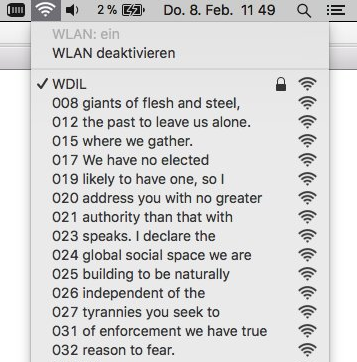
To mark his passing, [Moritz Metz] came up with a rather unusual memorial. Using a bit of code on an ESP8266 board, he created a device that would broadcast out Barlow’s “A Declaration of the Independence of Cyberspaceline-by-line in the form of 228 WiFi SSIDs. Perhaps not the most effective way to get Barlow’s words out to the people, but we’ll give him extra points for style.

The code itself is based on FakeBeaconESP8266, which as the name implies, allows the user to create fake WiFi networks. to broadcast the manifesto of your choosing, you need only add in the appropriate sendBeacon() lines at the bottom of the code. It would appear that prefixing each line with a number is required to make devices scanning for networks show the lines of text in proper sequence. At least on the devices demoed, anyway.

Just to be clear: you should definitely not do this. Jamming up the local environment with a bunch of fake networks is a pretty terrible idea. But as a memorial for a man who occasionally claimed to be an anarchist, you could do worse. Plus we have to admit “Giants of Flesh and Steel” is an awesome name for a network.

Continue reading “ESP8266 Broadcasts Memorial WiFi Spam”

Hacking A Sonoff WiFi Switch

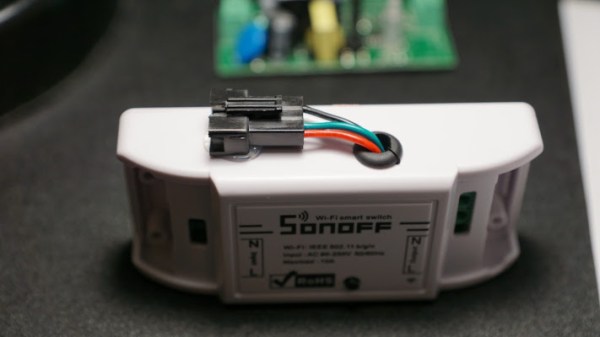
The ESP8266 platform has become so popular that it isn’t just being used in hobby and one-off projects anymore. Companies like Sonoff are basing entire home automation product lines around the inexpensive WiFi card. What this means for most of us is that there’s now an easily hackable and readily available product on the market that’s easily reprogrammed and used with tools that we’ve known about for years now, as [Dan] shows in his latest project.

[Dan] has an aquaponics setup in his home, and needs some automation to run the lights. Reaching for a Sonoff was an easy way to get this done, but the out-of-the-box device can only be programmed in the simplest of ways. To get more control over the unit, he wired a USB-to-Serial UART to the female headers on the board and got to programming it.

The upgraded devices are fully programmable and customizable now, and this would be a great hack for anyone looking to get more out of a Sonoff switch. A lot of the work is already done, like building a safe enclosure, wiring it, and getting it to look halfway decent. All that needs to be done is a little bit of programming. Of course, if you’d like to roll out your own home automation setup from scratch that can do everything from opening the garage door to alerting you when your dog barks, that’s doable too. You’ll just need a little more hardware.

Easier End-User Setup For ESP32 Projects

As hackers, we occasionally forget that not everyone is enamored with the same nerdy minutia that we are. Configuring hardware by changing some lines in the code and compiling a new firmware doesn’t sound like that big of a deal to those of us who’ve been around the block a few times, but might as well be ancient Sanskrit to the average person. As long as your projects are for personal use this isn’t really a concern, but what if you plan on distributing the code for a project or perhaps even selling finished products? Shipping it out with hard-coded variables simply isn’t an option.

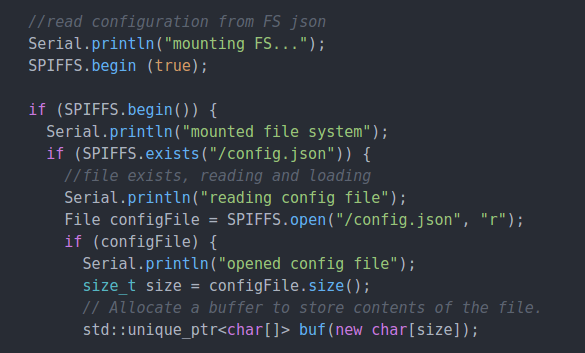
Code for loading configuration file from SPIFFS

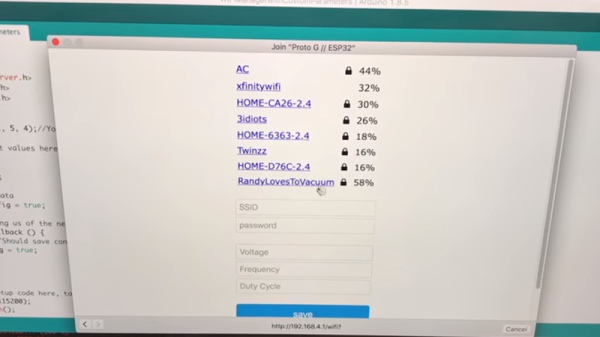
In a recent video, [Proto G] shows a clever way to use WiFiManager to make configuring your ESP32 project easier for end-users. Not only can you use the captive portal system to configure the ESP32’s WiFi against a nearby access point, but it can allow users to enter in configuration data which can be picked up in your code by using SPI Flash File System (SPIFSS).

With the setup demonstrated in the video below by [Proto G], you don’t need anything more exotic than a web browser to configure the device. The end user simply searches for the device’s WiFi network, connects to it, and is presented with an easy to understand dialog which has them select a WiFi network to configure against along with some fields to enter in custom variables. All this information is then stored to a file on the SPI flash. When the ESP32 reboots, it reads the configuration from the saved file and applies the requested settings.

This is very similar to how many consumer devices are now configured, and even the less technically-inclined recipients of such a device should be able to work through the setup with a bit of hand-holding. If you plan on handing one of your ESP32 projects to John Q. Public, this is the kind of configuration you should be aiming for.

We’ve covered using WiFiManager to make ESP32 projects easier to manage, but the addition of arbitrary variables to the captive portal opens up a lot of possibilities. Just the kind of thing you need when you start considering the leap to commercial product.

Continue reading “Easier End-User Setup For ESP32 Projects”