Double the RAM on D-Link router

posted Sep 19th 2009 1:00pm by Mike Szczys
filed under: misc hacks, peripherals hacks

d-link_double_ram

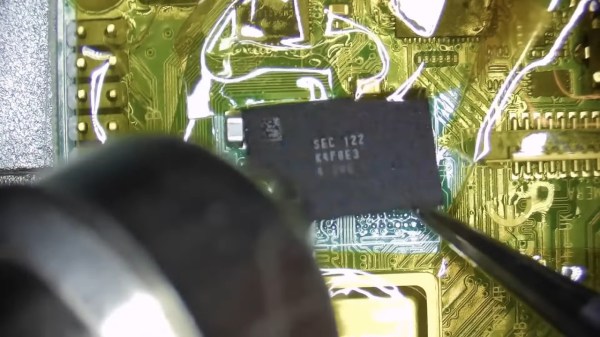
[Pelaca] upgraded the RAM on his D-Link DIR-320 router from 32MB to 64MB. This hack is simple enough: swap out the existing RAM chip for another one and change the bios to make use of the upgrade. The actual execution is not that simple because of the pitch of the TSOP II package; you’ll need to bring your mad soldering skills to pull this off.

This reminds us of when upgrading original Xbox RAM to 128MB was all the rage. It involved the same type of hack, adding four memory chips to unpopulated positions on the motherboard. The forums are thick with people complaining that their box not working after a failed upgrade attempt. Hopefully you’ll have better luck.

[Thanks Juan]

Visual hardware identification guide

posted Jul 18th 2009 12:51pm by Eliot Phillips
filed under: pcs hacks, tool hacks

hardwareguide

Check out this visual hardware guide from deviantART member [Sonic840]. It has everything from memory modules, to bus sockets, to power connectors, to an entire array of CPU sockets that have been used over the years. You’re bound to see something in there you didn’t know existed.

[via Gizmodo]


Parts: 32KB SPI SRAM memory (23K256)

posted Mar 2nd 2009 10:00am by Ian
filed under: misc hacks, parts

23k256ii

Microchip’s new 23K256 is a serially interfaced 32 kilobyte SRAM memory chip, available in 8 pin DIP and 8 pin SO packages. SRAM, like EEPROM, is a data storage medium. Data stored in SRAM is lost without constant power, but it’s really fast and there’s no limits to the number of write cycles. EERPOM stores data even without power, but it’s slow and usually limited to around a million write cycles.

32K SRAM chips typically have 15 address lines and 8 data lines, like the IS61LV256AL we used on our CPLD development board.  The 23K256 requires just four signal lines, but sacrifices the speed of a parallel memory interface. It’s a great way to add extra memory to a low-pin count microcontroller without routing 23 signal traces. We’ll show you how to interface this chip below.

Read the rest of this entry »

Use the CPU cache to prevent cold boot? No.

posted Jan 18th 2009 5:22pm by Eliot Phillips
filed under: downloads hacks, security hacks

coldboot

Frozen Cache is a blog dedicated to a novel way to prevent cold boot attacks. Last year the cold boot team demonstrated that they could extract encryption keys from a machine’s RAM by placing it in another system (or the same machine by doing a quick reboot). Frozen Cache aims to prevent this by storing the encryption key in the CPU’s cache. It copies the key out of RAM into the CPU’s registers and then zeroes it in RAM. It then freezes the cache and attempts to write the key back to RAM. The key is pushed into the cache, but isn’t written back to RAM.

The first major issue with this is the performance hit. You end up kneecapping the processor when you freeze the cache and the author suggests that you’d only do this when the screen is locked. We asked cold boot team member [Jacob Appelbaum] what he thought of the approach. He pointed out that the current cold boot attack reconstructs the key from the full keyschedule, which according to the Frozen Cache blog, still remains in RAM. They aren’t grabbing the specific key bits, but recreating it from all this redundant information in memory. At best, Frozen Cache is attempting to build a ‘ghetto crypto co-processor’.

We stand by our initial response to the cold boot attacks: It’s going to take a fundamental redesign of RAM before this is solved.

[via Slashdot]

Faster browsing with RAM disks

posted Nov 20th 2008 7:14pm by Eliot Phillips
filed under: downloads hacks, firefox hacks, lifehacks, macs hacks

esperancedv

A coworker approached us today wondering if they could get a performance boost using Samsung’s newly announced 256GB SSD. Most of their work is done in browser, so we said “no”. They’d only see benefit if they were reading/writing large files. Their system has plenty of RAM, and we decided to take a different approach. By creating a filesystem in RAM, you can read and write files much faster than on a typical hard drive. We decided to put the browser’s file cache into RAM. Read the rest of this entry »


Memristor-based memory prototype by 2009

posted Jul 11th 2008 7:25pm by Benjamin Eckel
filed under: news

An article in EETimes suggests that we may see a memristor-based memory prototype in development as soon as 2009. The memristor is claimed by many to be the theorized fourth passive circuit element, linking the fundamental circuit variables of charge and flux. This news may not sound that exciting to most computer geeks, but this new component could usher in a new era of computer memory by forming the basis of RRAM (resistive random-access memory).

Scientists at HP labs have finally confirmed that the memristor behaves as their theories predicted. The reason that the component will work so well for memory is that the process is nonvolatile and the bits themselves will only change after the CPU tells them to. The bits in current DRAM systems slowly fade out and require a refreshment every 50 nanoseconds.

[via /.]

Breaking disk encryption with RAM dumps

posted Feb 21st 2008 3:12pm by Eliot Phillips
filed under: pcs hacks


If you haven’t gotten a chance yet, do watch the video of this attack. It’s does a good job explaining the problem. Full drive encryption stores the key in RAM while the computer is powered on. The RAM’s stored data doesn’t immediately disappear when powered off, but fades over time. To recover the keys, they powered off the computer and booted from a USB disk that created an image of the RAM. You can read more about the attack here.

How can you reduce this threat? You can turn off USB booting and then put a password on the BIOS to prevent the specific activity shown in the video. Also, you can encrypt your rarely used data in a folder on the disk. They could still decrypt the disk, but they won’t get everything. I don’t think this problem will truly be fixed unless there is a fundamental change in hardware design to erase the RAM and even then it would probably only help computers that are powered off, not suspended.

The potential for this attack has always been talked about and I’m glad to see someone pull it off. I’m hoping to see future research into dumping RAM data using a USB/ExpressCard with DMA access.

Hack a Day serves up fresh hacks each day, every day from around the web and a special How-To hack each week.

Send us your hacks