Joan Feynman Found Her Place In The Sun

Google ‘Joan Feynman’ and you can feel the search behemoth consider asking for clarification. Did you mean: Richard Feynman? Image search is even more biased toward Richard. After maybe seven pictures of Joan, there’s an endless scroll of Richard alone, Richard playing the bongos, Richard with Arline, the love of his life.

Yes, Joan was overshadowed by her older brother, but what physicist of the era wasn’t? Richard didn’t do it on purpose. In fact, no one supported Joan’s scientific dreams more than he did, not even their mother. Before Richard ever illuminated the world with his brilliance, he shined a light on his little sister, Joan.

Continue reading “Joan Feynman Found Her Place In The Sun”

Python Keeps A Gecko Happy: Terrarium Automation With Raspberry Pi

For better or worse, pets often serve as inspiration and test subjects for hardware hacks: smarten up that hamster wheel, tweet the squirrel hunting adventures from a dog’s point of view, or automate and remote control a reptile enclosure. [TheYOSH], a gecko breeder from the Netherlands, chose the latter and wrote TerrariumPi for the Raspberry Pi to control and monitor his exotic companion’s home through a convenient web interface.

The right ecosystem is crucial to the health and happiness of any animal that isn’t native to its involuntarily chosen surroundings. Simulating temperature, humidity and lighting of its natural habitat should therefore be the number one priority for any pet owner. The more that simulation process is reliably automated, the less anyone needs to worry.

TerrariumPi supports all the common temperature/humidity sensors and relay boards you will find for the Raspberry Pi out of the box, and can utilize heating and cooling, watering and spraying, as well as lighting based on fixed time intervals or sensor feedback. It even supports location based sunrise and sunset simulation — your critter might just think it never left Madagascar, New Caledonia or Brazil. All the configuration and monitoring happens in the browser, as demonstrated in [TheYOSH]’s live system with public read access (in Dutch).

It only seems natural that Python was the language of choice for a reptile-related system. On the other hand, it doesn’t have to be strictly used for reptiles or even terrariums; TerrariumPi will take care of aquariums and any other type of vivarium equally well. After all, we have seen the Raspberry Pi handling greenhouses and automating mushroom cultivation before.

Hackers Vs. Mold: Building A Humidistat Fan

Having a mold problem in your home is terrible, especially if you have an allergy to it. It can be toxic, aggravate asthma, and damage your possessions. But let’s be honest, before you even get to those listed issues, having mold where you live feels disgusting.

You can clean it with the regular use of unpleasant chemicals like bleach, although only with limited effectiveness. So I was not particularly happy to discover mold growing on the kitchen wall, and decided to do science at it. Happily, I managed to fix my mold problems with a little bit of hacker ingenuity.

Continue reading “Hackers Vs. Mold: Building A Humidistat Fan”

Mad Eye For The WiFi

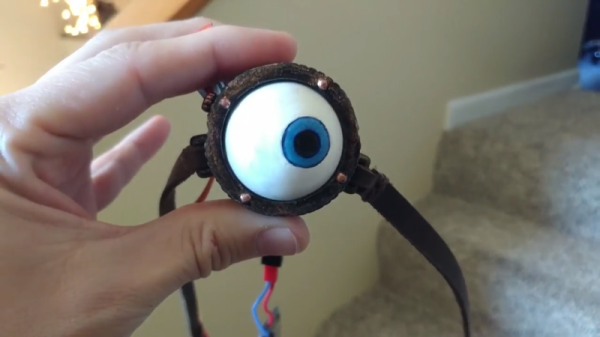
In the Harry Potter universe, Professor Moody was, perhaps unfairly, given the nickname Mad Eye for the prosthetic eye he wore. His eye remains a challenge for technically-minded cosplayers aiming to recreate the look and feel of this unique piece of headgear. [cyborgworkshop] had already mastered the basic eye, but wanted to take things further.

The original build relied on a sub-micro servo to move the eyeball. This was done at random as an attempt to simulate the eye’s behaviour in the books and films. However, wanting more, [cyborgworkshop] decided to make the eye more reactive to its surrounding environment. Using the Adafruit Huzzah, a breakout board for the ESP8266, code was whipped up to detect the number of WiFi access points in the area. The more access points, the more frequent and erratic the movement of the eye. Occasional slower periods of movement are coded in before the eye resumes its wild darting once more, depending on just how saturated the local WiFi environment is.

It’s a great twist on the project, and [cyborgworkshop] has provided more details on the initial build, too. If you think you’re having déja vu, check out this build using recycled parts.

Prototyping, Making A Board For, And Coding An ARM Neural Net Robot

[Sean Hodgins]’s calls his three-part video series an Arduino Neural Network Robot but we’d rather call it an enjoyable series on prototyping, designing a board with surface mount parts, assembling it, and oh yeah, putting a neural network on it, all the while offering plenty of useful tips.

In part one, prototype and design, he starts us out with a prototype using a breadboard. The final robot isn’t on an Arduino, but instead is on a custom-made board built around an ARM Cortex-M0+ processor. However, for the prototype, he uses a SparkFun SAM21 Arduino-sized board, a Pololu DRV8835 dual motor driver board, four photoresistors, two motors, a battery, and sundry other parts.

Once he’s proven the prototype works, he creates the schematic for his custom board. Rather than start from scratch, he goes to SparkFun’s and Pololu’s websites for the schematics of their boards and incorporates those into his design. From there he talks about how and why he starts out in a CAD program, then moves on to KiCad where he talks about his approach to layout.

Part two is about soldering and assembly, from how he sorts the components while still in their shipping packages, to tips on doing the reflow in a toaster oven, and fixing bridges and parts that aren’t on all their pads, including the microprocessor.

In Part three he writes the code. The robot’s objective is simple, run away from the light. He first tests the photoresistors without the motors and then writes a procedural program to make the robot afraid of the light, this time with the motors. Finally, he writes the neural network code, but not before first giving a decent explanation of how the neural network works. He admits that you don’t really need a neural network to make the robot run away from the light. But from his comparisons of the robot running using the procedural approach and then the neural network approach, we think the neural network one responds better to what would be the in-between cases for the procedural approach. Admittedly, it could be that a better procedural version could be written, but having the neural network saved him the trouble and he’s shown us a lot that can be reused from the effort.

In case you want to replicate this, [Sean]’s provided a GitHub page with BOM, code and so on. Check out all three parts below, or watch just the parts that interest you.

Continue reading “Prototyping, Making A Board For, And Coding An ARM Neural Net Robot”

Home Brew Augmented Reality

In July of 2016 a game was released that quickly spread to every corner of the planet. Pokemon Go was an Augmented Reality game that used a smart phone’s GPS location and camera to place virtual creatures into the person’s real location. The game was praised for its creativity and was one of the most popular and profitable apps in 2016. It’s been download over 500 million times since.

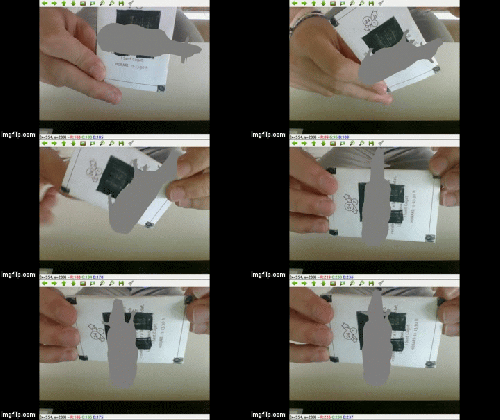
Most of its users were probably unaware that they were flirting with a new and upcoming technology called Augmented Reality. A few day ago, [floz] submitted to us a blog from a student who is clearly very aware of what this technology is and what it can do. So aware in fact that they made their own Augmented Reality system with Python and OpenCV.

In the first part of a multi-part series – the student (we don’t know their name) walks you through the basic structure of making a virtual object appear on a real world object through a camera. He 0r she gets into some fairly dense math, so you might want to wait until you have a spare hour or two before digging into this one.

Thanks to [floz] for the tip!

ESP8266 Home Monitor Is Stylishly Simplistic

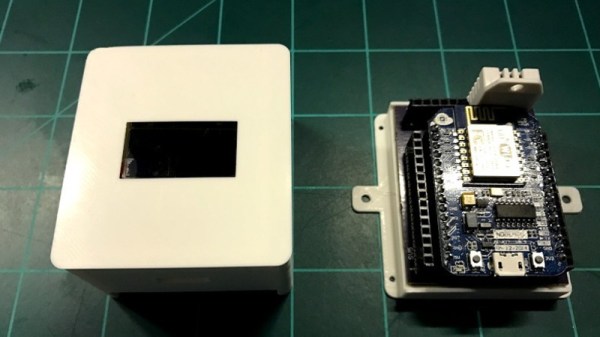
It’s often said that “Less is More”, and we think that the chic ESP8266 environmental monitor posted by Thingiverse user [bkpsu] definitely fits the bill. Dubbed “Kube”, the device is a 3D printed white cube with an OLED display in the center, which [bkpsu] says was designed specifically for the approval of his wife. Weirdly, she didn’t like the look of bare PCBs on the wall.

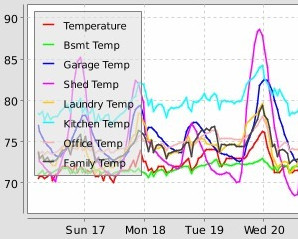
Multiple Kubes allow for whole-house monitoring.

Inside, things are a little more complex. The Kube uses the NodeMCU development board, and a custom breakout that [bkpsu] designed to interface with the display and sensors. For temperature and humidity monitoring, the Kube is using the ever-popular DHT22, and [bkpsu] mentions that he has future plans for things like motion sensors and direct control of RGB LED strips. All the data collected by the Kube is piped into openHAB via MQTT.

On the very detailed Thingiverse page, [bkpsu] gives background information on his design goals for the project, tips for printing out a high-quality case, a parts list with Amazon links, and pinout information for getting it all wired up. The PCB is even available on OSH Park for those who want a Kube of their own.

Even with all the stick home monitoring and automation products on the market today, many hackers simply can’t bring themselves to buying a turn-key commercial product. But we think with the results hackers have been getting rolling their own solutions, they just might be on to something.