Homemade Test Jig Is Cheaper Than Outsourcing

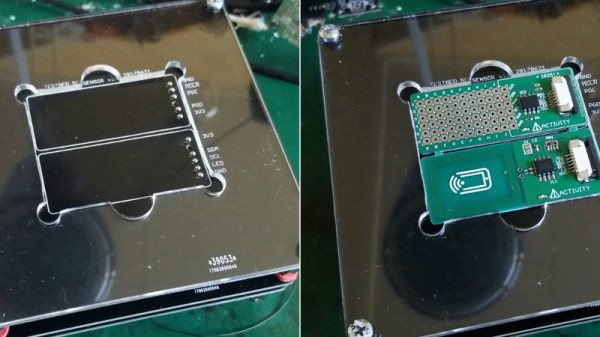
In the past, [Sjaak] has had his testing and programming jigs made for him in Shenzhen, but realized they weren’t that great of a value. They weren’t terribly expensive in the grand scheme of things, but they didn’t include any wiring, so he was still spending his own time and money. His quest to develop his own in-house jigs not only netted him a considerable cost savings in the end, but also produced a nicely detailed post on his site for anyone else who may be heading down the same path. That’s a win-win in our book.
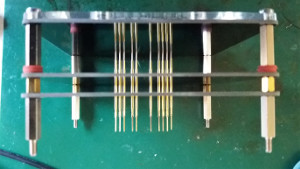
The idea behind a jig is pretty simple: essentially it’s just a mount that holds the PCB, and a set of pins which contact the appropriate points on the board. The jig can then provide power, programming, status LEDs for testing, etc. Basically anything that you can’t or don’t want to include on the final board, but will help in testing or programming them.

To start, [Sjaak] begins with a blank PCB in Eagle and imports his target board. With the two lined up, he can then mark where he wants the pins to go on the jig, and add labels to the silkscreen to make things a little easier during diagnostics. The target board is then removed, the file converted to Gerber, and it’s sent off for manufacturing. With a few more tweaks, the file is then exported to DXF and laser cut out of acrylic. When the PCBs come back, it’s just a matter of sandwiching it all together with some standoffs and adding the pins.

[Sjaak] mentions that he was inspired by an old post on how SparkFun was internally handling their test jigs, though we think with a dash of automation he could make things even easier for himself.

Tips For Basic Machining On A Drill Press

It’s safe to say most Hackaday readers would love to have a mill at home, or a nice lathe, but such equipment isn’t always practical for the hobbyist. The expense and amount of room they take up is a hard sell unless you’re building things on them regularly, so we’re often forced to improvise. In his latest video, [Eric Strebel] gives some practical advice on using a standard drill press to perform tasks you would normally need a mill or lathe for; and while his tips probably won’t come as a surprise to the old-hands out there, they might just help some of the newer players get the most out of what they have access to.

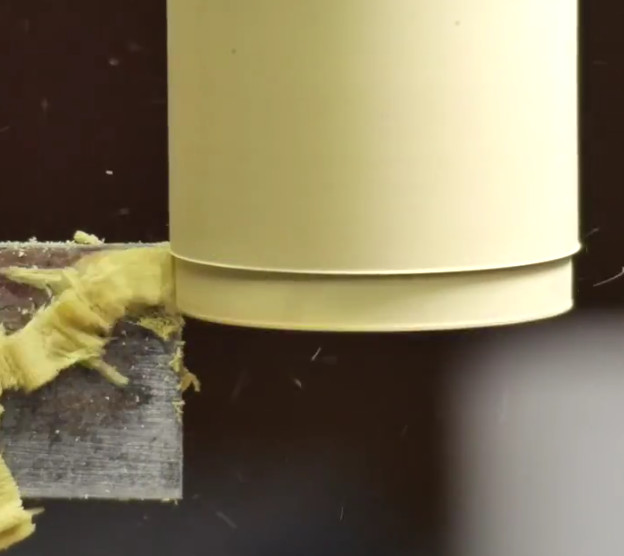
[Eric] explains the concept of the cross slide vice, which is the piece of equipment that makes machining on a drill press possible. Essentially it’s a standard vice, but with screws that allow you to move the clamped piece in the X and Y dimensions under the drill which can already move in the Z dimension. For those counting along at home, that puts us up to the full three dimensions; in other words, you can not only make cuts of varying depths, but move the cut along the surface of the work piece in any direction.

You can even turn down a (small) piece of round stock by placing it in the chuck of the drill press, and putting a good chisel in the cross slide vice. The chisel can then be moved up against the spinning piece to make your cuts. We don’t suggest doing anything too heavy, but if you need to turn down something soft like a piece of plastic or wood to a certain diameter, it can do in a pinch.

[Eric Strebel] is quickly becoming a favorite around these parts. His well-produced videos show viewers the practical side of product design and in-house manufacturing. We recently covered his video on doing small-scale production, and there’s plenty more invaluable info to be had browsing back through his older videos.

The quest to do machining without actually having a machine shop is certainly not new to Hackaday. There have been many different approaches to solving the issue, but picking up a decent drill press and cross slide is a first step down the rabbit hole for most people.

Continue reading “Tips For Basic Machining On A Drill Press”

Real-Life Electronic Neurons

All the kids down at Stanford are talking about neural nets. Whether this is due to the actual utility of neural nets or because all those kids were born after AI’s last death in the mid-80s is anyone’s guess, but there is one significant drawback to this tiny subset of machine intelligence: it’s a complete abstraction. Nothing called a ‘neural net’ is actually like a nervous system, there are no dendrites or axions and you can’t learn how to do logic by connecting neurons together.

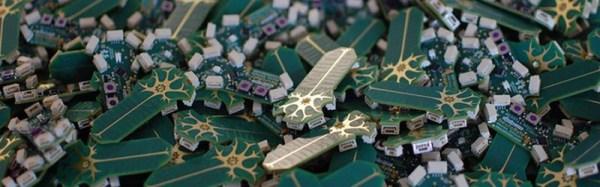
NeruroBytes is not a strange platform for neural nets. It’s physical neurons, rendered in PCBs and Molex connectors. Now, finally, it’s a Kickstarter project, and one of the more exciting educational electronic projects we’ve ever seen.

Regular Hackaday readers should be very familiar with NeuroBytes. It began as a project for the Hackaday Prize all the way back in 2015. There, it was recognized as a finalist for the Best Product, Since then, the team behind NeuroBytes have received an NHS grant, they’re certified Open Source Hardware through OSHWA, and there are now enough NeuroBytes to recreate the connectome of a flatworm. It’s doubtful the team actually has enough patience to recreate the brain of even the simplest organism, but is already an impressive feat.

The highlights of the NeuroBytes Kickstarter include seven different types of neurons for different sensory systems, kits to test the patellar reflex, and what is probably most interesting to the Hackaday crowd, a Braitenberg Vehicle chassis, meant to test the ideas set forth in Valentino Braitenberg’s book, Vehicles: Experiments in Synthetic Psychology. If that book doesn’t sound familiar, BEAM robots probably do; that’s where the idea for BEAM robots came from.



It’s been a long, long journey for [Zach] and the other creators of NeuroBytes to get to this point. It’s great that this project is now finally in the wild, and we can’t wait to see what comes of it. Hopefully a full flatworm connectome.

Play A Claw Machine From Your Armchair

Have you ever been seduced by a claw machine in an arcade, only to have your hopes of a cuddly toy dashed as it fails to hang onto your choice? Then you’re in luck, because now you can play to your heart’s content online. [Ryan Walmsley] wants you to control his Raspberry Pi-driven claw machine.

Hardware-wise he’s replaced the original 8052 microcontroller and relay control with the Pi and a custom H-bridge PCB. We particularly light the warning: “Highish voltage”, and we feel it should appear more often. There is some code in his GitHub repository, but we suspect it doesn’t have everything.

We had a lot of fun digging into the documentation on this one. From his initial thoughts through some prototyping and a board failure, to the launch of the online version and finally a run-down of how it all works, he’s got it covered.

Sadly the machine itself isn’t online all the time, it seems to be only online when [Ryan] is at home, so if you live on the other side of the world from his British base you may be out of luck. Fortunately though his previous live streams are online, so you can see it in action on a past outing below the break.

Of course what kind of swag do you load up in a claw machine like this one? On his Twitter feed we’ve seen tests of the aliens from Toy Story (who start their existence in a claw machine so quite fitting). The majority of items show in is recorded games — now numbering over 2000 — have been our beloved companion cube.

Continue reading “Play A Claw Machine From Your Armchair”

3D Printed Cookie Molds For The Best Speculoos

Experiencing nostalgia for the outstanding Belgian cuisine [Adam], currently stuck in Ohio, found himself in craving some home-made speculoos. For the uninitiated, speculoos is what those brown cookies usually served with coffee on planes dream of becoming one day.

To add some extra regional flavour, [Adam] decided to print his own molds featuring motifs from Brussels. The risks of 3D prints in the kitchen are the subject of a lively discussion. They are addressed in this project by recommending the use of food safe filament and sealant for the molds. The fact that the dough will be removed from the molds almost instantly and that the molds don’t go into the oven puts the risks in the vicinity of using plastic cutting boards in your kitchen.

[Adam]’s write up features solid, well illustrated baking instructions that should enable any of you to replicate this delicacy. Some links to additional references and two recipes are thrown in for good measure. The article finishes with detailed instructions for designing your own molds that take the properties of the medium into account, to ensure your custom motif will still be recognizable after baking. Line art with a stroke width of around 2-3 mm seems to work best. It is that time of year and we hope to see a lot more tricks to take your cookie and edible house designs to the next level so don’t forget to send in a tip.

With 3D printed molds having been used to shape resin, silicone and even metal, we are at a point where cookie dough looks like a natural progression.

Brits: Make A Vote, Put Cash A Hackerspace’s Way

Those of you who have been involved in the running of a hackerspace or makerspace will know the never-ending struggle to maintain financial solvency, and the quest for sources of income to move your organisation forward. It’s certainly a topic upon which Hackaday’s crew have some experience, more than one of us has helped run a space.

A good avenue to explore lies with community grants: money from organisations on a philanthropic basis to invest in community organisations. These can come from charities, governmental organisations, or even from companies as part of their corporate social responsibility. It’s this last source of grant money that claims our attention today, because we are in the final days of voting for the Aviva Community Fund, in which the British financial and insurance company makes grants for worthy causes across the country. The causes compete to gain as much support as they can, and hope to thus win their prize.

Among the many worthy recipients of the cash are a selection of hackerspaces. First up are Hitchin Hackspace, whose Big Hak full-size rendition of a Milton Bradley Big Trak toy was featured in our coverage of EMF Camp 2016. They are building a new space in what we’ll call a redundant community facility because it sounds better than “Former public toilet”, and winning a grant will help them a lot in that aim.

Then we have East London Makerspace. They have secured an unused garage to turn into a makerspace, as the capital’s population of our community swells to support ever more spaces in its different suburbs. Like Hitchin, the money would go to the essential work involved in creating a functioning space where previously there was nothing.

Finally, we have the unexpected, a heating system from Milton Keynes Men In Sheds. If you know about Men In Sheds as a community organisation for older people, you’ll be wondering why this is listed here. What we haven’t told you is that MK Makerspace is a subgroup of the MK Shed that occupies the upstairs portion of their building, and what warms the Shedders also warms the hacker community of one of Britain’s new towns.

These appear to be the only hackerspaces bidding for grant money, but votes can usefully be given to other allied causes. Linlithgow Remakery and Tool Library, for instance could use a boost, as could the other Men In Sheds groups scattered across the competition.

So if you are one of Hackaday’s British readers, please take a minute to stop by the voting pages listed above, and give them a boost. You have a couple of days to get your votes in, so make them count, and make a difference!

Disclosure: [Jenny List] is a member of Milton Keynes Makerspace.

Huge 74181 Is A Classic ALU You Can Actually Understand

You can no longer buy a brand-new 74181, they’ve been out of production for years. All is not lost though, for [Dave’s Dev Lab] have created a facsimile of one on a printed circuit board, using modern single-gate 74-series chips.

Why on earth would you want an oversized replica of an outdated logic chip from nearly five decades ago, we hear you ask? The answer lies in education. If you were to embark on learning about the internals of a microprocessor by taking a modern example such as the one that powers the device on which you are reading this, you would find it to be a daunting task. Over six decades of progress in computer technology have delivered the performance enhancements that put a supercomputer in your smartphone, but at the expense of a contemporary microprocessor being an extremely complex machine which you can’t peer into for any level of understanding.

Simple enough to work your way through the logic

The starting point for the student of microprocessor internals often lies in the past. The technology of the early 1970s holds the fundamentals from which a modern processor can be understood, but remains simple enough to grasp in its entirety as a beginner. Registers, instruction decoders, counters, and an arithmetic/logic unit, or ALU. And for decades the 74181, as an all-in-one 4-bit ALU on a chip that you might have found in a minicomputer at the turn of the 1970s, represented the most convenient way to teach the operation of these devices. Electronic engineers and computer scientists of all ages will have encountered them as they gained their qualifications.

The PCB version of the 181 faithfully follows the original, but with modern 74LVC gates laid out as they would be in the circuit diagram of the chip, and LEDs to show logic state at the different parts of the circuit. Thus when it is used to teach ALU operation it can show every part of the device in detail in a way a real 74181 would never have done.

If the 74181 has caught your interest, we’ve previously brought you [Ken Shirriff]’s reverse engineering of the device in detail using breathtaking images of the silicon.