Meet Tympan, The Open Hardware Hearing Aid

If you’re the kind of person who’s serious about using open source software and hardware, relying on a medical device like a pacemaker or an insulin pump can be a particular insult. You wouldn’t trust the technology with your email, and yet you’re forced to put your life into the hands of a device you can’t examine yourself. Unfortunately we don’t (yet) have any news to report on open source pacemakers, but at least now there’s an open software and hardware hearing aid for those who need it.
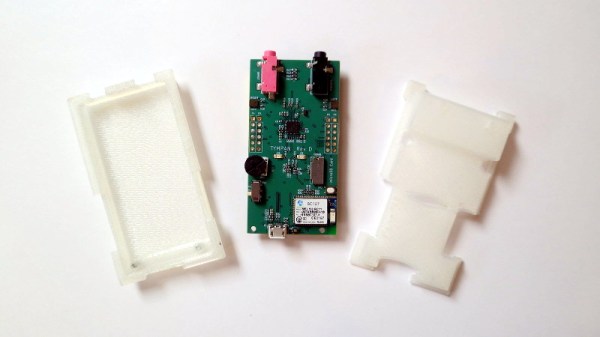
The Tympan project aims to develop a fully open source hearing aid that you can not only build yourself, but expand and modify to fit your exact specifications. Ever wanted to write code for your hearing aid with the Arduino IDE? No problem. You want Bluetooth, I2C, and SPI? You got it. In truth we’re not sure what this kind of technology makes possible just yet, but the point is that now those who want to hack their hearing aids have a choice in the matter. We have no doubt the community will come up with incredible applications that we can’t even begin to imagine.

But these open hearing aids aren’t just hackable, they’re affordable. Traditional hearing aids can cost thousands of dollars, but you can buy the Tympan right now for $250. You don’t even need to check with your health insurance first. Such a huge reduction in price means there’s a market for these outside the hardware hacking crowd, and yet another example of how open source can put cutting edge technology into the hands of those who would otherwise have to go without.

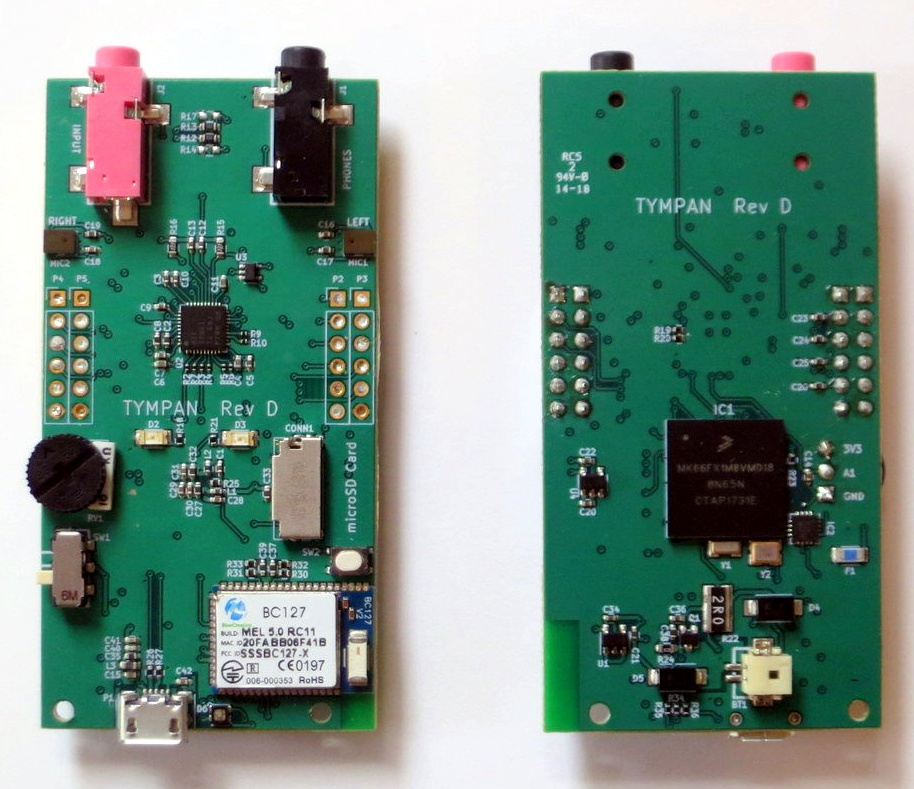
The latest version of the Tympan hardware, revision D, is powered by the Teensy 3.6 and features a Sierra Wireless BC127 Bluetooth radio, dual MEMS microphones, and even a microSD slot for recording audio or logging data. It might be a bit bigger than the traditional hearing aids you’re used to seeing, but with an external microphone and headphone setup, the wearer could simply keep it in their pocket.

We’ve seen DIY hearing aids before, but unless you’re willing to carry a breadboard around with you, they’ve generally been limited to proof of concept sort of builds. We’re glad to see a mature project like Tympan join the growing movement for open source medical hardware; it’s a another big step forward towards democratizing these critical pieces of technology.


Grape Plasma Explained

You’ve probably seen the videos of a grape — cut almost totally in half — in a microwave creates a plasma. A recent physics paper studies the phenomenon with a lot of high-tech gear and now the actual mechanism is known. [Veritasium] interviews the scientists and explains the grape plasma phenomenon in plain language. You can see the video below or read the paper directly.

Turns out the grape is about 1/10 of the microwave frequency and the refractive index of the grape at microwave frequencies might be as much as ten. A whole grape can get all the microwaves trapped inside, but two grapes — or two halves — that touch create fields strong enough to ionize the air.

Continue reading “Grape Plasma Explained”

Leigh Johnson’s Guide To Machine Vision On Raspberry Pi

We salute hackers who make technology useful for people in emerging markets. Leigh Johnson joined that select group when she accepted the challenge to build portable machine vision units that work offline and can be deployed for under $100 each. For hardware, a Raspberry Pi with camera plus screen can fit under that cost ceiling, and the software to give it sight is the focus of her 2018 Hackaday Superconference presentation. (Video also embedded below.)

The talk is a very concise 13 minutes, so Leigh flies through definitions of basic terms, before quickly naming TensorFlow and Keras as the tools she used. The time she saved here was spent on explaining what convolutional neural networks are and how they work, just enough to prepare the audience. But all of that is really just background, the meat of the talk is self-contained examples that Leigh has put together and made available online. I love to see that since it means you go beyond just watching and try it out for yourself. Continue reading “Leigh Johnson’s Guide To Machine Vision On Raspberry Pi”

Hackaday Podcast 008: The Art Episode: Joe Kim, Strings And CRTs, Hydrogen Done 2-Ways

We know you love the original art on Hackaday. Those fantastic illustrations are the work of Joe Kim, and he joins us as a guest on this week’s episode to talk about his background, what inspires him, and how he pulls it all off.

This episode is still packed with hacks. Editors Mike Szczys and Elliot Williams somehow stumble into two projects that end up generating hydrogen (despite that not being their purpose). But that art angle this week goes beyond Joe’s guest appearance as we look at a hack to add green curve tracing goodness on a black and white CRT, and an incredible take on a string art building machine. We get a look at interesting hardware that landed on the clearance rack, ultralight robots that move with flex PCB actuators, a throwback to mechanical computing, and giving up control of your home heating and cooling to a Raspberry Pi.

Links for all discussed on the show are found below. As always, join in the comments below as we’ll be watching those as we work on next week’s episode!

Take a look at the links below if you want to follow along, and as always, tell us what you think about this episode in the comments!

Direct download (60 MB or so.)

Continue reading “Hackaday Podcast 008: The Art Episode: Joe Kim, Strings And CRTs, Hydrogen Done 2-Ways”

A Modular Mounting System Via 3D Printing

When working with cameras or other tools, it can often be useful to have some manner of stand or tripod to hold things in position, freeing up one’s hands for other tasks. Unfortunately, when it comes to smaller cameras and devices like smartphones and tablets, there are few standardized solutions. [yyh1002] has skirted the problem by creating a customizable modular mounting system, and it’s taken the 3D-printing world by storm.

The system was inspired by GoPro mounts, which are a system of plastic arms and screws that can effectively position the small devices in all manner of orientations. [yyh1002]’s system is GoPro-compatible, using the same fasteners and similar geometry, and tons of other modelers have added on.

The parts are 3D printed and consist of a series of arms, clamps and joints that can be configured to suit the task at hand. Source files are available, which allows custom version to be made. This is useful for modifying parts like phone holders to suit different models, to avoid fouling buttons or interfering with camera placement. Thus far, the community has contributed parts as diverse as G-clamps, camera mounts, and parts to mate to Playstation controllers. (Editor’s note: I’m actually printing out a Pi Zero case from this series as I edit this post. Coincidence!)

It’s a useful system, and we look forward to seeing more parts uploaded in future. Meanwhile, don’t forget – it’s remarkably easy to tripod mount just about anything.

Yes, You Can Put IoT On The Blockchain Using Python And The ESP8266

Last year, we saw quite a bit of media attention paid to blockchain startups. They raised money from the public, then most of them vanished without a trace (or product). Ethics and legality of their fundraising model aside, a few of the ideas they presented might be worth revisiting one day.

One idea in particular that I’ve struggled with is the synthesis of IoT and blockchain technology. Usually when presented with a product or technology, I can comprehend how and/or why someone would use it – in this case I understand neither, and it’s been nagging at me from some quiet but irrepressible corner of my mind.

The typical IoT networks I’ve seen collect data using cheap and low-power devices, and transmit it to a central service without more effort spent on security than needed (and sometimes much less). On the other hand, blockchains tend to be an expensive way to store data, require a fair amount of local storage and processing power to fully interact with them, and generally involve the careful use of public-private key encryption.

I can see some edge cases where it would be useful, for example securely setting the state of some large network of state machines – sort of like a more complex version of this system that controls a single LED via Ethereum smart contract.

What I believe isn’t important though, perhaps I just lack imagination – so lets build it anyway.

Continue reading “Yes, You Can Put IoT On The Blockchain Using Python And The ESP8266”

The Easiest Thermal Camera Build You’ll Ever See

Thermal cameras are one of those tools that we all want, but just can’t justify actually buying. You don’t really know what you would do with one, and when even the cheap ones are a couple hundred dollars, it’s a bit out of the impulse buy territory. So you just keeping waiting and hoping that eventually they’ll drop to the price that you can actually own one yourself.

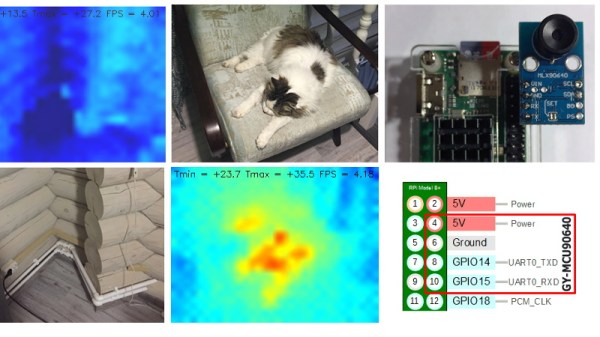
Well, today might be the day you were waiting for. While it might not be the prettiest build, we think you’ll agree it can’t get much easier than what [vvkuryshev] has put together. His build only has two components: a Raspberry Pi and a thermal camera module he picked up online for about $80 USD. There isn’t even any wiring involved, the camera fits right on the Pi’s GPIO header.

Of course, you probably wouldn’t be seeing this on Hackaday if all he had to do was just buy a module and solder it to the Pi’s header. As with most cheap imported gadgets, the GY-MCU90640 module that [vvkuryshev] bought came with some crusty Windows software which wasn’t going to do him much good on the Raspberry Pi. But after going back and forth a bit with the seller, he was able to get some documentation for the device that put him on the right track to writing a Python script which got it working under Linux.

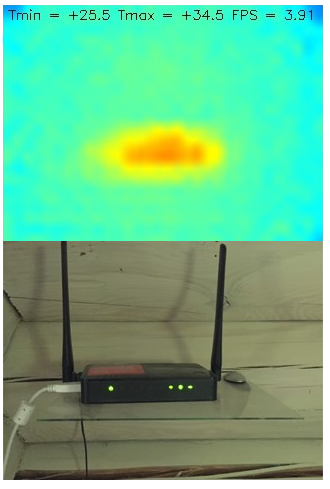
The surprisingly simple Python script reads a frame from the camera four times a second over serial and run it through OpenCV. It even adds some useful data like the minimum and maximum temperatures in the frame to the top of the image. Normally the script would output to the Pi’s primary display, but if you want to use it remotely, [vvkuryshev] says he’s had pretty good luck running it over VNC. In fact, he says that with a VNC application on your phone you could even use this setup on the go, though the setup is a bit awkward for that in its current incarnation.

This isn’t the first DIY thermal camera build we’ve seen, and it isn’t even the first one we’ve seen that leveraged a commercially available imaging module. But short of buying a turn-key camera, we don’t see how it could get any easier to add heat vision to your bag of tricks.