On the left, the Thunderbolt chip as mounted on the motherboard originally. On the right, the shim installed in place of a Thunderbolt BGA chip, with the IPEX connector soldered on

Macbook Gets NVMe SSD With Help Of A BGA-Imitating PCB

Recently, we stumbled upon a video by [iBoff], adding an M.2 NVMe port to a 2011-2013 MacBook. Apple laptops never came with proper M.2 ports, especially the A1278 – so what’s up? The trick is – desoldering a PCIe-connected Thunderbolt controller, then soldering a BGA-like interposer PCB in place of where the chip was, and pulling a cable assembly from there to the drive bay, where a custom adapter PCB awaits. That adapter even lets you expose the PCIe link as a full-sized PCIe 4x slot, in case you want to connect an external GPU instead of the NVMe SSD!

The process is well-documented in the video, serving as an instruction manual for anyone attempting to install this specific mod, but also a collection of insights and ideas for anyone interested in imitating it. The interposer board ships with solder balls reballed onto it, so that it can be installed in the same way that a BGA chip would be – but the cable assembly connector isn’t installed onto the interposer, since it has to be soldered onto the mainboard with hot air, which would then melt the connector. The PCB that replaces the optical drive makes no compromises, either, tapping into the SATA connector pins and letting you add an extra 2.5mm SATA SSD.

Adding an NVMe drive is an underappreciated way to speed up your old laptop, and since they’re all PCIe under the hood, you can really get creative with the specific way you add it. You aren’t even limited to substituting obscure parts like Thunderbolt controllers – given a laptop with a discrete GPU and a CPU-integrated one, you could get rid of the discrete GPU and replace it with an adapter for one, or maybe even two NVMe drives, and all you need is a PCB that has the same footprint as your GPU. Sadly, the PCB files for this adapter don’t seem to be open-source, but developing a replacement for your own needs would be best started from scratch, either way.

We’ve seen such an adapter made for a Raspberry Pi 4 before, solderable in place of a QFN USB 3.0 controller chip and exposing the PCIe signals onto the USB 3 connector pins. However, this one takes it up a notch! Typically, without such an adapter, we have to carefully solder a properly shielded cable if we want to get a PCIe link from a board that never intended to expose one. What’s up with PCIe and why is it cool? We’ve talked about that in depth!

Continue reading “Macbook Gets NVMe SSD With Help Of A BGA-Imitating PCB”

A small round NRF51822 board glued to the underside of a mailbox lid, with a small vibration sensor attached

Check Your Mailbox Using The AirTag Infrastructure

When a company creates an infrastructure of devices, we sometimes subvert this infrastructure and use it to solve tricky problems. For example, here’s a question that many a hacker has pondered – how do you detect when someone puts mail into your mailbox? Depending on the availability of power and wireless/wired connectivity options, this problem can range from “very easy” to “impractical to solve”. [dakhnod] just made this problem trivial for the vast majority of hackers, with the FakeTag project – piggybacking off the Apple’s AirTag infrastructure.

This project uses a cheap generic CR2032-powered NRF51822 board, sending the mailbox status over the FindMy system Apple has built for the AirTag devices. For the incoming mail detection, he uses a simple vibration sensor, glued to the flap lid – we imagine that, for flap-less mailboxes, an optical sensor or a different kind of mechanical sensor could be used instead. Every time someone with a FindMy-friendly iPhone passes by [dakhnod]’s mailbox, he gets an update on its status, with a counter of times the sensor has been triggered. [dakhnod] estimates that the device could run for up to a year on a single battery.

Continue reading “Check Your Mailbox Using The AirTag Infrastructure”

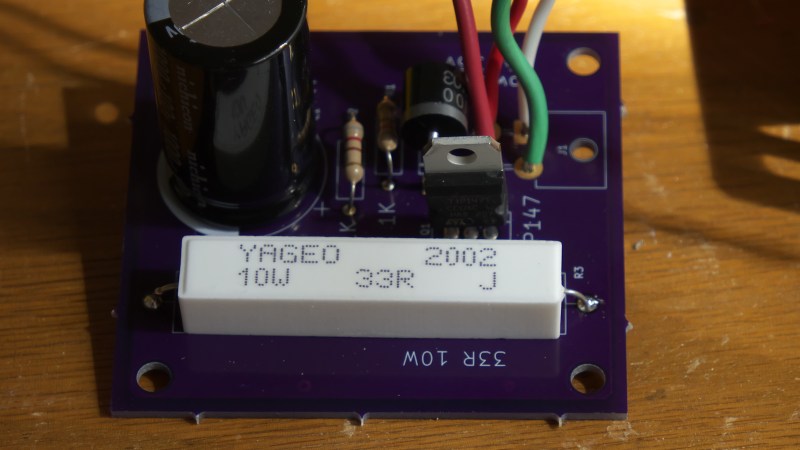
The laser driver's internals, showing the custom PCB, the PSU, connectors and the interlocks.

Laser Driver Design Keeps Safety First

[Les] from [Les’ Lab] has designed a driver for laser diodes up to 10 watts, and decided to show us how it operates, tells us what we should keep in mind when designing such a driver, and talks about laser safety in general. This design is an adjustable current regulator based on the LM350A, able to provide up to 10 watts of power at about 2 volts – which is what his diode needs. Such obscure requirements aren’t easily fulfilled by commonly available PSUs, which is why a custom design was called for.

He tells us how he approached improving stability of the current regulation circuit, the PCB design requirements, and planning user interface for such a driver. However, that’s just part of the battle – regulating the current properly is important, but reducing the potential for accidental injuries even more so. Thus, he talks extensively about designing the driver circuit with safety in mind – using various kinds of interlocks, like a latching relay circuit to prevent it from powering up as soon as power is applied.

Continue reading “Laser Driver Design Keeps Safety First”

The LackRack Enterprise Edition in Revspace, Netherlands

Rackmount Hardware Placement Issues? IKEA LACK To The Rescue!

[hackbyte] reminds us about a classic hack that, even though we’ve seen floating around for over a decade, has somehow never quite graced our pages before. Many of us keep small home labs and even, at times, collections of servers that we’d be comfortable be calling mini-datacenters. However, if you use the ever-abundant 19″ switches, servers and other hardware, keeping these mounted and out of the way can be a thorny experience. Which leads us to, undoubtedly, unintentional – but exceptionally handy – compatibility between IKEA LACK table series and 19″ rackmount hardware.

The half-humorous half-informative wiki page on Eth0Wiki talks about this idea in depth, providing a myriad of examples and linking to pages of other hackerspaces and entities who implemented this idea and improved upon it. These tables look nice and fit anywhere, stack neatly when not in use, and you can put a bottle of Club-Mate on top. Aka, they’re the exact opposite of cheap clunky cabinets actually designed for rackmount you can buy, and cost a fraction of the price. What’s not to love?

You can buy a whole lot of cheap hardware in 19″, and arguably, that’s where you can get the best hardware for your dollar. Many a hackerspace has used these tables for makeshift infrastructure, permanent in all but intent. So, in case some of us missed the memo, now you are aware of yet another, underappreciated solution for mounting all these servers we get for cheap when yet another company replaces its equipment – or undergoes a liquidation. If LackRack hasn’t been on your radar – what have you been using for housing your rackmount hardware collection?

Wondering what to do with an old server? Building a powerful workstation is definitely on the list. Alternatively, you could discard the internals and stuff it full of Raspberry Pi!

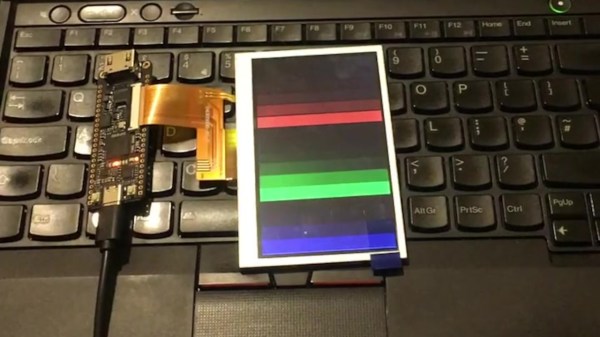
The new PewPew with an LCD showing some patterns, being held in someone's hand.

Hackaday Prize 2022: PewPew LCD Plays With Python

[deshipu] aka [Radomir Dopieralski] has been building educational handhelds for a good part of a decade now, and knows how to design hardware that makes for effective teaching. Today, we are graced with the PewPew LCD project, latest in the PewPew student-friendly handheld series, powered by CircuitPython.

The PewPew LCD from the other side, showing the simple PCB-built-in CR2032 battery holderThe goal for all of these devices has been consistent — making game programming accessible and fun. This time, as an entry in the Reuse, Recycle, Revamp round of Hackaday Prize, the new PewPew receives an upgrade – from an 8×8 LED matrix to an LCD display. This might not sound like much, but the change of display technology itself isn’t the main point. [deshipu] is working on ways to bring down the price and assembly complexity of PewPew handhelds, and he’s found there’s plenty of old stock RH-112 displays, previously used on cellphones like Nokia 1202, which these days go for as little as $1.30 a piece.

It’s exceptionally simple to get into writing games for the PewPew – one of the reasons why it’s a strong platform for workshops and individual learning. There’s already a slew of games and tutorials, and we can’t wait to see all the cool games people can build when given all the extra pixels! And, of course, we appreciate setting an example for giving new life to old displays – displays that’d otherwise inevitably end up in a trash container behind a warehouse in China.

The Reuse, Recycle, Revamp Hackaday Prize 2022 round is going on for two more weeks. If you’re making good use of something that would otherwise be discarded, please do share it with us, so that we can all learn and draw inspiration from your projects!

Resulting tweezer assembly, with a 3D printed replacement case for both of the probes

Hackaday Prize 2022: Glue-Hindered Smart Tweezer Repair Involves A Rebuild

[Dan Julio] owns a pair of Miniware multimeter tweezers, a nifty helper tool for all things SMD exploration. One day, he found them broken – unable to recognize any component between the two probes. He thought it could be a broken connection problem, and decided to take them apart. Presence of some screws on their case fooled him – in the end, it turned out that the case was glued together, and could only be opened destructively. For an entry in the “Reuse, Recycle, Revamp” round of 2022 Hackaday Prize, he tells us how he brought these tweezers back from the dead.

During the disassembly, he broke a custom flexible PCB, which wasn’t reassuring either. However, that was no reason to give up – he reverse-engineered the connections and the charging circuitry, then assembled parts of the broken tweezers together using a small generic protoboard as a base. Indeed, it was likely a broken connection between probes, because the reassembled tweezers worked!

Of course, having exposed PCBs wouldn’t do, and from the very start, assembling these tweezers back together was not an option. Instead, he developed a replacement case in OpenSCAD, bringing the tweezers back to life as his trusty tool – and still leaving repairability on the table. If you’re interested in the details, he goes more into how these tweezers are designed when it comes to charging and connectivity, and we recommend that you give his write-up a read!

We’ve been seeing smart tweezers around for over a decade now, from reviews and hacks of commercially made ones, to DIY chopstick-based and PCB-based ones. If you already own a pair of tweezers you’ve grown attached to, you can neatly retrofit them with a capacitance sensing function!

An ATTiny board that one of the students developed for this project, etched on single-sided FR4.

Electronics And C++ Education With An ATTiny13

When [Adam, HA8KDA] is not busy with his PhD studies, he mentors a group of students interested in engineering. To teach them a wide range of topics, he set out to build a small and entertaining embedded project as they watch and participate along the way. With this LED-adorned ATTiny13A project, [Adam] demonstrated schematic and PCB design, then taught C++ basics and intricacies – especially when it comes to building low-footprint software – and tied it all together into a real-world device students could take home after the project. His course went way beyond the “Hello world”s we typically expect, and some of us can only wish for a university experience like this.

He shares the PCB files and software with us, but also talks about the C++20 framework he’s developed for this ATTiny. The ATTiny13A is very cheap, and also very limited – you get 1K of ROM and 64 bytes of RAM. This framework lets you make good use of it, providing the basics like GPIO wiggling, but also things like low-power operation hooks, soft PWM with optional multi-phase operation support and EEPROM access. Students could write their own animations for this device, and he includes them in the repo, too!

In educational projects, it pays to keep code direct and clean, cruft-less and accessible to students. These are the things you can only achieve when you truly understand the tools you’re working with, which is the perfect position for teaching about them! [Adam] intends to show that C++ is more than suitable for low-resource devices, and tells us about the EEPROM class code he wrote – compiling into the same amount of instructions as an Assembly implementation and consuming the same amount of RAM, while providing compile-time checks and fail-safe syntax.

We’ve talked about using C++ on microcontrollers before, getting extra compile-time features without overhead, and this project illustrates the concept well. [Adam] asks us all, and especially our fellow C++ wizards, for our opinions on the framework he designed. Could you achieve even more with this simple hardware – make the code more robust, clean, have it do more within the limited resources?

What could you build with an ATTiny13, especially with such a framework? A flashy hairclip wearable, perhaps, or a code-learning RF-remote-controlled outlet. We’ve also seen a tiny camera trigger for endurance races,, a handheld Flappy Bird-like console, and many more!