Keep Tabs On PC Use With Custom Analog Voltmeter

With the demands of modern computing, from video editing, streaming, and gaming, many of us will turn to a monitoring system of some point to keep tabs on CPU usage, temperatures, memory, and other physical states of our machines. Most are going to simply display on the screen but this data can be sent to external CPU monitors as well. This retro-styled monitor built on analog voltmeters does a great job of this and adds some flair to a modern workstation as well.

The build, known as bbMonitor, is based on the ESP32 platform which controls an array of voltmeters via PWM. The voltmeters have been modified with a percentage display to show things like CPU use percentage. Software running on the computers sends this data in real time to the ESP32 so the computer’s behavior can be viewed at a glance. Each voltmeter is also augmented with RGB LEDs that change color from green to red as use increases as well. The project’s creator, [Corebb], also notes that the gauges will bounce around if the computer is under heavy load but act more linearly when under constant load, also helping to keep an eye on computer status.

While the build does seem to rely on a Windows machine to run the software for export to the monitor, all of the code is open-sourced and available on the project’s GitHub page and could potentially be adapted for other operating systems. And, as far as the voltmeters themselves go, there have been similar projects in the past that use stepper motors as a CPU usage monitor instead.

Continue reading “Keep Tabs On PC Use With Custom Analog Voltmeter”

A Smart Power Distribution Unit For Home Automation

Power distribution units, as the name implies, are indispensable tools to have available in a server rack. They can handle a huge amount of power for demands of intensive computing and do it in a way that the wiring is managed fairly well. Plenty of off-the-shelf solutions have remote control or automation capabilities as well, but finding none that fit [fmarzocca]’s needs or price range, he ended up building his own essentially from scratch that powers his home automation system.

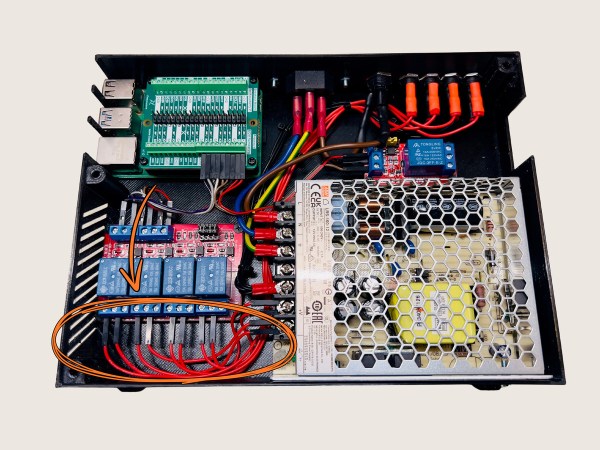
Because it is the power supply for a home automation system, each of the twelve outlets in this unit needed to be individually controllable. For that, three four-channel relay boards were used, each driven by an output on an ESP32. The ESP32 is running the Tasmota firmware to keep from having to reinvent the wheel, while MQTT was chosen as a protocol for controlling these outlets to allow for easy integration with the existing Node-RED-based home automation system. Not only is control built in to each channel, but the system can monitor the power consumption of each outlet individually as well. The entire system is housed in a custom-built sheet metal enclosure and painted to blend in well with any server rack.

Adding a system like this to a home automation system can simplify a lot of the design, and the scalable nature means that a system like this could easily be made much smaller or much larger without much additional effort. If you’d prefer to keep your hands away from mains voltage, though, we’ve seen similar builds based on USB power instead, with this one able to push around 2 kW.

Implantable Battery Charges Itself

Battery technology is the major limiting factor for the large-scale adoption of electric vehicles and grid-level energy storage. Marginal improvements have been made for lithium cells in the past decade but the technology has arguably been fairly stagnant, at least on massive industrial scales. At smaller levels there have been some more outside-of-the-box developments for things like embedded systems and, at least in the case of this battery that can recharge itself, implantable batteries for medical devices.

The tiny battery uses sodium and gold for the anode and cathode, and takes oxygen from the body to complete the chemical reaction. With a virtually unlimited supply of oxygen available to it, the battery essentially never needs to be replaced or recharged. In lab tests, it took a bit of time for the implant site to heal before there was a reliable oxygen supply, though, but once healing was complete the battery’s performance leveled off.

Currently the tiny batteries have only been tested in rats as a proof-of-concept to demonstrate the chemistry and electricity generation capabilities, but there didn’t appear to be any adverse consequences. Technology like this could be a big improvement for implanted devices like pacemakers if it can scale up, and could even help fight diseases and improve healing times. For some more background on implantable devices, [Dan Maloney] catches us up on the difficulties of building and powering replacement hearts for humans.

Downloading Satellite Imagery With A Wi-Fi Antenna

Over the past century or so we’ve come up with some clever ways of manipulating photons to do all kinds of interesting things. From lighting to televisions and computer screens to communication, including radio and fiber-optics, there’s a lot that can be done with these wave-particles and a lot of overlap in their uses as well. That’s why you can take something like a fairly standard Wi-Fi antenna meant for fairly short-range communication and use it for some other interesting tasks like downloading satellite data.

Weather satellites specifically use about the same frequency range as Wi-Fi, but need a bit of help to span the enormous distance. Normally Wi-Fi only has a range in the tens of meters, but attaching a parabolic dish to an antenna can increase the range by several orders of magnitude. The dish [dereksgc] found is meant for long-range Wi-Fi networking but got these parabolic reflectors specifically to track satellites and download the information they send back to earth. Weather satellites are generally the target here, and although the photons here are slightly less energy at 1.7 GHz, this is close enough to the 2.4 GHz antenna design for Wi-Fi to be perfectly workable and presumably will work even better in the S-band at around 2.2 GHz.

For this to work, [dereksgc] isn’t even using a dedicated tracking system to aim the dish at the satellites automatically; just holding it by hand is enough to get a readable signal from the satellite, especially if the satellite is in a geostationary orbit. You’ll likely have better results with something a little more precise and automated, but for a quick and easy solution a surprisingly small amount of gear is actually needed for satellite communication.
Continue reading “Downloading Satellite Imagery With A Wi-Fi Antenna”

Flute Now Included On List Of Human Interface Devices

For decades now, we’ve been able to quickly and reliably interface musical instruments to computers. These tools have generally made making and recording music much easier, but they’ve also opened up a number of other out-of-the-box ideas we might not otherwise see or even think about. For example, [Joren] recently built a human interface device that lets him control a computer’s cursor using a flute instead of the traditional mouse.

Rather than using a MIDI interface, [Joren] is using an RP2040 chip to listen to the flute, process the audio, and interpret that audio before finally sending relevant commands to control the computer’s mouse pointer. The chip is capable of acting as a mouse on its own, but it did have a problem performing floating point calculations to the audio. This was solved by converting these calculations into much faster fixed point calculations instead. With a processing improvement of around five orders of magnitude, this change allows the small microcontroller to perform all of the audio processing.

[Joren] also built a Chrome browser extension that lets a flute player move a virtual cursor of sorts (not the computer’s actual cursor) from within the browser, allowing those without physical hardware to try out their flute-to-mouse skills. If you prefer your human interface device to be larger, louder, and more trombone-shaped we also have a trombone-based HID for those who play the game Trombone Champ.

Optical Tweezers Investigate Tiny Particles

No matter how small you make a pair of tweezers, there will always be things that tweezers aren’t great at handling. Among those are various fluids, and especially aerosolized droplets, which can’t be easily picked apart and examined by a blunt tool like tweezers. For that you’ll want to reach for a specialized tool like this laser-based tool which can illuminate and manipulate tiny droplets and other particles.

[Janis]’s optical tweezers use both a 170 milliwatt laser from a DVD burner and a second, more powerful half-watt blue laser. Using these lasers a mist of fine particles, in this case glycerol, can be investigated for particle size among other physical characteristics. First, he looks for a location in a test tube where movement of the particles from convective heating the chimney effect is minimized. Once a favorable location is found, a specific particle can be trapped by the laser and will exhibit diffraction rings, or a scattering of the laser light in a specific way which can provide more information about the trapped particle.

Admittedly this is a niche tool that might not get a lot of attention outside of certain interests but for those working with proteins, individual molecules, measuring and studying cells, or, like this project, investigating colloidal particles it can be indispensable. It’s also interesting how one can be built largely from used optical drives, like this laser engraver that uses more than just the laser, or even this scanning laser microscope.

Continue reading “Optical Tweezers Investigate Tiny Particles”

3D Printer Streaming Solution Unlocks Webcam Features

While 3D printer hardware has come along way in the past decade and a half, the real development has been in the software. Open source slicers are constantly improving, and OctoPrint can turn even the most basic of printers into a network-connected powerhouse. But despite all these improvements, there’s still certain combinations of hardware that require a bit of manual work.

[Reticulated] wanted an easy way to monitor his prints over streaming video, but didn’t have any of the cameras that are supported by OctoPrint. Of course he could just point a cheap network-connected camera at the printer and be done with it, but he was looking for a bit better integration than that. In the process, he demonstrates how to unlock some features hidden in inexpensive webcams.

He set about building something that wouldn’t require buying more equipment or overloading the limited hardware responsible for the actual printing. A few of his existing cameras have RTMP support, which allows a fairly straightforward setup with YouTube Live once Monaserver is set up to handle the RTMP feeds from the cameras and OBS Studio is configured to stream it out to YouTube. Using the OctoPrint API, he was able to pull data such as the current extruder temperature and overlay it on the video.

One of the other interesting parts of this build is that not all of [Reticulated]’s cameras have built-in RTMP support but following this guide he was able to get more of them working with this setup than otherwise would have had this capability by default. Even beyond 3D printing, this is an excellent guide (and tip) for getting a quick live stream going for whatever reason. For anything more mobile than a working 3D printer, though, you might want to look at taking your streaming setup mobile instead.