We love hearing about a good experiment, and here’s a pretty neat one: researchers used a VR headset, an off-the-shelf VR360 camera, and some custom software to glue them together. The result? Owl-Vision squashes a full 360° of un-distorted horizontal visual perception into 90° of neck travel to either side. One can see all around oneself, without needing to physically turn one’s head any further than is natural.
It’s still a work in progress, and accessing the paper currently doesn’t have a free option, but the demonstration video at that link (also embedded below) gives a solid overview of what’s going on.
Some time ago [Kelton] was working on a clock inspired by Rube Goldberg contraptions. It uses only a single motor, and he’s proud to now show off the finished product (video, embedded below.)
The clock shows hours on the left, and minutes on the right. Every sixty minutes the clock drops a marble. That marble kicks off a series of visually-satisfying operations that culminate in advancing the hour. Then everything resets, and it continues for as long as it has power.
The hour oscillates in a very satisfying manner as it locks in.
At the top of each hour, the minute hand tips a marble with a gravity cam. That marble runs down a track gaining enough momentum to flip a kicker, and a short series of falling dominoes builds enough force to tip and trigger the spring-loaded ratchet that locks in a new hour. You can skip directly to 2:09 if you just want to listen to [Kelton] explain the whole operation from beginning to end.
We think it’s very interesting to note that this clock’s complexity is, if anything, understated. Each of the mechanisms involved must individually reset by their own separate mechanisms, each of which are as intriguing as their showier counterparts, and we’re sure they were every bit as difficult to get just right. And of course, it’s all driven by a single motor.
You may recall the promising start this clock project was off to and we’re delighted to see it come to completion, especially considering its complexity. Not every project sees completion, and fewer still get a version two, but that’s okay. What really floats our boat is seeing the process and details as well as hearing about what worked and what didn’t. We’re glad this clock reached the finish line, but even if something doesn’t work out, there’s always something to learn.
Rare earth elements are used to produce magnets with very high strength that also strongly resist demagnetization, their performance is key to modern motors such as those in electric vehicles (EVs). The stronger the magnets, the lighter and more efficient a motor can be. So what exactly does it take to break up with rare earths?
Rare earth elements (REEs) are actually abundant in the Earth’s crust, technically speaking. The problem is they are found in very low concentrations, and inconveniently mixed with other elements when found. Huge amounts of ore are required to extract useful quantities, which requires substantial industrial processing. The processes involved are ecologically harmful and result in large amounts of toxic waste.
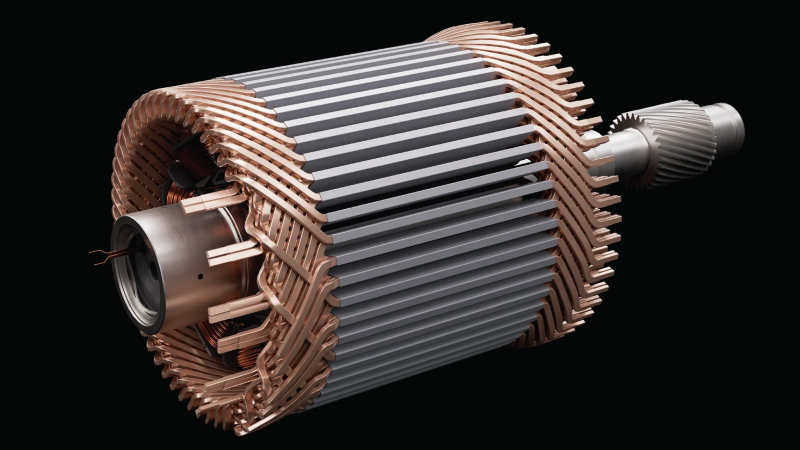
Moving away from rare earth magnets in EV motors would bring a lot of benefits, but poses challenges. There are two basic approaches: optimize a motor for non-rare-earth magnets (such as iron nitrides), or do away with permanent magnets entirely in favor of electromagnets (pictured above). There are significant engineering challenges to both approaches, and it’s difficult to say which will be best in the end. But research and prototypes are making it increasingly clear that effective REE-free motors are perfectly feasible. Breaking up with REEs and their toxic heritage would be much easier when their main benefit — technological performance — gets taken off the table as a unique advantage.
8cc.vim is a C compiler that exists as pure Vimscript. Is it small? It sure is! How about fast? Absolutely not! Efficient? Also no. But does it work and is it neat? You betcha!
Ever typed :wq to write the buffer and exit in Vim? When you do that, you’re using Vimscript. Whenever one enters command mode : in Vim, one is in fact using a live Vimscript interpreter. That’s the space in which this project exists and does its magic. Given enough time, anyway.
Vimscript itself was created by [Bram Moolenaar] in 1991. The idea was to execute batches of vim commands programmatically. It’s been used for a variety of purposes since then.
8cc is a lightweight C compiler that has been supplanted by chibicc, but that doesn’t matter much because as author [rhysd] admits, this is really just a fun concept project more than anything. It may take twenty minutes or more to compile “hello world”, but doing it entirely from within Vim is a trip.
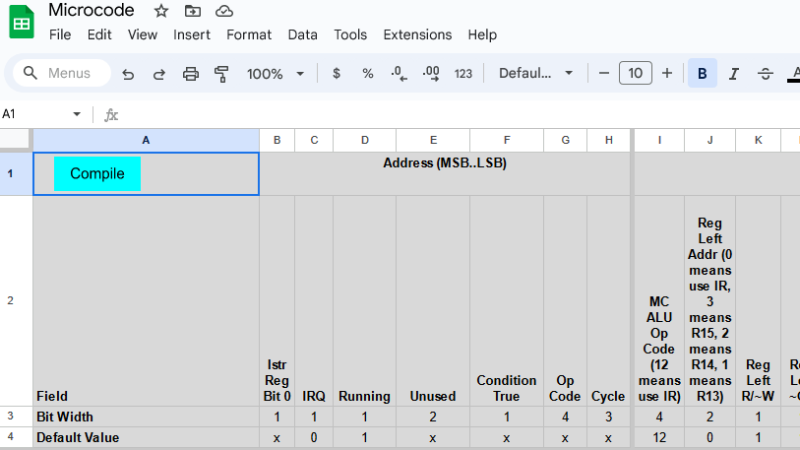
When homebrewing a CPU, one has to deal with microcode. Microcode is the low-level nuts and bolts of how, precisely, a CPU executes instructions (like opcodes) and performs functions such as updating the cycle counter or handling interrupt requests. To make this task easier, [Bob Alexander] created a microcode compiler built in Google Sheets to help with his own homebrew work, but it’s flexible and configurable enough to be useful to others, as well.
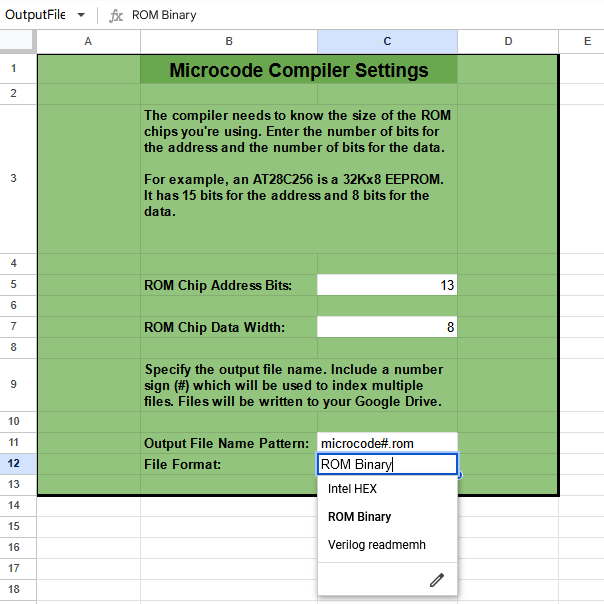
A CPU’s microcode usually lives in read-only memory, and writing the microcode is only one step in the journey. [Bob]’s tool compiles his microcode into files that can be burned into memory (multiple EEPROM chips, in [Bob]’s case) or used as a Verilog program in the case of implementing the CPU in an FPGA. It’s configurable enough to be adapted for other homebrew CPU projects, though one would of course have to re-write the microcode portion.
A read-only version of the spreadsheet makes for some fun browsing, and if it piques your interest enough to get a copy of your own complete with the compiler script, you can do that here. It uses Google Sheets, and writes the output files into one’s Google Drive.
This kind of low-level project really highlights the finer points of just how the hard work of digital computing gets done. A good example is the Gigatron which implemented a RISC CPU using only microcode, memory, and logic gates in the late 70s. We’ve even seen custom microcode used to aid complex debugging.
Useless robots (or useless machines) are devices that, when switched on, exist only to turn themselves back off. They are fun and fairly simple builds that are easy to personify, and really invite customization by their creators. Even so, [tobychui]’s Kawaii Useless Robot goes above and beyond in that regard. Not only will his creation dutifully turn itself off, but if the user persists in engaging it, Kawaii Useless Robot grows progressively (and adorably) upset which ultimately culminates in scooting about and trying to run away.
If anything, it gets cuter when upset.
This is actually a ground-up re-imagining of an original work [tobychui] saw from a Japanese maker twelve years ago. That original Kawaii Useless Robot did not have any design details, so [tobychui] decided to re-create his own.
Behind the laser-cut front panel is a dot matrix LED display made up of eight smaller units, and inside are a total of four motors, an ESP32 development board, and supporting electronics. A neat touch is the ability to allow connections over Wi-Fi for debugging or remote control. The project page has some nice photos of the interior that are worth checking out. It’s a very compact and efficient build!
Watch it in action in the video (embedded below) which also includes a tour of the internals and a thorough description of the functions.
Large Language Models (LLMs) can produce extremely human-like communication, but their inner workings are something of a mystery. Not a mystery in the sense that we don’t know how an LLM works, but a mystery in the sense that the exact process of turning a particular input into a particular output is something of a black box.
This “black box” trait is common to neural networks in general, and LLMs are very deep neural networks. It is not really possible to explain precisely why a specific input produces a particular output, and not something else.
Why? Because neural networks are neither databases, nor lookup tables. In a neural network, discrete activation of neurons cannot be meaningfully mapped to specific concepts or words. The connections are complex, numerous, and multidimensional to the point that trying to tease out their relationships in any straightforward way simply does not make sense.