Acrylic Stencils Help With Component Placement For SMD Assembly

Surface mount is where the action is in the world of DIY PCBs, and deservedly so. SMDs are so much smaller than through-hole components, and fewer holes to drill make surface-mount PCBs easier to manufacture. Reflow soldering is even a snap now thanks to DIY ovens and solder stencils you can get when you order your boards.

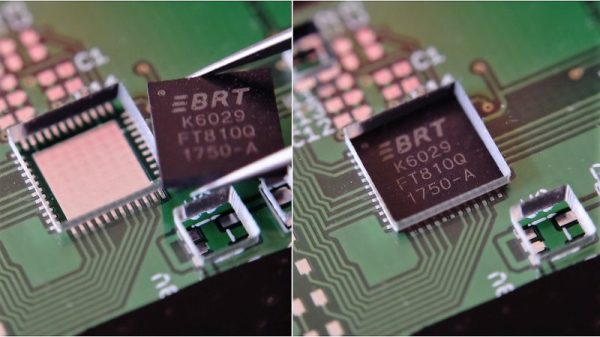
So what’s the point of adding another stencil to the surface-mount process? These component placement stencils are [James Bowman]’s solution for speeding up assembly of boards in production runs too small to justify a pick and place robot. [James] finds that placing small components like discrete resistors and caps easy, but struggles with the placement of the larger components, like QFN packaged microcontrollers. Getting such packages lined up exactly is hard when the leads are underneath, and he found repositioning led to smeared solder paste. His acrylic stencils, which are laser-cut from SVGs derived directly from the Eagle files with a script he provides, sandwich the prepped board and let him just drop the big packages into their holes. The acrylic pops off after placement, leaving the components stuck to the solder paste and ready for their trip to the Easy Bake.

[James] claims it really speeds up hand placement in his biggish runs, and it’s a whole lot cheaper than a dedicated robot. But as slick as we think this idea is, a DIY pick and place is still really sweet.

IoT Solar Pool Heating

A backyard swimming pool can be a great place to take a refreshing dip on a summer’s day. It can also be a place to freeze your giblets off if the sun has been hiding for even a few hours. That can make pools an iffy proposition unless they’re heated, and that starts to get really expensive in terms of upfront costs and ongoing charges for fuel or power. Unless you put the sun and the IoT to work for pool-heating needs.

Preferences vary, of course, but [Martin Harizanov] and his family clearly like their swims on the warm side. With nobody using the pool when it was below 25°C (77°F), [Martin] picked up a few bits to harness the sun to warm the water. Loops of PVC lawn irrigation tubing were tossed onto a shed roof with a favorable solar aspect and connected to the pool with a length of garden hose. The black thin-wall tubing is perfect for capturing the sun’s energy, and 200 meters of the stuff can really heat things up fast. A small pump is controlled by a microcontroller — it’s not explicitly stated but we suspect it’s a Raspberry Pi — with a pair of temperature sensors to sample the water in the pool and in the heating loop. Metrics are gathered and logged by Emoncms, an open source energy monitoring app. [Martin] says he’s harvesting about 10 kW from the sun on a good day, and that the pool water in the heating loop has gotten up to a steamy 55°C (131°F) without any other energy inputs other than the pump.

Plenty of others have made the leap to solar for pool season extension, with designs from the simple to the more complex. And if you live where the sun doesn’t shine, there’s always a compost water heater.

Blinging Buttons For Pick And Place

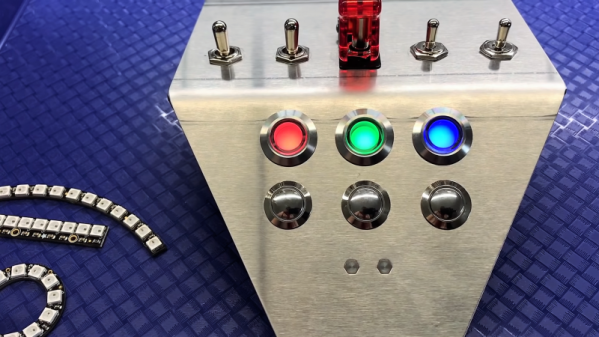
With 3D-printing, cheap CNC machines, and the huge variety of hardware available these days, really slick-looking control panels are getting to be commonplace. We’re especially fond of those nice indicators with the chrome bezels, and the matching pushbuttons with LED backlighting; those can really make a statement on a panel.

Sadly for [Proto G], though, the LEDs in his indicator of choice were just boring old one-color units, so he swapped them out and made these addressable RGB indicators. The stock lamps are not cheap units, but they do have a certain look, and they’re big enough to allow room for a little modification. The original guts were removed with a Dremel to make way for a Neopixel board. [Proto G] wanted to bring the board’s pads out to screw terminals, so he had to adapt the 3.0-mm pitch blocks he had on hand to the 2.54-mm pitch on Neopixel board, but that actually came out neater than you’d think. With a little hot glue to stick it all back together, he now has fully-addressable indicators that can be daisy-chained together and only take up a single GPIO pin.

These indicators and the nice looking panel they’re on is part of a delta pick-and-place robot build [Proto G] has been working for a while. He’s had some interesting side projects too, like the clickiest digital clock in the world and easing ESP32 setup for end-users. While we like all his stuff, we can’t wait to write up the finished delta.

Continue reading “Blinging Buttons For Pick And Place”

Custom Circuit Makes For Better Battery Level Display

Isn’t it always the way? There’s a circuit right out of the textbooks, or even a chip designed to do exactly what you want — almost exactly. It’s 80% perfect for your application, and rather than accept that 20%, you decide to start from scratch and design your own solution.

That’s the position [Great Scott!] found himself in with this custom LED battery level indicator. As the video below unfolds we learn that he didn’t start exactly from scratch, though. His first pass was the entirely sensible use of the LM3914 10-LED bar graph driver chip, a device that’s been running VU meters and the like for the better part of four decades. With an internal ladder of comparators and 1-kilohm resistors, the chip lights up the 10 LEDs according to an input voltage relative to an upper and lower limit set by external resistors. Unfortunately, the fixed internal resistors make that a linear scale, which does not match the discharge curve of the battery pack he’s monitoring. So, taking design elements from the LM3914 datasheet, [Great Scott!] rolled his own six-LED display from LM324 quad-op amps. Rather than a fixed resistance for each stage, trimmers let him tweak the curve to match the battery, and now he knows the remaining battery life with greater confidence.

Perhaps the 18650 battery pack [Great Scott!] is building is for the e-bike he has been working on lately. If it is, we’re glad to see that he spot-welded the terminals, unlike a recent e-bike battery pack build that may have some problems down the road.

Continue reading “Custom Circuit Makes For Better Battery Level Display”

Replace Your Calipers With A Microscope And Image Analysis

Getting a good measurement is a matter of using the right tool for the job. A tape measure and a caliper are both useful tools, but they’re hardly interchangeable for every task. Some jobs call for a hands-off, indirect way to measure small distances, which is where this image analysis measuring technique can come in handy.

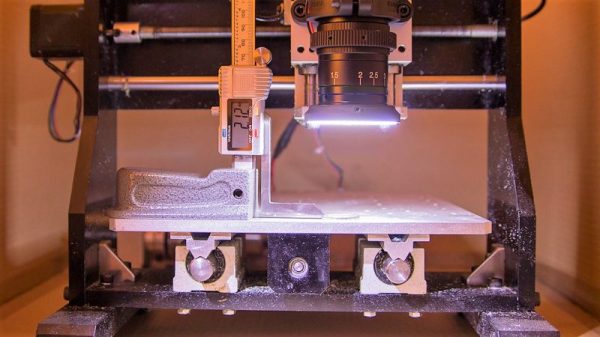
Although it appears [Saulius Lukse] purpose-built this rig, which consists of a microscopic lens on a digital camera mounted to the Z-axis of a small CNC machine, we suspect that anything capable of accurately and smoothly transitioning a camera vertically could be used. The idea is simple: the height of the camera over the object to be measured is increased in fine increments, with an image acquired in OpenCV at each stop. A Laplace transformation is performed to assess the sharpness of each image, which when plotted against the frame number shows peaks where the image is most in focus. If you know the distance the lens traveled between peaks, you can estimate the height of the object. [Salius] measured a coin using this technique and it was spot on compared to a caliper. We could see this method being useful for getting an accurate vertical profile of a more complex object.

From home-brew lidar to detecting lightning in video, [Saulius] has an interesting skill set at the intersection of optics and electronics. We’re looking forward to what he comes up with next.

Old Time Traffic Signal Revived With A Raspberry Pi Controller

Anyone with even a passing familiarity with the classic animated shorts of the 1940s will recognize the traffic signal in the image above. Yes, such things actually existed in the real world, not just in the Looney world of [Bugs Bunny] et al. As sturdy as such devices were, they don’t last forever, though, which is why a restoration of this classic Acme traffic signal was necessary for a California museum. Yes, that Acme.

When you see a traffic signal from the early days of the automotive age like this one, it becomes quickly apparent how good the modern equivalent has become. Back in the day, with a mix of lights distributed all over the body of the signal, arms that extend out, and bells that ring when the state changes, it’s easy to see how things could get out of hand at an intersection. That complexity made the restoration project by [am1034481] and colleagues at the Southern California Traffic Museum all the more difficult. Each signal has three lights, a motor for the flag, and an annunciator bell, each requiring a relay. What’s more, the motor needs to run in both directions, so a reversing relay is needed, and the arm has a mechanism to keep it in position when motor power is removed, which needs yet another relay. With two signals, everything was doubled, so the new controller used a 16-channel relay board and a Raspberry Pi to run through various demos. To keep induced currents from wreaking havoc, zero-crossing solid state relays were used on the big AC motors and coils in the signal. It looks like a lot of work, but the end results are worth it.

Looking for more information on traffic signal controls? We talked about that a while back.

Profiles In Science: Jack Kilby And The Integrated Circuit

Sixty years ago this month, an unassuming but gifted engineer sitting in a lonely lab at Texas Instruments penned a few lines in his notebook about his ideas for building complete circuits on a single slab of semiconductor. He had no way of knowing if his idea would even work; the idea that it would become one of the key technologies of the 20th century that would rapidly change everything about the world would have seemed like a fantasy to him.

We’ve covered the story of how the integrated circuit came to be, and the ensuing patent battle that would eventually award priority to someone else. But we’ve never taken a close look at the quiet man in the quiet lab who actually thought it up: Jack Kilby.

Continue reading “Profiles In Science: Jack Kilby And The Integrated Circuit”