This 3D Printed “Bladeless” Fan Gets It Done Cheap

Not long after Dyson unveiled their “bladeless” fan, a fairly steady stream of ever cheaper clones have been hitting the market. But this 3D printed version created by [Elite Worm] must surely be one of the most budget-friendly takes on the concept. If you’ve got a 3D printer, we’d wager you’ve already got most of the parts required to build your own.
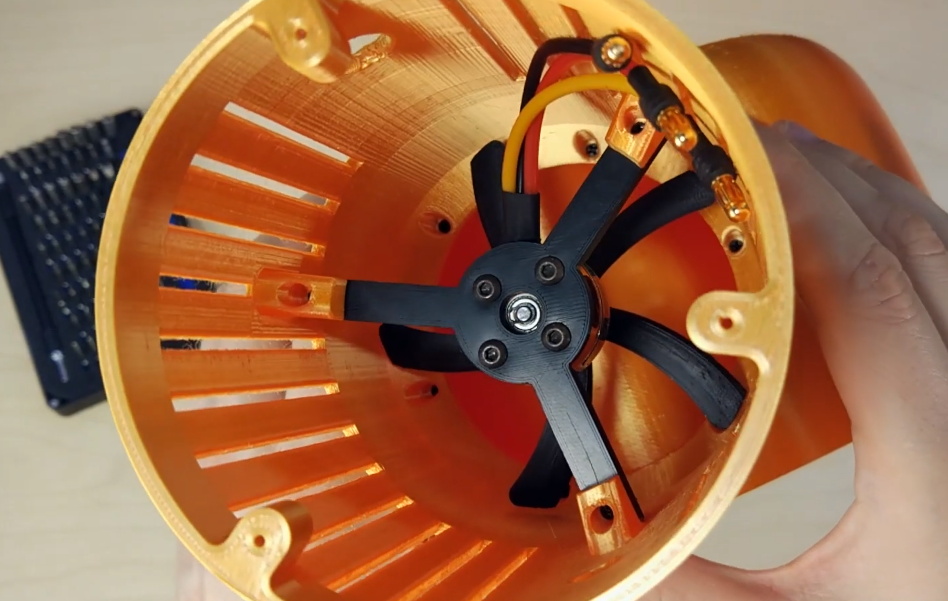
See, there’s a blade.

To be clear, of course there’s a blade. They aren’t magic, obviously. The fan is just small, and hidden inside the base. Air is pulled from the sides and bottom, and into the ring mounted to the top of the unit. When the air eventually exits the thin slit in the ring, it “sticks” to the sides due to the Coandă effect and produces a low pressure zone in the center. That’s all a fancy way of saying that the air flow you get from one of these gadgets is several times greater than what the little dinky fan would be capable of under normal circumstances. That’s the theory, anyway.

We can’t promise that all the physics are working as they should in this 3D printed version, but in the video after the break it certainly appears to be moving a considerable amount of air. It’s also quite loud, but that’s to be expected given it’s using a brushless hobby motor. To get it spinning, [Elite Worm] is using a Digispark ATtiny85 connected to a standard RC electronic speed control (ESC). The MCU reads a potentiometer mounted to the side of the fan and converts that to a PWM signal required by the ESC.

Beyond the electronics, essentially every piece of this project has been printed on a standard desktop 3D printer. An impressive accomplishment, though we probably would have gone with a commercially available propeller for safety’s sake. On the other hand, the base of the fan should nicely contain the shrapnel created should it explode at several thousand RPM. Probably.

Continue reading “This 3D Printed “Bladeless” Fan Gets It Done Cheap”
A Cyclopic LCD Case For Your Raspberry Pi Server

If you’ve got a personal website that needs hosting or a few hundred gigabytes of files that could use a centralized storage location, the Raspberry Pi’s small size and extreme energy efficiency make it a compelling server choice compared to that curbside Pentium 4 box you’ve been trying to find a home for. All you need is something to put in.

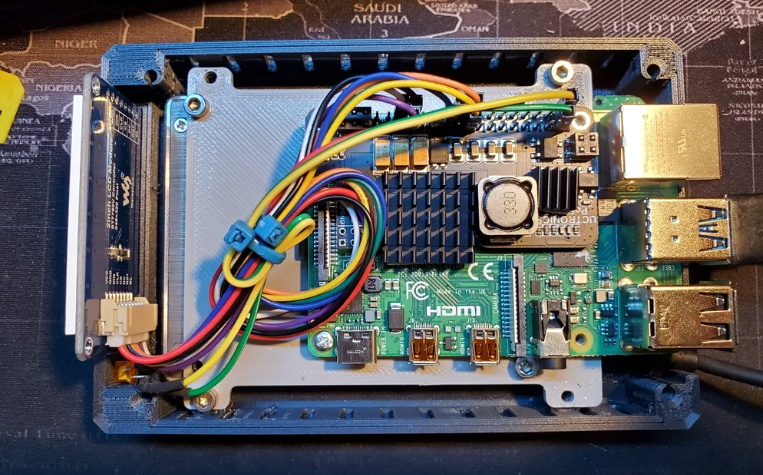
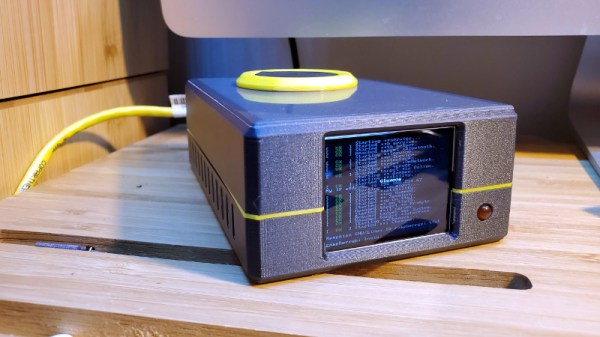
Of course there’s no shortage of Pi case designs ready to be extruded from your 3D printer, but we recently found ourselves particularly taken with this unique one designed by [Ken Segler]. It’s not only small and sleek with a dash of futuristic flair, but it includes a front-mounted two inch 240 x 320 IPS display that connects to the Pi over SPI. At the minimum that gives you a way to see all those beautiful boot messages on startup, but with a little code, it could provide you with various system statics and status messages at a glance.

While the LCD is clearly the star of the show here, the case also has a few other nice features that make it worthy of your consideration. The magnetically attached fan filter on the the top, for one. The stacked layout that puts the Pi directly above the SSD also makes for a relatively compact final product.

One thing to note though is that [Ken] is using Power-over-Ethernet, meaning there’s no spot for a dedicated power jack on the case. It’s an easy enough feature to add into your own build, but naturally not everyone’s network is suitably equipped. In that case, beyond the normal annoyances of editing STL files, it shouldn’t be too much trouble to add one in without having to literally hack your way through the printed plastic.

A PIN Pad Blasting UV Sanitizer

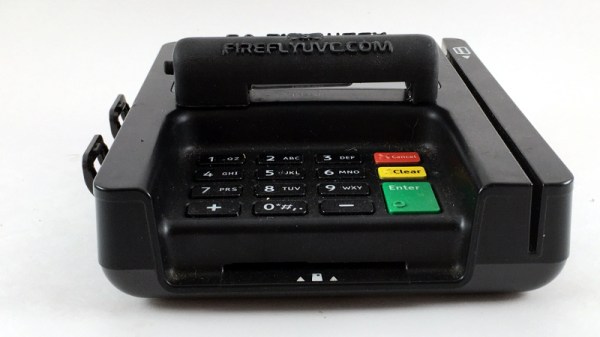
Retailers have instituted enhanced cleaning procedures in response to the COVID-19 pandemic, with an aim to keep frequently touched surfaces as clean as possible. Certainly one of the most commonly handled objects in the entire store is the payment terminal by the register, and the PIN pad specifically. Which is why [Josh Starnes] is working on a UV sterilizer that mounts onto a standard credit card terminal.

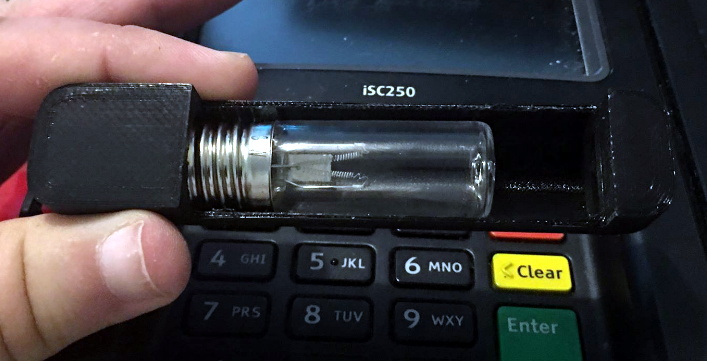
It’s a simple enough idea, but as is often the case, figuring out how to properly execute it is where things get tricky. [Josh] has already moved through several design iterations for his 3D printed enclosure in an attempt to make something that’s unobtrusive enough to be practical. The goal is to make something that the user won’t mistake for some kind of skimming device, which can certainly be tricky.

The skeptics in the audience will be happy to hear that [Josh] isn’t bothering with an LED UV source, either. We’ve all seen the pitfalls of trying to sanitize using UV LEDs, so this design goes old school with a small 12 volt UV bulb. That does mean it will need a dedicated power source however, which it seems like he’ll be addressing in the next phase of the project.


OCR Reads Old Newspapers So We Don’t Have To

Plenty of people don’t bother to read the current newspaper, let alone editions that were published over 100 years ago. But there’s a wealth of important historical information buried in these dusty old publications, assuming you can find a way to reliably digitize and index it all. You might think the solution is as simple as running images of the paper through optical character recognition (OCR) software, but as [John Scancella] explains, the problem is a bit more complicated than that.

Stretching the text vertically highlights the columns.

Ultimately, the issue largely comes down to formatting. The OCR software reasonably assumes all the text is in orderly horizontal lines, because in the vast majority of cases, it would be. That’s how you’re reading these words now. But as anyone who’s seen an old time newspaper knows, that’s not how things were necessarily written back then. Pages consisted of multiple narrow columns of stories separated by vertical lines; if the OCR tries to read the page from left to right, the resulting text is a mishmash of several unrelated topics.

The answer is to break all those articles into their own images, but doing that manually at any sort of scale simply isn’t an option. So [John] has been working on a system that uses OpenCV to identify the columns of text and isolate them. He details the multi-step process down in his write-up, and even provides the Python code should you want to give it a spin. But the short version is that the image is converted to grayscale and the OpenCV dilate function is used to stretch the text in the Y dimension. This produces big blobs of white that can easily be picked out with findContours() and snipped into individual images.

It’s not a perfect solution, and there are still a few pitfalls. For one, the name of the paper needs to be removed from the front page before the stretching operation happens. But it’s clearly a step in the right direction, and the results certainly look very promising. Anything that makes OCR more accurate or easier to implement is a win in our book, so we’re excited to see where [John] takes this concept.

Building A Heavy Duty Open Source Ventilator

Since the COVID-19 pandemic started, we’ve seen several attempts to create homebrew ventilators designed to address the shortage of these lifesaving machines. Unfortunately, most hackers aren’t terribly experienced when it comes to designing practical medical equipment. So while many of the designs might have appeared functional on the workbench, there’s little chance they’d get used in any official capacity.

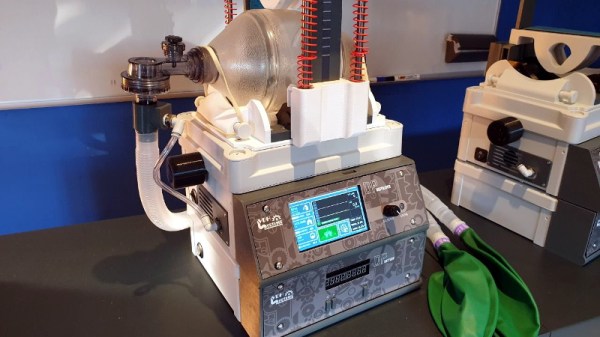
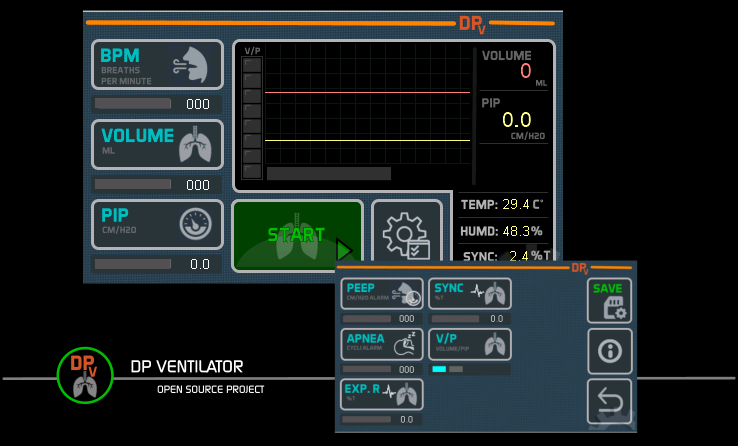
The open source DP Ventilator is still clearly the product of a couple plucky hackers, but we think it shows a level of design maturity that’s been missing in many of the earlier attempts. Made primarily with 3D printed components, this mechanical device is designed to operate a hand-held manual resuscitator; essentially standing in for a human operator. This makes the design far less complex than if it had to actually pump air itself, not to mention safer for the patient since the resuscitator (often referred to as an Ambu Bag) installed in it would be a sterile pre-packaged item.

In the video after the break, you can see just how much thought and effort has been put into the device’s touch screen interface. With a few quick taps the medical professional operating the DP Ventilator can dial in variables such as breathing rate, pressure, and volume to match the patient’s needs. While the Arduino Mega 2560 at the machine’s heart wouldn’t pass muster for any regulating body in charge of medical devices, we think with a few more tweaks, this design is getting close to something that might actually be able to save lives.

Continue reading “Building A Heavy Duty Open Source Ventilator”

Mil-Spec Looks Without Defense Department Budget

While hackers and makers have a tendency to focus on functionality above all else, that doesn’t mean there isn’t room for some visual flair. A device that works well and looks good will always be more impressive than the bare bones approach, but the extra time and money it usually takes to polish up the visual component of a build means it’s often overlooked. Which is exactly what [Jay Doscher] wanted to address with his Mil-Plastic project.

On the surface, the Mil-Plastic is yet another entry in the rapidly growing and often ill-defined world of cyberdecks: custom computing devices that forgo the standard laptop and desktop dichotomy and instead explore the road not taken by mainstream consumer electronics. To that end, it’s a solid build more than worthy of praise. But more than that, it’s also a lesson on how 3D printing and some clever design can create a truly impressive visual for little more than the cost of a spool of PLA.

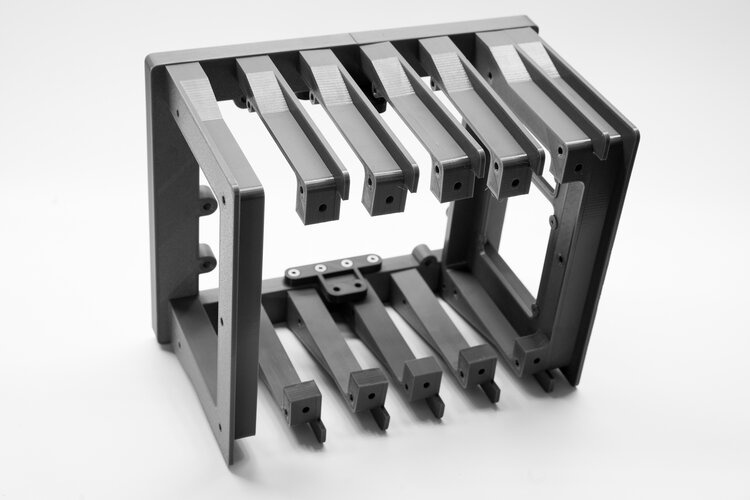
The modular design allows parts to be printed in parallel.

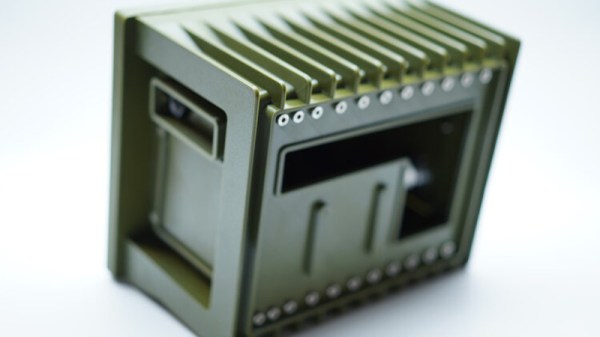
The Mil-Plastic, as the name implies, looks like it was pulled from a Humvee or an Abrams tank. While the gorgeous olive green PETG filament that [Jay] has stumbled upon certainly helps, his eye for detail and design chops aren’t to be underestimated. He’s given the case a rugged and armored look that simply screams “Your Tax Dollars At Work”, complete with faux cooling fins running along the back and a generous application of low-profile stainless steel fasteners. We’ve taken a close look at the decadence of military engineering in the past, and the Mil-Plastic could hang with the best of them.

Most importantly, [Jay] has given us all the tools and information we need to recreate the look on our own terms. You don’t have to be in the market for yet another Raspberry Pi gadget to appreciate the Mil-Plastic; the design can serve as the backbone for whatever you happen to be building. The printed case not only looks impressive, but can easily be modified and expanded as needed.

[Jay] kicked off a minor revolution late last year with his Raspberry Pi Recovery Kit, and has continued to produce well-documented designs that illustrate the incredible power of desktop 3D printing. If you can look through his portfolio and not get inspired, you may want to speak with a doctor.

Tiny Raspberry Pi Mac Nails The Apple Aesthetic

We know that some in the audience will take issue with calling a Raspberry Pi in a 3D-printed case the “World’s Smallest iMac”, but you’ve got to admit, [Michael Pick] has certainly done a good job recreating the sleek look of the real hardware. While there might not be any Cupertino wizardry under all that PLA, it does have a properly themed user interface and the general aversion to external ports and wires that you’d expect to see on an Apple desktop machine.

The clean lines of this build are made possible in large part by the LCD itself. Designed specifically for the Raspberry Pi, it offers mounting stand-offs on the rear, integrated speakers, a dedicated 5 V power connection, and a FFC in place of the traditional HDMI cable. All that allows the Pi to sit neatly on the back of the panel without the normal assortment of awkward cables and adapters going in every direction. Even if you’re not in the market for a miniature Macintosh, you may want to keep this display in mind for your future Pi hacking needs.

Well, that’s one way to do it.

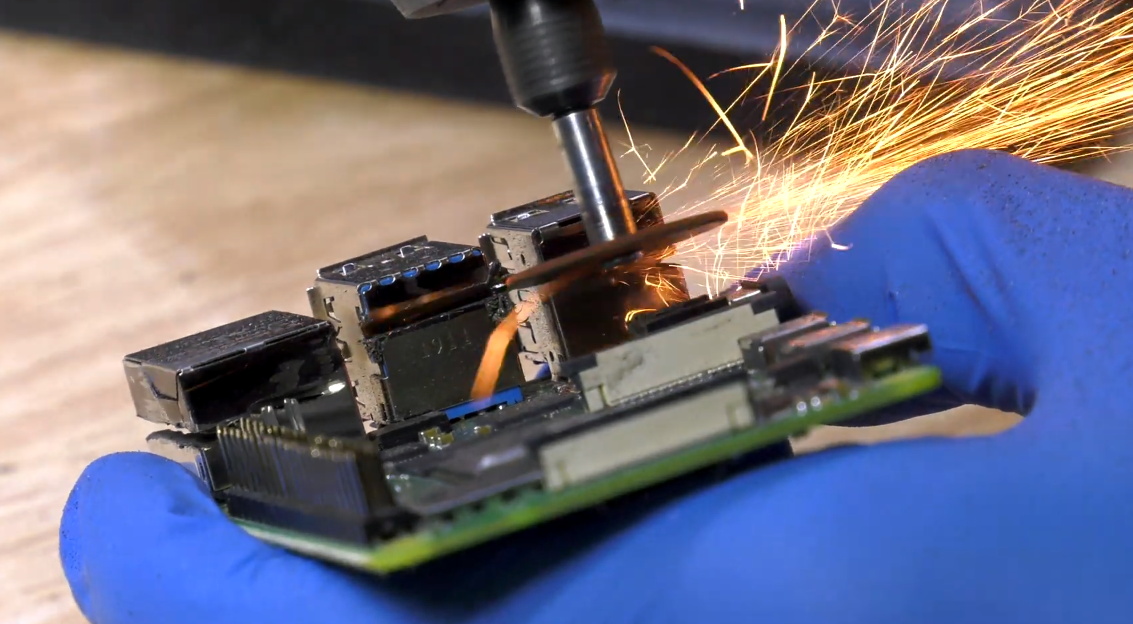
Despite this clean installation, the diminutive Raspberry Pi was still a bit too thick to fit inside the 3D-printed shell [Michael] designed. So he slimmed it down in a somewhat unconventional, but admittedly expedient, way. With a rotary tool and a steady hand, he simply cut the double stacked USB ports in half. With no need for Ethernet in this build, he bisected the RJ-45 connector as well. We expect some groans in the comments about this one, but it’s hard to argue that this isn’t a hack in both the literal and figurative sense.

We really appreciate the small details on this build, from the relocated USB connectors to the vent holes that double as access to the LCDs controls. [Michael] went all out, even going so far as to print a little insert for the iconic Macintosh logo on the front of the machine. Though given the impressive work he put into his miniature “gaming PC” a couple months back, it should come as no surprise; clearly this is a man who takes his tiny computers very seriously.

Continue reading “Tiny Raspberry Pi Mac Nails The Apple Aesthetic”