Mobile SIGINT Hacking On A Civilian’s Budget

Signals Intelligence (SIGINT) refers to performing electronic reconnaissance by eavesdropping on communications, and used to be the kind of thing that was only within the purview of the military or various three letter government agencies. But today, for better or for worse, the individual hacker is able to pull an incredible amount of information out of thin air with low-cost hardware and open source software. Now, thanks to [Josh Conway], all that capability can be harnessed with a slick all-in-one device: the RadioInstigator.

In his talk at the recent 2019 CircleCityCon, [Josh] (who also goes by the handle [CrankyLinuxUser]) presented the RadioInstigator as an affordable way to get into the world of wireless security research beyond the traditional WiFi and Bluetooth. None of the hardware inside the device is new exactly, it’s all stuff the hacking community has had access to for a while now, but this project brings them all together under one 3D printed “roof” as it were. The end result is a surprisingly practical looking device that can be used on the go to explore huge swaths of the RF spectrum at a cost of only around $150 USD.
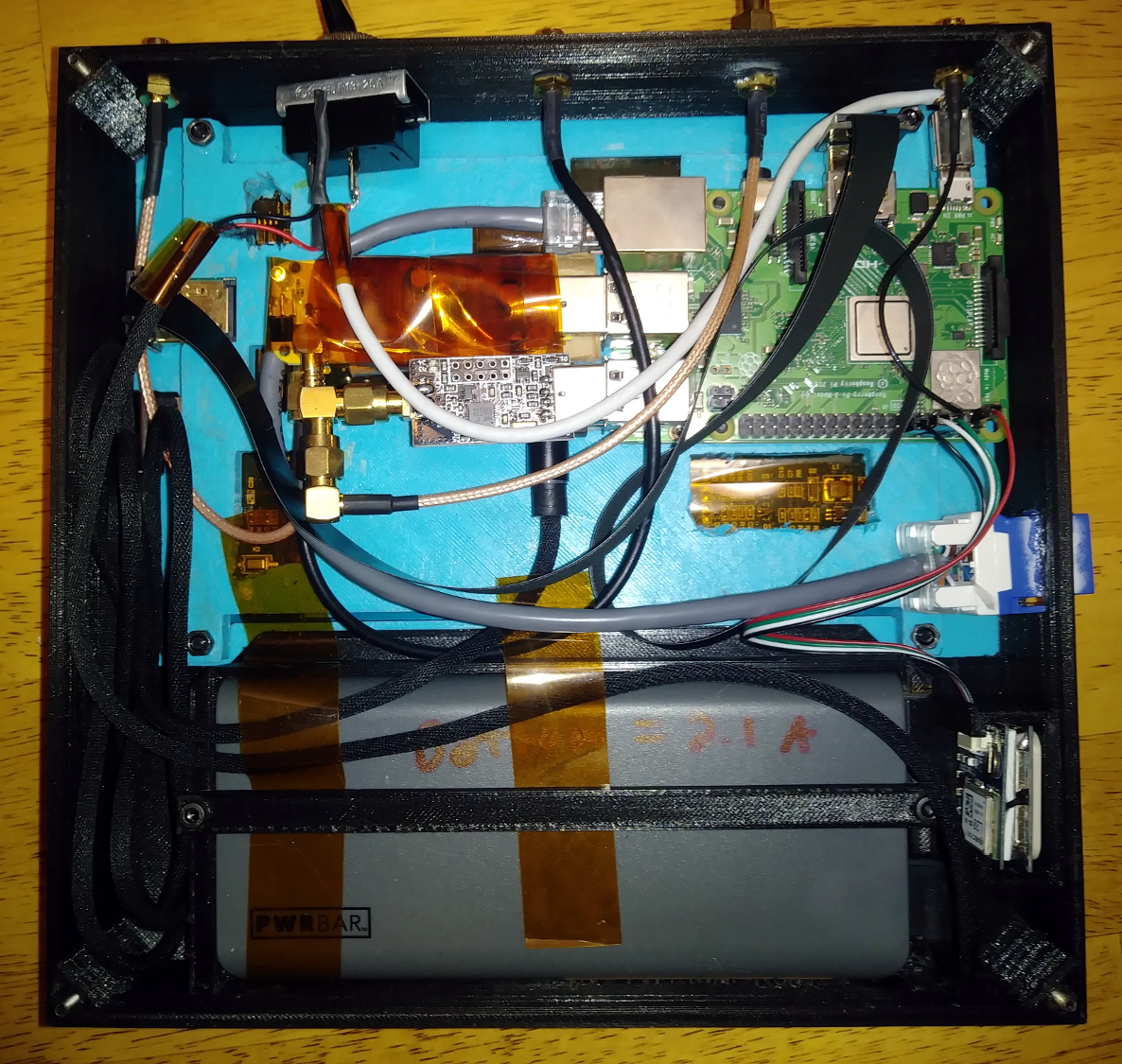
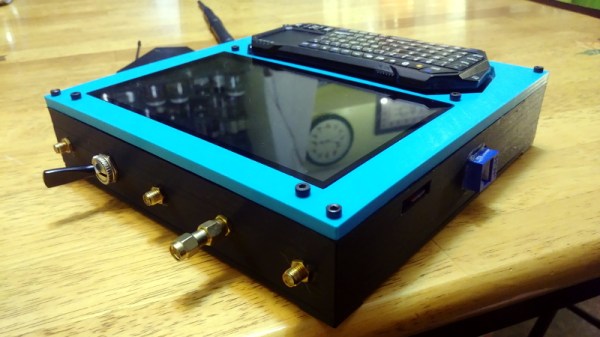
So what has [Josh] packed into this wireless toybox? It will probably come as little surprise to find out that the star of the show is a Raspberry Pi 3 B+, combined with a touch screen display and portable keyboard so the user can interface with the various security tools installed.

To help the RadioInstigator surf the airwaves there’s an RTL-SDR and a 2.4 Ghz nRF24LU1+ “Crazyradio”, both broken out to external antenna connectors on the outside of the device. There’s even an external SMA connector hooked up to the Pi’s GPIO pin, which can be used for low-power transmissions from 5 KHz up to 1500 MHz with rpitx. Everything is powered by a beefy 10,000 mAh battery pack which should give you plenty of loiter time to perform your investigations.

[Josh] has also written several Bash scripts which will get a trove of radio hacking tools installed on the Pi automatically, either by pulling them in through the official repositories or downloading the source and compiling them. Getting the software environment into a known-good state can be a huge time sink, so even if you don’t build your own version of the RadioInstigator, his scripts are still worth checking out.

You can do some pretty incredible things with nothing more than a Pi and an RTL-SDR, but we can’t help but notice there’s still plenty of room inside the RadioInstigator for more gear. It could be the perfect home for a Mult-RTL setup, or maybe even a VGA adapter for spoofing cell networks.

Continue reading “Mobile SIGINT Hacking On A Civilian’s Budget”
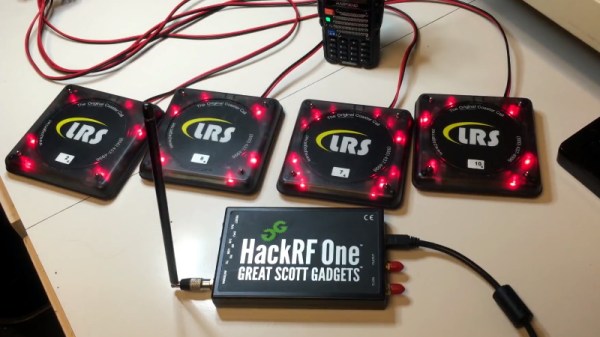
Your Table Is Ready, Courtesy Of HackRF

Have you ever found yourself in a crowded restaurant on a Saturday night, holding onto one of those little gadgets that blinks and vibrates when it’s your turn to be seated? Next time, bust out the HackRF and follow along with [Tony Tiger] as he shows how it can be used to easily fire them off. Of course, there won’t actually be a table ready when you triumphantly show your blinking pager to the staff; but there’s only so much an SDR can do.

Even if you aren’t looking to jump the line at your favorite dining establishment, the video that [Tony] has put together serves as an excellent practical example of using software defined radio (SDR) to examine and ultimately replicate a wireless communications protocol. The same techniques demonstrated here could be applied to any number of devices out in the wild with little to no modification. Granted these “restaurant pagers” aren’t exactly high security devices to begin with, but you’d be horrified surprised how many other devices out there take a similarly cavalier attitude towards security.

[Tony] starts by using inspectrum to examine the Frequency-shift keying (FSK) modulation used by the 467.750 Mhz devices, and from there, uses Universal Radio Hacker to capture the actual binary data being sent over the air. Between studying the transmissions and the information he found online, he was eventually able to piece together the packet structure used by the restaurant’s base station.

Finally, he wrote a Python script which generates packets based on which pager he wants to set off. If he’s feeling particularly mischievous, he can even set them all off at once. The script outputs a binary file which is then loaded into GNU Radio for transmission via the HackRF. [Tony] says he’s not quite ready to release his script yet, but he gives enough information in the video that the intrepid hacker could probably get their own version up and running by the time he gets it posted up to GitHub anyway.

We saw some very similar techniques demonstrated at the recent WOPR Summit security conference, so once you’re done hacking the local restaurants, you can take these same lessons and apply them to the rest of the Internet of Things. If you’re wondering, it’s even easier to eavesdrop on the non-restaurant pagers.

Continue reading “Your Table Is Ready, Courtesy Of HackRF”

Simple Arduino Universal Remote Control

The infrared remote control might not hold the seat of honor in the average home theater setup that it once enjoyed, but it’s not quite out to pasture yet. After all, what are you going to use to stop Netflix once the Chromecast invariably disconnects from your phone? As long as there are devices out there that will respond to commands blasted their way via an IR LED, hackers will be looking to get in on the action.

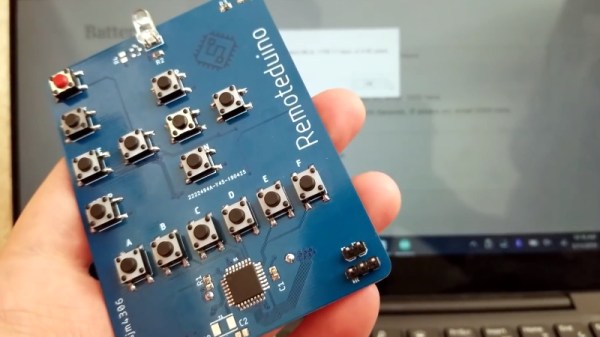
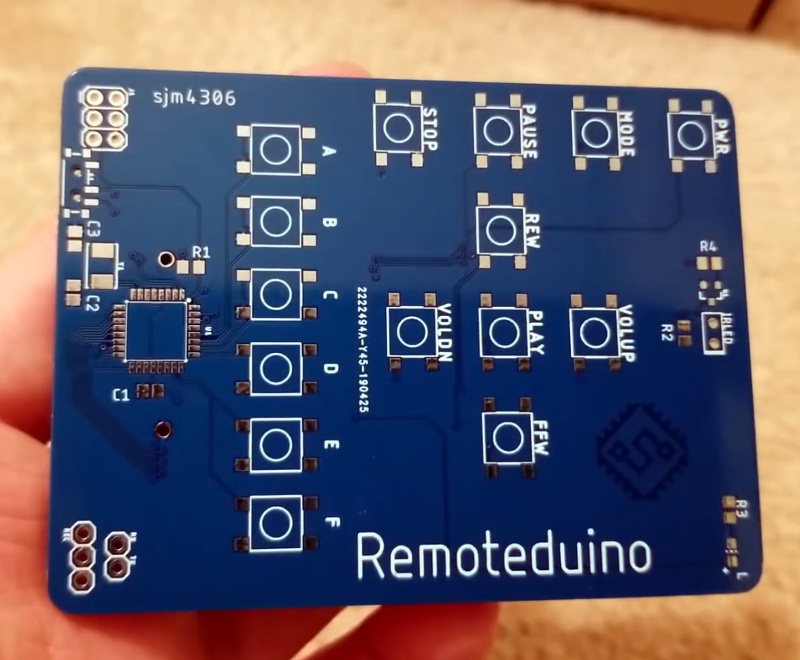
In an effort to make IR remote hacking just a bit easier, [sjm4306] has submitted his Remoteduino for the 2019 Hackaday Prize. With this handy tool in your arsenal, you can focus on developing the software side of your next IR remote project without worry about the hardware. Just upload your code, and get clicking.

As you might imagine, the design is rather simple. On the front edge of the PCB you’ve got the prerequisite IR LED, and a healthy supply of tactile buttons that your code can use as input. The remote features a fairly standard layout on the top half, complete with silkscreened labels for the common functions, but below that [sjm4306] has packed in six general purpose buttons that can be used for whatever you like.

The Remoteduino is powered by an ATmega328P, and the whole thing runs on a CR2032 cell mounted on the backside. [sjm4306] mentions in his write-up on Hackaday.io that battery life was always a consideration during development of the Remoteduino, so he’s made a few energy-saving considerations. Using the internal 8 MHz oscillator instead of an external crystal shaved a bit off the top, and the aggressive sleep routines got him the rest of the way. In testing, he estimates the battery should last a few years even with daily use.

Continue reading “Simple Arduino Universal Remote Control”

Repairdown: Disklavier DKC500RW Control Unit

If you’ve been kind enough to accompany me on these regular hardware explorations, you’ve likely recognized a trend with regards to the gadgets that go under the knife. Generally speaking, the devices I take apart for your viewing pleasure come to us from the clearance rack of a big box retailer, the thrift store, or the always generous “AS-IS” section on eBay. There’s something of a cost-benefit analysis performed each time I pick up a piece of gear for dissection, and it probably won’t surprise you to find that the least expensive doggy in the window is usually the one that secures its fifteen minutes of Internet fame.

DKC500RW installed on right side.

But this month I present to you, Good Reader, something a bit different. This time I’m not taking something apart just for the simple joy of seeing PCB laid bare. I’ve been given the task of repairing an expensive piece of antiquated oddball equipment because, quite frankly, nobody else wanted to do it. If we happen to find ourselves learning about its inner workings in the process, that’s just the cost of doing business with a Hackaday writer.

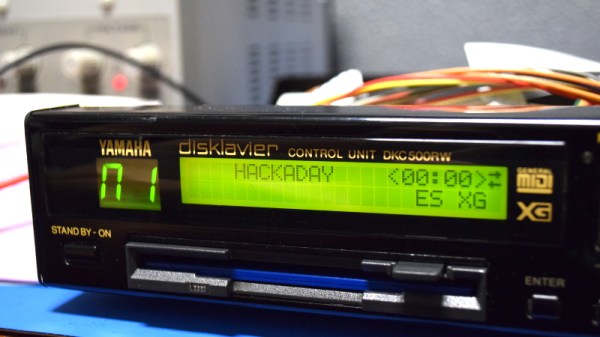
The situation as explained to me is that in the late 1990’s, my brother’s employer purchased a Yamaha Mark II XG “Baby Grand” piano for somewhere in the neighborhood of $20,000. This particular model was selected for its ability to play MIDI files from 3.5 inch floppy disks, complete with the rather ghostly effect of the keys moving by themselves. The idea was that you could set this piano up in your lobby with a floppy full of Barry Manilow’s greatest hits, and your establishment would instantly be dripping with automated class.

Unfortunately, about a month or so back, the piano’s Disklavier DKC500RW control unit stopped reading disks. The piano itself still worked, but now required a human to do the playing. Calls were made, but as you might expect, most repair centers politely declined around the time they heard the word “floppy” and anyone who stayed on the line quoted a price that simply wasn’t economical.

Before they resorted to hiring a pianist, perhaps a rare example of a human taking a robot’s job, my brother asked if he could remove the control unit and see if I could make any sense of it. So with that, let’s dig into this vintage piece of musical equipment and see what a five figure price tag got you at the turn of the millennium.

Continue reading “Repairdown: Disklavier DKC500RW Control Unit”

Freeform ESP8266 Network Attached Data Display

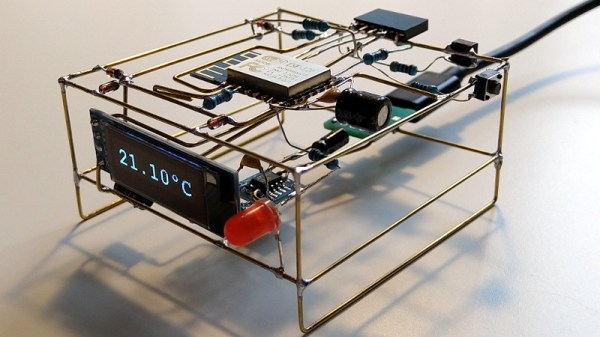
Like many of us, [Josef Adamčík] finds himself fascinated with so-called “freeform” electronic designs, where the three dimensional circuit makes up sections of the device’s structure. When well executed, such designs really blur the line between being a practical device and an artistic piece. In fact his latest design, an ESP8266 MQTT client, would seem to indicate there might not be much of a “line” at all.

The inspiration for this project actually comes from something [Josef] had worked on previously: an ESP8266-based environmental monitoring system. That device had sensors to pick up on things such as humidity and ambient light level, but it didn’t have a display of its own; it just pushed the data out onto the network using MQTT. So he thought a companion device which could receive this environmental data and present it to him in a unique and visually appealing way would be a natural extension of the idea.

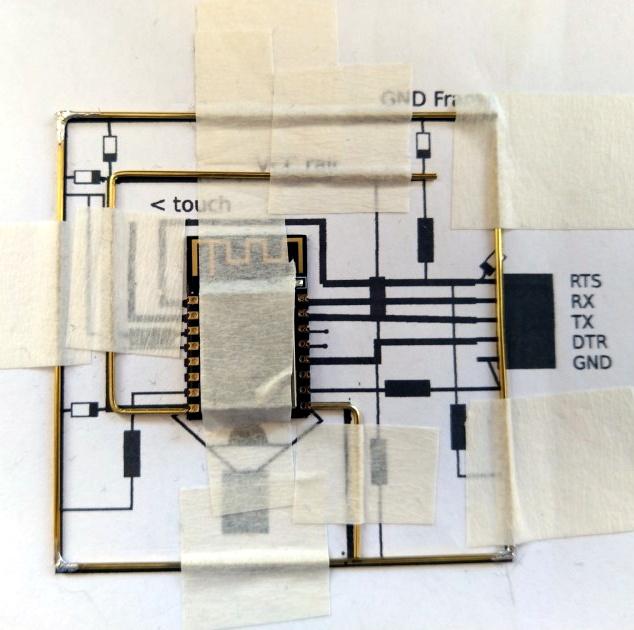
As the display doesn’t need any local sensors of its own, it made the design and construction much easier. Which is not to say it was easy, of course. In this write-up, [Josef] takes the reader through the process of designing each “layer” of the circuit in 2D, printing it out onto paper, and then using that as a guide to assemble the real thing. Once he had the individual panels done, he used some pieces of cardboard to create a three dimensional jig which helped him get it all soldered together.

On the software side it’s pretty straightforward. It just pulls the interesting bits of information off of the network and displays it on the OLED. Right now it’s configured to show current temperature on the display, but of course that could be changed to pretty much anything you could imagine if you’re looking to add a similar device to your desktop. There’s also a red LED on the device which lights up to let [Josef] know when the batteries are getting low on the remote sensor unit; a particularly nice touch.

If you’d like to see more of these freeform circuits, we’d advise you to checkout the finalists for our recently concluded “Circuit Sculpture” contest. Some of the finalists are truly beyond belief.

See Starlink’s “Space Train” Before It Leaves The Station

Have you looked up into the night sky recently and seen a bizarre line of luminous dots? Have you noticed an uptick in the number of UFO reports mentioned in the news and social media? If so, you may have already been touched by what many have come to affectionately call Elon Musk’s “Space Train”: a line of tightly grouped Starlink satellites that are making their way around the globe.

Some have wondered what’s so unique about the Starlink satellites that allows them to be visible from the ground by the naked eye, but that’s actually nothing new. It’s all about being in the right place at the right time, for both the observer and the spacecraft in question. The trick is having the object in space catch the light from the Sun when it has, from the observer’s point of view, already set. It’s essentially the same reason the Moon shines at night, but on a far smaller scale.

The ISS as it travels through Earth’s night and day

The phenomena is known as “satellite flare”, and chasing them is a favorite pastime of avid sky watchers. If you know when and where to look on a clear night, you can easily spot the International Space Station as it zips across the sky thanks to this principle. NASA even offers a service which uses email or SMS to tell you when the ISS should be visible from your location.

What makes the Starlink satellites unique isn’t that we can see them from the ground, but that there’s so many of them flying in a straight line. The initial launch released 60 satellites in a far tighter formation than we’ve ever seen before; Elon even warned that collisions between the individual Starlink satellites wasn’t out of the realm of possibility. The cumulative effect of these close proximity satellite flares is a bit startling, and understandably has people concerned about what the night sky might look like when all 12,000 Starlink satellites are in orbit.

The good news is, the effect is only temporary. As the satellites spread out and begin individual maneuvers, that long line in the sky will fade away. But before Elon’s “Space Train” departs for good, let’s look at how it was created, and how you can still catch a glimpse of this unique phenomena.

Continue reading “See Starlink’s “Space Train” Before It Leaves The Station”

Keeping Birds At Bay With An Automated Spinning Owl

There’s nothing wrong with building something just to build it, but there’s something especially satisfying about being able to solve a real-world problem with a piece of gear you’ve designed and fabricated. When all the traditional methods to keep birds from roosting on his mother’s property failed, [MNMakerMan] decided to come up with a more persuasive option: a solar powered spinning owl complete with expandable batons.

We imagine the owl isn’t strictly necessary when you’re whacking the birds with a metal bar to begin with, but it does add a nice touch. Perhaps it will even serve to deter some of the less adventurous birds before they get within clobbering distance, which is probably in their best interest. [MNMakerMan] says the rotation speed of the bars seems low enough that he doesn’t think it will do the birds any physical harm, but it’s still got to be fairly unpleasant.

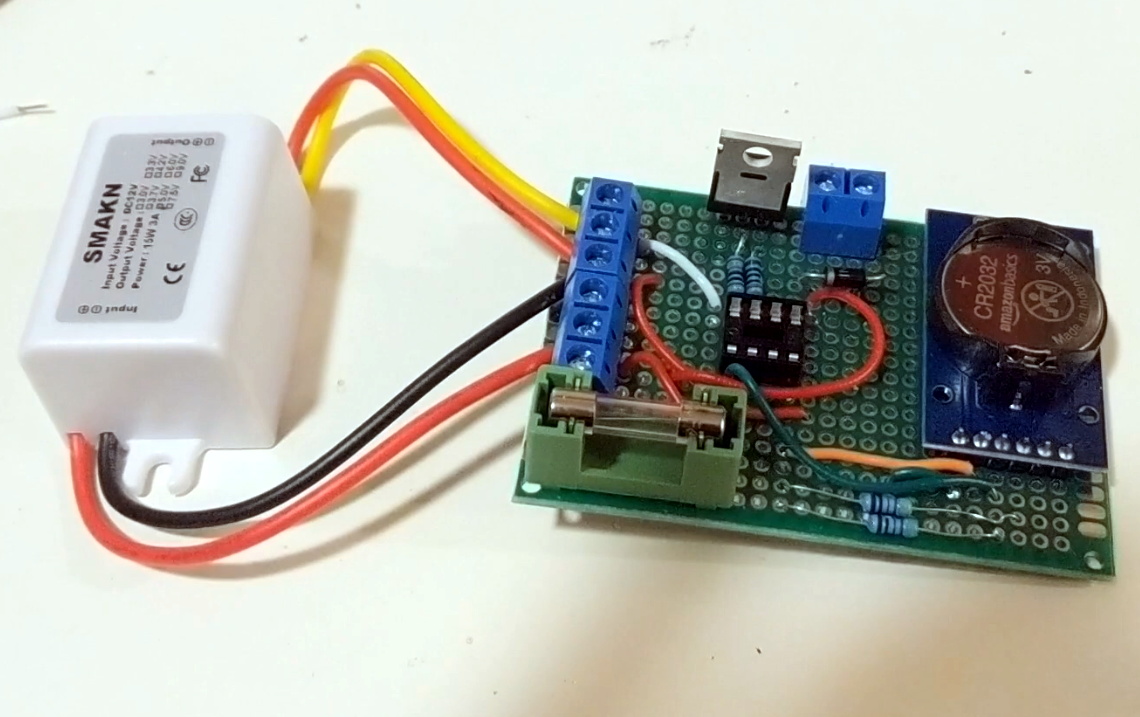
At first glance you might think that this contraption simply spins when the small 10 watt photovoltaic panel next to it catches the sun, but there’s actually a bit more to it than that. Sure he probably could just have it spin constantly whenever the sun is up, but instead [MNMakerMan] is using a ATtiny85 to control the 11 RPM geared DC motor with a IRF540 MOSFET. By adding a DS3231 RTC module into the mix, he’s able to not only accurately control when the spinner begins and ends its bird-busting shift, but implement timed patterns rather than running it the whole time. All of which can of course be fine-tuned by adjusting a couple variables and reflashing the chip.

We’ve seen plenty of automated systems for keeping cats away, and of course squirrels are a common target for such builds as well, but devices to deter birds are considerably less common among these pages. So it would seem that, at least for now, [MNMakerMan] has the market cornered on solar bird smashing gadgets. We’re sure Mom’s very proud.

Continue reading “Keeping Birds At Bay With An Automated Spinning Owl”