Convert A Curbside CRT TV Into An Arcade Monitor

While an old CRT TV may work well enough on a MAME cabinet project, the real arcade purists are quick to point out that a proper arcade monitor and a TV aren’t the same thing. A real arcade board uses RGB to connect to the monitor, that is, direct control over the red, green, and blue signals. Conversely video over coax or composite, what most people associate with old CRT TVs, combine all the video information down into an analog signal. Put simply, RGB allows for a much cleaner image than composite.

Many in the arcade restoration scene say that trying to convert a bog standard CRT TV into a RGB monitor isn’t possible, but [Arcade Jason] had his doubts. Over on his YouTube channel, he’s recently posted a tutorial on how to go from a trashed CRT TV to a monitor worthy of proper arcade gaming with relatively little work. As real arcade monitors are becoming increasingly rare, these kind of modifications are likely to get more common as coin-op gamers look to keep the old ways alive.

Now obviously every TV is going to do be different inside. All CRT TVs contain high voltages, and on some the circuit boards aren’t even mains-isolated, so take care if you try this. [Jason] certainly doesn’t claim that the method he demonstrates will work on whatever old TV you happen to have kicking around. But the general idea and some of the techniques he shows off are applicable to most modern TVs, and can help you tailor the method to your particular piece of gear. It all starts with a wet finger. Seriously.

[Jason] demonstrates a rather unique way of determining which pins on the TV’s control chip are responsible for the individual color signals by wetting his finger and sliding it over the pins. When a change in color is seen on the displayed image, you know you’re getting close. We can’t say it’s the most scientific or even the safest method, but it worked for him.

He then follows up with a jumper wire and resistor to find the precise pins which are responsible for each color, and solders up his actual RGB connection for the arcade board. In addition to the three color wires, a sync signal is also needed. This is the same sync signal used in composite video, so all that’s needed is to solder to the pad for the original composite video jack. Add a ground signal, and you’ve got yourself a proper RGB monitor.

Interestingly, this one has come full circle, as [Jason] says his attempt was inspired by an old post on Hackaday. It’s the Circle of Hacker Life.

[Thanks to Seebach for the tip]

Continue reading “Convert A Curbside CRT TV Into An Arcade Monitor”

VCF East 2018: The Mail Order App Store

Today we take the concept of a centralized software repository for granted. Whether it’s apt or the App Store, pretty much every device we use today has a way to pull applications in without the user manually having to search for them on the wilds of the Internet. Not only is this more convenient for the end user, but at least in theory, more secure since you won’t be pulling binaries off of some random website.

But centralized software distribution doesn’t just benefit the user, it can help developers as well. As platforms like Steam have shown, once you lower the bar to the point that all you need to get your software on the marketplace is a good idea, smaller developers get a chance to shine. You don’t need to find a publisher or pay out of pocket to have a bunch of discs pressed, just put your game or program out there and see what happens. Markus “Notch” Persson saw his hobby project Minecraft turn into one of the biggest entertainment franchises in decades, but one has to wonder if it would have ever gotten released commercially if he first had to convince a publisher that somebody would want to play a game about digging holes.

In the days before digital distribution was practical, things were even worse. If you wanted to sell your game or program, it needed to be advertised somewhere, needed to be put on physical media, and it needed to get shipped out to the customer. All this took capital that would easily be beyond many independent developers, to say nothing of single individuals.

But at the recent Vintage Computer Festival East, [Allan Bushman] showed off relics from a little known chapter of early home computing: the Atari Program Exchange (APX). In a wholly unique approach to software distribution at the time, individuals were given a platform by which their software would be advertised and sold to owners of 8-bit machines such as the Atari 400/800 and later XL series computers. In the early days, when the line between computer user and computer programmer was especially blurry, the APX let anyone with the skill turn their ideas into profit. Continue reading “VCF East 2018: The Mail Order App Store”

Gaming System Built With Kite, The DIY Android Kit

As a gamer, [Lexie Dostal] dreamed of a smartphone that was a viable gaming platform: something with enough power to run the games and emulators he was interested in, with the controls to make playing them feel natural. So when he got his hands on an early version of Kite, the modular open hardware platform designed to be hacked and customized, that’s exactly what he decided to build. The Kite kit would provide the touch screen and Android-equipped motherboard, he just needed to design a case and integrate controls to make it a real gaming device.

The case design [Lexie] came up with is inspired by the bottom half of the Nintendo 3DS, and ended up only a few centimeters wider than the stock case from the Kite kit. Unfortunately, his delta 3D printer wasn’t large enough to fit the device’s case, so he ended up having to break it into five separate pieces and glue them together. With the case in one piece he worked his way from 220 to 400 grit sand paper, filling any voids in the print with glue as he went. A few coats of primer, more sanding, and a final matte texture spray give the final case a very professional-looking finish.

Not only was the Nintendo 3DS an inspiration for the device, it was also a donor for some of the parts. The directional pad, analog “nub”, and buttons are replacement 3DS hardware, which is interfaced to the KiteBoard with an Arduino Nano. When he couldn’t find springs small enough to use for the shoulder buttons, he bought some thin music wire and wound them himself. Talk about attention to detail.

There’s quite a bit of gear packed into the case, but [Lexie] thinks there’s probably still room to make some improvements. He could free up some room by dropping the connectors and soldering everything directly, and says he’d like to come up with a custom PCB to better interface with the 3DS’s hardware to cut down on some of the wiring required. With the extra room he thinks the battery, currently a 3200 mAh pack designed for the LG V20 smartphone, could probably be replaced with something even bigger.

Readers may recall that the Kite is currently in the running for the 2018 Hackaday prize. Seeing Kite already delivering on the promise of making it easier to develop powerful Android devices is very exciting, and we can’t wait to see what else hackers will be able to do with it.

Put The 3D Printer To Sleep So You Can Rest Easy

At this point you’ve probably already heard the news: cheap Chinese 3D printers sometimes catch fire. Now we can’t say we’re shocked to find out that absolute bottom of the barrel gear wasn’t designed to the highest standards (gotta cut those corners someplace), but that doesn’t change the fact that there are thousands of hackers and makers out there who are in possession of one of these suspect machines. Just tossing them to the curb is hardly the hacker way, so we’ve got to find ways to make the best of the hand dealt to us.

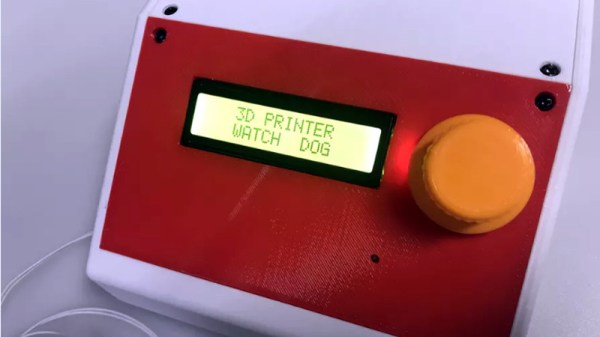
After sleeping with one eye (and maybe one nostril) open during some overnight prints, Hackaday.io user [TheGrim] wanted a way to make sure his Alunar Anet A6 didn’t stay powered on any longer than necessary. So he came up with a way of using the printer’s own endstop switch to detect if the print has completed, and cut the power.

The idea is simple, but of course the real trick is in the implementation. By adding a “Home” command to his ending G-Code in Cura, [TheGrim] reasoned he could use the Y endstop switch to determine if the print had completed. It was just a matter of reading the state of the switch and acting on it.

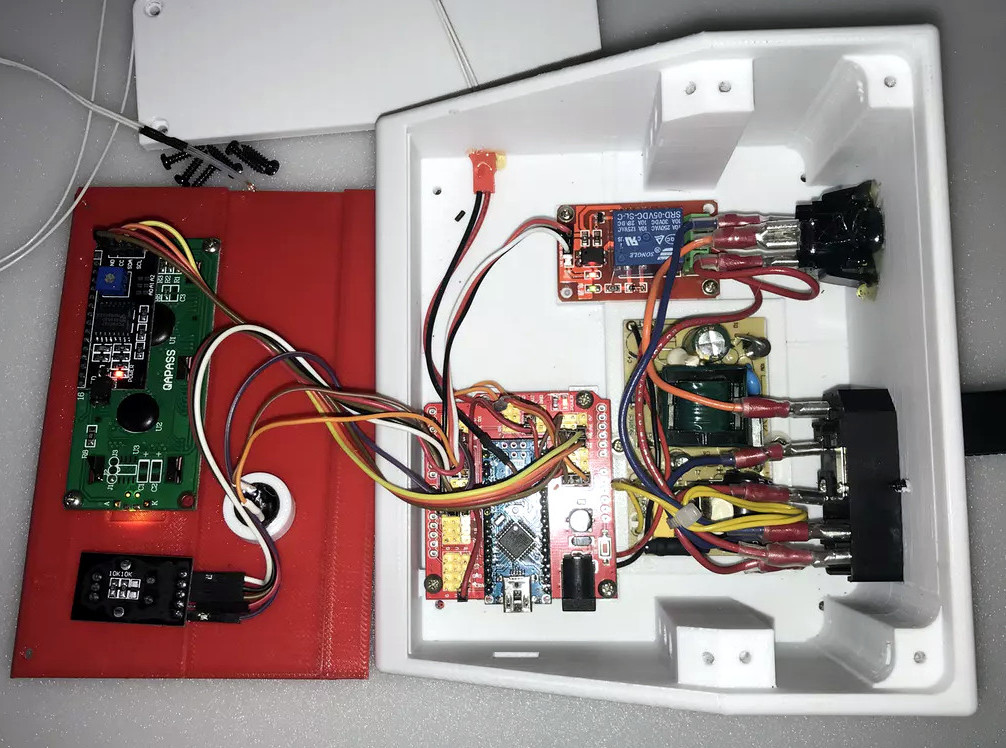
In the most basic implementation, the switch could be used to control a relay on the AC side of the power supply. But [TheGrim] doesn’t trust relays, and he wanted to pack in a couple “smart” features so he ended up using a PIC microcontroller and two 12 amp TRIACs. There’s also a couple of LEDs and toggle switches to serve as the user interface, allowing you to enable and disable the automatic shutdown and get status information about the system.

Will cutting the juice to the PSU prevent another terrible fire? It’s debatable. But it certainly can’t hurt, and if it makes [TheGrim] feel more confident about running his machine, then so be it. We’d still advise anyone with a 3D printer at home to brush up on their fire safety knowledge.

Talking To Laptop Batteries With The ESP8266

It’s not something you often give a lot of thought to, but the modern consumer laptop battery is a pretty advanced piece of technology. Not only does it pack several dozen watt-hours of energy into a relatively small and lightweight package, but it features integrated diagnostic capability to make sure all those temperamental lithium cells are kept in check. Widely available and extremely cheap thanks to the economies of scale (unless you try to get them from the OEM, anyway), they’re a very compelling option for powering your projects.

Of course, it also helps if, like [teliot] you have a bunch of the things lying around. For reasons we won’t get into, he’s got a whole mess of Acer AL12x32 battery packs which he wanted to use for something other than collecting dust. He had the idea of hooking one up to a solar panel and using it as a power supply for some ESP8266 projects but wanted to be able to talk to the battery for status and diagnostic information. After studying the Smart Battery System (SBS) protocol the batteries use, he was able to come up with some code that lets him pull 37 separate fields of information from the pack’s onboard electronics using his ESP8266.

Battery consumption over time

It took some fiddling with a multimeter to figure out which pin did what on the eight pin interface of the battery. Two of the pins need to be shorted to enable the dual 12 VDC pins to kick in. Technically that’s all you really need to do if you want to utilize the battery in a low-tech sort of way. But to actually get some information from the battery, [teliot] had to identify the two pins which are for the System Management Bus (SMBus) interface where the SBS data lives.

Once he knew which pins to talk to the battery on, the rest was fairly easy. SBS is well documented, and the SMBus interface is very similar to I2C. Like all the cool kids are doing these days, his code publishes the battery info to MQTT where he can plot it and get finely grained info on the performance of his solar power system.

This isn’t the first time we’ve seen a hacker wrangle laptop batteries through SMBus, but it’s always nice to get multiple perspectives on a topic. If you plan on making this kind of thing part of your standard bag of tricks, you might even want to take the time to build a dedicated SMBus scanner.

[via /r/esp8266]

“Watch Dogs” Inspired Hacking Drone Takes Flight

They say that life imitates art, which in modern parlance basically means if you see something cool in a video game, movie or TV show, you might be inclined to try and build your own version. Naturally, such things generally come in the form of simple props, perhaps with the occasional embedded LED or noise making circuit. It’s not as if you can really build a phaser from Star Trek or a phone booth that’s bigger on the inside.

But after seeing the hacking quadcopter featured in the video game Watch Dogs 2, [Glytch] was inspired to start work on a real-world version. It doesn’t look much like the drone from the game, but that was never the point. The idea was to see how practical a small flying penetration testing platform is with current technology, and judging by the final build, we’d say he got his answer.

All the flight electronics are off the shelf quadcopter gear. It’s running on a Betaflight OMNIBUS F4 Pro V2 Flight controller with an M8N GPS mounted in the front and controlling the 2006 2400KV motors with a DYS F20A ESC. Interestingly [Glytch] is experimenting with using LG HG2 lithium-ion cells to power the quad rather than the more traditional lithium-polymer pack, though he does mention there are some issues with the voltage curve between the two battery technologies.

But the real star of the show is the payload: a Hak5 Pineapple Nano. As the Pineapple provides a turn-key penetration testing platform on its own, [Glytch] just needed a way to safely carry it and keep it powered. The custom frame keeps it snug, and the 5 Volt Battery Eliminator Circuit (BEC) on the DYS F20A ESC combined with a female USB port allows powering the Pineapple without having to make any hardware modifications.

We’ve seen quadcopters with digital weaponry before, though not nearly as many as you might think. But as even the toy grade quadcopters become increasingly capable, we imagine the airborne hacking revolution isn’t far away.

Continue reading ““Watch Dogs” Inspired Hacking Drone Takes Flight”

Flash Your Libre Firmware With A Libre Programmer

Whether or not you personally agree with all the ideals of the Free Software Foundation (FSF), you’ve got to give them credit: they don’t mess around. They started by laying the groundwork for a free and open source operating system, then once that dream was realized, started pushing the idea of replacing proprietary BIOS firmware with an open alternative such as Libreboot. But apparently, even that’s not enough, as there’s still more freedom to be had. We’re playing 4D Libre Chess now, folks.

To flash your libre boot firmware on your libre OS running computer without any proprietary funny business, you’re going to need a libre chip programmer. Luckily, the FSF has just awarded the Zerocat Chipflasher their “Respects Your Freedom” certification, meaning every element of the product is released under a free license for your hacking enjoyment. According to the FSF, this is a major milestone towards their goal of providing users a truly free and open source computer, from the browser all the way down to the BIOS.

Of course, you don’t need to be Richard Stallman to appreciate a fully open chip programmer. With the software, wiring diagrams, and PCB files available on the Chipflasher’s website, the project is an excellent educational reference. Is also means that with a clone the Chipflasher’s Git repository, you’re well on the way to spinning up your own build of the device.

Given the roughly $350 USD price tag on the first generation Zerocat Chipflasher, it seems fairly likely we’ll be seeing some DIY builds of this device before too long. Not that we want to deprive Zerocat commercial success for this very neat piece of gear, but for many it’s a mighty steep price; even if you do get all the Freedoms.

It may use a device of slightly more nebulous morality than the Zerocat Chipflasher, but our own [Bryan Cockfield] documented the saga of getting Libreboot installed on a Thinkpad X200 if you’d like to know more about the high stakes world of BIOS replacement. Whatever it takes to get that Intel Management Engine off your penguin-powered box.