This Week In Security: Unicode, Truecrypt, And NPM Vulnerabilities

Unicode, the wonderful extension to to ASCII that gives us gems like “✈”, “⌨”, and “☕”, has had some unexpected security ramifications. The most common problems with Unicode are visual security issues, like character confusion between letters. For example, the English “M” (U+004D) is indistinguishable from the Cyrillic “М” (U+041C). Can you tell the difference between IBM.com and IBМ.com?

This bug, discovered by [John Gracey] turns the common problem on its head. Properly referred to as a case mapping collision, it’s the story of different Unicode characters getting mapped to the same upper or lowercase equivalent.

'ß'.toLowerCase() === 'SS'.toLowerCase() // true
// Note the Turkish dotless i
'John@Gıthub.com'.toUpperCase() === 'John@Github.com'.toUpperCase()

GitHub stores all email addresses in their lowercase form. When a user sends a password reset, GitHub’s logic worked like this: Take the email address that requested a password reset, convert to lower case, and look up the account that uses the converted email address. That by itself wouldn’t be a problem, but the reset is then sent to the email address that was requested, not the one on file. In retrospect, this is an obvious flaw, but without the presence of Unicode and the possibility of a case mapping collision, would be a perfectly safe practice.

This flaw seems to have been fixed quite some time ago, but was only recently disclosed. It’s also a novel problem affecting Unicode that we haven’t covered. Interestingly, my research has turned up an almost identical problem at Spotify, back in 2013.
Continue reading “This Week In Security: Unicode, Truecrypt, And NPM Vulnerabilities”


Movie-Style Hacking With A Wall Of Glowing Hex

Over the years, the media has managed to throw together some pretty ridiculous visual depictions of computer hacking. But perhaps none have gone as far down the road of obfuscation as The Matrix, where the most experienced hackers are able to extract information from a display of cascading green glyphs like a cyberpunk version of reading tea leaves. It’s absolutely ridiculous, with zero basis in reality.

Well, maybe not anymore. Taking a page from these outlandish visions of hacking, [Erik Bosman] has constructed a dedicated hex dump display out of fourteen segment alphanumeric LEDs that looks like it could be pulled from a movie set. But make no mistake, it’s more than just a pretty face. By cleverly varying the brightness of the individual characters, he’s managed to make his so-called “hexboard” completely usable despite the fact that everything’s the same color.

While he says the project is not quite at 100% yet, he’s already released the firmware, computer-side software, and even the PCB design files for anyone who might want to build their own version. Though as you might imagine, it’s quite a tall order.

The display is broken up into segments holding eight Houkem-5421 LED modules apiece, each with its own STM32F030F4 and two TC7258E LED controllers. The bill of materials on this one is a bit intimidating, but when the end result look this good it’s hard to complain.

To build a somewhat smaller version that also features a more retro vibe, you might consider doing something similar by chaining together vintage LED “bubble” displays.

Programming Arduinos With Voice Commands

Programming is a valuable skill, though one that can be daunting to learn. Throw hardware in the mix, and things ratchet up another level again. However, there are many projects that have sought to reduce the level of difficulty for newcomers. HeyTeddy is a new project that allows users to program an Arduino with voice commands, and the help of on-screen tutorials.

It’s a system that initially sounds cumbersome, but through smart design, is actually quite streamlined. Users can talk to the system, which uses an Amazon Alexa device for natural language voice recognition. This enables HeyTeddy to respond to questions like “how do I use a flex sensor?” as well as direct commands, such as “Set pin 10 to 250”.

The demo video does a great job of demonstrating the system. While the system is not suited to professional development tasks, its has value as an educational tool for beginners. The system is able to guide users through both hardware setup on a breadboard, as well as guide them through tests when things don’t work. Once their experience level builds, code can be exported to the Arduino IDE for direct editing.

It’s a great tool that has plenty of promise to bring many more users into the hardware hacking fold. It’s out of the workshop of [MAKInteract], whose work we’ve seen before. Video after the break.

Continue reading “Programming Arduinos With Voice Commands”

Interactive Core Memory Shield Helps Explains The Past

[Andy Geppert] sends in his incredibly clever interactive core memory shield. 

In a great display of one hacker’s work being the base for another’s, [Andy] started out with [Jussi Kilpelainen]’s core memory shield for Arduino.  As he was playing with the shield he had a desire to “see” the core memory flipping and got the idea to add an LED matrix aligned behind the individual cores.

The first iteration worked, but it only showed the state that the Arduino believed the core memory to be in. What he really wanted was a live read on the actual state. He realized that an Adafruit Featherwing 8×8 matrix display also fits behind the core memory. Now the LEDs update based on the read state of the core memory. This allows him to flip the individual bits with a magnetic stylus and see the result. Very cool.

You can see a video of it working after the break.

Continue reading “Interactive Core Memory Shield Helps Explains The Past”

A Box With A Pocket Sized Boom

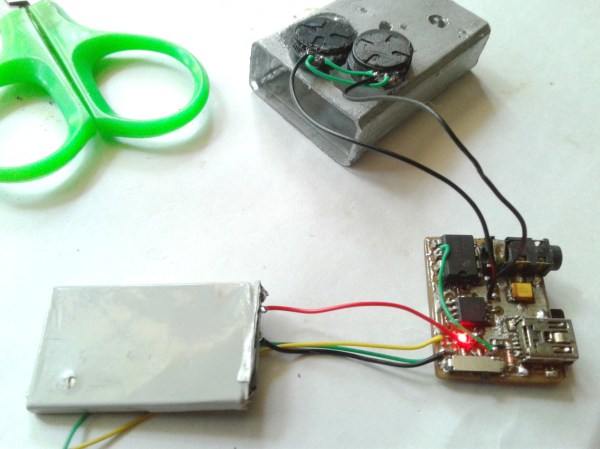
[Discreet Electronics Guy] sends in his very pocket sized boom box.

One thing we love about [Discreet Electronics Guy]’s projects is how they really showcase that a cool hack is possible without access to 3D printers, overnight PCB services, and other luxuries. Everything in this board is hand made by electronics standards. The board is etched, the vias are wires, and even the case seems to be a modified plastic mint container.

The boombox itself uses an ATiny85 at its core which plays .wav files from an SD card. This is routed through an audio amp which powers two small speakers. We love the volume knob being a board mount potentiometer. The device even features its own small LiON battery pack. If you don’t want to enjoy the deep sound of the two small speakers there’s a headphone jack.

He’s got a great write-up on the circuit design on his website and you can see a video of him presenting the project here or after the break.

Continue reading “A Box With A Pocket Sized Boom”

Super Easy Small Robot Wheels

Anyone who has delved into DIY wheels knows that they are a trickier than it may seem, especially if the wheels aren’t just for show and need to provide things like decent traction and durability. 3D printers have helped a lot, but they’re not a cure-all.

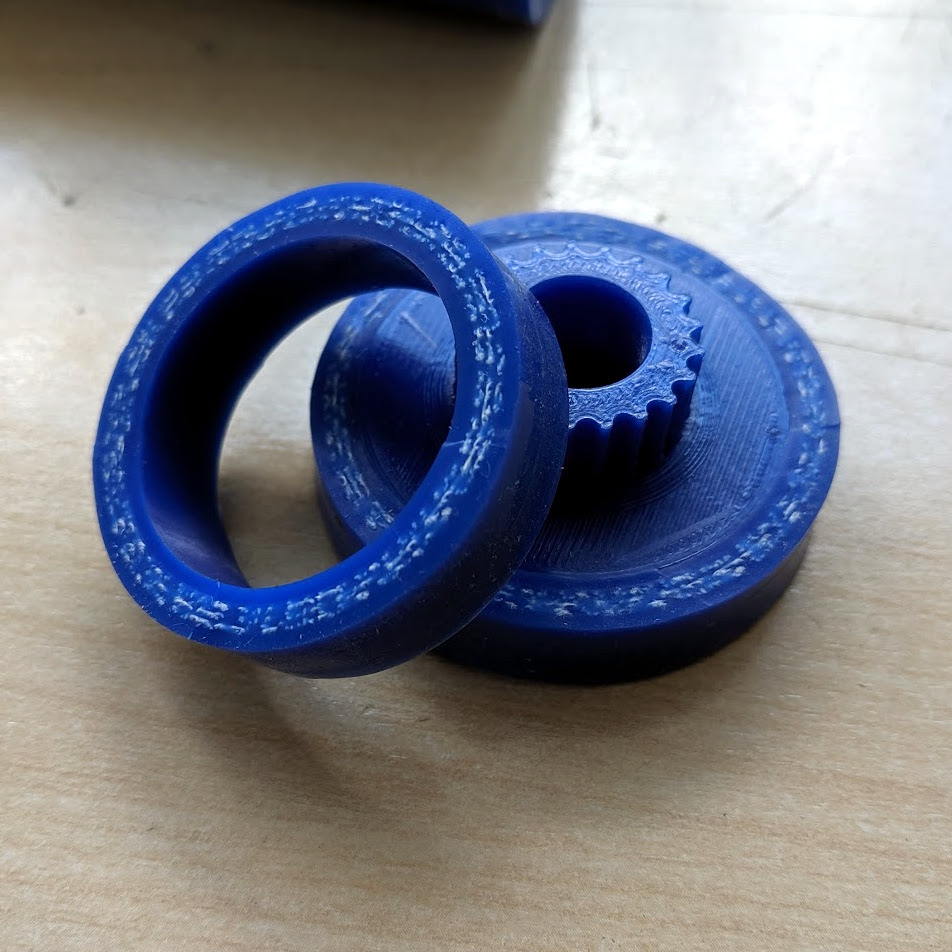
Check out how [Robert K.] makes wheels from segments of automotive silicone hose, which are constructed with fibers embedded within them for durability and structure. Not only are these hoses easily sourced, but the silicone makes a great wheel surface and the hoses themselves are highly durable. He uses a 3D printed jig to cut a slice of hose that press-fits perfectly onto a 3D printed hub. [Robert] finds that a 28 mm hose pulled over a 35 mm diameter wheel is a perfect fit.

These wheels are for a Beetleweight class combat robot, which are limited to three pounds (1.36 kg) or less. You can see some video of [Robert]’s previous Beetleweight robot named ‘Bourbon’, and we have featured what goes into the even-smaller Antweight class (one pound or less) in the past.

Degassing Epoxy Resin On The (Very) Cheap

Anyone who’s tried to encapsulate something in epoxy resin knows how much of a hassle air bubbles can be. If you’re trying to get a perfectly clear finish, the last thing you want is a bunch of microscopic bubbles frozen in time. The best way to prevent this is to put the parts in a vacuum chamber so all the air works its way out before the epoxy cures, but that’s a considerable investment for a one-off project.

But assuming your parts are small enough, [Jasper Sikken] has a great tip that allows you to construct a simple vacuum chamber for just a few dollars. He shows his homemade chamber off in the video after the break, and we think you’ll agree that the change between before and after is pretty dramatic. The best part is that if you want to build your own version, you only need two parts.

The first one is a airtight container large enough to hold the piece you’re working on. Remember that the larger the chamber is the more time it will take to pump down to a suitable vacuum, so avoid the temptation to use something larger than necessary. [Jasper] used a glass jar with a locking lid, which is not only cheap and readily available, but has a decently large internal volume.

Obviously, the second component is the vacuum pump itself. This might normally be a tall order, but [Jasper] recently found that you can buy small battery-powered gadgets designed for sucking the air out of food containers for as little as $5 USD from the usual import sites. All you need to do is pop a hole in the lid of your container, hold the device over the hole, and watch the magic.

This method is great for anything smaller than a paperweight, but if you’ve got something bigger than that, you’ll need to step up your chamber game. Luckily even larger vacuum chambers can be built cheaply at a pinch.

Continue reading “Degassing Epoxy Resin On The (Very) Cheap”