Liar’s 3D Printing: Multiple Colors With One Extruder

Good 3D printers now have multiple hot ends. You ought to be able to print in different colors or print support material. However, a lot of us don’t have multiple hot ends. Turns out, you don’t have to have multiple hot ends to print in multiple colors. To accomplish that you need a lot of patience and the willingness to tell bald-faced lies. Don’t worry, though, you’ll only be lying to some computer hardware and software, so that doesn’t count.

You may have seen people talk about putting a pause between layers to switch from one color to another. That works, but it limits your options. For example, if you want to put some colored text on a different colored background, you have to either have the text poke out, or it has to be “under” the background. It can’t be flush if you only have a single extruder and hot end. My method is a lot more trouble, but it can generate good results.

Keep in mind, with hobby-grade printers, multiple color printing has a lot of problems even if you do have multiple extruders. This isn’t a panacea. But you can get results on par with a similar printer that has multiple heads.

Bottom Line Up Front

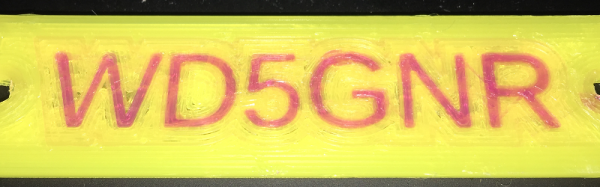
Here are a few pictures of test prints that use this technique. A Monoprice Mini printer with the stock extruder and hot end created them using different PLA filament. On the left is a test cube, with a color spot in the middle of the layers (as well as some spots on the top surface you can’t see). To the right is a plate with my call sign in a contrasting color. It is hard to tell in the picture, of course, but there is one surface. The text is at the same height as the yellow surface.

I didn’t spend a lot of time making these prints since I was more focused on perfecting the methodology. The layer heights aren’t very fine, the infill is sparse, and the print speed was fast. However, you could invest time into making better-looking prints. You can also use the usual techniques that you use with a “real” multi-extrusion printer (such as priming towers, ooze shields, etc.).

Continue reading “Liar’s 3D Printing: Multiple Colors With One Extruder”
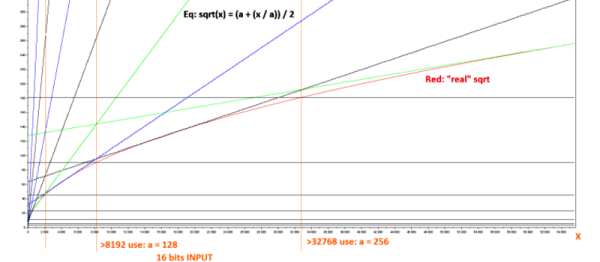
Ask Hackaday: Computing Square Roots On FPGA?

Hackaday reader [nats.fr] wrote in with some code from a project that resizes a video stream on the fly using an FPGA. Doing this right means undoing whatever gamma correction has been applied to the original stream, resizing, and then re-applying the gamma. Making life simpler, [nats.fr] settled on a gamma of two, which means taking a bunch of square roots, which isn’t fast on an FPGA.

[nats]’s algorithm is pretty neat: it uses a first-stage lookup to figure out in which broad range the value lies, and then one step of Hero’s algorithm to refine from there. (We think this is equivalent to saying he does a piecewise linear interpolation, but we’re not 100% sure.) Anyway, it works decently.

Of course, when you start looking into the abyss that is special function calculation, you risk falling in. Wikipedia lists more methods of calculating square roots than we have fingers. One of them, CORDIC, avoids even using multiplication by resorting to clever bitshifts and a lookup table. Our go-to in these type of situations, Chebyshev polynomial approximation, didn’t even make the cut. (Although we suspect it would be a contender in the gamma=1.8 or gamma=2.2 cases, especially if combined with range-reduction in a first stage like [nats.fr] does.)

So what’s the best/fastest approximation for sqrt(x) for 16-bit integers on an FPGA? [nats.fr] is using a Spartan 6, so you can use a multiplier, but division is probably best avoided. What about arbitrary, possibly fractional, roots?

Hackaday Links: December 25th, 2016

You should be watching the Doctor Who Christmas special right now. Does anyone know when the Resturant at the End of the Universe spinoff is airing?

We have a contest going on right now. It’s the 1 kB Challenge, a contest that challenges you to do the most with a kilobyte of machine code. The deadline is January 5th, so get cracking.

A few years ago, [Kwabena] created the OpenMV, a Python-powered machine vision module that doesn’t require a separate computer. It’s awesome, and we’re going to have his talk from the Hackaday SuperConference up shortly. Now the OpenMV is getting an upgrade. The upgrades include an ARM Cortex M7, more RAM, more heap for less money. Here’s a link to preorder.

There ain’t no demoscene party like an Amtrak demoscene party because an Amtrak demoscene party lasts ten hours.

E-paper displays are fancy, cool, and low-power. Putting them in a project, however, is difficult. You need to acquire these display modules, and this has usually been a pain. Now Eink has a web shop where you can peruse and purchase epaper display modules and drivers.

[Kris] built a pair of STM32L4 dev boards that are easily programmed in the Arduino IDE. Now he’s putting these boards up on Kickstarter. The prices are reasonable – $15 for the smaller of the pair, and $25 for the bigger one. Remember, kids: ARM is the future, at least until RISC-V takes over.

This is how you do holiday greeting cards.

Didn’t get what you want for Christmas?  Don’t worry, Amazon still has A Million Random Digits with 100,000 Normal Deviates in stock. It’s also available on audible dot com. Sometimes we don’t have time to sit down and read a million random digits but with audible dot com, you can listen to a million random digits in audio book format. That’s audible dot com please give us money.

northkoreaThis is the last Hackaday Links post of the year, which means it’s time for one of our most cherished traditions: reviewing our readership in North Korea.

It’s been a banner year for Hackaday in the Democratic People’s Republic of North Korea. The readership has exploded in 2016, with a gain of nearly 300%. To put that in perspective, in 2015 we had thirty-six views from North Korea across every page on Hackaday. In 2016, that number increased to one hundred and forty.

That’s a phenomenal increase and a yearly growth that is unheard of in the publishing industry. We’d like to tip our hat to all our North Korean reader, and we’re looking forward to serving you in 2017.

Creating A PCB In Everything: KiCad, Part 3

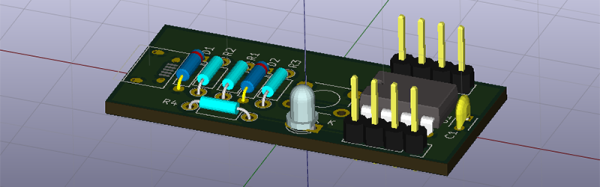
This is the third and final installment of a series of posts on how to create a PCB in KiCad, and part of an overarching series where I make the same schematic and board in dozens of different software tools. A few weeks ago, we took a look at making a schematic in KiCad, and more recently turned that schematic into a board ready for fabrication.

For our KiCad tutorials, we’ve already done the basics. We know how to create a PCB, make a part from scratch, and turn that into a board. This is the bare minimum to be considered competent with KiCad, but there’s so much more this amazing tool has to offer.

In part three of this KiCad tutorial, we’re going to take a look at turning our board into Gerbers. This will allow us to send the board off to any fab house. We’re going to take a look at DRC, so we can make sure the board will work once we receive it from the fab. We’re also going to take a look at some of the cooler features KiCad has to offer, including push and shove routing (as best as we can with our very minimalist board) and 3D rendering.

Continue reading “Creating A PCB In Everything: KiCad, Part 3”

Solving IoT Problems With Node.js For Hardware

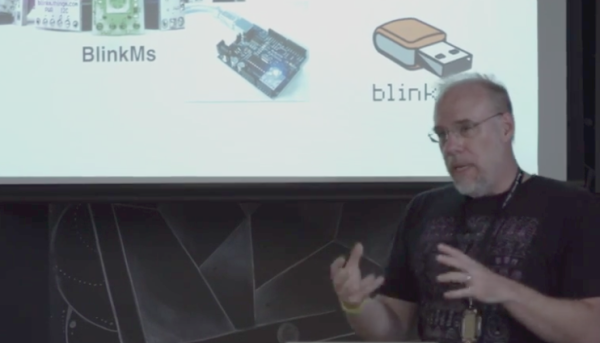
Tod Kurt knows a thing or two about IoT devices. As the creator of blink(1), he’s shipped over 30,000 units that are now out in the wild and in use for custom signaling on everything from compile status to those emotionally important social media indicators. His talk at the 2016 Hackaday SuperConference covers the last mile that bridges your Internet of Things devices with its intended use. This is where IoT actually happens, and of course where it usually goes astray.

Continue reading “Solving IoT Problems With Node.js For Hardware”

New Part Day: Better Pins

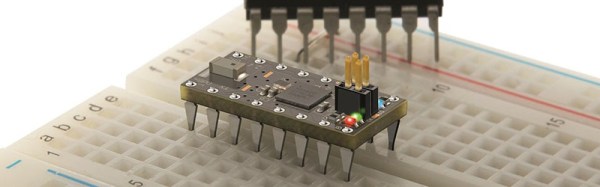
If you’re making a circuit that is designed to plug into a breadboard, you have a problem. Those 0.1″ header pins are square, and the metal leaf contacts inside a solderless breadboard will eventually get bent out of shape. You only need to look at the breadboards in a university electronics lab for evidence of this.

The solution to this problem is to make pins that are as similar as possible to the leads on DIP chips. They should be flat, of course, and it would be nice if they didn’t have those plastic spacers and didn’t present a blob of solder on the top side of the chip.

Flip-Pins are the answer. Think of them as standard pin headers, but meant for breadboard applications, and having a great aesthetic for your projects. They’re designed to look as much like standard IC pins as possible, and have the same thickness (0.020″) as standard DIP leads.

The application of Flip-Pins is a lot like soldering standard 0.1″ pin headers. The pins ship in neat little plastic retainers and can be tacked onto a PCB with just a little bit of solder. There’s a datasheet, and models for Altium, KiCad, and Eagle.

Flip-Pins grew out of another project, the OSHChip, to create an all-in-wonder chip containing an ARM microcontroller, radio, and a crossbar so any pin can be mapped to any peripheral. The OSChip itself is very cool, but one question constantly asked of the creator of this neat chip was, ‘where did you get those pins?’ From a factory. Now you can buy these pins from Evil Mad Scientist and Tindie. They’re a bit pricey, but they do look great.

Alan Yates: Why Valve’s Lighthouse Can’t Work

[Alan Yates] is a hacker’s engineer. His job at Valve has been to help them figure out the hardware that makes virtual reality (VR) a real reality. And he invented a device that’s clever enough that it really should work, but difficult enough that it wasn’t straightforward how to make it work.

In his presentation at the Hackaday Supercon 2016, he walked us through all of the design and engineering challenges that were eventually conquered in getting the Lighthouse to market. We’re still a bit overwhelmed by the conceptual elegance of the device, so it’s nice to have the behind-the-scenes details as well.

Continue reading “Alan Yates: Why Valve’s Lighthouse Can’t Work”