It’s Never Too Late To Upgrade Your ZX81 Keyboard

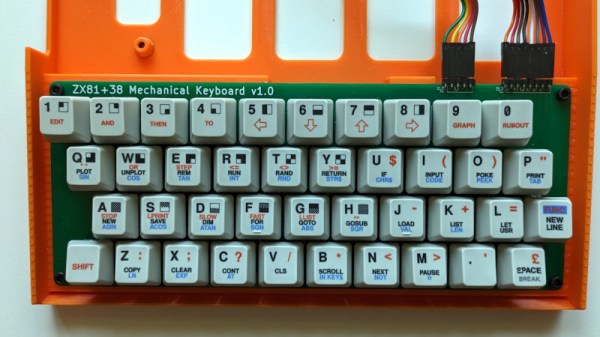
Sir Clive Sinclair’s ZX81 was a phenomenal sales success as one of the cheapest machines available in the early 1980s, but even its most fervent admirers will admit that it suffered heavily from the Sinclair economy drive. In particular that membrane keyboard was notorious for its lack of feedback, and a popular upgrade back in the day was a replacement keyboard. Now we can bring you what might be the ultimate in ZX replacement keyboards, in the form of [Brian Swetland]’s mechanical ZX81 keyboard.

The familiar 40-key layout is all there, using Cherry MX key switches and a beautiful set of custom-printed keycaps. There’s little more to a ZX keyboard than the matrix wiring, and in this case it’s all incorporated on a PCB. None of these techniques were readily available to individuals back in the ’80s, so a large piece of perfboard, key switches from an old terminal keyboard, and Letraset would have had to suffice.

We have to admit liking this project a lot, in fact we’re even tempted by a set of these keycaps for a regular keyboard just for old time’s sake. If you’re interested in the ZX81 then take a look at how we used one to help us through the pandemic.
Macro Pad Cheap Enough To Give Away

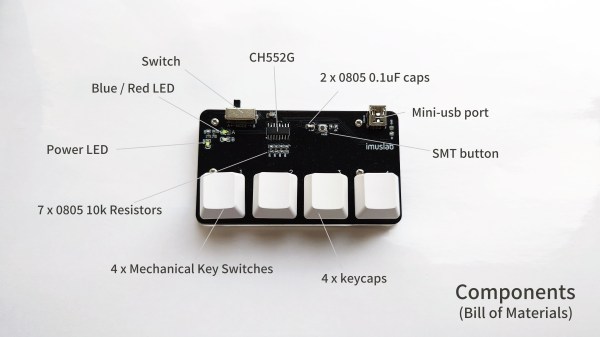
Supercon 2022 showed that hackers are starting to come together again in Maker Faires, conventions, and festivals. [Toby Chui] plans to be one of those hackers and wants something to give to fellow attendees. Thus, the $3 Macro Pad was born.

We’ve seen our fair share of macro pads, so a simple four-key pad isn’t exactly novel. However, the focus on size and cost makes it stand out. The pad is the size of a business card, making it easy to give away. For a microcontroller, [Toby] used a CH552G, which is cheap and compatible with the Arduino IDE. Although, with 10 GPIO, a matrix layout could have supported a full-sized number pad, the diodes required would have added to the cost significantly. A cheap PCB and 3d-printed base make up the device’s bulk.

[Toby] provides a handy tool for assigning keys from your browser without coding. However, the source code is on GitHub if you want to develop a more complicated scheme. This isn’t the first time we’ve featured the CH552 chip, and it likely won’t be the last.

Continue reading “Macro Pad Cheap Enough To Give Away”

Hall Sensors Offer Drop-In Replacement For Drifting Game Console Joysticks

No bananas were harmed in the making of this Hall effect drift-proof joystick replacement. OK, not really — two bananas were turned to mush. But it’s OK, they’re just bananas, after all.

Why bananas, you ask? Because [Marius Heier] uses them to demonstrate what we all intuitively know — that rubbing something over and over again tends to wear it away — but engineers seem to have forgotten. Wear such as this, with resistance material rather than fruits, is what causes the dreaded drift, a problem that the world collectively spends $20 billion a year dealing with, according to [Marius].

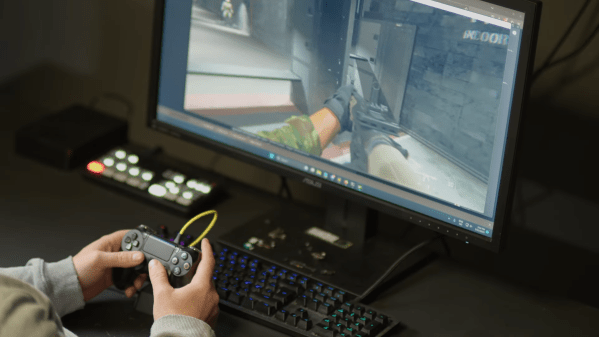
While numbers like that seem to be firmly in class-action lawsuit territory, sometimes it’s best to take matters into your own hands and not wait for the courts. The fix [Marius] shows here is to yank the potentiometers off a PS4 joystick and replace them with contactless Hall effect sensors. The end of the shaft for each axis gets a diametral neodymium magnet attached to it, while a 3D printed bracket holds a tiny custom PCB in close proximity. The PCB has an AS5600 Hall sensor, which translates the shaft angle to an analog voltage output. After programming the chip over its I2C bus, the sensor outputs a voltage proportional to the angle of each shaft, just like the original pots, but without all the wear and tear.

While [Marius] is selling these as drop-in replacements for PS4 controllers, he plans to release all the design files so you can build one yourself. He also has his sights set on replacements for PS5 and Xbox controllers, so watch for those. This isn’t his first foray into joystick hacking, having shared his 3D Hall effect and haptic feedback joysticks with us previously.

Continue reading “Hall Sensors Offer Drop-In Replacement For Drifting Game Console Joysticks”

Machining A Golf Ball To Make A Lovely Tactile Volume Knob

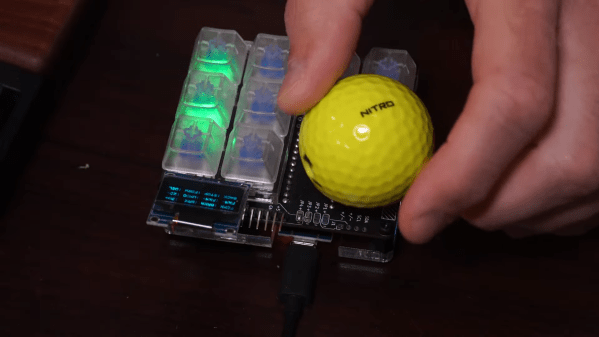
Golf balls are wonderfully tactile things. They have a semi-grippy covering, and they’re a beautiful size and weight that sits nicely in the hand. Sadly, most of them just get smacked away with big metal clubs. [Jeremy Cook] recognized their value as a human interface device, though, and set about turning one into a useful volume knob.

The trick here is in the machining. [Jeremy] used a 3D printed jig to hold a golf ball tightly in place so that it could be machined using a milling machine. With the bottom taken off and a carefully-designed 3D printed insert in the bottom, the golf ball is ready to be used as a knob for a volume control. As for the hardware side of things, [Jeremy] used an existing USB keypad, fitting the golf ball onto the encoder for volume and seek control in various programs.

The results sadly weren’t ideal. While the golf ball sits nicely upon the encoder, [Jeremy] found the device uncomfortable to use. Size may be an issue, but we also suspect the crowding of the surrounding buttons has a role to play. It forces the wrist into an uncomfortable curve to access the ball without hitting the surrounding controls. Without that, it may be greatly improved.

Files are available for those wishing to make their own. We don’t get a lot of golf ball builds here on Hackaday, but we’d love to see more. Hit up the tipsline if you’ve got ’em. Video after the break.

Continue reading “Machining A Golf Ball To Make A Lovely Tactile Volume Knob”

Active Racing Simulator Pedal

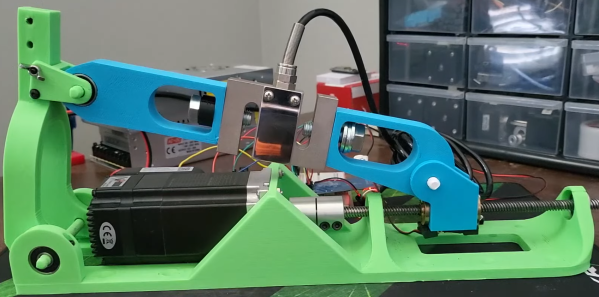
Racing virtual cars from behind a PC monitor might be cheaper than doing it in the real world, but high-end sim racing peripherals still come with high-end prices. With the increasing popularity of force-feedback pedals [Tristan Fenwick] built built an active pedal that can provide significant resistance.

[Tristan] integrated a load cell into the 3D printed pedal linkage, which is connected to a 130 W NEMA23 servo motor via a 8 mm lead screw. With constant feedback from the load cell, a simple PID controller running on an Arduino to actively adjust the pedal’s position and the amount of resistance it provides.

At ~$250 in parts, it’s a significantly more affordable than the $2300 price tag on a single Simucube pedal, which served as inspiration for this project. There are still some issues to address, such as shaky ADC readings and a lack of computing power on the Arduino, the demo video after the break looks incredibly promising. [Tristan] also notes that 300 kg is overkill and a slightly smaller servo motor would probably also work.

For more incredible simulator inspiration, check out the A-10 Warthog cockpit, a 3D printed flight sim yoke and pedals, and a tank driving simulator from before the age of computer graphics.

Continue reading “Active Racing Simulator Pedal”

New Drivers For Ancient Webcam

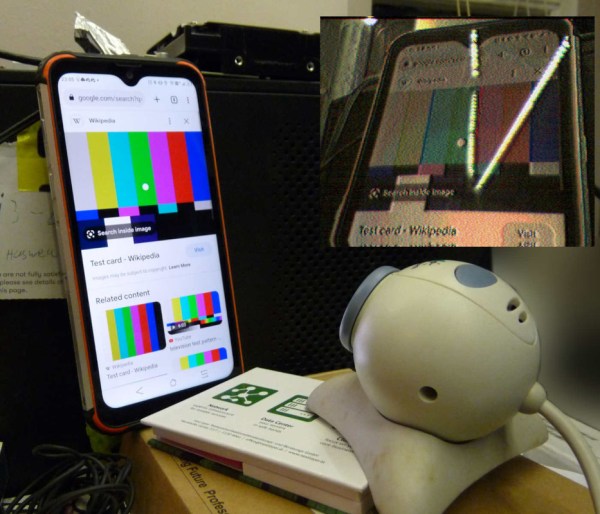
For those of us who are a little older, the 90s seem like they were just a few years ago. The younger folks might think that the 90s were ancient history though, and they might be right as we’ve been hearing more bands like Pearl Jam and The Offspring playing on the classic rock stations lately. Another example of how long ago the 90s were is taking a look at the technological progress that has happened since then through the lens of things like this webcam from 1999, presuming you load up this custom user space driver from [benjojo].

Thankfully the driver for this infamous webcam didn’t need to be built completely from scratch. There’s a legacy driver available for Windows XP which showed that the camera still physically worked, and there’s also a driver for Linux which was used as a foundation to start working from. From there a USB interface was set up which allowed communication to the device. Not a simple task, but apparently much easier than the next steps which involve actually interpreting the information coming from the webcam. This is where a background in digital signal processing is handy to have. First, the resolution and packet size were sorted out which led to a somewhat recognizable image. From there a single monochrome image was pieced together, and then after deconstructing a Bayer filter and adding color, the webcam is back to its former 90s glory.

[benjojo] has hosted all of the code for this project on a GitHub page for anyone who still has one of these webcams sitting around in the junk drawer. The resolution and color fidelity are about what we’d expect for a 25-year-old device that predates Skype, Facebook, Wikipedia, and Firefox. And, while there are still some things that need to be tweaked such as the colors, white balance, and exposure, once that is sorted out the 90s and early 00s nostalgia is free to flood in.

RP2040 Gets Intellikeys Keyboard Up And Running

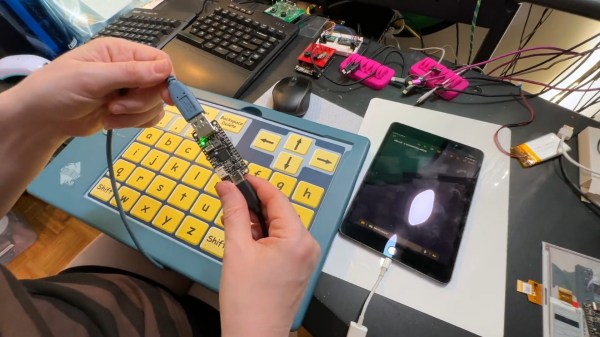
The Spectronic Intellikeys was an innovative keyboard-like accessibility device that used special plastic overlays that change its functionality. While a USB version of the accessible keyboard exists, it doesn’t work like a normal HID device, so it’s not plug and play as you might expect. It’s also no longer in production or supported by the manufacturer. Where industry falls down, the community steps in, right? To that end, Adafruit has built a tool for interfacing with these useful accessibility devices.

The key is the way the Intellikeys was intended to work with a computer. It was designed to download its firmware from the host machine, using special drivers that are only compatible with certain versions of Windows. That means you can’t use it with iPads or Chromebooks, for example.

To get around this, Adafruit used an RP2040 Feather configured as a USB host to talk to the Intellikeys. It queries the device, determines which overlay it currently has installed, and provides it the necessary firmware. On the other end, the Feather enumerates as a regular USB HID device. That allows it to work with a wide variety of tablets, computers, and even smartphones.

If you’ve got an Intellikeys USB device and miss using it, this could be just the thing you need. Meanwhile, you can check out some of the other interesting keyboard designs we’ve featured over the years.

Continue reading “RP2040 Gets Intellikeys Keyboard Up And Running”