[Quinn] Uses “Forsooth” To Win The Internet! –Also Fixes Apple IIc+ Beep

By this point we are all familiar with [Quinn Dunki] and her awesome engineering and retro hacking. [Quinn] aims her latest blog post at the Apple IIc Plus and its tone deaf bleeping beep. You can hear it for yourself in her beep comparison video after the break.

[Quinn] gets straight into the source code as expected and works through a logical process that she explains quite nicely while looking for the origin of the problem. There are some interesting and hard to follow moves in the source as control jumps around the ROM(s) all in the name of minimizing RAM. In proper form [Quinn] uses the ROM bank switching ability to her advantage as she see’s [the Woz’s] efficiency and raises him some fancy footwork of her own along with a beep that doesn’t make our skin crawl.

Continue reading “[Quinn] Uses “Forsooth” To Win The Internet! –Also Fixes Apple IIc+ Beep”

400 Transistors And 1800 Resistors Form This 1967 Personal Computer

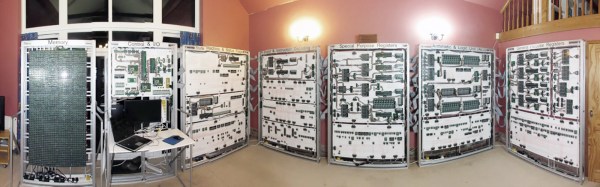
What kind of computer could you build in 1967? Well, if you were reading Wireless World (a UK magazine) and had a good bit of spare cash, you could build [Brian Crank’s] Wireless World Computer. You only needed 400 germanium transistors, 1800 resistors, and an odd number of capacitors, switches, diodes, and neon bulbs. You also needed a good bit of patience, we suspect.

In 1967, the computer cost about 50 pounds to build (perhaps $125 at 1967 exchange rates which would now be about $900 in today’s money). To save parts (and thus money and build complexity), the computer used a trick: it processed data one bit at a time. Many older computers did this, including another UK computer named EDSAC.

Continue reading “400 Transistors And 1800 Resistors Form This 1967 Personal Computer”

Wheel Of Password!

Before the rise of the Nintendo Gameboy, Tiger LCD games were the king of handheld gaming. Inexpensive and appealing to a wide audience, you still often find them “in the wild” or lurking in your house, even today. When [Lee] found a “Wheel Of Fortune” model laying low in a box, having a look inside and turning the handheld into something it’s not.

Being based on a game show, this specific model has a feature most Tiger handheld’s don’t: a cartridge slot. Originally intended to supply additional categories and phrases, the slot is a wide open bus to the internal CPU. It didn’t take long for the some probing with the Bus Pirate to decode the data protocol.

So what does one do with a hacked game show game? Well you could just make it say goofy stuff, or you could make it into a TOTP password generator. Future plans are to take off the computer umbilical cord and bit bang the cart slot with an AVR. Once done anyone, trying to break in to [Lee’s] PC will never suspect the innocent old toy is the key to the kingdom.

Join us after the break for a quick demo video

Continue reading “Wheel Of Password!”

AROS: Run An Amiga OS Like It’s 1993

We read this article on oddball open-source operating systems by [Bryan Lunduke] of the “Linux Action Show” podcast, and it caused us to play around in an Amiga-like operating system (running as a VM) for an hour. We’re pretty sure that you’ll succumb to the same fate. But even worse, the article is just the first in a series. There goes your weekend hacking productivity for the foreseeable future.

AmigaOS_3_and_clonesAROS is an open-source, API-compatible rewrite of the Amiga OS. Now, AROS is no fancy-schmancy AmigaOS4. No sir, the AROS project started in 1995 and settled on Amiga OS API version 3.1, and it stays true to its roots.

But this doesn’t mean that you’re going to have to give up the creature comforts of life in the 21st century. Get yourself a full-fledged AROS distribution, like icaros desktop, and you’ll find a pretty beefy ecosystem of applications included. It’s mostly what you’d want out of an Amiga — games, audio, video, and graphics editing software, a WebKit-based browser, and even a super-minimal word processor.

It’s retro, it’s sexy, and it’s fun. Just the ticket for running on that unused craptop gathering dust in the corner. (It’s also reported to run on Raspberry Pi running Linux.) Still not convinced? Lemmings.

Upgrade Your Computer The 1985 Way

Today when you want to upgrade your computer you slap in a card, back in the early 80’s things were not always as simple.  When [Carsten] was digging around the house he found his old, and heavily modified Rockwell AIM 65 single board computer, flipped the switch and the primitive 6502 machine popped to life.

Added to the computer was a pile of wires and PCB’s in order to expand the RAM, the I/O to form a “crate bus” and of course tons of LED blinkenlights! On that bus a few cards were installed, including a decoder board to handle all the slots, a monitor controller, a massive GPIO card, and even a universal EEPROM programmer.

If that was not enough there was even a OS upgrade from the standard issue BASIC, to a dual-boot BASIC and FORTH. Though again unlike today where upgrading your OS requires a button click and a reboot, making all these upgrades are planned out on paper, which were scanned for any retro computer buff to pour through.

[Carsten] posted a video of this computer loading the CRT initilization program from a cassette. You can watch, but shouldn’t listen to that video here.

BBC’s Micro:bit Gets Python

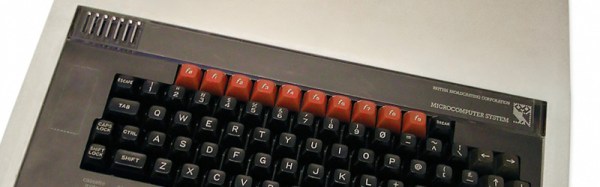
The BBC has developed a computer to be used by thousands of students across the UK. While not very powerful in terms of hardware, it comes with an interpreted language that will get students writing their own code and will launch the careers of an entire generation of web developers. This is, of course, the BBC Micro, a computer introduced in 1981, but is still deeply revered by millions of former students.

Microcontrollers are everywhere now, and the BBC is looking to replicate their success with the micro:bit. Unlike the BBC Micro, this isn’t a proper computer with a keyboard and a monitor. Instead, it’s a microcontroller development platform based on an ARM chip. Now, the micro:bit is getting Python, the BASIC of today, and will assuredly be even more useful in UK classrooms.

The initial development for Python on the micro:bit started down the road of using Microsoft’s TouchDevelop as a browser-based IDE that would send C++ code to an mBed cloud compilation service. A hex file would be generated, this would be downloaded to the local file system, and finally the student would simply drag the hex file over to the micro:bit since it appeared on the desktop as a USB storage device. This was a terrible idea, because MicroPython exists. The current way of running Python on the micro:bit is as simple as plugging it in to a USB port, opening a terminal, and writing some code. It’s the closest you’re ever going to get to a computer with BASIC in ROM, and it’s the best device for millions of 11-year-olds to learn how to code.

Thanks [dassheep] for the tip.

DIY Computer — 1968 Style

What does it mean to “build your own computer?” Today, it is likely to mean you bought a motherboard, a power supply, and a case and put it all together. You might even have made an embedded computer using a few chips, including an off the shelf CPU. However, there are those guys (like me) who have built entire computers using FPGAs and some (not like me) who have built computers out of TTL chips, discrete components, and even relays and we have covered quite a few of them.

It hasn’t always been that easy. Components are readily available now and relatively cheap (especially considering inflation). In the 1960’s, simple components cost more than you pay for them today and back then your hypothetical self was making less money. In just about every way imaginable, the cost was prohibitive.

clipSo what did you do if you were a kid saving money from a paper route in 1968 and you wanted to build a computer? Maybe you turned to How to Build a Working Digital Computer a book published in 1968 by [Edward Alcosser], [James Phillips], and [Allen Wolk]. This book did as the title promised: you could build a working digital computer. The components, though, were paper clips, tin cans, thread spools, and other household items. The only real electronic components you had to use were light bulbs and a battery, although you might also use store-bought switches in some places instead of the homemade versions shown in the book.

Continue reading “DIY Computer — 1968 Style”