This excellent content from the Hackaday writing crew highlights recurring topics and popular series like Linux-Fu, 3D-Printering, Hackaday Links, This Week in Security, Inputs of Interest, Profiles in Science, Retrotechtacular, Ask Hackaday, Teardowns, Reviews, and many more.
If you wanted me to demo CP/M running on an emulated Altair 8800, I’d pull out a tiny board from my pocket. You might wonder how I wound up with an Altair 8800 that runs CP/M (even WordStar), that fits in your pocket and cost less than $10. Turns out it’s a story that goes back to 1975.
When the Altair 8800 arrived back in 1975, I wanted one. Badly. I’d been reading about computers but had no hands-on experience. But back then, as far as I was concerned, the $400 price tag might as well have been a million bucks. I was working for no real pay in my family’s store, though in all fairness, adjusted into today’s money that was about $2,000.
I’d love to buy one now, but a real Altair costs even more today than it did back then. They also take up a lot of desk space. Sure, there are replicas and I’ve had a few. I even helped work the kinks out of Vince Briel’s clone which I’ve enjoyed. However, the Briel computer has two problems. First, it takes a little work to drive a serial port (it uses a VGA and a PS/2 keyboard). Second, while it’s smaller than a real Altair, it is still pretty large — a byproduct of its beautiful front panel.
So to quickly show off CP/M to someone, you need to haul out a big box and find a VGA monitor and PS/2 keyboard — both of which are becoming vanishing commodities. I made some modifications to get the serial port working, but it is still a lot to cart around. You could go the software route with a simulator like SIMH or Z80pack, but now instead of finding a VGA monitor and a PS/2 keyboard, you need to find a computer where you can install the software. What I really wanted was a simple and portable device that could boot CP/M.
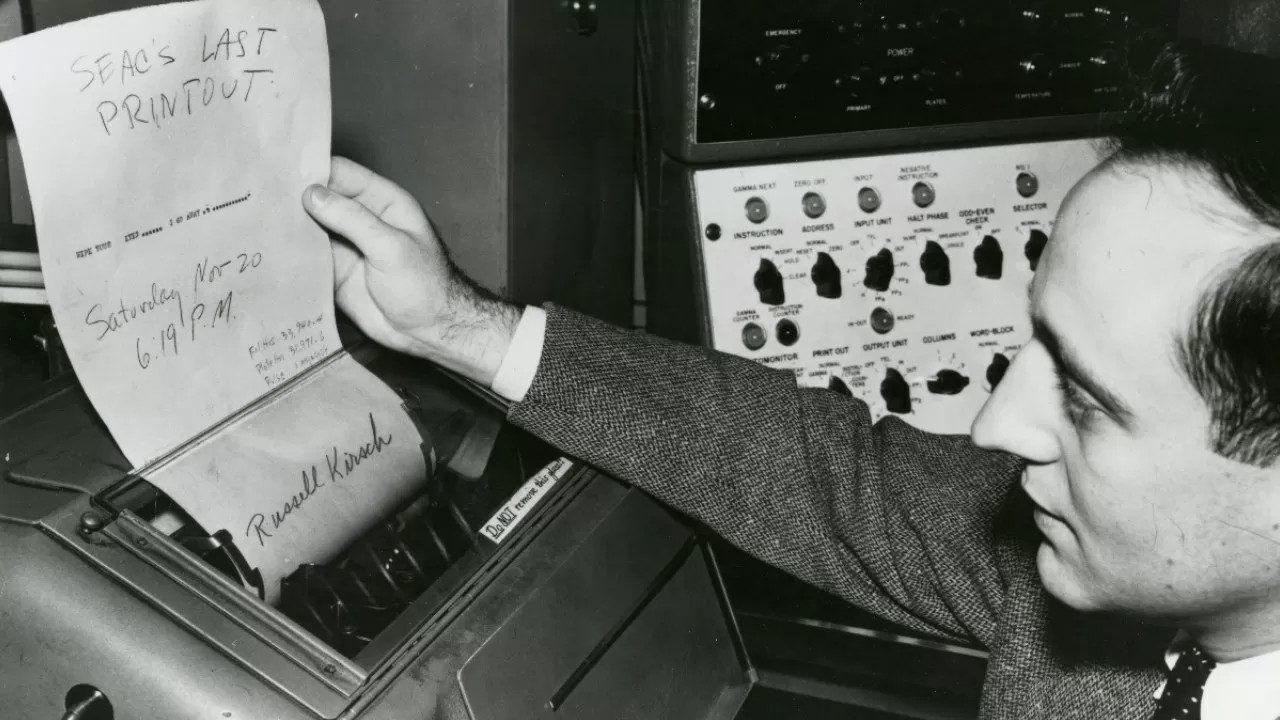
It’s true what they say — you never know what you can do until you try. Russell Kirsch, who developed the first digital image scanner and subsequently invented the pixel, was a firm believer in this axiom. And if Russell had never tried to get a picture of his three-month-old son into a computer back in 1957, you might be reading Hackaday in print right now. Russell’s work laid the foundation for the algorithms and storage methods that make digital imaging what it is today.
Russell reads SEAC’s last printout. Image via TechSpot
Russell A. Kirsch was born June 20, 1929 in New York City, the son of Russian and Hungarian immigrants. He got quite an education, beginning at Bronx High School of Science. Then he earned a bachelor’s of Electrical Engineering at NYU, a Master of Science from Harvard, and attended American University and MIT.
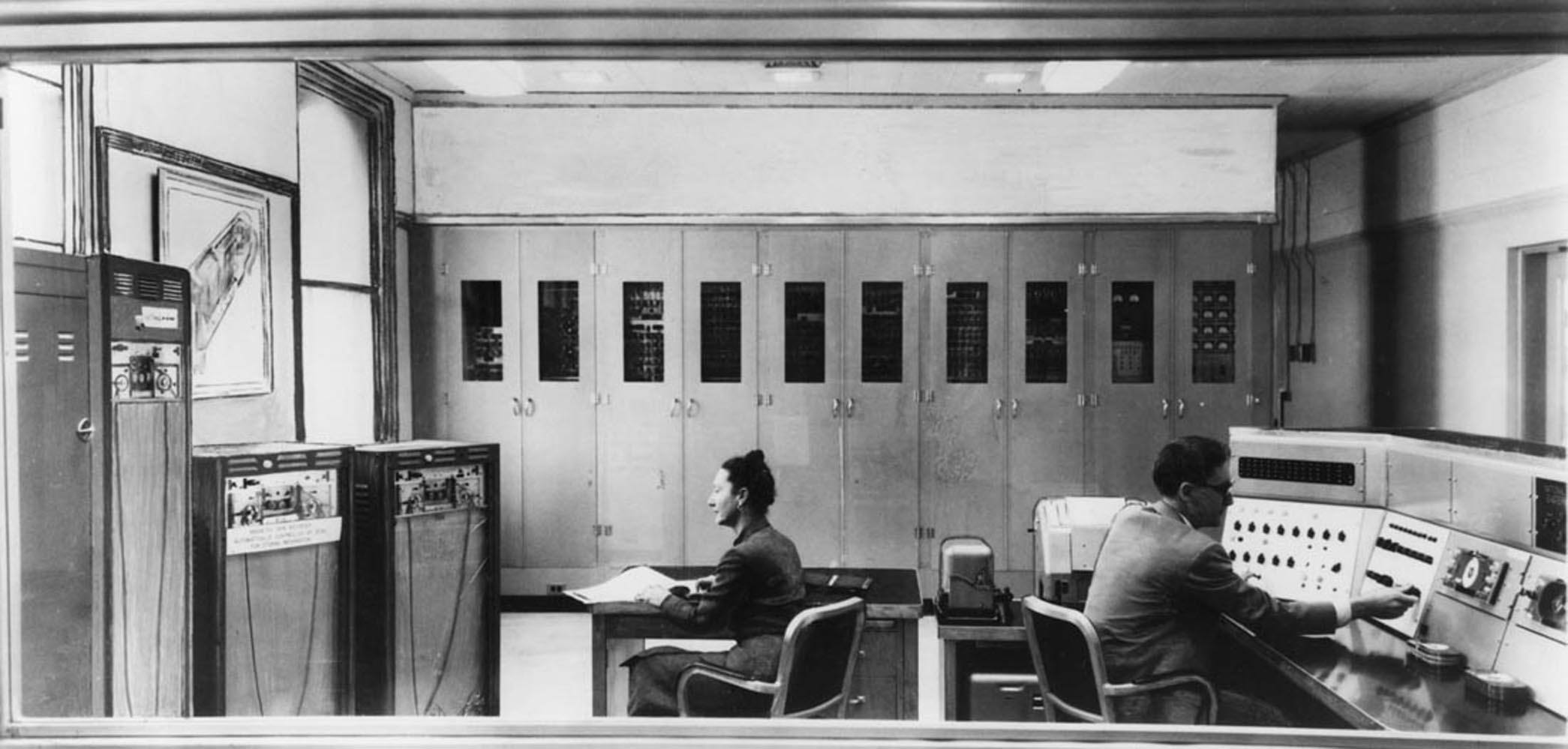
In 1951, Russell went to work for the National Bureau of Standards, now known as the National Institutes of Science and Technology (NIST). He spent nearly 50 years at NIST, and started out by working with one of the first programmable computers in America known as SEAC (Standards Eastern Automatic Computer). This room-sized computer built in 1950 was developed as an interim solution for the Census Bureau to do research (PDF).
Standards Eastern Automatic Computer (SEAC) was the first programmable computer in the United States. Credit: NIST via Wikimedia
Like the other computers of its time, SEAC spoke the language of punch cards, mercury memory, and wire storage. Russell Kirsch and his team were tasked with finding a way to feed pictorial data into the machine without any prior processing. Since the computer was supposed to be temporary, its use wasn’t as tightly controlled as other computers. Although it ran 24/7 and got plenty of use, SEAC was more accessible than other computers, which allowed time for bleeding edge experimentation. NIST ended up keeping SEAC around for the next thirteen years, until 1963.
The Original Pixel Pusher
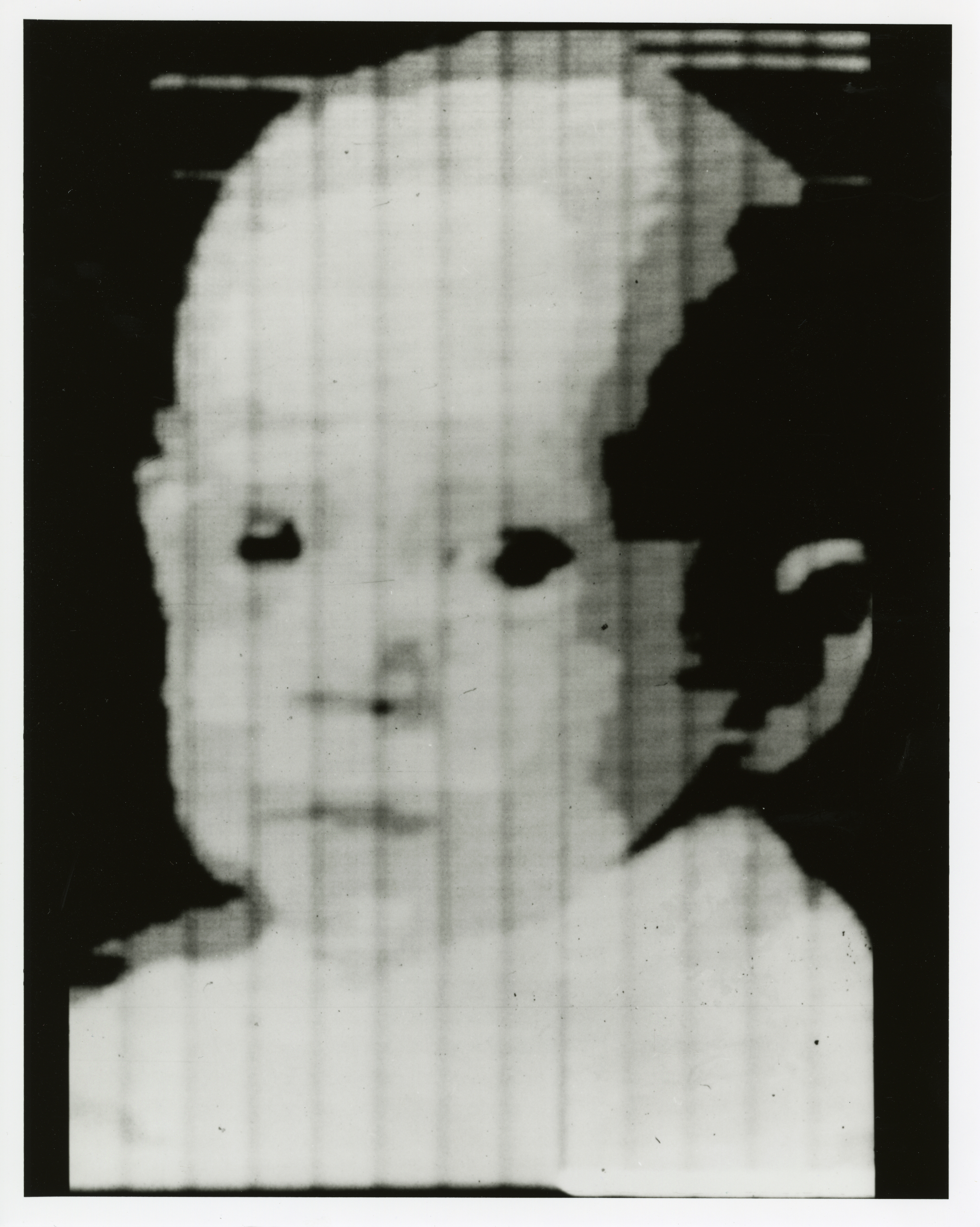
This photo of Russell’s son Walden is the first digitized image. Public Domain via Wikimedia
The term ‘pixel’ is a shortened portmanteau of picture element. Technically speaking, pixels are the unit of length for digital imaging. Pixels are building blocks for anything that can be displayed on a computer screen, so they’re kind of the first addressable blinkenlights.
As the drum slowly rotated, a photo-multiplier moved back and forth, scanning the image through a square viewing hole in the wall of a box. The tube digitized the picture by transmitting ones and zeros to SEAC that described what it saw through the square viewing hole — 1 for white, and 0 for black. The digital image of Walden is 76 x 76 pixels, which was the maximum allowed by SEAC.
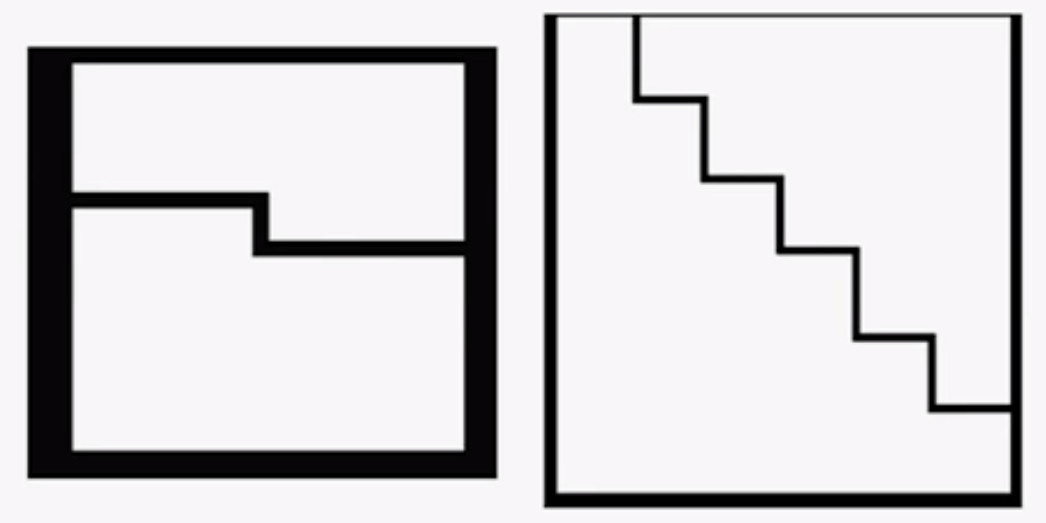
In in the video below, Russell discusses the idea and proves that variable pixels make a better image with more information than square pixels do, and with significantly fewer pixels overall. It takes some finagling, as pixel pairs of triangles and rectangles must be carefully chosen, rotated, and mixed together to best represent the image, but the image quality is definitely worth the effort. Following that is a video of Russell discussing SEAC’s hardware.
Russell retired from NIST in 2001 and moved to Portland, Oregon. As of 2012, he could be found in the occasional coffeehouse, discussing technology with anyone he could engage. Unfortunately, Russell developed Alzheimer’s and died from complications on August 11, 2020. He was 91 years old.
In 1960, Enzo Ferrari said “Aerodynamics are for people who can’t build engines”. It’s a quote that’s been proven laughably wrong in decades since. Aerodynamics are a key consideration for anyone serious about performance in almost any branch of motorsport. Today, we’ll take a look at how aero influences the performance of your car, and what modifications you might undertake to improve things.
Gains To Be Had
Improving the aerodynamics of your vehicle can mean wildly different things, depending on what your end goal is. Aerodynamics affects everything from top speed, to fuel economy, to grip, and optimizing for these different attributes can take wildly different routes. Often, it’s necessary to find a balance between several competing factors, as improvements in one area can often be detrimental in another.
To understand aerodynamics with regards to cars, we need to know about the forces of lift (or downforce), and drag. Drag is the force that acts against the direction of motion, slowing a vehicle down. Lift is the force generated perpendicular to the direction of motion. In the context of flight, the lift force is generated upwards with respect to gravity, lofting planes into the air. In an automotive context, we very much prefer to stay on the ground. Wings and aerodynamic surfaces on cars are created to create lift in the opposite direction, pushing the vehicle downwards and creating more grip. We refer to this “downwards lift” as downforce.
You normally think of a critical section — that is, a piece of a program that excludes other programs from using a resource — as a pretty advanced technique. You certainly don’t often think of them as part of shell scripting but it turns out they are surprisingly useful for certain scripts. Most often, a critical section is protecting some system resource like a shared memory location, but there are cases where a shell script needs similar protection. Luckily, it is really easy to add critical sections to shell scripts, and I’ll show you how.
Sometimes Scripts Need to Be Selfish
One very common case is where you want a script to run exactly one time. If the same script runs again while the original is active, you want to exit after possibly printing a message. Another common case is when you are updating some file and you need undisturbed access while making the change.
That was actually the case that got me thinking about this. I have a script — may be the subject of a future Linux-Fu — that provides dynamic DNS by altering a configuration file for the DNS server. If two copies of the script run at the same time, it is important that only one of them does modifications. The second copy can run after the first is totally complete.
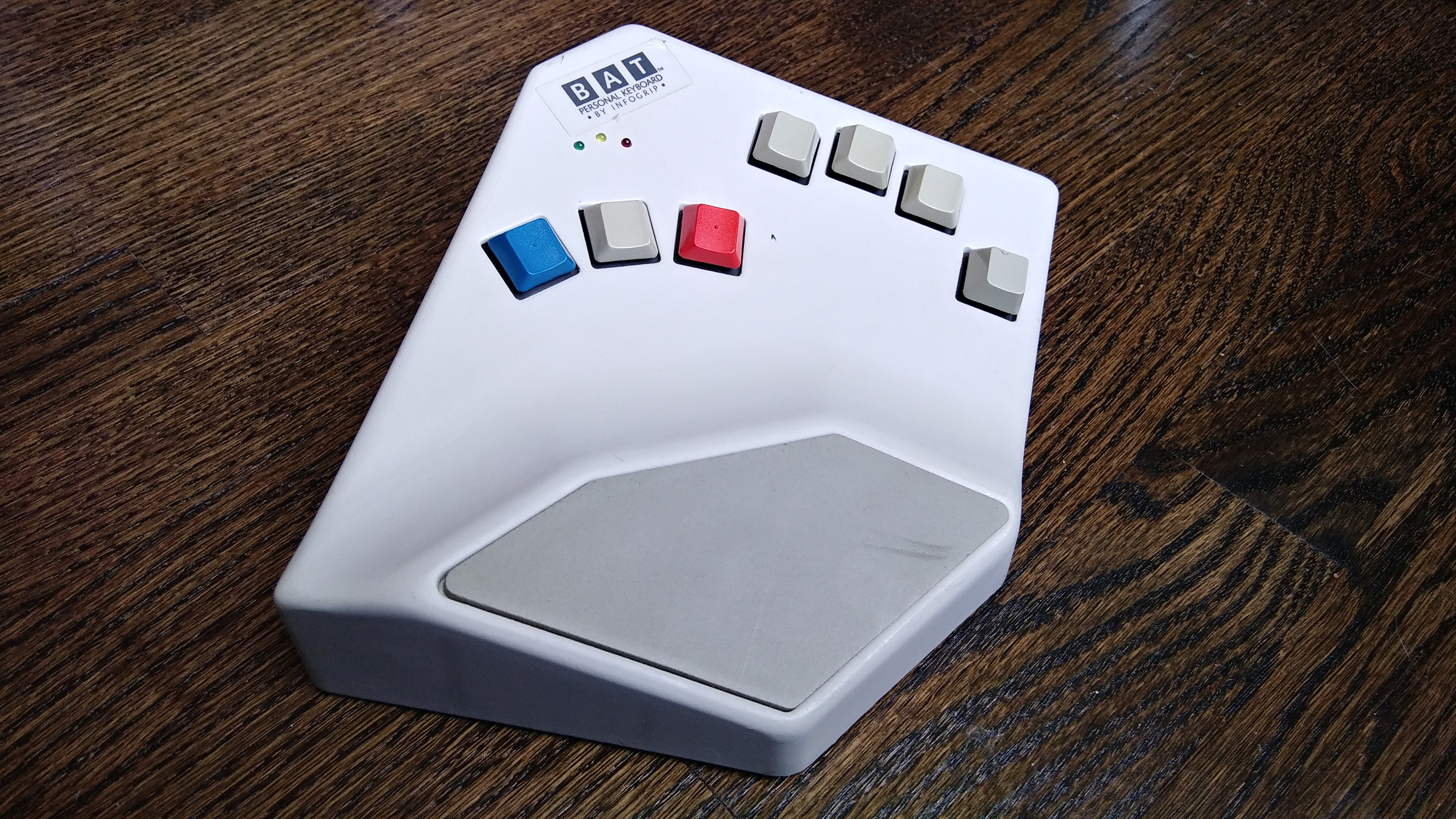
I guess it shouldn’t surprise me that by researching weird and interesting keyboards, I would uncover more weird and interesting keyboards. This is the BAT personal keyboard by Infogrip, and it’s something I came across while researching the DataHand keyboard and mentally filed away as something cool to look into.
When I came across a used BAT for a reasonable price, I snagged it, even though it didn’t come with any of the manuals or software, not even a cord. Like I said, reasonable price. I looked these keyboards up and found out that you can buy them new for a lot more than what I paid.
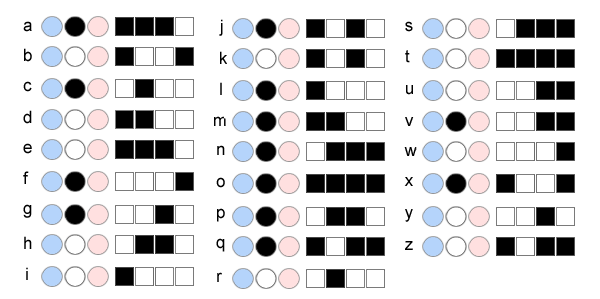
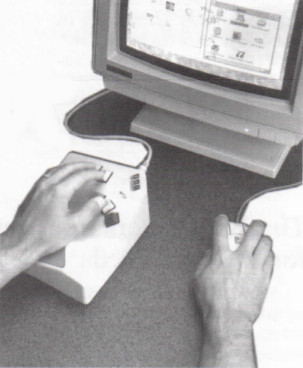
My gently used BAT in all its angular glory.The lowercase letter chords use either the middle thumb key or no thumb key. Image via Infogrip
Instead of stretching your fingers all over a regular keyboard, poking keys one at a time to spell out words, you press combinations of keys simultaneously, like playing chords on a piano.
You’re meant to use your thumb for the red, grey, and blue keys, and lay the other four on the rest of the keys. All of the alphabet keys are chorded with or without the gray thumb key, and all the number, symbol, and modifier keys are accessed through the red and blue layers.
Why would you want one of these? Well, given enough time to learn the chords, you can do anything a standard 104+ keyboard can do with only seven keys. You would never need to look down, not even for those weird seldom-used keys, and the only finger that ever travels is your thumb. All of this reduced hand/finger/wrist travel is going to be easier on the body.
The BAT lets you CAD like a madlad. Via Bill Buxton
The BAT is also part programmable macro pad, and from what I can gather, the main selling point was that you could quickly input shortcuts in CAD programs and the like, because you could keep one hand on the mouse.
The BAT came in both left- and right-handed versions that can be used either alone or together. Imagine how fast you could type if you chorded everything and split the typing duties between both hands! The only trouble is learning all those different finger combinations, although they say it doesn’t take that long.
We might’ve thought that extrusion based 3D printers have hit their peak in performance capabilities. With the remaining process variables being tricky to model and control, there’s only so much we can expect on dimensional accuracy from extruded plastic processes. But what if we mixed machines, adding a second machining process to give the resulting part a machined quality finish? That’s exactly what the folks at E3D have been cooking up over the last few years: a toolchanging workflow that mixes milling and 3D printing into the same process to produce buttery smooth part finishes with tighter dimensional accuracy over merely 3D printing alone.
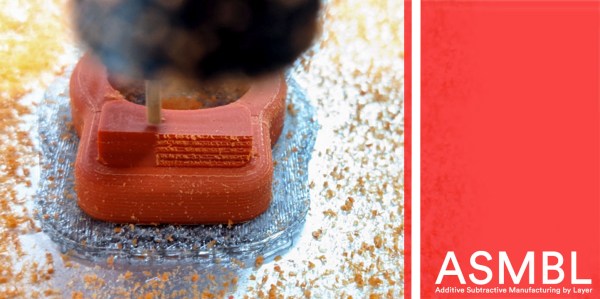
Dubbed ASMBL (Additive/Subtractive Machining By Layer), the process is actually the merging of two complimentary processes combined into one workflow to produce a single part. Here, vanilla 3D printing does the work of producing the part’s overall shape. But at the end of every layer, an endmill enters the workspace and trims down the imperfections of the perimeter with a light finishing pass while local suction pulls away the debris. This concept of mixing og coarse and fine manufacturing processes to produce parts quickly is a re-imagining of a tried-and-true industrial process called near-net-shape manufacturing. However, unlike the industrial process, which happens across separate machines on a large manufacturing facility, E3D’s ASMBL takes place in a single machine that can change tools automatically. The result is that you can kick off a process and then wander back a few hours (and a few hundred tool changes) later to a finished part with machined tolerances.
What are the benefits of such an odd complimentary concoction, you might ask? Well, for one, truly sharp outer corners, something that’s been evading 3D printer enthusiasts for years, are now possible. Layer lines on vertical surfaces all but disappear, and the dimensional tolerances of holes increases as the accuracy of the process is more tightly controlled (or cleaned up!) yielding parts that are more dimensionally accurate… in theory.
But there are certainly more avenues to explore with this mixed process setup, and that’s where you come in. ASMBL is still early in development, but E3D has taken generous steps to let you build on top of their work by posting their Fusion 360 CAM plugin, the bill-of-materials and model files for their milling tool, and even the STEP files for their toolchanging motion system online. Pushing for a future where 3d printers produce the finer details might just be a matter of participating.
It’s exciting to see the community of 3D printer designers continue to rethink the capabilities of its own infrastructure when folks start pushing the bounds beyond pushing plastic. From homebrew headchanging solutions that open opportunity by lowering the price point, to optical calibration software that makes machines smarter, to breakaway Sharpie-assisted support material, there’s no shortage of new ideas to play with in an ecosystem of mixed tools and processes.
Have a look at ASMBL at 2:29 in their preview after the break.
It doesn’t matter whether you know it as a railway, a railroad, a chemin de fer, or a 铁路, it’s a fair certainty that the trains near where you live are most likely to be powered either by diesel or electric locomotives. Over the years from the first horse-drawn tramways to the present day there haven’t been many other ways to power a train, and since steam locomotives are largely the preserve of museums in the 21st century, those two remain as the only two games in town.
But step back to the dawn of the railway age, and it was an entirely different matter. Think of those early-19th-century railway engineer-barons as the Elon Musks and Jeff Bezos’ of their day, and instead of space and hyperloop startups their playground was rail transport. Just as some wild and crazy ideas are spoken about in the world of tech startups today, so it was with the early railways. One of the best-known of these even made it to some real railways, I’m speaking of course about the atmospheric railway.
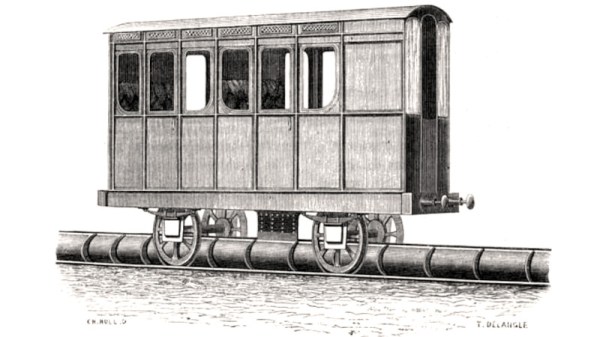
These trains were propelled not by a locomotive, but by air pressure pushing against a piston in a partially evacuated tube between the tracks.





 Dubbed ASMBL (Additive/Subtractive Machining By Layer), the process is actually the merging of two complimentary processes combined into one workflow to produce a single part. Here, vanilla 3D printing does the work of producing the part’s overall shape. But at the end of every layer, an endmill enters the workspace and trims down the imperfections of the perimeter with a light finishing pass while local suction pulls away the debris. This concept of mixing og coarse and fine manufacturing processes to produce parts quickly is a re-imagining of a tried-and-true industrial process called near-net-shape manufacturing. However, unlike the industrial process, which happens across separate machines on a large manufacturing facility, E3D’s ASMBL takes place in a single machine that can change tools automatically. The result is that you can kick off a process and then wander back a few hours (and a few hundred tool changes) later to a finished part with machined tolerances.