Ask Hackaday: What Can Be Done With Your Bootlooping Blu-Ray?

Last Friday, thousands of owners of Samsung Blu Ray players found that their home entertainment devices would no longer boot up. While devices getting stuck in a power-cycling loop is not uncommon, this case stands out as it affected a huge range of devices all at the same time. Samsung’s support forum paints a bleak picture, with one thread on the issue stretching to 177 pages in just a week.

So what is going on, and what can be done to fix the problem? There’s a lot of conflicting information on that. Some people’s gear has started working again, others have not and there are reports of customers being told to seek in-person repair service. Let’s dive in with some wild speculation on the problem and circle back by commiserating about the woes of web-connected appliances.

Continue reading “Ask Hackaday: What Can Be Done With Your Bootlooping Blu-Ray?”

Hackaday Podcast 073: Betrayal By Clipboard, Scratching 4K, Flaming Solder Joints, And Electric Paper

Hackaday editors Mike Szczys and Elliot Williams review a great week in the hacking world. There’s an incredible 4k projector build that started from a broken cellphone, a hand-cranked player (MIDI) piano, and a woeful story of clipboard vulnerabilities found in numerous browsers and browser-based apps. Plus you’ll love the field-ready solder splice that works like a strike-on box match (reminiscent of using thermite to weld railroad rail) and we spend some time marveling at the problem of finding power cuts on massive grid systems.

Take a look at the links below if you want to follow along, and as always, tell us what you think about this episode in the comments!

Take a look at the links below if you want to follow along, and as always, tell us what you think about this episode in the comments!

Direct download (60 MB or so.)

Continue reading “Hackaday Podcast 073: Betrayal By Clipboard, Scratching 4K, Flaming Solder Joints, And Electric Paper”

This Week In Security: Bitdefender, Ripple20, Starbucks, And Pwned Passwords

[Wladimir Palant] seems to be on a one man crusade against security problems in security software. The name may not be immediately recognizable, but among his other infamies is originating Adblock Plus, which we have a love-hate relationship with. (Look, surf the net with an adblocker, but disable it for sites you trust and want to support, like HaD).

This week, he announced a rather serious flaw in the Bitdefender. The disclosure starts off with high praise for the Bitdefender: “security-wise Bitdefender Antivirus is one of the best antivirus products I’ve seen so far….” Even with that said, the vulnerability he found is a serious one. A malicious website can trigger the execution of arbitrary applications. The problem was fixed in an update released on the 22nd.

Image by Wladimir Palant, CC BY-SA 4.0

The vulnerability is interesting. First, Bitdefender uses an API that was added to web browsers specifically to enable security software to work without performing man-in-the-middle decryption of HTTPS connections. When a problem is detected, Bitdefender replaces the potentially malicious page with it’s own error message.

Because of the way this is implemented, the browser sees this error message as being the legitimate contents of the requested site. Were this a static page, it wouldn’t be a problem. However, Bitdefender provides an option to load the requested page anyway, and does this by embedding tokens in that error page. When a user pushes the button to load the page, Bitdefender sees the matching tokens in the outgoing request, and allows the page. Continue reading “This Week In Security: Bitdefender, Ripple20, Starbucks, And Pwned Passwords”

Grey Gear: French TV Encryption, 1980s Style

Who among us didn’t spend some portion of their youth trying in vain to watch a scrambled premium cable TV channel or two? It’s a wonder we didn’t blow out our cones and rods watching those weird colors and wavy lines dance across the screen like a fever dream.

In the early days of national premium television in America, anyone who’d forked over the cash and erected a six-foot satellite dish in the backyard could tune in channels like HBO, Showtime, and the first 24-hour news network, CNN. Fed up with freeloaders, these channels banded together to encrypt their transmissions and force people to buy expensive de-scrambling boxes. On top of that, subscribers had to pay a monthly pittance to keep the de-scrambler working. Continue reading “Grey Gear: French TV Encryption, 1980s Style”

Netbooks: The Next Generation — Chromebooks

Netbooks are dead, long live the Chromebook. Lewin Day wrote up a proper trip down Netbook Nostalgia Lane earlier this month. That’s required reading, go check it out and come back. You’re back? Good. Today I’m making the case that the Chromebook is the rightful heir to the netbook crown, and to realize its potential I’ll show you how to wring every bit of Linuxy goodness out of your Chromebook.

I too was a netbook connoisseur, starting with an Asus Eee 901 way back in 2009. Since then, I’ve also been the proud owner of an Eee PC 1215B, which still sees occasional use. Only recently did I finally bite the bullet and replace it with an AMD based Dell laptop for work.

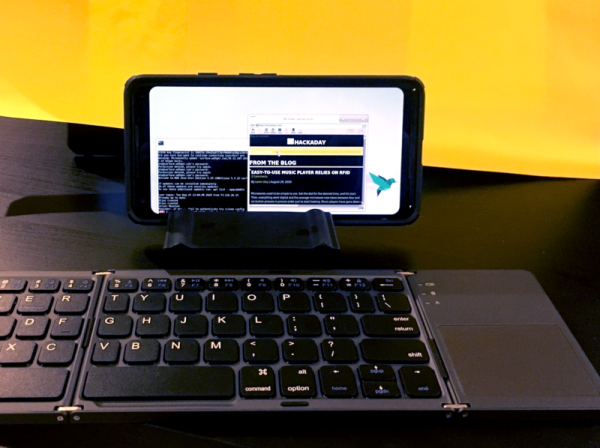
For the longest time, I’ve been intrigued by a good friend who went the Chromebook route. He uses a Samsung Chromebook Plus, and is constantly using it to SSH into his development machines. After reading Lewin’s article, I got the netbook bug again, and decided to see if a Chromebook would fill the niche. I ended up with the Acer Chromebook Tab 10, codename Scarlet. The price was right, and the tablet form factor is perfect for referencing PDFs.

Two Asus Netbooks and a ChromeOS tablet.
Behold, my netbook credentials.

The default ChromeOS experience isn’t terrible. You have the functionality of desktop Chrome, as well as the ability to run virtually any Android app. It’s a good start, but hardly the hacker’s playground that a Linux netbook once was. But we can still get our Linux on with this hardware. There are three separate approaches to making a Chromebook your own virtual hackspace: Crostini, Crouton, and full OS replacement.

Continue reading “Netbooks: The Next Generation — Chromebooks”

Ask Hackaday: Is Our Power Grid Smart Enough To Know When There’s No Power?

Just to intensify the feeling of impending zombie apocalypse of the COVID-19 lockdown in the British countryside where I live, we had a power cut. It’s not an uncommon occurrence here at the end of a long rural power distribution network, and being prepared for a power outage is something I wrote about a few years ago. But this one was a bit larger than normal and took out much more than just our village. I feel very sorry for whichever farmer in another village managed to collide with an 11kV distribution pole.

What pops to mind for today’s article is the topic of outage monitoring. When plunged into darkness we all wonder if the power company knows about it. The most common reaction must be: “of course the power company knows the power is out, they’re the ones making it!”. But this can’t be the case as for decades, public service announcements have urge us to report power cuts right away.

In our very modern age, will the grid become smart enough to know when, and perhaps more importantly where, there are power cuts? Let’s check some background before throwing the question to you in the comments below.

Continue reading “Ask Hackaday: Is Our Power Grid Smart Enough To Know When There’s No Power?”

Gigatron Hack Chat

Join us on Wednesday, June 24 at noon Pacific for the Gigatron Hack Chat with Walter Belgers!

There was a time when if you wanted a computer, you had to build it. And not by ordering parts from Amazon and plugging everything together in a case — you had to buy chips, solder or wire-wrap everything, and tinker endlessly. The process was slow, painful, and expensive, but in the end, you had a completely unique machine that you knew inside out because you put every bit of it together.

In some ways, it’s good that those days are gone. Being able to throw a cheap, standardized commodity PC at a problem is incredibly powerful, but that machine will have all the charm of a rubber doorstop and no soul at all. Luckily for those looking to get back a little of the early days of the computer revolution or those that missed them entirely, there are alternatives like the Gigatron. Billed as a “minimalistic retro computer,” the Gigatron is a kit that takes the builder back even further in time than the early computer revolution since it lacks a microprocessor. All the logic of the 8-bit computer is built up from discrete 7400-series TTL chips.

The Gigatron is the brainchild of Marcel van Kervinck and Walter Belgers. Tragically, Marcel recently passed away, but Walter is carrying the Gigatron torch forward and leading a thriving community of TTL-computer aficionados as they extend and enhance what their little home-built machines can do. Walter will stop by the Hack Chat to talk all things Gigatron, and answer your questions about how this improbably popular machine came to be.

join-hack-chatOur Hack Chats are live community events in the Hackaday.io Hack Chat group messaging. This week we’ll be sitting down on Wednesday, June 24 at 12:00 PM Pacific time. If time zones have you down, we have a handy time zone converter.

Click that speech bubble to the right, and you’ll be taken directly to the Hack Chat group on Hackaday.io. You don’t have to wait until Wednesday; join whenever you want and you can see what the community is talking about.
Continue reading “Gigatron Hack Chat”