Stretching The Definitions Of A Custom IC

Maker Faire is the nexus for all things new and exciting. At the Bay Area Maker Faire this weekend, zGlue introduced a new platform that stretches the definition of custom ICs. Is this custom silicon? No, not at all. zGlue is a platform allowing anyone to take off-the-shelf ICs and package them into a single module, allowing you to build a smaller PCB with a shorter BOM.

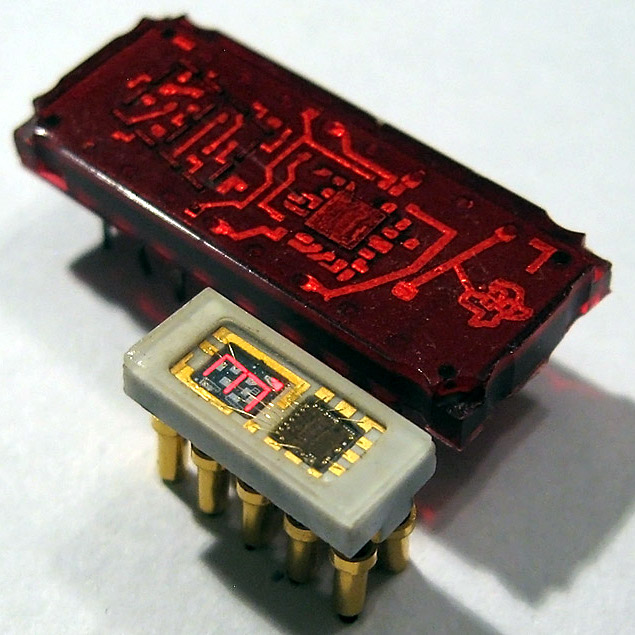
The zGlue module found in the zOrigin

The idea behind zGlue is to take all of the fun chips available today from accelerometers to tiny microcontrollers with integrated wireless and put them on a tiny, tiny board that is then encapsulated. At Maker Faire, the zGlue team was busy demonstrating their cloud-based platform that allows anyone to add off-the-shelf chips to the zGlue stack and assemble it into a custom module.

Of course, every new tech startup needs a demo, so zGlue has come up with zOrigin, a small fitness tracker that features a suite of chips crammed into one encapsulated package. The chips included in the zOrigin ZiP package are a Dialog DA14585 microcontroller with BLE, an Analog Devices heart rate monitor, a crystal, a bit of Flash, a power monitoring IC and an accelerometer. There are also thirty passives stuck in this single chip, and with a battery, some LEDs, and a vibration motor, this chip becomes a complete solution for wearable fitness trackers.

Shoving a bunch of chips into a single module is nothing new; most of wireless modules available on the market are just that. NextThingCo experimented with a Linux computer on a chip with the GR8 module, again, just a bunch of chips slathered in epoxy. The most visible benefit of custom modules is probably the Octavo System on a Chip that became the PocketBone.

While the ability to create custom modules from off-the-shelf chips is nothing new for manufacturers, the ability for anyone to create their own custom ICs has remained out of reach for the Average Joe hardware hacker. zGlue is the solution to this problem, and the prices seem fairly reasonable, starting at around $100 for the initial R&D.

Scrapped Motors Don’t Care About Direction

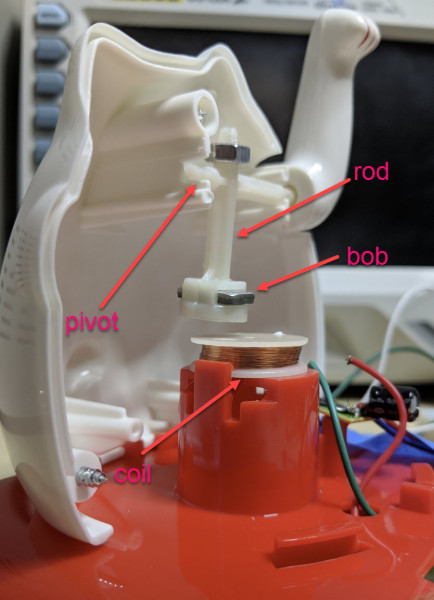
Spinners built into games of chance like roulette or tabletop board games stop on a random number after being given a good spin. There is no trick, but they eventually rest because of friction, no matter how hard your siblings wind up for a game-winning turn. What if the spinning continued forever and there was no programming because there was no controller? [Ludic Science] shows us his method of making a perpetual spinner with nothing fancier than a scrapped hard disk drive motor and a transformer. His video can also be seen below the break.

Fair warning: this involves mains power. The brushless motor inside a hard disk drive relies on three-phase current of varying frequencies, but the power coming off a single transformer is going to be single-phase AC at fifty or sixty Hz. This simplifies things considerably, but we lose the self-starting ability of the motor and direction control, but we call those features in our perpetual spinner. With two missing phases, our brushless motor limps along in whatever direction we initiate, but the circuit couldn’t be much more straightforward.

This is just the latest skill on a scrapped HDD motor’s résumé (CV). They will run with a 9V battery, or work backwards and become an encoder. If you want to use it more like the manufacturer’s intent, consider this controller.

Continue reading “Scrapped Motors Don’t Care About Direction”

Nuclear Synchroscope Gets New Life

The Synchroscope is an interesting power plant instrument which doubles up as two devices in one. If the generator frequency is not matched with the grid frequency, the rotation direction of the synchroscope pointer indicates if the frequency (generator speed) needs to be increased or decreased. When it stops rotating, the pointer angle indicates the phase difference between the generator and the grid. When [badjer1] [Chris Muncy] got his hands on an old synchroscope which had seen better days at a nuclear power plant control room, he decided to use it as the enclosure for a long-pending plan to build a Nixie Tube project. The result — an Arduino Nixie Clock and Weather Station — is a retro-modern looking instrument which indicates time, temperature, pressure and humidity and the synchroscope pointer now indicates atmospheric pressure.

Rather than replicating existing designs, he decided to build his project from scratch, learning new techniques and tricks while improving his design as he progressed. [badjer1] is a Fortran old-timer, so kudos to him for taking a plunge into the Arduino ecosystem. Other than the funky enclosure, most of the electronics are assembled from off-the-shelf modules. The synchroscope was not large enough to accommodate the electronics, so [badjer1] had to split it into two halves, and add a clear acrylic box in the middle to house it all. He stuck in a few LEDs inside the enclosure for added visual effect. Probably his biggest challenge, other than the mechanical assembly, was making sure he got the cutouts for the Nixie tubes on the display panel right. One wrong move and he would have ended up with a piece of aluminum junk and a missing face panel.

Being new to Arduino, he was careful with breaking up his code into manageable chunks, and peppering it with lots of comments, for his own, and everyone else’s, benefit. The electronics and hardware assembly are also equally well detailed, should anyone else want to attempt to replicate his build. There is still room for improvement, especially with the sensor mounting, but for now, [badjer1] seems pretty happy with the result. Check out the demo video after the break.

Thanks for the tip, [Chris Muncy].

Continue reading “Nuclear Synchroscope Gets New Life”

Open Source Calculator Teaches Us About Quality Documentation

Graphing calculators are one of those funny markets that never seem to change. Standardized testing has created a primordial stew of regulatory capture in which ancient technology thrives at modern retail prices while changing little. The NumWorks calculator certainly isn’t the first competitor to challenge the Texas Instruments dynasty with a more modern interface (and a design from this decade), but behind it’s subtle color pops and elegant lines lies the real gem; a fantastically well documented piece of open source hardware. The last time we wrote about the NumWorks, it was to demonstrate a pretty wild hack that embedded an entire Pi Zero but it’s worth drawing attention to the calculator itself.

Hackaday readers traveling to the NumWorks website might spy the section at the bottom of the page titled “Developers” with tantalizing links like “Hardware,” “Software,” and “GitHub.” These lead to a wealth of knowledge about how the product is put together and sources to build the enclosure and firmware yourself (the PCB schematic and layout sources seem to be missing, though there is this handy gerber viewer). However merely posting sources is a low bar NumWorks far exceeds.

How is the firmware put together? Here’s a handy architecture guide! Why did they choose C++ and what tradeoffs were made to fit everything in a resource constrained embedded system? Here’s a design guide! How exactly does the math engine take in text, comprehend the expression contained therein, and evaluate it? There’s a document for it! There’s even a multi-platform SDK setup guide.

Firmware documentation is old hat; we’ve come to expect (or at least hope!) for it. For us the most interesting documentation is actually for the mechanical and electrical systems. The EE guides start with part selection (with datasheet links) then move on to walkthroughs of major areas of the schematic. At this point is should be no surprise that the board has pads for a completely standard 10 pin ARM debug connector and documented test points for UART, SPI, and an SD card.

The mechanical pages read like a quick primer on design for injection molding and tricks to reduce assembly errors (called “poka-yoke“). Ever wondered what that funny frame plastic models come in is called? The NumWorks calculator’s buttons are made in one, and it’s called a “sprue”. There are pages describing each piece of the housing one at a time.

Treat yourself to a reading of NumWorks’ excellent documentation. And if you need a new calculator, maybe consider the open source option.

Continue reading “Open Source Calculator Teaches Us About Quality Documentation”

DIY SSR For Mains Switching

Typical power strips have their sockets tightly spaced. This makes it cumbersome to connect devices whose wall warts or power bricks are bulky — you end up losing an adjoining socket or two. And if the strip has a single power switch, you cannot turn off individual devices without unplugging them.

Planning to tackle both problems together, [Travis Hein] built himself some custom Dual SSR Controlled Socket Outlets for his workbench. He also decided to add remote switching ability so he could turn off individual sockets via a controller, Raspberry Pi, smartphone app or most ideally, a nice control panel on his desk consisting of a bank of switches.

The easiest solution for his problem would have been to just buy some off-the-shelf SSR or relay modules and wire them up inside his sockets. But he couldn’t find any with the features he wanted, and SSR’s were a little bit on the expensive side. Also, we wouldn’t have a project to write about – sometimes even the simple ones can show us a thing or two.

For starters, he walks us through a quick and simplified primer on figuring out thermal dissipation for the triacs which will be used on his boards. This is tricky since the devices are connected directly to utility voltage so he needs to take care of track clearances, mechanical separation as well as safety. However, for his first board prototypes, he did not add any heat sinking for the triacs, thereby limiting their use to low current loads. Since the SSR also needs to have a wide control voltage range, he describes how the two transistor constant-current input block works to limit opto-triac LED current over a range of 2 V to 30 V.

Before he moves on to his next prototype, [Travis] is looking for feedback to improve his design, make it safer, and figure out if it can pass safety protocols. Let him know via comments below.

Case Mod Takes “All In One” Printer To The Next Level

You’ve seen printers with scanners in them, printers with copiers in them, even ones with the ancient technology known as “facsimile” built-in. But have you ever seen a printer with a full gaming computer built into it? No? Well, you still haven’t, technically. There’s no printer to be had anymore inside this re-purposed HP Photosmart 6520 case, but it’s probably the closest we’re going to get.

[Jacob Lee] wrote in to share this awesome build with us, which sees the motherboard, graphics card, ATX power supply, and hard drives all fit seamlessly into the shell of a disused “All-in-one” style printer. Incredibly, he even managed to integrate an LCD into the top; which hinges open when in use and gives a look down into the madness that makes this build tick.

To say there’s a lot of hardware packed into this thing is an understatement. Which is all the more impressive when you consider that he] didn’t take the easy way out for any of it. He could have used a mini-ITX motherboard, or a slim PSU. He could have even dropped the graphics card for integrated. No, [Jacob] is clearly a subscriber to the “Go big or go home” ethos.

As if putting all this gear inside of a normal looking printer case wasn’t impressive enough, he even went as far as adding female ports for Ethernet, HDMI, and USB on the rear of the device to give it a stock look. He mentions there’s some room for improvement with the USB ports, but the power switch and IEC port really look like they could have been original components.

In the age of the Raspberry Pi and other diminutive computers, we don’t see too many proper desktop computer projects anymore. Fewer still that are so well executed and creative. We don’t know how many other people might be trying to stick a computer in a printer case, but if they’re out there, the bar has just been set pretty high.

DIY Variacs Get ESP8266 Upgrades

If you’be been hacking and making long enough, you’ve probably run into a situation where you realize that a previous project could be improved with the addition of technology that simply wasn’t available when you built it. Sometimes it means starting over from scratch, but occasionally you luck out and can shoehorn in some new gear without having to go back to the drawing board.

The two isolated variacs that [nop head] built were already impressive, but with the addition of the ESP8266 he was able to add some very slick additional features which really took them to the next level. He’s done an exceptional job detailing the new modifications, including providing all the source for anyone who might be walking down a similar path.

His variacs have digital energy meters right in the front panel which give voltage, amps, and a real-time calculation of watts. After reading an article by [Thomas Scherrer] about sniffing the SPI data out of one of these meters with an Arduino, [nop head] reasoned he could do the same thing with an ESP8266. The advantage being that he could then pull that data out over the network to graph or analyze however he wishes.

For his older variac, he decided to automate the device by adding a stepper and belt to turn the knob. The stepper is controlled by a Pololu stepper driver, which in turn get’s its marching orders from another ESP8266. He even came up with a simple web interface which allows you to monitor and control the variac from your smart device.

We don’t often see many variacs around these parts, and even fewer attempts at building custom ones. It’s one of those pieces of equipment you either can’t live without, or have never even heard of.