Your BOM Is Not Your COGS

“The prototype was $12 in parts, so I’ll sell it for $15.” That is your recipe for disaster, and why so many Kickstarter projects fail. The Bill of Materials (BOM) is just a subset of the Cost of Goods Sold (COGS), and if you aren’t selling your product for more than your COGS, you will lose money and go out of business.

We’ve all been there; we throw together a project using parts we have laying around, and in our writeup we list the major components and their price. We ignore all the little bits of wire and screws and hot glue and time, and we aren’t shipping it, so there’s no packaging to consider. Someone asks how much it cost, and you throw out a ballpark number. They say “hey, that’s pretty reasonable” and now you’re imagining making it in volume and selling it for slightly higher than your BOM. Stop right there. Here’s how pricing really works, and how to avoid sinking time into an untenable business.

Continue reading “Your BOM Is Not Your COGS”

“Yell To Press B” Mod Makes N64 Controller Worse

There’s probably no reason anyone would actually desire a mod like this. Well, no good reason. But [William Osman] had been pondering what it would be like to play some classic games with inputs other than buttons, and decided to make an audio sensor responsible for pressing the B button on an old N64 controller. This “Yell To Press B” mod was also something unique to show his hosts when he visited the YouTube video game aficionados, [Game Grumps].

[William] acknowledges that the build is a bit of a hack job, but the project page does a good job of documenting his build process and covering the kinds of decisions involved in interfacing to a separate piece of hardware. After all, most budding hackers have sooner or later asked themselves “how do I make my gadget press a button on this other thing?” [William] ends up using a small relay to close the connection between the traces for the B button when triggered by a microphone module, but he points out that it should be possible to do a non-destructive version of the mod. Examples exist of reading the N64 controller’s state with an Arduino, which could form the basis of a man-in-the-middle approach of “Yell To Press B” (or anything else) instead of soldering to the button contacts. A video is embedded below, in which you can watch people struggle to cope with the bizarre mod.

Continue reading ““Yell To Press B” Mod Makes N64 Controller Worse”

3D Printering: Blender Tips For Printable Objects

3D models drawn in Blender work great in a computer animated virtual world but don’t always when brought into a slicer for 3D printing. Slicers require something which makes sense in the real world. And the real world is far less forgiving, as I’ve found out with my own projects which use 3D printed parts.

Our [Brian Benchoff] already talked about making parts in Blender with his two-part series (here and here) so consider this the next step. These are the techniques I’ve come up with for preparing parts for 3D printing before handing them off to a slicer program. Note that the same may apply to other mesh-type modeling programs too, but as Blender is the only one I’ve used, please share your experiences with other programs in the comments below.

I’ll be using the latest version of Blender at this time, version 2.79b. My printer is the Crealty CR-10 and my slicer is Cura 3.1.0. Some of these steps may vary depending on your slicer or if you’re using a printing service. For example, Shapeways has instructions for people creating STLs from Blender for uploading to them.

Continue reading “3D Printering: Blender Tips For Printable Objects”

Tractor Drives Itself, Thanks To ESP32 And Open Source

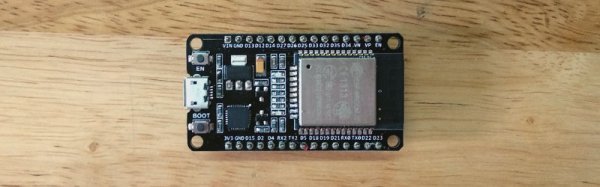
[Coffeetrac]’s ESP32-based Autosteer controller board, complete with OLD OLED display for debugging and easy status reference.
Modern agricultural equipment has come a long way, embracing all kinds of smart features and electronic controls. While some manufacturers would prefer to be the sole gatekeepers of the access to these advanced features, that hasn’t stopped curious and enterprising folks from working on DIY solutions. One such example is this self-steering tractor demo by [Coffeetrac], which demonstrates having a computer plot and guide a tractor through an optimal coverage pattern.

A few different pieces needed to come together to make this all work. At the heart of it all is [Coffeetrac]’s ESP32-based Autosteer controller, which is the hardware that interfaces to the tractor and allows for steering and reading sensors electronically. AgOpenGPS is the software that reads GPS data, interfaces to the Autosteer controller, and tells equipment what to do; it can be thought of as a mission planner.

[Coffeetrac] put it all together with everything controlled by a tablet mounted in the tractor’s cab. The video is embedded below, complete with a “cockpit view” via webcam right alongside the plotted course and sensor data.

Continue reading “Tractor Drives Itself, Thanks To ESP32 And Open Source”

The Negative Rail Explained

With the high availability of modular components and incredible wealth of information and tutorials online, it’s now easier than ever for hackers and makers to assemble complex electronic projects without getting bogged down with the theory behind it all. But the downside is that the modern electronic hobbyist often doesn’t have as deep an understanding of the low-level concepts that they would have if they had to build everything from scratch. This can be a problem when they try diagnosing and repairing faults, or when they start to branch out into reverse engineering.

Which makes “Building Blocks” by [David Christensen] a very compelling series. Every week he will be demonstrating a new circuit on his blog, complete with a plain English explanation of how and why it’s used. In this first installment of the series, he’s tackling a concept most of us have seen when poking around in more complex electronic devices, but maybe never really gave much thought to: the negative rail.

What exactly is the negative rail, anyway? It’s pretty easy to understand the positive rail in a circuit and its relation to ground; even multiple positive rails, such as in devices which use both 5 V and 3.3 V, are simple enough to wrap your head around. Unfortunately when something drops below that logical 0V reference, it isn’t quite as intuitive. But as [David] explains, the negative rail in a circuit is critical for dealing with bipolar signals, such as audio, which ride above and below the 0 V center point.

[David] goes over a few methods used to create the negative rail, from the classic center-tap transformer to using a buck-boost converter. But not content with just describing how these circuits work, he walks the reader through the creation of a charge pump circuit that you can drop into your next project if you find yourself in need of the elusive voltage. After explaining and diagramming it, he builds the circuit on a scrap piece of copper clad board and puts it through some benchmarks to prove it matches the theory he laid out.

If you’re in the mood for more negative talk, check out the battle our very own [Steven Dufresne] had with voltages of varying polarity when building his BB-8 robot.

Lightsaber Uses Pogo Pins To Make Assembly A Breeze

There was an endless supply of fantastic projects at Supercon this year, but one whose fit and finish really stood out was [Scott]’s lightsaber. If you were walking around and saw someone with a very bright RGB device with a chromed-out handle hanging off their belt it was probably this, though it may have been hard to look at directly. On the outside, the saber looks like a well-polished cosplay prop, and it is! But when Scott quickly broke down the device into component pieces it was apparent that extra care had been put into the assembly of the electronics.

Like any good lightsaber replica the blade is lit, and wow is it bright. The construction is fairly simple, it’s a triplet of WS2812B LED strips back to back on a triangular core, mounted inside a translucent polycarbonate tube with a diffuser. Not especially unusual. But the blade can be popped off the hilt at a moments notice for easy transport and storage, so the strips can’t be soldered in. Connectors would have worked, but who wants flying wires when they’re disconnecting their lightsaber blade. The answer? Pogo pins! Scott runs the power, ground, and data lines out of the strips and into a small board with slip ring-style plated rings. On the hilt, there is a matching array of pogo pins to pass along power and data. The data lines from all the strips are tied together minimizing the number of connections to make, and the outer two power rings have more than one pin for better current-carrying capacity. A handy side effect is that there is nowhere on the blade where there aren’t LEDs; the strips go down to the very end of the blade where it meets the main board inside the hilt.

The hilt is filled with an assembly of 18650’s and a Teensy mounted with a custom shield, all fit inside a printed midframe. The whole build is all about robust design that’s easy to assemble. The main board is book-ended by perpendicular PCBs mounted to the ends, one at the top to connect to the blade and one at the bottom to connect to a speaker. Towards the bottom there is space for an optional Bluetooth radio to allow remote RGB control.

Scott is selling this as a product but also provides detailed instructions and parts lists for each component. Assembly instructions for the blade are here. The hilt is here. And pogo adapters are on OSH Park here. An overview of the firmware with links to GitHub is here. Check out a walkthrough of the handle assembly and blade attachment after the break!

Continue reading “Lightsaber Uses Pogo Pins To Make Assembly A Breeze”

Making PCBs With A Cutting Plotter

[LudwigLabs] is creating PCBs using copper foil and a cutting plotter (vinyl cutter). In this approach, it’s an additive process where instead of removing copper from a copper-clad board, the traces are cut out of copper foil and transferred to a solid backing surface (cardboard, fiberglass, etc.).

While similar to the use of copper tape laid out by hand, as covered by us last year, the big advantage of using a cutting plotter is that it allows one to create much more complicated traces similar to those you would expect to see on a factory-made PCB. Since cutting plotters translate a 2D design into very precise movements of the cutting blade, this allows for sharp angles and significantly thinner traces, allows designs from EDA software like KiCad or Altium to be quickly translated to physical boards.

Enterprising hackers might consider the possibility of using this approach to make two-sided, and even multi-layered boards. The copper is produced separately from the substrate which opens up the potential for using uncommon materials like glass or paper to host the circuits. The main limitations are the transferring of (very delicate) copper structures and creating vias without damaging the traces.

As a comparison with traditional PCB fab processes, the photo exposure and etching (or laser exposure and etching) process requires the creation of masks, UV exposing a board, etching, cleaning and so on. The simplicity of copper foil traces has led to many experimenting with this approach. Would you want to use this additive process, or are there refinements or alterations you would make?