PIC Up A NeoPixel Ring And C What You Can Do Using This Tutorial

lit ringAs [Shahriar] points out in the introductory matter to his latest video at The Signal Path, Arduinos are a great way for a beginner to dig into all kinds of electronic excitement, but they do so at the cost of isolating that beginner from the nitty gritty of microcontrollers. Here, [Shahriar] gives a very thorough walkthrough of a 60-neopixel ring starting with the guts and glory of a single RGB LED. He then shows how that ring can easily be programmed using a PIC and some C.

[Shahriar]’s eval board is a simple setup that he’s used for other projects. It’s based on the PIC18F4550 which he’s programming with an ICD-U64. The PIC is powered through USB, but he’s using a separate switching supply to power the ring itself since he would need ~60mA per RGB to make them burn white at full brightness.

He’s written a simple header file that pulls in the 18F4550 library, sets the fuses, and defines some constants specific to the ring size. As he explains in the video, the PIC can create a 48MHz internal clock from a 20Mhz crystal and he sets up this delay in the header as well. The main code deals with waveform generation, and [Shahriar] does a great job explaining how this is handled with a single pin. Before he lights up the ring, he puts his scope on the assigned GPIO pin to show that although the datasheet is wrong about the un-delayed width of the low period for a zero bit, it still works to program the LEDs.

[Shahriar] has the code available on his site. He is also holding a giveaway open to US residents: simply comment on his blog post or on the video at YouTube and you could win either a TPI Scope Plus 440 with probes and a manual or a Tektronix TDS2232 with GPIB. He’ll even pay the shipping.

Continue reading “PIC Up A NeoPixel Ring And C What You Can Do Using This Tutorial”

800+ LED Wall With Diffuser Panel Is A Work Of Art

LED Wall

What happens when you take over 800 individually addressable super bright RGB LEDs and house them in a giant diffused panel? You get awesome. That’s what you get.

[Epoch Rises] is a small electronic music and interactive technology duo who create cool interactive projects (like this wall) for their live shows and performances. They love their WS2812B LEDs.

The cool thing about this wall is that it can take any video input, it can be controlled by sound or music, an iPad, or even generate random imagery by itself. The 800 LEDs are controlled by a Teensy 3.0 using the OctoWS2811 library from Paul Stoffregen which is capable of driving over 1000 LEDs at a whopping 30FPS using just one Teensy microcontroller. It works by using Direct Memory Access to send data over serial into the Teensy’s memory and directly out to the LEDs with very little overhead — it is a Teensy after all!

Continue reading “800+ LED Wall With Diffuser Panel Is A Work Of Art”

Quick And Dirty RFID Door Locks Clean Up Nice

homemade RFID Door Locks

[Shawn] recently overhauled his access control by fitting the doors with some RFID readers. Though the building already had electronic switches in place, unlocking the doors required mashing an aging keypad or pestering someone in an adjacent office to press a button to unlock them for you. [Shawn] tapped into that system by running some wires up into the attic and connecting them to one of two control boxes, each with an ATMega328 inside. Everything functions as you would expect: presenting the right RFID card to the wall-mounted reader sends a signal to the microcontroller, which clicks an accompanying relay that drives the locks.

You may recall [Shawn’s] RFID phone tag hack from last month; the addition of the readers is the second act of the project. If you’re looking to recreate this build, you shouldn’t have any trouble sourcing the same Parallax readers or building out your own Arduino on a stick, either. Check out a quick walkthrough video after the jump.

Continue reading “Quick And Dirty RFID Door Locks Clean Up Nice”

Make That C64 Keyboard Work As A USB Keyboard

keyboard-to-usb-mapping

Let’s face it, we all have keyboard peculiarities. Don’t try to deny it, everyone who types a lot has an opinion of the keyboard they stroke so frequently. We know [Brian Benchoff] swears by his model M, and we’re guessing he was the one that bumped into [Evan] and convinced him to write about his conversion of a Commodore 64 keyboard for use as a USB device.

This is not [Evan’s] first rodeo. We recently saw him fixing up the worn off letters of his own model M. But this time around there’s some clever microcontroller work at play. Apparently mapping 122 keys using an Atmel AVR 32u4 chip (built in USB connectivity) is quite a task. Luckily someone’s already worked out all kinds of good things and is sharing the love with the Soarer’s Keyboard Controller Firmware. Of course it handles scanning, but also includes debounce, muxing, and the trick to scan more keys than the uC has pins for. We still don’t fully understand that bit of it. But [Evan] did post the config file he’s using so perhaps after we get elbow-deep in the code we’ll have a better understanding.

If you give this a try, we want to hear about it. Anyone have any modern keyboards they’re in love with? Leave a comment below.

Add A Bluetooth Interface To Your Kitchen Scale

Kitchen scale

When [Adam] found himself in need of a force meter, he didn’t want to shell out the cash for a high-end model. Instead, he realized he should be able to modify a simple and inexpensive kitchen scale to achieve the results he desired.

The kitchen scale [Adam] owned was using all through hole components on a double-sided PCB. He was able to easily identify all of the IC’s and find their datasheets online. After doing some research and probing around with a frequency counter, he realized that one of the IC’s was outputting a frequency who’s pulse width was directly proportional to the amount of weight placed on the scale. He knew he should be able to tap into that signal for his own purposes.

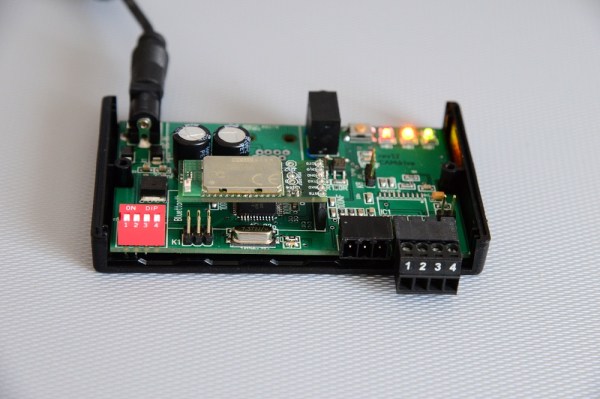
[Adam] created his own custom surface mount PCB, and used an ATMega8 to detect the change in pulse width. He then hooked up a Bluetooth module to transmit the data wirelessly. These components required no more than 5V, but the scale runs from two 3V batteries. Using what he had on hand, [Adam] was able to lower the voltage with just a couple of diodes.

[Adam] managed to cram everything into the original case with little modification. He is now considering writing an Android application to interface with his upgraded kitchen scale.

An Amazing DIY Single Board ARM Computer With BGA

DIY Single Board Computer ARM

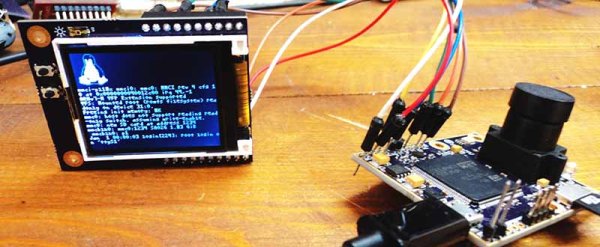
Typically, you buy a single board Linux computer. [Henrik] had a better idea, build his own ARM based single board computer! How did he do it? By not being scared of ball grid array (BGA) ARM processors.

Everyone loves the Raspberry Pi and Beagle Board, but what is the fun in buying something that you can build? We have a hunch that most of our readers stay clear of BGA chips, and for good reason. Arguably, one of the most important aspects of [Henrik’s] post is that you can easily solder BGAs with cheaply available tools. OSH Park provides the inexpensive high-quality PCBs, OSH Stencils provides the inexpensive stencils, and any toaster oven allows you to solder even the most difficult of components. Not only does he go over the PCB build, he also discusses the bootloader, u-boot, and how to get Linux running.

Everything worked out very well for [Henrik]. It’s a good thing too, cause we sure wouldn’t want to debug a PCB as complicated as this one. What projects have you built that use a BGA? Let us know how it went!

Connect 4 Robot Taunts You Before Kicking Your Butt

Connect 4 Robot

[Patrick McCabe] is a student at MIT and for his final project in his Microcomputer Project Laboratory course he decided to build a clever Connect 4 Robot.

The only criteria for the project was that you have to use the Cypress PSOC 5LP kit along with a 8051 micro-controller or equivalent (programmed in the same assembly language as the PSOC). All in all, [Patrick] had 5 weeks to work on the project.

He’s using a regular old Connect 4 game along with an assortment of custom parts. A stepper motor drives the token carriage back and forth across a 15″ aluminum channel using a timing belt. A servo releases the tokens, and all the other components, brackets, and other pieces were either made with his very own UP Mini 3D printer, or out of acrylic using the school’s laser cutter. It’s an extremely clean and well thought out build, and he’s actually uploaded all the custom part files (in SolidWorks format) online, for others to build their own.

Continue reading “Connect 4 Robot Taunts You Before Kicking Your Butt”