the RP2040 stamp

Putting The RP2040 On A Stamp

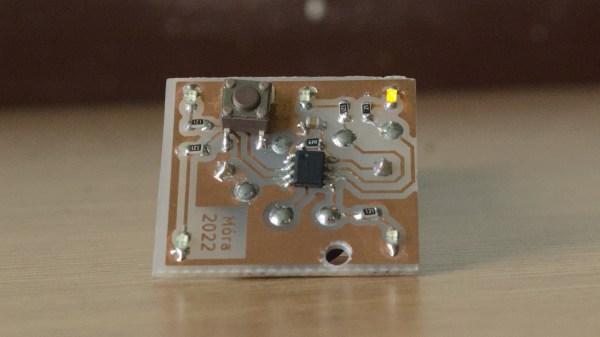
In the electronics world, a little one-inch square board with castellated edges allows a lot of circuitry to be easily added in a small surface area. You can grab a prepopulated module, throw it onto your PCB of choice, and save yourself a lot of time routing and soldering. This tiny Raspberry Pi 2040 module from [SolderParty] ticks all those boxes.

With all 30 GPIO broken out, 8MB of onboard flash, and a NeoPixel onboard, you have plenty to play with on top of the already impressive specs of the RPi2040. Gone are the days of in-circuit programmers, and it uses a UF2 bootloader to make it easy B to transfer new images over USB. Rust, MicroPython, Arduino, and the PicoSDK are all development options for code. All the KiCad files, BOM, schematics, and firmware are up on GitHub under a CERN license for your perusal pleasure. They’ve helpfully included footprints as well as a reference carrier board design.

It is a handy little project that might be good to keep in mind or just use as a reference design for your efforts. We have a good overview of the RPi2040 from an STM perspective. If you’re curious about what you could even use this little stamp for, why not driving an HDMI signal?

ESP32 composite library with LVGL demo. (Credit: aquaticus)

Generating Composite Video On ESP32 With LVGL GUI

RCA connector mounted to ESP32 board. (Credit: aquaticus)

Just because a microcontroller doesn’t have a dedicated video peripheral doesn’t mean it cannot output a video signal. This is demonstrated once again, this time on the ESP32 by [aquaticus] with a library that generates PAL/SECAM and NTSC composite signals. As a finishing touch on the hardware side, [aqaticus] added an RCA jack is an optional extra. The composite signal itself is generated on GPIO 25, with the selection from a wide number of PAL and NTSC resolutions.

In addition, LVGL support is integrated: this is an open-source library that provides a cross-platform way to provide graphical UIs for embedded platforms. Using this combination any ESP32 can generate a fully graphical UI on a monochrome or color display to add some extra flair and functionality to an ESP32 project.

Currently, this library does not support color output, but hopefully this will be added in the future. Even so, together with simple VGA output using a DAC, this library provides yet another way to add analog video output to ubiquitous MCUs like the ESP32. Even if these MCUs are not going to be decoding any video formats at a reasonable speed, adding a UI that’s more user-friendly than an HD44780-based display and a few buttons can really elevate the user experience.

An assortment of MemoryStick cards and devices, some of them, arguably cursed, like a MemoryStick-slot-connected camera.

Hacker Challenges MemoryStick To A Fight And Wins

It’s amazing when a skilled hacker reverse-engineers a proprietary format and shares the nitty-gritty with everyone. Today is a day when we get one such write-up – about MemoryStick. It is one of those proprietary formats, a staple of Sony equipment, these SD-card-like storage devices were evidently designed to help pad Sony’s pockets, as we can see from the tight lock-in and inflated prices. As such, this format has always remained unapproachable to hackers. No more – [Dmitry Grinberg] is here with an extensive breakdown of MemoryStick protocol and internals.

If you ever want to read about a protocol that is not exactly sanely designed, from physical layer quirks to things like inexplicable large differences between MemoryStick and MemoryStick Pro, this will be an entertaining read for hackers of all calibers. Dmitry doesn’t just describe the bad parts of the design, however, as much as that rant is entertaining to read – most of the page is taken by register summaries, struct descriptions and insights, the substance about MemoryStick that we never got.

One sentence is taken to link to a related side project of [Dmitry] that’s a rabbithole on its own – he has binary patched MemoryStick drivers for PalmOS to add MemoryStick Pro support to some of the Sony Clie handhelds. Given the aforementioned differences between non-Pro and Pro standards, it’s a monumental undertaking for a device older than some of this site’s readers, and we can’t help but be impressed.

To finish the write-up off, [Dmitry] shares with us some MemoryStick bit-banging examples for the STM32. Anyone who ever wanted to approach MemoryStick, be it for making converter adapters to revive old tech, data recovery or preservation purposes, or simply hacker curiosity, now can feel a bit less alone in their efforts.

We are glad to see such great hacking on the MemoryStick front – it’s much needed, to the point where our only article mentioning MemoryStick is about avoiding use of the MemoryStick slot altogether. [Dmitry] is just the right person for reverse-engineering jobs like this, with extensive reverse-engineering history we’ve been keeping track of – his recent reverse-engineering journey of an unknown microcontroller in cheap E-Ink devices is to behold.

A small circuit board glowing purple inset with computer code

Power Cycling Museum Computers On The Cheap

Flicking a circuit breaker to power cycle hundreds of desktop computers inside interactive museum exhibits is hardly ideal. Computers tend to get cranky when improperly shutdown, and there’s an non-zero risk of data loss. However, financial concerns ruled out commercial computer management solutions, and manually shutting down each exhibit at the end of the day is not practical. Tasked with finding a solution, [Jeff Glass] mixed off-the-shelf UPS (uninterruptible power supply) hardware, a Featherwing and some Python to give the museum’s computer-run exhibits a fighting chance.

Without drastically changing the one-touch end-of-day procedure, the only way to properly shutdown the hundreds of computers embedded in the museum exhibits involved using several UPS units, keeping the PCs briefly powered on after the mains power was cut. This in itself solves nothing – while the UPS can trigger a safe shutdown via USB, this signal could only be received by a single PC. These are off-the-shelf consumer grade units, and were never intended to safely shut down more than one computer at a time. However, each 300 watt UPS unit is very capable of powering multiple computers, the only limitation is the shutdown signal and the single USB connection.

To get around this, the Windows task scheduling service was setup to be triggered by the UPS shutdown signal, which itself then triggered a custom Python script. This script then relays the shutdown signal from the UPS to every other computer in the museum, before shutting itself down for the evening.

While many computers can be enabled to boot on power loss, the UPS and safe shutdown scripts meant that this wasn’t an option. To get around this, an ESP32 Featherwing and a little bit if CircuitPython code sends out WOL (wake-on-LAN) signals over Ethernet automatically on power up. This unit is powered by a non-UPS backed power outlet, meaning that it only sends the WOL signal in the morning when mains power is restored via the circuit breaker.

There are undoubtedly a variety of alternative solutions that appear ‘better’ on paper, but these may gloss over the potential costs and disruption to a multi-acre museum. Working within the constraints of reality means that the less obvious fix often ends up being the right one. How would you have tackled this problem? Sound off in the comments below. And while you’re here, make sure to check out our coverage of other UPS solutions, like this supercap UPS.

Render HTML And CSS On An ESP32

As the available computing power from affordable microcontrollers continues to increase, there is an inevitable blurring of the line between them and the lower tier of application processors capable of running Linux-based operating systems. For the most part a microcontroller busies itself with behind-the-scenes tasks, but as so many projects here have demonstrated, they can be pretty capable when it comes to user-facing applications too. Now [Andy Green] has extended the possibilities with affordable silicon, by producing a proof-of-concept HTML + CSS renderer over h2 on ESP32 for libwebsockets. Surf the web on a microcontroller without settling for a text-only experience? Why not!

He freely admits that this is far from being a complete HTML rendering engine, in that while it parses and renders HTML and CSS with JPEG and PNG image support, it does so only with a subset of HTML and is not tolerant of any malformations. There is also no JS support, which is hardly surprising given the available resources.

Even with those limitations it remains an impressive piece of work, which we hope will one day be able to make some effort at displaying Hackaday on ESP32 devices such as the badge.team European conference badges. Definitely a project to watch!

Careful Cuts Lets Logger Last A Year On A Coin Cell

Coin cells are great for backup power for things like real-time clocks, or even for powering incredibly small mechanical devices like watches. But for something like a data logger, running on a standard microcontroller, most people would reach for a lithium cell of some sort. Not so with this build, though, which squeezes every joule of energy from a coin cell in order to run a data logger for a full year.

Won’t be needing that anymore.

Most of the design and engineering required to improve the efficiency of the data logger involve standard practices for low-power devices such as shutting off unnecessary components and putting the device to sleep when not actively running, but this build goes far beyond that. The Vcc pin on the RTC was clipped which disables some of its internal logic but still keeps its basic functionality intact.

All of the voltage regulators were removed or disabled in favor of custom circuitry that doesn’t waste as much energy. The status and power LEDs were removed where possible, and the entire data logger is equipped with custom energy-efficient code as well.

If you’re starting a low-power project, even one that isn’t a datalogger, it’s worth checking out this build to see just how far you can go if you’re willing to hack at a PCB with cutting tools and a soldering iron. As to why this data logger needed such a low power requirement, it turns out it’s part of a kit being used in classrooms and using a coin cell brought the price of the entire unit down tremendously. Even if you have lithium cells on hand, though, it’s still worthwhile to check out the low power modes of your microcontroller.

Thanks to [Adrian] for the tip!

Reversible Ventilation Hack Keeps The Landlord Happy

When a person owns the home they live in, often the only approval they need for modifications is from their significant other or roommate. In the worst case, maybe a permit is required. But those who rent their dwellings are far more constrained in almost every case, and when it comes to environmental controls, they are most decidedly off limits. Unless you’re a resourceful hacker like [Nik], that is, who has seamlessly integrated his apartment’s ventilation system into his smart home controller — all without any permanent modifications!

The controller itself only gives three settings to vent the apartment: Low, Medium, High, and then High for 30 minutes, with all modes having to be actuated with a manual button press. [Nik] wanted automation and integration with his smart home.

A clean 3D printed enclosure wraps things nicely

Thankfully, the engineers who designed the controller used in [Nik]’s apartment made it very convenient to reverse engineer it. A flat ribbon cable conveniently breaks out all of the buttons and 12 VDC, and he can interface directly using its connector. First hack: done.

Next, [Nik] needed a longer cable to run between the controller and his ESP8266 based control module. Finding the connector on AliExpress was easy, but finding a compatible cable of length required some more resourcefulness. The cable was eventually sourced from the airbag controller of a Renault Megane! Second hack, using a car part in a controller: well done!

Integration into his smart home wasn’t just electronic. The module looks right at home above the original controller, and if you didn’t know better you’d never think it wasn’t original equipment. Final hack: Done!

Be sure to check out his build log over at Hackaday.io, and if home automation hacks are your cup of tea, check out this automatic tea maker.