C++ has been quickly modernizing itself over the last few years. Starting with the introduction of C++11, the language has made a huge step forward and things have changed under the hood. To the average Arduino user, some of this is irrelevant, maybe most of it, but the language still gives us some nice features that we can take advantage of as we program our microcontrollers.
Modern C++ allows us to write cleaner, more concise code, and make the code we write more reusable. The following are some techniques using new features of C++ that don’t add memory overhead, reduce speed, or increase size because they’re all handled by the compiler. Using these features of the language you no longer have to worry about specifying a 16-bit variable, calling the wrong function with NULL, or peppering your constructors with initializations. The old ways are still available and you can still use them, but at the very least, after reading this you’ll be more aware of the newer features as we start to see them roll out in Arduino code. Continue reading “Using Modern C++ Techniques With Arduino”→
[Niko1499] had a plan. He’d built a cool hardware controller for the game Kerbal Space Program (KSP). He got a lot of positive reaction to it and decided to form a company to produce them. As many people have found out, though, that’s easier said than done, and the planned company fell short of its goals. However, [Niko1499] has taken his controller and documented a lot about its construction, including some of the process he used to get there.
If you haven’t run into it before, KSP is sort of half simulator, half game. You take command of an alien space program and develop it, plan and execute missions, and so on. The physics simulation is quite realistic, and the game has a large following.
When we first saw the photos, we thought it was an old Heathkit trainer, and–indeed–the case is from an old Heathkit. However, the panel is laser cut, and the software is Arduino-based. [Niko1499] covers a few different methods of letting the Arduino control the game by emulating a joystick, a keyboard, or by using some software to take serial data and use it to control the game.
Here’s a classic “one thing led to another” car hack. [Alexandre Blin] wanted a reversing camera for his old Peugeot 207 and went down a rabbit hole which led him to do some extreme CAN bus reverse-engineering with Arduino and iOS. Buying an expensive bezel, a cheap HDMI display, an Arduino, a CAN bus shield, an iPod touch with a ghetto serial interface cable that didn’t work out, a HM-10 BLE module, an iPad 4S, the camera itself, and about a year and a half of working on it intermittently, he finally emerged poorer by about 275€, but victorious in a job well done. A company retrofit would not only have cost him a lot more, but would have deprived him of everything that he learned along the way.
Adding the camera was the easiest part of the exercise when he found an after-market version specifically meant for his 207 model. The original non-graphical display had to make room for a new HDMI display and a fresh bezel, which cost him much more than the display. Besides displaying the camera image when reversing, the new display also needed to show all of the other entertainment system information. This couldn’t be obtained from the OBD-II port but the CAN bus looked promising, although he couldn’t find any details for his model initially. But with over 2.5 million of the 207’s on the road, it wasn’t long before [Alexandre] hit jackpot in a French University student project who used a 207 to study the CAN bus. The 207’s CAN bus system was sub-divided in to three separate buses and the “comfort” bus provided all the data he needed. To decode the CAN frames, he used an Arduino, a CAN bus shield and a python script to visualize the data, checking to see which frames changed when he performed certain functions — such as changing volume or putting the gear in reverse, for example.
The Arduino could not drive the HDMI display directly, so he needed additional hardware to complete his hack. While a Raspberry Pi would have been ideal, [Alexandre] is an iOS developer so he naturally gravitated towards the Apple ecosystem. He connected an old iPod to the Arduino via a serial connection from the Dock port on the iPod. But using the Apple HDMI adapter to connect to the display broke the serial connection, so he had to put his thinking cap back on. This time, he used a HM-10 BLE module connected to the Arduino, and replaced the older iPod Touch (which didn’t support BLE) with a more modern iPhone 4S. Once he had all the bits and pieces working, it wasn’t too long before he could wrap up this long drawn upgrade, but the final result looks as good as a factory original. Check out the video after the break.
It’s great to read about these kinds of hacks where the hacker digs in his feet and doesn’t give up until it’s done and dusted. And thanks to his detailed post, and all the code shared on his GitHub repository, it should be easy to replicate this the second time around, for those looking to upgrade their old 207. And if you’re looking for inspiration, check out this great Homemade Subaru Head Unit Upgrade.
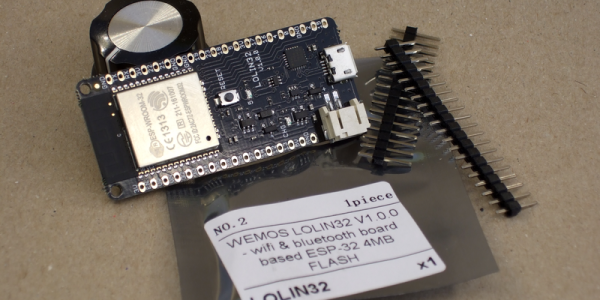
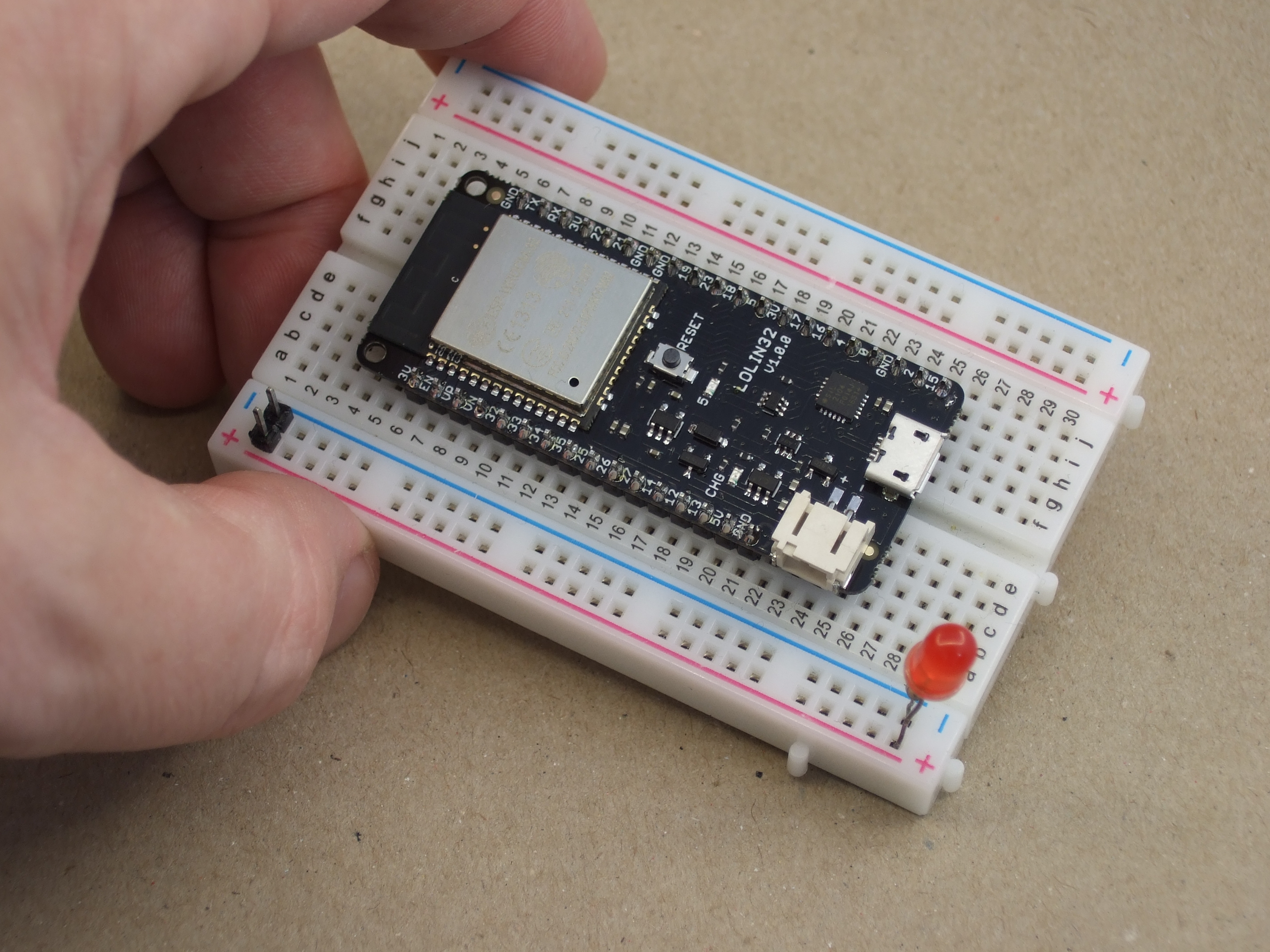
Just two weeks ago our favorite supplier of cheap ESP8266 boards, WeMos, released the long-awaited LOLIN32 ESP-32 board, and it’s almost a killer. Hackaday regular [deshipu] tipped us off, and we placed an order within minutes; if WeMos is making a dirt-cheap ESP32 development board, we’re on board! It came in the mail yesterday. (They’re out of stock now, more expected soon.)
If you’ve been following the chip’s development, you’ll know that the first spin of ESP-32s had some silicon bugs (PDF) that might matter to you if you’re working with deep sleep modes, switching between particular clock frequencies, or using the brown-out-reset function. Do the snazzy new, $8, development boards include silicon version 0 or 1? Read on to find out!
Starting up a new hackerspace from the ground up is a daunting task. Before you even think about the fun stuff like tools and a space, you’ve got a ton of social engineering to do. Finding like-minded people with the drive and passion for seeing the project through is a major stumbling block where many projects falter. If you get past that, then figuring out a corporate structure and getting funds together to start building something can be difficult, as can local permits and the endless red tape that always seems to accompany anything seen as new or innovative.
But finally the magic day comes for your group to open the doors on the new hackerspace, perhaps with an open house or some event to bring the community in and maybe rustle up some paying members. It should be a happy occasion, but for a new hackerspace near Houston, the grand opening celebration was thwarted when thieves broke into the space and cleaned out all their tools days before it opened.
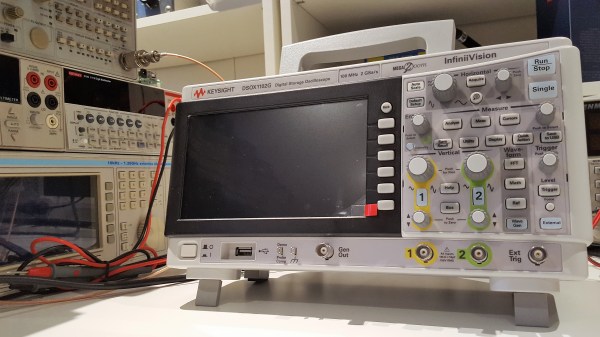
A few weeks ago we published an article on the newly released Keysight 1000X, an oscilloscope that marks Keysight’s late but welcome entry into the hacker-centric entry-level market. Understandably, this scope is causing a lot of excitement as it promises to bring some of the high-end pedigree of the well-known 2000X and 3000X models down to a much affordable price. Now couple that with the possibility of hacking its bandwidth lock and all this fuss is well justified.
[Dave Jones] from the EEVblog got his hands on one, and while conducting a UART dump saw the scope report 200 MHz bandwidth despite being labelled as a 100 MHz model. He then proceeded to actually hack the main board to unlock an undocumented 200 MHz bandwidth mode. This created a lot of confusion: some said [Dave] got a “pre-hacked” version, others assumed all 100 MHz versions actually have a stock bandwidth of 200 MHz.
Alongside the question of bandwidth, many wondered how this would fare against the present entry-level standard, the Rigol 1054Z. Is the additional cost and fewer channels worth the Keysight badge?
Keysight’s response to our queries and confusion was the promise to send us a review unit. Well, after receiving it and playing around with it, clearly a lot of Keysight’s high-end excellence has trickled down to this lower end version. However, this machine was not without some silly firmware issues and damning system crashes! Read on the full review below. Continue reading “Scope Review: Keysight 1000 X-Series”→
Betteridge’s Law of Headlines states, “Any headline that ends in a question mark can be answered by the word no.” This law remains unassailable. However, recent claims have called into question a black box hidden deep inside every Intel chipset produced in the last decade.
Yesterday, on the Semiaccurate blog, [Charlie Demerjian] announced a remote exploit for the Intel Management Engine (ME). This exploit covers every Intel platform with Active Management Technology (AMT) shipped since 2008. This is a small percentage of all systems running Intel chipsets, and even then the remote exploit will only work if AMT is enabled. [Demerjian] also announced the existence of a local exploit.
Intel’s ME and AMT Explained
Beginning in 2005, Intel began including Active Management Technology in Ethernet controllers. This system is effectively a firewall and a tool used for provisioning laptops and desktops in a corporate environment. In 2008, a new coprocessor — the Management Engine — was added. This management engine is a processor connected to every peripheral in a system. The ME has complete access to all of a computer’s memory, network connections, and every peripheral connected to a computer. The ME runs when the computer is hibernating and can intercept TCP/IP traffic. Management Engine can be used to boot a computer over a network, install a new OS, and can disable a PC if it fails to check into a server at some predetermined interval. From a security standpoint, if you own the Management Engine, you own the computer and all data contained within.
The Management Engine and Active Management Technolgy has become a focus of security researchers. The researcher who finds an exploit allowing an attacker access to the ME will become the greatest researcher of the decade. When this exploit is discovered, a billion dollars in Intel stock will evaporate. Fortunately, or unfortunately, depending on how you look at it, the Managment Engine is a closely guarded secret, it’s based on a strange architecture, and the on-chip ROM for the ME is a black box. Nothing short of corporate espionage or looking at the pattern of bits in the silicon will tell you anything. Intel’s Management Engine and Active Management Technolgy is secure through obscurity, yes, but so far it’s been secure for a decade while being a target for the best researchers on the planet.
Semiaccurate’s Claim
In yesterday’s blog post, [Demerjian] reported the existence of two exploits. The first is a remotely exploitable security hole in the ME firmware. This exploit affects every Intel chipset made in the last ten years with Active Management Technology on board and enabled. It is important to note this remote exploit only affects a small percentage of total systems.
The second exploit reported by the Semiaccurate blog is a local exploit that does not require AMT to be active but does require Intel’s Local Manageability Service (LMS) to be running. This is simply another way that physical access equals root access. From the few details [Demerjian] shared, the local exploit affects a decade’s worth of Intel chipsets, but not remotely. This is simply another evil maid scenario.
Should You Worry?
This hacker is unable to exploit Intel’s ME, even though he’s using a three-hole balaclava.
The biggest network security threat today is a remote code execution exploit for Intel’s Management Engine. Every computer with an Intel chipset produced in the last decade would be vulnerable to this exploit, and RCE would give an attacker full control over every aspect of a system. If you want a metaphor, we are dinosaurs and an Intel ME exploit is an asteroid hurtling towards the Yucatán peninsula.
However, [Demerjian] gives no details of the exploit (rightly so), and Intel has released an advisory stating, “This vulnerability does not exist on Intel-based consumer PCs.” According to Intel, this exploit will only affect Intel systems that ship with AMT, and have AMT enabled. The local exploit only works if a system is running Intel’s LMS.
This exploit — no matter what it may be, as there is no proof of concept yet — only works if you’re using Intel’s Management Engine and Active Management Technology as intended. That is, if an IT guru can reinstall Windows on your laptop remotely, this exploit applies to you. If you’ve never heard of this capability, you’re probably fine.
Still, with an exploit of such magnitude, it’s wise to check for patches for your system. If your system does not have Active Management Technology, you’re fine. If your system does have AMT, but you’ve never turned it on, you’re fine. If you’re not running LMT, you’re fine. Intel’s ME can be neutralized if you’re using a sufficiently old chipset. This isn’t the end of the world, but it does give security experts panning Intel’s technology for the last few years the opportunity to say, ‘told ‘ya so’.




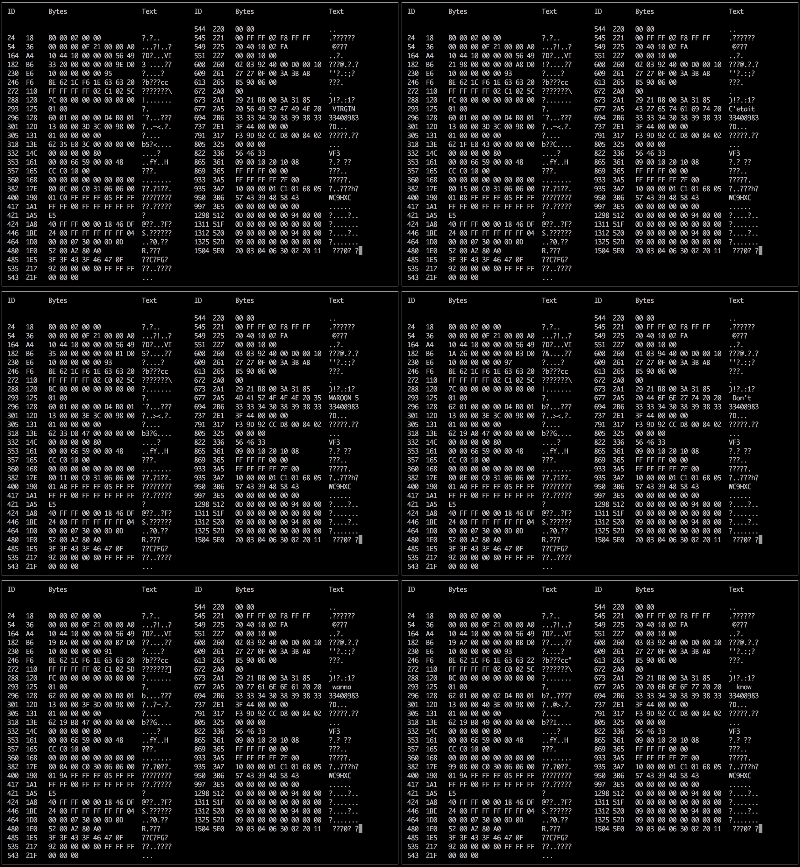 Adding the camera was the easiest part of the exercise when he found an after-market version specifically meant for his 207 model. The original non-graphical display had to make room for a new HDMI display and a fresh bezel, which cost him much more than the display. Besides displaying the camera image when reversing, the new display also needed to show all of the other entertainment system information. This couldn’t be obtained from the OBD-II port but the CAN bus looked promising, although he couldn’t find any details for his model initially. But with over 2.5 million of the 207’s on the road, it wasn’t long before [Alexandre] hit jackpot in a French University student project who used a 207 to study the CAN bus. The 207’s CAN bus system was sub-divided in to three separate buses and the “comfort” bus provided all the data he needed. To decode the CAN frames, he used an Arduino, a CAN bus shield and a python script to visualize the data, checking to see which frames changed when he performed certain functions — such as changing volume or putting the gear in reverse, for example.