How hot is the water coming out of your tap? Knowing that the water in their apartment gets “crazy hot,” redditor [AEvans28] opted to whip up a visual water temperature display to warn them off when things get a bit spicy.
This neat little device is sequestered away inside an Altoids mint tin — an oft-used, multi-purpose case for makers. Inside sits an ATtiny85 microcontroller — re-calibrated using an Arduino UNO to a more household temperature scale ranging from dark blue to flashing red — with additional room for a switch, while the 10k ohm NTC thermristor and RGB LED are functionally strapped to the kitchen faucet using electrical tape. The setup is responsive and clearly shows how quickly [AEvans28]’s water heats up.
Diablo. Mech Warrior. Every LucasArts game. There are reasons to build an old PC, and no, emulation cannot completely capture the experience of playing these old games. [Drygol] set out to create a retro PC and succeeded brilliantly. The built features an old desktop AT case (when is the last time you saw one of them?), a 233MHz Pentium with MMX technology, an ancient PCI video card, and an old ISA Ethernet card (with AUI connector). Incoming upgrades will be an ATI 3D Rage PRO, PCI SoundBlaster, and hopefully Windows 98SE.
Right now, we’re gearing up for the Hackaday Superconference next weekend. It’s going to be awesome, and we’re going to announce the winner of the Hackaday Prize. We have another contest going on right now – the Enlightened Raspberry Pi Contest. The name of the game here is documentation. Build something, document it on hackaday.io, and you get some cool prizes.
Okay, we haven’t even hit Halloween yet, but if you’re planning some kind of holiday project, now’s a good time to start ordering your parts, especially if you’re designing your own PCB. While there’s no PCB involved, [designer2k2] built a desktop “hollow” Christmas tree using some WS2812 RGB LEDs controlled by a microcontroller and powered by USB.
The board running [designer2k2]’s project is a Digispark, a USB powered board by Digistump which contains an ATtiny85. The LEDs, four different sized NeoPixel rings, plus a single pixel for the top, are connected together using some solid wire which makes for a very cool look. The code that runs on the ATtiny is the part that really makes this tree. The code cycles through colors and some light chaser effects, as well as a mode that shows a green tree with some white lights. The whole project is topped off by a routine that spells “XMAS” as you look at the tree from the top down.
We’ve seen some otherChristmastreehacks over the years controlled by various things, but this one is a fairly simple, cool design. [Designer2k2] also released the code for the tree and I’m sure a lot of us could come up with some more light designs.
[Luc] wanted to make a clock like no other. He knows that the territory is well-trod, especially in the area of minimalist design. Undeterred, [Luc] came up with a fresh design that uses the resistor color code to display the time. He’s calling it the Nerd’s Ultimate Watch.
It doesn’t get much more minimalist than four RGB LEDs. Each one illuminates in the color that represents the digit in the current time. For instance, I’m typing this sentence at 1:37PM. The clock uses 24-hour time, so let’s call it 13:37. Using resistor color code time, that’s 1, 3, 3, 7, or brown, orange, orange, violet. Continue reading “Who Could Resist A Color Coded Clock?”→
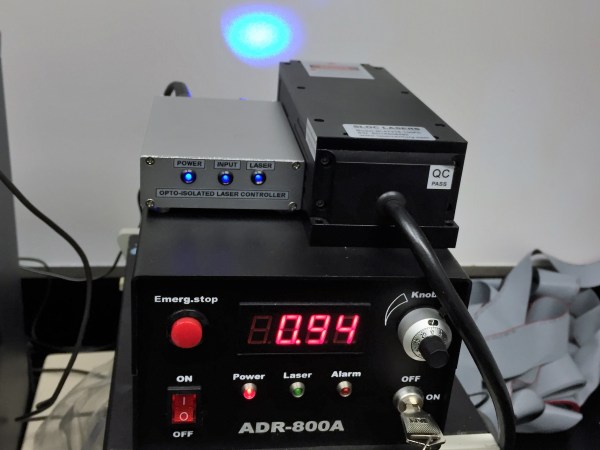
[Scott Harden] is working on a research project involving optogenetics. From what we were able to piece together optogenetics is like this: someone genetically modifies a mouse to have cell behaviors which can activated by light sensitive proteins. The mice then have a frikin’ lasers mounted on their heads, but pointing inwards towards their brains not out towards Mr. Bond’s.
Naturally, to make any guesses about the resulting output behavior from the mouse the input light has to be very controlled and exact. [Scott] had a laser and he had a driver, but he didn’t have a controller to fire the pulses. To make things more difficult, the research was already underway and the controller had to be built
The expensive laser driver had a bizarre output of maybe positive 28 volts or, perhaps, negative 28 volts… at eight amps. It was an industry standard in a very small industry. He didn’t have a really good way to measure or verify this without either destroying his measuring equipment or the laser driver. So he decided to just build a voltage-agnostic input on his controller. As a bonus the opto-isolated input would protect the expensive controller.
The kind of travesty that can occur when [Scott] doesn’t have access to nice project boxes.The output is handled by an ATtiny85. He admits that a 555 circuit could generate the signal he needed, but to get a precision pulse it was easier to just hook up a microcontroller to a crystal and know that it’s 100% correct. Otherwise he’d have to spend all day with an oscilloscope fiddling with potentiometers. Only a few Hackaday readers relish the thought as a relaxing Sunday afternoon.
He packaged everything in a nice project box. He keeps them on hand to prevent him from building circuits on whatever he can find. Adding some tricks from the ham-radio hobby made the box look very professional. He was pleased and surprised to find that the box worked on his first try.
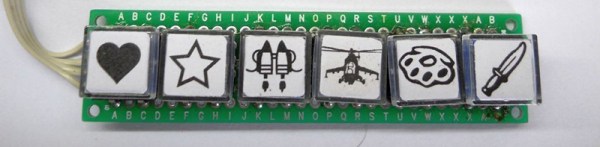
Believe it or not, some video games are still developed for the PC. With video games come cheat codes, and when they’re on the PC, that means using a keyboard. You can easily program any microcontroller to send a string of characters over a USB port with the touch of a button. Believe it or not, a lot of people haven’t put these two facts together. [danjovic] has, leading him to build a simple and cheap USB keystroke generator for quickly typing in cheat codes.
[danjovic] is basing his build around a Digispark, a cheap, USB-enabled ATtiny85 dev board. This, of course, means there’s not a lot of pins to play with – there are only four I/O pins, and one of them is connected to ground by a LED. That leaves only three I/O pins, but [danjovic] managed to put seven different cheats in his project using diodes and something that is almost charlieplexing.
If you’re wondering, this is a very inexpensive project. [danjovic] is using a Chinese digispark clone, a handful of 1N4148 diodes, and a few tact switches. Anyone with a well-stocked part drawer or a tenner on eBay could build this. If you want the proof of work for this project, you can check out the demo video below.
A digital dash is cool and all, but analog gauges have lasting appeal. There’s something about the simplicity of a purely mechanical gauge connected directly to a vehicle’s transmission. Of course that’s not what’s hapenning here. Instead, this build is an analog display for GPS-acquired speed data.
The video below does a good job at explaining the basics of [Grant Stephens]’ build. The display itself is a gutted marine speedometer fitted with the movement from a motorcycle tachometer. The tach was designed to take a 4-volt peak-to-peak square wave input signal, the frequency of which is proportional to engine speed. To display road speed, [Grant] stuffed an ATTiny85 with a GPS module into the gauge and cooked up a script to convert the GPS velocity data into a square wave. There’s obviously some latency, and the gauge doesn’t appear to register low speeds very well, but all in all it seems to match up well to the stock speedo once you convert to metric.






![The kind of travesty that can occur when [Stefan Kiese] doesn't have access to nice project boxes.](https://hackaday.com/wp-content/uploads/2016/07/img_3466.jpg)