Among Us Emergency Meeting Button Becomes Reality

Among Us has been an indie gaming success story. A game built by a small team has, after several years on the market, become a worldwide sensation. Gameplay consists of players attempting to find the imposter amongst their ranks and an “Emergency Meeting” can be called if players need to speak to each other. [john lemme] wanted to be able to do the same with his roommates, and set about building the real thing.

The build relies on an ESP32, which reads the state of a big red emergency button. When pressed, the ESP32 uses its WiFi connection to trigger a Discord conference call containing all the roommates. Naturally, it also plays the buzzer sound from the actual game, too – via a small amplifier and a speaker yanked from some headphones.

It’s a fun build, though [john] notes it has its limits. The call takes 10 seconds to initiate after the button press, and the audio hardware doesn’t do a great job of recreating the buzzer noise from the game. However, it’s a good starting point, and we think the concept could actually prove useful with some refinement. Video after the break.

Continue reading Among Us Emergency Meeting Button Becomes Reality”
The Most Expensive D20 You’ll See Today

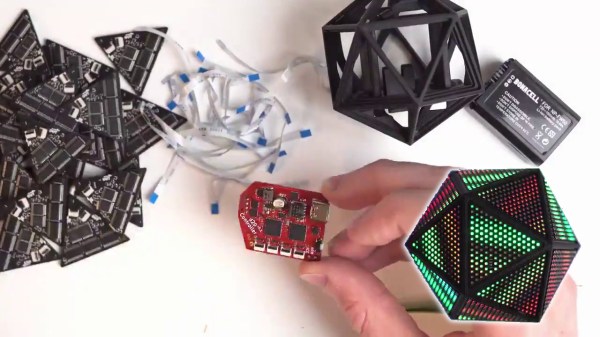
Roll your negotiation skill, because this d20 is a hefty one. The Tweet is also below. We are charmed by [Greg Davill]’s twenty-sided LED contraption, but what do we call it? Is it a device? A sculpture? A die? Even though “d20” is right on his custom controller PCB, we don’t think this will grace the table at the next elf campaign since it is rather like taking a Rolls Royce to the grocery store. Our builder estimates the price tag at $350 USD and that includes twenty custom PCB light panels with their components, a controller board, one battery pack, and the 3D printed chassis that has to friction-fit the light faces.

Power and communication for all the panels rely on twenty ribbon cables daisy-chained throughout the printed scaffolding, which you can see in the picture above. [Greg] made a six-sided LED cube last year, and there are more details for it, but we suspect he learned his lesson about soldering thousands of lights by hand. There are one-hundred-twenty LEDs per panel, times twenty, that is over two-thousand blinkenlights. We don’t yet have specs on the controller, but last time he used a SAMD51 processor to support over three-thousand lights. We don’t know where he’ll go next, but we’re game if he wants to make a chandelier for Hackaday’s secret underground lair.

(Editor’s Note: If you were at Supercon last year, and you got to play with this thing in the flesh, it’s worth it!)

Continue reading “The Most Expensive D20 You’ll See Today”

Simple Sprite Routines Ease Handheld Gaming DIY

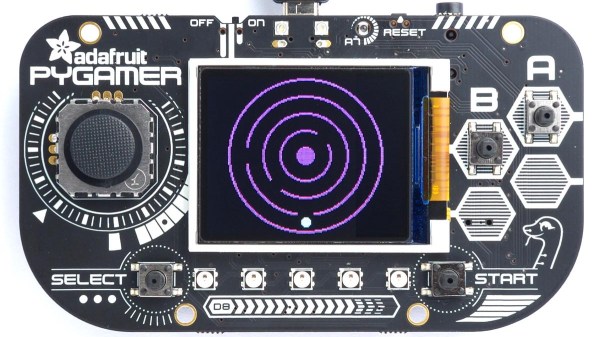
Making your own handheld games is made much easier with [David Johnson-Davies’] simple sprite routines for the Adafruit PyBadge and PyGamer boards. Sprites can be thought of as small, fixed-size graphical objects that are drawn, erased, moved, and checked for collision with other screen elements.

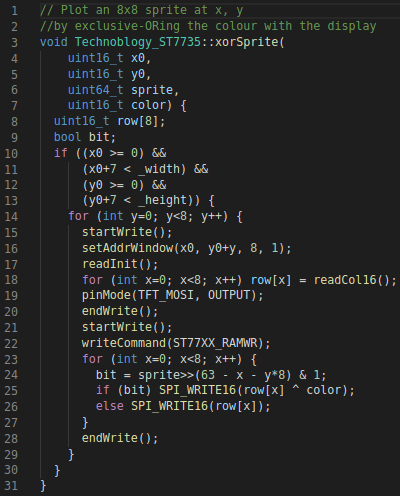
xorSprite() plots an 8×8 sprite, moveSprite() moves a given sprite by one pixel without any flicker, and hitSprite() checks a sprite for collision with any screen elements in a given color. That is all it takes to implement a simple game, and [David] makes them easy to use, even providing a demo program in the form of the rolling ball maze shown here.

These routines work out-of-the-box with the PyBadge and PyGamer, but should be easy to adapt to any TFT display based on the ST7735 controller. The PyGamer is the board shown here, but you can see the PyBadge as it was used to create an MQTT-enabled conference badge.

If you really want to take a trip down the rabbit hole of sprite-based gaming graphics, you simply can’t miss hearing about the system [Sprite_TM] built into the FPGA Game Boy badge.

60’s Natural Gas Pipeline Computer Retires To Play Games

Computer gaming has come a very long way since the 1960s. While computers of that era may not run Doom or anything even close to it, many of us had our first exposure to computers playing Hunt the Wumpus, Adventure, or Star Trek over a clackety old TeleType machine. If you missed those days, or if you simply miss them, you might enjoy the video from [somecomputerguy] who fires up an old retired gas pipeline computer and loads enough paper tape into it to play Lunar Lander. (Video embedded below.)

We don’t miss the days of toggling in a bootloader so you could load the paper tape for a second bootloader before you could enter the actual program you wanted to run.

Continue reading “60’s Natural Gas Pipeline Computer Retires To Play Games”

Force Feedback Mouse Really Shakes Things Up

This is a very exciting time for those who like to spend their downtime exploring virtual worlds. The graphics in some big-budget titles are easily approaching photorealism, and immersive multi-channel sound can really make you believe you’ve been transported to another place or time. With another generation or two of GPU development and VR hardware, the line between gaming and reality is bound to get awful blurry.

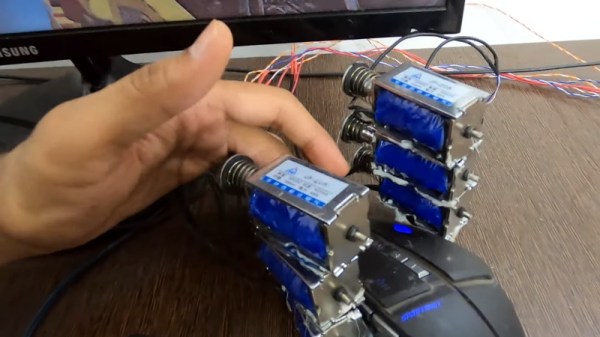
That said, we’re still a far way off from the holodeck aboard the Enterprise. A high-end PC and the latest in VR can fool your eyes and ears, but that still leaves your other senses out of the fun. That’s why [Jatin Patel] has developed this clever force-feedback mouse using an array of solenoids.

The idea is pretty simple: a Python program on the computer listens for mouse click events, and tells an attached Arduino to fire off the solenoids when the player pulls the virtual trigger. It’s naturally not a perfect system, as it would seem that clicking in the game’s menus would also start your “gun” firing. But as you can see in the video after the break, when it works, it works very well. The moving solenoids don’t just vibrate the mouse around, the metallic clacking actually accentuates the gun sound effects from the game.

With this kind of tactile feedback and an omnidirectional treadmill to keep us moving, we’d be pretty close to fooling our senses into thinking we’re actually somewhere else. Which frankly, sounds quite appealing right about now.

Continue reading “Force Feedback Mouse Really Shakes Things Up”

Dad Makes Xbox And Nintendo Work Together To Bridge The Accessibility Gap

In the last few years, console and controller manufacturers have been making great strides in accessibility engineering in order to improve the inclusiveness of people with different motor disabilities into the gaming world. One such example is the Xbox Adaptive Controller, which [Rory Steel] has used to build his daughter a fully customized controller to allow her to play Breath of the Wild on the Nintendo Switch.

His build plan is outlined in just a few Twitter videos, and sadly we don’t have a detailed walkthrough on how to build our own just yet, though he mentions plans on making such guide in the future. In the mean time, it’s not too hard to speculate on some specifics. The Adaptive Controller can use USB-C for communication, as the Switch also does with its Pro controller in wired mode. Interfacing the two is as simple as using an adapter to bridge the gap between the two vendors.

The joysticks are each wired into generic gamepads which act as the left and right sticks, each one being a separate USB input into the Adaptive Controller, while each one of the button inputs is broken out to 3.5mm jacks on its back, making them dead simple to wire to the sixteen arcade buttons surrounding the sticks. The layout might look unconventional to us, and [Rory] mentions this is simply a prototype that will be improved upon in the future after real-world testing. The size of his daughter’s smile tells us this is already a success in her eyes.

This is not the first time we’ve seen a build with the Xbox Adaptive Controller, and it’s nice to see just how well it enables parents to build their kids controllers they can use more easily, seeing as how before its introduction these kinds of controllers usually required the expertise for tearing expensive official controllers apart in ways the manufacturers never expected. We can only hope that going forward, this sort of accessibility becomes more the norm and less the exception.

[via Kotaku, thanks Itay for the tip!]

LEGO And Minecraft Team Up For Custom Gaming PC Case

There are probably few parents who haven’t watched their kids sitting on the floor, afloat on a sea of LEGO pieces and busily creating, and thought, “If only they could make a living at that.” But time goes on and kids grow up, and parents soon sing the same refrain as the kids sit transfixed by the virtual equivalent of LEGO: Minecraft.

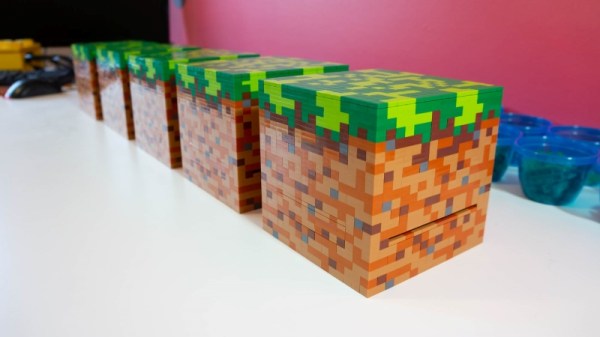
Finding a way to monetize either LEGO or Minecraft is a bit difficult for the young enthusiast; combining both obsessions into a paying proposition would be a dream come true. [Mike Schropp] did it, and this Minecraft-themed LEGO computer case was the result. Intel wanted a LEGO case for their new NUC mini-PC motherboard, and as a sponsor of the Minefaire event, the case needed to be Minecraft themed.

[Mike] chose the block that any Enderman would choose: the basic grass block. Each of the ten cases he made for the show had about 1000 of the smallest LEGO pieces available, to recreate the texture of the grass block in all its faux 8-bit glory. The 4″ x 4″ (10cm x 10cm) 8th Gen NUC board was a great fit for the case, which included slots for ventilation and SD card access, plus pop-out covers to access the board’s ports. It’s not exactly a screamer, but playing Minecraft on a grass block made from LEGO bricks is probably worth the performance hit.

We’ve seen [Mike]’s work a time or two here, most recently with a full-scale LEGO rack-mount server. Our hats off to him for another fun and creative build, and for proving that you’re never too old to LEGO. Or Minecraft.