DooM Retrospective: 25 Years Of Metal

Metal is many things. A material hard and coarse in nature that by forging it in fire becomes sharp enough to cut through anything in its path. The music that bares its namesake is equally cutting and exudes an unyielding attitude that seeks to separate the posers from the true acolytes. Metal is the sentiment of not blindly following the rules, a path less taken to the darker side of the street. In videogame form, there is nothing more metal than Doom.

The creators of Doom, id Software, were always hellbent on changing the perception of PC gaming in the 1990s. Games of the time were rigid and slow in comparison to their console counterparts. The graphical fidelity was technically superior on PC, but no other developer could nail movement in a game like id. The team had made a name for themselves with their Commander Keen series (which came about after a failed Super Mario Bros. 3 PC demo) along with the genre defining Wolfenstein 3D, but nothing topped Doom. In an era that was already soaking with “tude”, Doom established an identity all its own. The moody lighting, the grotesque monster designs, the signature push forward combat, and all the MIDI guitars a Soundblaster could handle; Doom looked and felt a cut above everything else in 1993.

In December of that year, Senators Joe Lieberman and Herb Kohl held a hearing to publicly condemn the inclusion of violence in videogames sold in America. The bulk of the arguments sought to portray the videogame industry and its developers as deviants seeking to corrupt the nation’s youth. Id Software responded as if to raise the largest middle finger imaginable, by releasing Doom to the world the very next day. A quarter of a century later people are still talking about it.

Continue reading “DooM Retrospective: 25 Years Of Metal”

A Portal Port Programmed For Platforms Of The Past

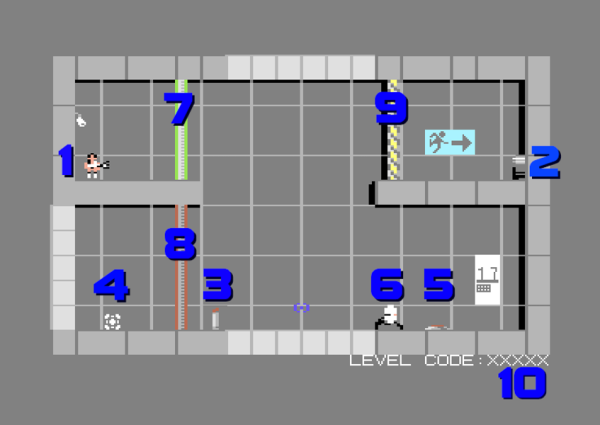
If you still have a Commodore 64 and it’s gathering dust, don’t sell it to a collector on eBay just yet. There’s still some homebrew game development happening from a small group of programmers dedicated to this classic system. The latest is a Portal-like game from [Jamie Fuller] which looks like a blast.

The Commodore doesn’t have quite the same specs of a Playstation, but that’s no reason to skip playing this version. It has the same style of puzzles where the player will need to shoot portals and manipulate objects in order to get to the goals. GLaDOS even makes appearances. The graphics by [Del Seymour] and music by [Roy Widding] push the hardware to its limits as well.

If you don’t have a C64 laying around, there are some emulators available such as VICE that can let you play this game without having to find a working computer from the 80s. You can also build your own emulator if you’re really dedicated, or restore one that had been gathering dust. And finally, we know it’s not, strictly speaking, a port of Portal, but some artistic license in headlines can be taken on occasion.

Continue reading “A Portal Port Programmed For Platforms Of The Past”

Custom Joystick For An Old Commodore Finds An Unlikely Home

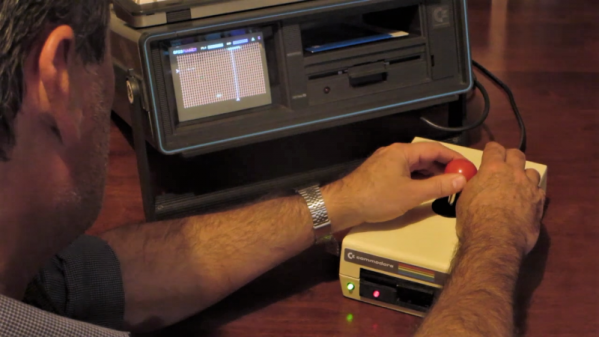
Retro hardware is getting harder and harder to come by, with accessories such as joysticks and mice dropping out of the market the fastest. So if your old machine needs a new joystick, you may find yourself whipping it up yourself. While you’re at it, you might as well have some fun as [Tom Tilley] did when he built a C-64 joystick inside a replica disk drive case for his rare SX-64 luggable.

Anyone who remembers the amount of desk space the classic Commodore 1541 disk drive occupied might wonder why someone would want such an enormous base for a joystick. But rest assured that no actual 1541s were harmed in the making of this joystick; rather, [Tom] created a smaller replica of the drive case from MDF. The face of the case is about 80% original size, and the depth is cut down to about half the original, so the joystick actually ends up being a manageable size while offering a nice, broad wrist support. The drive door is 3D-printed and painted, and adorned with the original green and red LEDs. Decorations like the front badge and even replicas of the original rear panel labels, connectors, and switches were printed from files off a website devoted to recreating Commodore hardware from paper. Because Commodore love knows no bounds.

It’s silly, but it works, and we love the attention to detail. Hat’s off to [Tom] for not settling for yet another joystick build, and for keeping the Commodore flame burning. They may be tough machines, but they won’t be around forever.

Continue reading “Custom Joystick For An Old Commodore Finds An Unlikely Home”

Retro Wall Phone Becomes A Doorbell, And So Much More

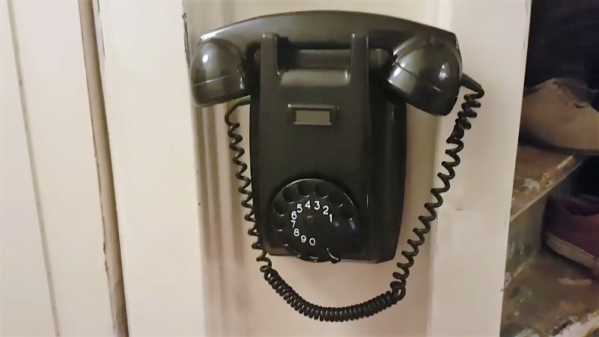
We have to admit that this retasked retro phone wins on style points alone. The fact that it’s filled with so much functionality is icing on the cake.

The way [SuperKris] describes his build sounds like a classic case of feature creep. Version 1 was to be a simple doorbell, but [SuperKris] would soon learn that one does not simply replace an existing bell with a phone and get results. He did some research and found that the ringer inside the bakelite beauty needs much more voltage than the standard doorbell transformer supplies, so he designed a little H-bridge circuit to drive the solenoids. A few rounds of “while I’m at it” later, the phone was stuffed with electronics, including an Arduino and an NFR24 radio module that lets it connect to Domoticz, a home automation system. The phone’s rotary dial can now control up to 10 events and respond to alarms and alerts with different ring patterns. And, oh yes – it’s a doorbell too.

In general, we prefer to see old equipment restored rather than gutted and filled with new electronics. But we can certainly get behind any effort to retask old phones with no real place in modern telecommunications. We’ve seen a few of these before, like this desk telephone that can make cell calls.

Continue reading “Retro Wall Phone Becomes A Doorbell, And So Much More”

Memory Mapping Methods In The Super Nintendo

Not only is the Super Nintendo an all-around great platform, both during its prime in the 90s and now during the nostalgia craze, but its relative simplicity compared to modern systems makes it a lot more accessible from a computer science point-of-view. That means that we can get some in-depth discussion on how the Super Nintendo actually does what it does, and understand most of it, like this video from [Retro Game Mechanics Explained] which goes into an incredible amount of detail on the mechanics of the SNES’s memory system.

Two of the interesting memory systems the SNES uses are called DMA and HDMA. DMA stands for direct memory access, and is a way for the Super Nintendo to access memory independently of the CPU. The advantages to this are that it’s incredibly fast compared to more typical methods of accessing memory. This isn’t particulalry unique, but the HDMA system is. It allows the SNES to do all kinds of interesting tricks with its video output display like changing color gradients and doing all kinds of masking effects.

If you’re interested in the inner workings of classic consoles like the SNES, this video gets way down in the weeds in the system itself. It’s interesting to see how programmers were able to squeeze more capability from these limited (by modern standards) systems by manipulating memory like the DMA and HDMA systems do.  [Retro Game Mechanics Explained] is a great resource for exploring in-depth aspects of lots of classic games, like how speedrunners can execute arbitrary code in old Mario games.

Continue reading “Memory Mapping Methods In The Super Nintendo”

A Daylight-Readable Bar Graph Display In The 70s Wasn’t Cheap

The driver board with display attached; the row of lamps is visible on the right hand side.

LEDs weren’t always an easy solution to displays and indicators. The fine folks at [Industrial Alchemy] shared pictures of a device that shows what kind of effort and cost went into making a high brightness bar graph display in the 70s, back when LEDs were both expensive and not particularly bright. There are no strange materials or methods involved in making the display daylight-readable, but it’s a peek at how solving problems we take for granted today sometimes took a lot of expense and effort.

The display is a row of 28 small incandescent bulbs, mounted in a PCB and housed in a machined aluminum frame. Holes through which to view the bulbs are on both the top and front of the metal housing, which allows the unit to be mounted in different orientations. It was made as a swappable module, its 56 machined gold pins mate to sockets on the driver board. The driver board itself consists of 14 LM119 dual comparators, each of which controls two bulbs on the display.

An example of a Wamco minitron bar graph display. Each window contains an incandescent filament. [Source: industrialalchemy.org]
[Industrial Alchemy] believes that the display unit itself may have been a bit of a hack in its own way. Based on the pin spacing and dimensions of the driver board, they feel that it was probably designed to host a row of modular units known as the Wamco minitron bar graph display. An example is pictured here; they resembled DIP chips and could be stacked side-by-side to make a display of any length. Each window contained an incandescent filament in a reflective well, and each light could be individually controlled.

These minitron bar graph units could only be viewed from the top, and were apparently high in cost and low in availability. Getting around these limitations may have been worth creating this compatible unit despite the work involved.

Display technology has taken many different turns over the years, and you can see examples of many of them in one place in the Circus Clock, which tells the time with a different technology for each digit: a nixie, a numitron, a 7-segment thyratron tube, a VFD, an LED dot display, and a rear projection display.

Circuit Bending A TV For Better Input

If you haven’t noticed, CRTs are getting hard to find. You can’t get them in Goodwill, because thrift stores don’t take giant tube TVs anymore. You can’t find them on the curb set out for the trash man, because they won’t pick them up. It’s hard to find them on eBay, because no one wants to ship them. That’s a shame, because the best way to enjoy old retrocomputers and game systems is with a CRT with RGB input. If you don’t already have one, the best you can hope for is an old CRT with a composite input.

But there’s a way. [The 8-Bit Guy] just opened up late 90s CRT TV and modded it to accept RGB input. That’s a monitor for your Apple, your Commodore, and a much better display for your Sega Genesis.

There are a few things to know before cracking open an old CRT and messing with the circuits. Every (color) CRT has three electron guns, one each for red, green, and blue. These require high voltage, and in CRTs with RGB inputs you’re looking at a circuit path that takes those inputs, amplifies them, and sends them to the gun. If the TV only has a composite input, there’s a bit of circuitry that takes that composite signal apart and sends it to the guns. In [8-bit guy]’s TV — and just about every CRT TV you would find from the mid to late 90s — there’s a ‘Jungle IC’ that handles this conversion, and most of the time there’s RGB inputs meant for the on-screen display. By simply tapping into those inputs, you can add RGB inputs with fancy-schmancy RCA jacks on the back.

While the actual process of adding RGB inputs to a late 90’s CRT will be slightly different for each individual make and model, the process is pretty much the same. It’s really just a little bit of soldering and then sitting back and playing with old computers that are finally displaying the right colors on a proper screen.

Continue reading “Circuit Bending A TV For Better Input”