Ride On With FOSS And GoldenCheetah

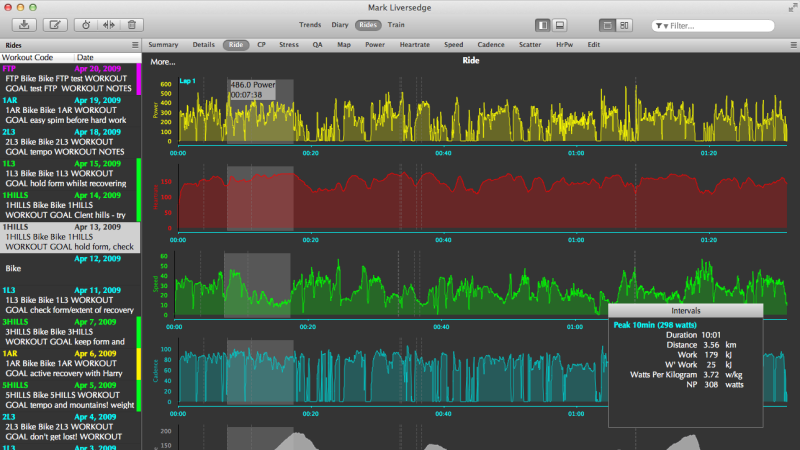
If you exclude certain companies like Peloton, the world of cycling technology is surprisingly open. It’s not perfect by any means, but there are enough open or open-ish standards for many different pieces of technology from different brands to interoperate with each other, from sensors and bike computers and even indoor trainers to some extent. This has also made it possible for open source software to exist in this realm as well, and the GoldenCheetah project has jumped in for all of us who value FOSS and also like to ride various bicycles from time to time.

GoldenCheetah focuses on gathering data from power meters, allowing cyclists to record their rides and save them in order to keep track of their training performance over time. It works well with sensors that use the ANT+ protocol, and once it has that data it can provide advanced analytics such as power curves, critical power modeling, and detailed charts for power, heart rate, and cadence. It can display and record live indoor-training data, and in some situations it can even run interval workouts, although not every indoor trainer is supported. There are no social features, subscriptions, or cloud requirements which can be refreshing in the modern world, but is a bit of a downside if you’re used to riding with your friends in something like Zwift.

All in all, though, it’s an impressive bit of software that encourages at least one realm of consumer electronics to stay more open, especially if those using bike sensors, computers, and trainers pick ones that are more open and avoid those that are proprietary, even if they don’t plan to use GoldenCheetah exclusively. And if you were wondering about the ANT+ protocol mentioned earlier, it’s actually used for many more things that just intra-bike wireless communications.

phyphox

Smartphone Sensors Unlocked: Turn Your Phone Into A Physics Lab

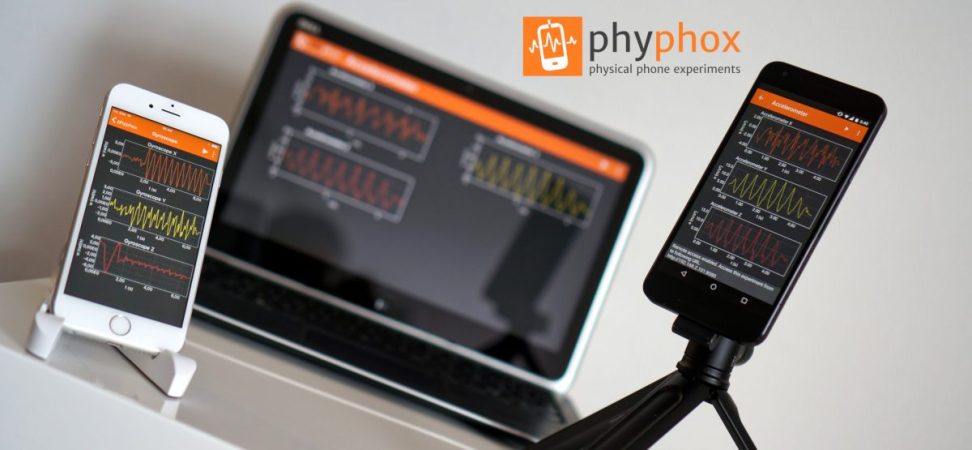
These days, most of us have a smartphone. They are so commonplace that we rarely stop to consider how amazing they truly are. The open-source project Phyphox has provided easy access to your phone’s sensors for over a decade. We featured it years ago, and the Phyphox team continues to update this versatile application.

Phyphox is designed to use your phone as a sensor for physics experiments, offering a list of prebuilt experiments created by others that you can try yourself. But that’s not all—this app provides access to the many sensors built into your phone. Unlike many applications that access these sensors, Phyphox is open-source, with all its code available on its GitHub page.

The available sensors depend on your smartphone, but you can typically access readings from accelerometers, GPS, gyroscopes, magnetometers, barometers, microphones, cameras, and more. The app includes clever prebuilt experiments, like measuring an elevator’s speed using your phone’s barometer or determining a color’s HSV value with the camera. Beyond phone sensors, the Phyphox team has added support for Arduino BLE devices, enabling you to collect and graph telemetry from your Arduino projects in a centralized hub.

Thanks [Alfius] for sharing this versatile application that unlocks a myriad of uses for your phone’s sensors. You can use a phone for so many things. Really.

Continue reading “Smartphone Sensors Unlocked: Turn Your Phone Into A Physics Lab”

A Tiny Chemistry Lab

While advances in modern technology have allowed average people access to tremendous computing power as well as novel tools like 3D printers and laser cutters for a bare minimum cost, around here we tend to overlook some of the areas that have taken advantage of these trends as well. Specifically in the area of chemistry, the accessibility of these things have opened up a wide range of possibilities for those immersed in this world, and [Marb’s Lab] shows us how to build a glucose-detection lab in an incredibly small form factor.

The key to the build is a set of three laser-cut acrylic sheets, which when sandwiched together provide a path for the fluid to flow as well as a chamber that will be monitored by electronic optical sensors. The fluid is pumped through the circuit by a custom-built syringe pump driven by a linear actuator, and when the chamber is filled the reaction can begin. In this case, if the fluid contains glucose it will turn blue, which is detected by the microcontroller’s sensors. The color value is then displayed on a small screen mounted to the PCB, allowing the experimenter to take quick readings.

Chemistry labs like this aren’t limited to one specific reaction, though. The acrylic plates are straightforward to laser cut, so other forms can be made quickly. [Marb’s Lab] also made the syringe pump a standalone system, so it can be quickly moved or duplicated for use in other experiments as well. If you want to take your chemistry lab to the extreme, you can even build your own mass spectrometer.

Continue reading “A Tiny Chemistry Lab”

Upgrading PC Cooling With Software

As computing power increases with each new iteration of processors, actual power consumption tends to increase as well. All that waste heat has to go somewhere, and while plenty of us are content to add fans and heat sinks for a passable air-cooled system there are others who prefer a liquid cooling solution of some sort. [Cal] uses a liquid cooler on his system, but when he upgraded his AMD chip to one with double the number of cores he noticed the cooling fans on the radiator were ramping quickly and often. To solve this problem he turned to Python instead of building a new cooling system.

The reason for the rapid and frequent fan cycling was that the only trigger for the cooling fans available on his particular motherboard is CPU temperature. For an air cooled system this might be fine, but a water cooled system with much more thermal mass should be better able to absorb these quick changes in CPU temperature without constantly adjusting fan speed. Using a python script set up to run as a systemd service, the control loop monitors not only the CPU temperature but also the case temperature and the temperature of the coolant, and then preferentially tries to dump heat from the CPU into the thermal mass of the water cooler before much ramping of cooling fans happens.

An additional improvement here is that the fans can run at a much lower speed, reducing dust in the computer case and also reducing noise compared to before the optimizations. The computer now reportedly runs almost silently unless it has been under load for several minutes. The script is specific to this setup but easily could be modified for other computers using liquid cooling, and using Grafana to monitor the changes can easily be done as [Cal] also demonstrates when calibrating and testing the system. On the other hand, if you prefer a more flashy cooling system as a living room centerpiece, we have you covered there as well.

An illustration of jellyfish swimming in the ocean by Rebecca Konte. The jellyfish are wearing cones on their "heads" to streamline their swimming that contain some sort of electronics inside.

The Six Million Dollar Jellyfish

What if you could rebuild a jellyfish: better, stronger, faster than it was before? Caltech now has the technology to build bionic jellyfish.

Studying the ocean given its influence on the rest of the climate is an important scientific task, but the wild pressure differences as you descend into the eternal darkness make it a non-trivial engineering problem. While we’ve sent people to the the deepest parts of the ocean, submersibles are much too expensive and risky to use for widespread data acquisition.

The researchers found in previous work that making a cyborg jellyfish was more effective than biomimetic jellyfish robots, and have now given the “biohybrid robotic jellyfish” a 3D-printed, neutrally buoyant, swimming cap. In combination with the previously-developed “pacemaker,” these cyborg jellyfish can explore the ocean (in a straight line) at 4.5x the speed of a conventional moon jelly while carrying a scientific payload. Future work hopes to make them steerable like the well-known robo-cockroaches.

If you’re interested in some other attempts to explore Earth’s oceans, how about drift buoys, an Open CTD, or an Open ROV? Just don’t forget to keep the noise down!

Continue reading “The Six Million Dollar Jellyfish”

FedEx Robot Solves Complex Packing Problems

Despite the fact that it constantly seems like we’re in the midst of a robotics- and artificial intelligence-driven revolution, there are a number of tasks that continue to elude even the best machine learning algorithms and robots. The clothing industry is an excellent example, where the flimsy materials can easily trip up robotic manipulators. But one task like this that seems like it might soon be solve is packing cargo into trucks, as FedEx is trying to do with one of their new robots.

Part of the reason this task is so difficult is that packing problems, similar to “traveling salesman” problems, are surprisingly complex. The packages are not presented to the robot in any particular order, and need to be efficiently placed according to weight and size. This robot, called DexR, uses artificial intelligence paired with an array of sensors to get an idea of each package’s dimensions, which allows it to then plan stacking and ordering configurations and ensure secure fits between all of the other packages. The robot must also be capable of quickly adapting if any packages shift during stacking and re-order or re-stack them.

As robotics platforms and artificial intelligence continue to improve, it’s likely we’ll see a flurry of complex problems like these solved by machine instead of by human. Tackling real-world tasks are often more complex than they seem, as anyone with a printer an a PC LOAD LETTER error can attest to, even handling single sheets of paper can be a difficult task for a robot. Interfacing with these types of robots can be a walk in the park, though, provided you read the documentation first.

$1 Graphene Sensor Identifies Safe Water

If you live in a place where you can buy Arduinos and Raspberry Pis locally, you probably don’t spend much time worrying about your water supply. But in some parts of the world, it is nothing to take for granted, bad water accounts for as many as 500,000 deaths worldwide every year. Scientists have reported a graphene sensor they say costs a buck and can detect dangerous bacteria and heavy metals in drinking water.

The sensor uses a GFET — a graphene-based field effect transistor to detect lead, mercury, and E. coli bacteria. Interestingly, the FETs transfer characteristic changes based on what is is exposed to. We were, frankly, a bit surprised that this is repeatable enough to give you useful data. But apparently, it is especially when you use a neural network to interpret the results.

What’s more, there is the possibility the device could find other contaminants like pesticides. While the materials in the sensor might have cost a dollar, it sounds like you’d need a big equipment budget to reproduce these. There are silicon wafers, spin coating, oxygen plasma, and lithography. Not something you’ll whip up in the garage this weekend.

Still, it is interesting to see a FET used this way and a cheap way to monitor water quality would be welcome. Using machine learning with water sensors isn’t a new idea. Of course, the sensor is one part of the equation. Monitoring is the other.