See Acorn Archimedes Get Repaired And Refurbished, In Glorious Detail

Want to see a 90s-era Acorn Archimedes A3020 home computer get opened up, refurbished, and taken for a test drive? Don’t miss [drygol]’s great writeup on Retrohax, because it’s got all that, and more!

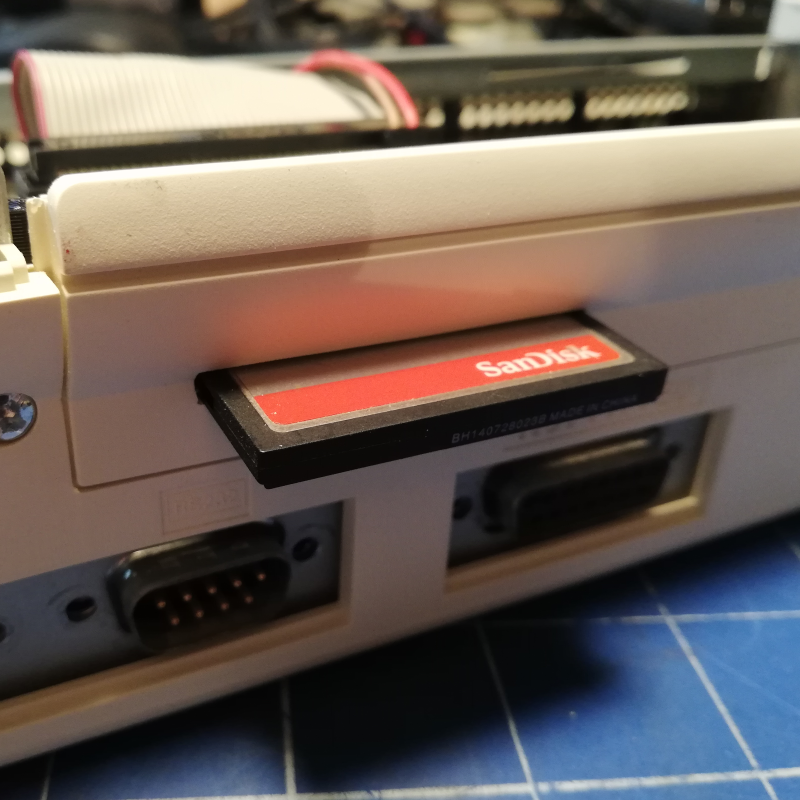
A modern upgrade allowing the use of a CF card in place of an internal hard drive, via a CF2IDE adapter and 3D-printed fixture.

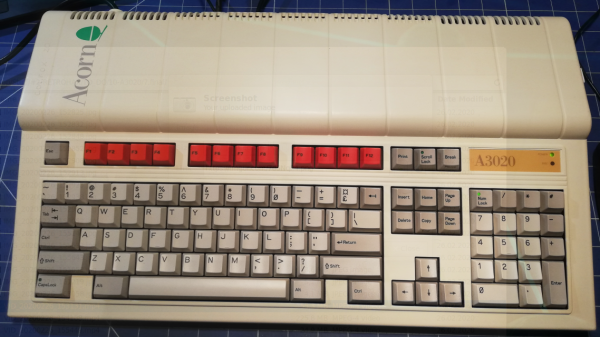
The Archimedes was a line of ARM-based personal computers by Acorn Computers, released in the late 80s and discontinued in the 90s as Macintosh and IBM PC-compatible machines ultimately dominated. They were capable machines for their time, and [drygol] refurbished an original back into working order while installing a few upgrades at the same time.

The first order of business was to open the machine up and inspect the internals. Visible corrosion gets cleaned up with oxalic acid, old electrolytic capacitors are replaced as a matter of course, and any corroded traces get careful repair. Removing corrosion from sockets requires desoldering the part for cleaning then re-soldering, so this whole process can be a lot of work. Fortunately, vintage hardware was often designed with hand-assembly in mind, so parts tend to be accessible for servicing with decent visibility in the process. The keyboard was entirely disassembled and de-yellowed, yielding an eye-poppingly attractive result.

Once the computer itself was working properly, it was time for a few modern upgrades. One was to give the machine an adapter to use a CF card in place of an internal IDE hard drive, and [drygol] did a great job of using a 3D-printed piece to make the CF2IDE adapter look like a factory offering. The internal floppy drive was also replaced with a GOTEK floppy emulator (also with a 3D-printed adapter) for another modern upgrade.

The fully refurbished and upgraded machine looks slick, so watch the Acorn Archimedes A3020 show off what it can do in the video (embedded below), and maybe feel a bit of nostalgia.

Continue reading “See Acorn Archimedes Get Repaired And Refurbished, In Glorious Detail”

Retro ISA Card Means Old, Slow Computers No Longer Need Old, Heavy Monitors

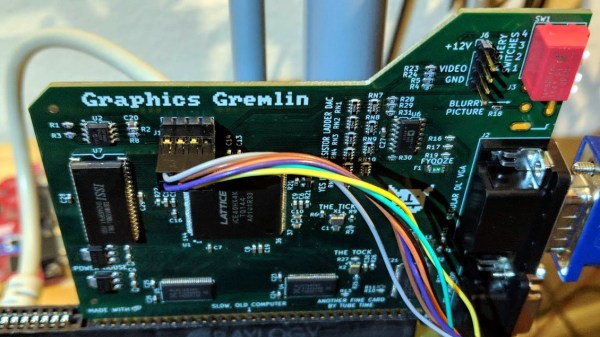
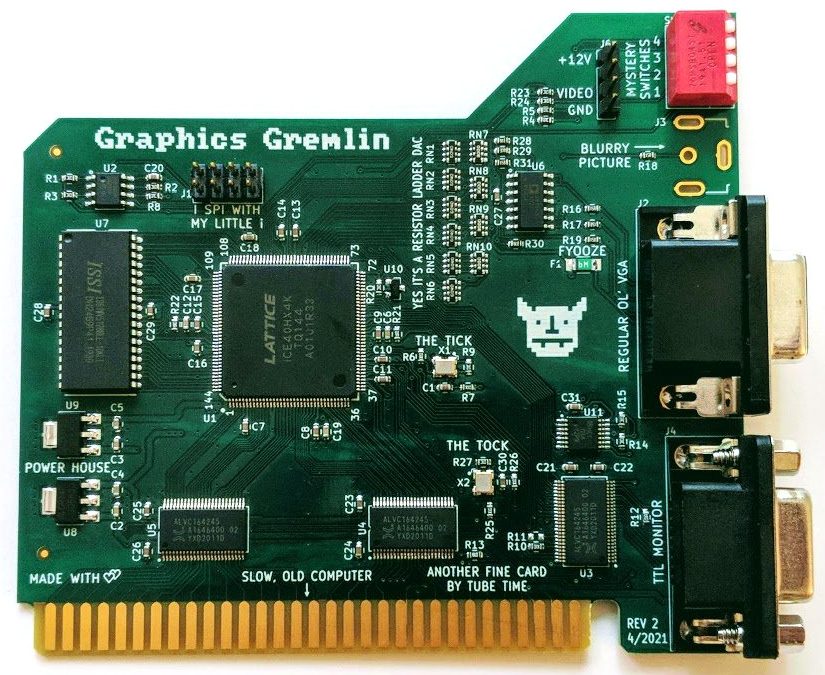
One thing about vintage computers is that they depend greatly on whether or not one can plug a compatible monitor into them. That’s what’s behind [Tube Time]’s Graphics Gremlin, a modern-design retro ISA video card that uses an FPGA to act just like a vintage MDA or CGA video card on the input end, but provides a VGA port for more modern display output options. (Actually, there is also an RGBI connector and a composite video out, but the VGA is probably the most broadly useful.)

Handy silkscreen labels make everything crystal clear. Click to enlarge.

Why bother making a new device to emulate an old ISA video card when actual vintage video cards are still plentiful? Because availability of the old cards isn’t the bottleneck. The trouble is that MDA or CGA monitors just aren’t as easy to come across as they once were, and irreplaceable vintage monitors that do still exist risk getting smashed during shipping. Luckily, VGA monitors (or at least converters that accept VGA input) are far more plentiful.

The board’s design files and assembly notes are all on the project’s GitHub repository along with plenty of thoughtful detail about both assembly and troubleshooting, and the Verilog code has its own document. The Graphics Gremlin is still under development, but you can also watch for the latest on [Tube Time]’s Twitter feed.

Thanks to [NoxiousPluK] for the tip!

Commodore 64 Emulator In VR Delivers A Full 80s Experience

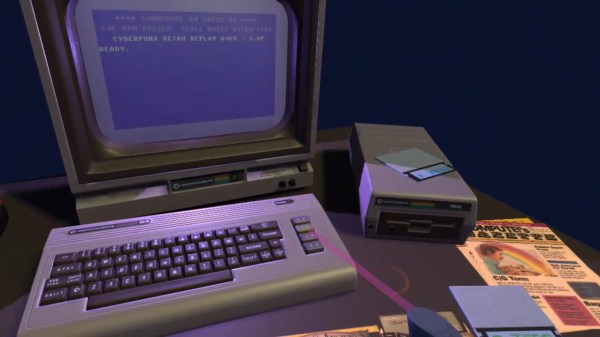
The simulated color CRT monitor looks surprisingly convincing in VR.

One way to play with vintage hardware without owning the hardware is to use an emulator, but [omni_shaNker] announced taking it to the next level by using VR to deliver a complete Commodore 64 system, in its full glory, complete with a native 80s habitat playset! This is a pretty interesting angle for simulating vintage hardware, especially since the emulator is paired with what looks like a pretty convincing CRT monitor effect in VR, not to mention a virtual 5.25″ floppy drive that makes compellingly authentic sounds.

The project is hosted on GitHub and supports a variety of VR hardware, but for owners of Oculus headsets, the application is also available on SideQuest for maximum convenience. SideQuest is essentially an off-the-books app store for managing software that is neither approved nor distributed by Facebook. Oculus is owned by Facebook, and Facebook is keen to keep a tight grip on their hardware.

As functional as the application is, there are still improvements and optimizations to be made. To address this, [omni_shaNker] put out a call for beta testers on Reddit, so if that’s up your alley be sure to get in touch. A video demonstration and overview that is chock-full of technical details is also embedded below; be sure to give it a watch to see what the project is all about.

Continue reading “Commodore 64 Emulator In VR Delivers A Full 80s Experience”

DIY Wireless Serial Adapter Speaks (True) RS-232

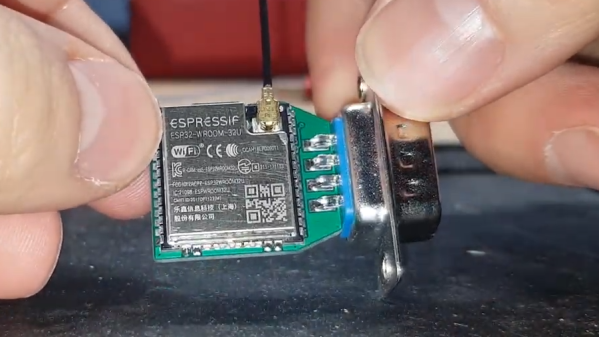
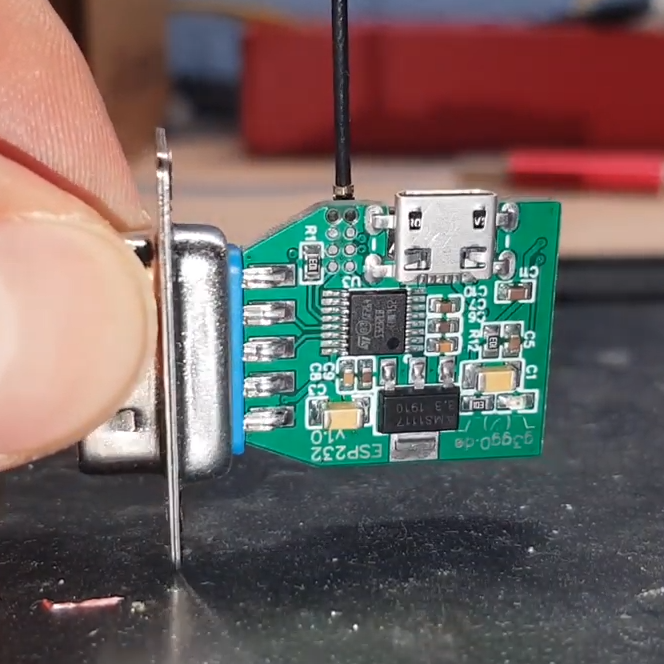
There is a gotcha lurking in wait for hackers who look at a piece of equipment, see a port labeled “Serial / RS-232”, and start to get ideas. The issue is the fact that the older the equipment, the more likely it is to be a bit old-fashioned about how it expects to speak RS-232. Vintage electronics may expect the serial data to be at bipolar voltage levels that are higher than what the typical microcontroller is used to slinging, and that was the situation [g3gg0] faced with some vintage benchtop equipment. Rather than deal with cables and wired adapters, [g3gg0] decided to design a wireless adapter with WiFi and Bluetooth on one end, and true RS-232 on the other.

The adapter features an ESP32 and is attached to a DB-9 plug, so it’s nice and small. It uses the ST3232 chip to communicate at 3 V logic levels on the microcontroller side, supports bipolar logic up to +/-13 V on the vintage hardware side, and a rudimentary web interface allows setting hardware parameters like baud rate. The nice thing about the ST3232 transceiver is that it is not only small, but can work from a 3 V supply with only four 0.1 uF capacitors needed for the internal charge pumps.

As for actually using the adapter, [g3gg0] says that the adapter’s serial port is exposed over TCP on port 23 (Telnet) which is supported by some programs and hardware. Alternately, one can connect an ESP32 to one’s computer over USB, and run firmware that bridges any serial data directly to the adapter on the other end.

Design files including schematic, bill of materials, and PCB design are shared online, and you can see a brief tour of the adapter in the video, embedded below.

Continue reading “DIY Wireless Serial Adapter Speaks (True) RS-232”

This Vintage LED Matrix Lives In A Gold Bathtub

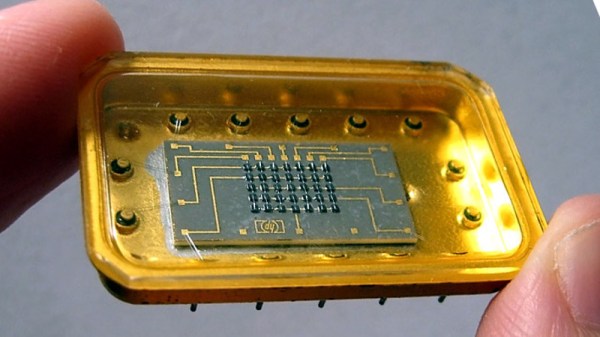
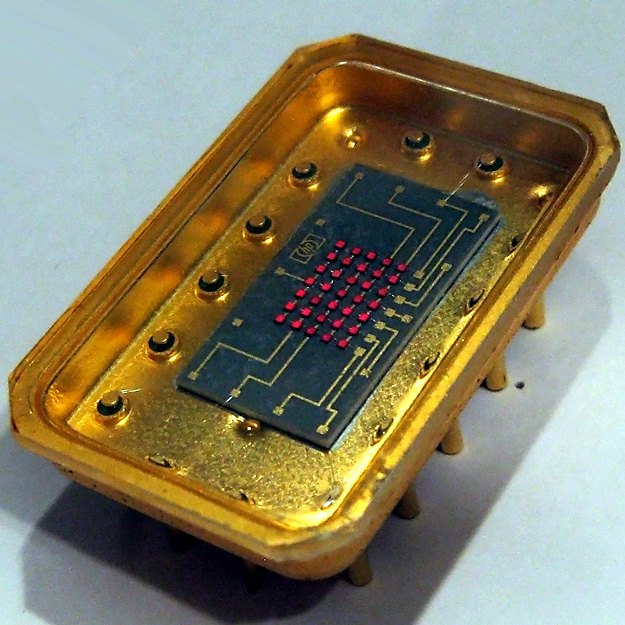
Early LED displays came in all sorts of configurations. Because the LED was fairly new technology, all kinds of ideas were getting tried, and with all that work there was plenty of opportunity for hardware that didn’t make the cut to fall into obscurity. That’s exactly what happened to the Hewlett-Packard 5082-7002, a 5×7 LED matrix display with something many of its brethren didn’t: an oversized gold tub to sit in.

It doesn’t seem that these displays were ever used in any actual products, and its origins are a mystery, but the device itself was nevertheless assigned an HP part number. Beyond that, not much is known about them, but [Industrial Alchemy] reminds us that many early LED devices were poorly documented and never produced in any real quantities. They became forgotten hardware, waiting to be rediscovered.

The 5082-7002 has a oversized gold tub that makes the 5×7 LED matrix mounted inside look puny by comparison, and reading any display made from these units would be difficult because the large size of the device would mean a lot of empty space between each character or digit. But it’s definitely got a striking look to it, no doubt about that.

What’s neat is that the 5802-7002 actually showed up in a video we featured with a look back at cool old LED technology. If you would like to (briefly) see the HP 5802-7002 a bit closer under a microscope, here is a link to the video, cued to 2:19.

Over-Engineered Incandescent Numerical Display Shows Great Workmanship

Back before LED technology came into its own, displays used incandescent bulbs. These vintage incandescent displays weren’t necessarily big; the Eaton 925H-C fiber optic display, for example, has numbers barely 7 mm tall and packs two of them into a tiny area. Of course, the depth of the display module itself is huge by today’s standards; those components have got to go somewhere, after all.

This particular device is, in [Industrial Alchemy]’s words, “[d]ripping with the spending excess that only a bottomless military budget can provide… the Eaton 925H-C may not be a practical device, but it is certainly an impressive one.”

The way the display works is this: individual incandescent bulbs light up fiber optic light guides, which terminate on the face of the display in small dots to make up a numerical display. With only fourteen bulbs, the dots we see here clearly aren’t individually addressable; the two digits are most likely broken up into seven segments each, with three dots making up each segment.

No expense seems spared in the design and manufacture of these displays. Even the incandescent lamps have individual shock absorbers.

The sheer amount of workmanship in these displays is remarkable, and their design makes them easy to retrofit with LED technology instead of replacing the tiny incandescent lamps. In a stark contrast to all of the machined aluminum and gold plated contacts seen here in the Eaton 925H-C, take a look at this Soviet-era seven-segment incandescent display whose construction is far less sophisticated, but shows off its own clever engineering. We’ve also seen more modern DIY takes on the concept, using LED light sources and cured UV resin light pipes to get that vintage look to the displays.

Vintage Calculator Design Shows Just How Much We Take For Granted Today

[Amen]’s Rockwell 920 calculator from the 70s was a very impressive piece of hardware for its time. It sported a 16-digit display, a printer, and it could run programs. It even had a magnetic card reader/writer that could be used to store programs and data externally. Seen through today’s eyes, it was less like a calculator and more like what we would call a single-board computer. They are also a window into another era, a time when many of the electrical design assumptions we take for granted hadn’t happened yet. When the time came to dig into what made the calculator tick, [Amen] had a lot of work to do just to get basic tools running.

For example, [amen]’s Blue Pill (an open-source, multipurpose test and measurement tool) is, on one hand, the perfect tool to snoop on the inner workings. However, those inner workings happen to use negative logic at -17 Volts, which means a logical zero is -17 V and a one is 0 V. Oh, and it uses an oddball clock rate, to boot. Since the Blue Pill doesn’t support -17 V negative logic (does anything?) a bit of custom work was needed to craft an interface. Once that was working, the Blue Pill was off to the races.

The unfamiliar elements didn’t end there. The pins on each IC, for example, are in a staggered layout quite unlike the DIP pattern most of us (and our tools, breadboards, and IC clips) are familiar with. As for the processor itself, [amen] has access to low-level documentation on Rockwell processors and instruction sets, but the timing diagrams are puzzling until one realizes the processor has two clock inputs at two different frequencies, resulting in what [amen] describes as four separate “clock phases”.

These design decisions were certainly made for good reasons at the time, and they even have a certain internal harmony to them, but it’s still a window into an era when the elements underpinning much of what we now have and work with had not yet happened.

Check out the video embedded below to see [amen] explain what it took to hook the Blue Pill up to a Rockwell 920. Also, if you’d like to see one of these vintage machines demonstrated in all its functioning glory, here’s a video of one being put through its paces.

Continue reading “Vintage Calculator Design Shows Just How Much We Take For Granted Today”