Train Speed Signaling Adapted For Car

One major flaw of designing societies around cars is the sheer amount of signage that drivers are expected to recognize, read, and react to. It’s a highly complex system that requires constant vigilance to a relatively boring task with high stakes, which is not something humans are particularly well adapted for. Modern GPS equipment can solve a few of these attention problems, with some able to at least show the current speed limit and perhaps an ongoing information feed of the current driving conditions., Trains, on the other hand, solved a lot of these problems long ago. [Philo] and [Tris], two train aficionados, were recently able to get an old speed indicator from a train and get it working in a similar way in their own car.

The speed indicator itself came from a train on the Red Line of the T, Boston’s subway system run by the Massachusetts Bay Transportation Authority (MBTA). Trains have a few unique ways of making sure they go the correct speed for whatever track they’re on as well as avoid colliding with other trains, and this speed indicator is part of that system. [Philo] and [Tris] found out through some reverse engineering that most of the parts were off-the-shelf components, and were able to repair a few things as well as eventually power everything up. With the help of an Arduino, an I/O expander, and some transistors to handle the 28V requirement for the speed indicator, the pair set off in their car to do some real-world testing.

This did take a few tries to get right, as there were some issues with the power supply as well as some bugs to work out in order to interface with the vehicle’s OBD-II port. They also tried to use GPS for approximating speed as well, and after a few runs around Boston they were successful in getting this speed indicator working as a speedometer for their car. It’s an impressive bit of reverse engineering as well as interfacing newer technology with old. For some other bits of train technology reproduced in the modern world you might also want to look at this recreation of a train whistle.

Continue reading “Train Speed Signaling Adapted For Car”

Misleading GPS, Philosophy Of Maps, And You

The oft-quoted saying “all models are wrong, but some are useful” is a tounge-in-cheek way of saying that at some level, tools we use to predict how the world behaves will differ from reality in some measurable way. This goes well beyond the statistics classroom it is most often quoted in, too, and is especially apparent to anyone who has used a GPS mapping device of any sort. While we might think that our technological age can save us from the approximations of maps and models, there are a number of limitations with this technology that appear in sometimes surprising ways. [Kyle] has an interesting writeup about how maps can be wrong yet still be incredibly useful especially in the modern GPS-enabled world. Continue reading “Misleading GPS, Philosophy Of Maps, And You”

Mobile Coffee Table Uses Legs To Get Around

For getting around on most surfaces, it’s hard to beat the utility of the wheel. Versatile, inexpensive, and able to be made from a wide array of materials has led to this being a cornerstone technology for the past ten thousand years or so. But with that much history it can seem a little bit played out. To change up the locomotion game, you might want to consider using robotic legs instead. That’s what [Giliam] designed into this mobile coffee table which uses custom linkages to move its legs and get itself from place to place around the living room.

Continue reading “Mobile Coffee Table Uses Legs To Get Around”

Rescuing High-Res Displays From Older Macs

When Apple started rolling out its Retina displays, it multiplied the amount of pixels compared to their standard, non-Retina displays by four. This increased pixel density while keeping the standard screen size — idea for those needing a lot of detail for their work. But, as is common with Apple, using these displays outside of the Apple ecosystem can be quite a challenge. Retina displays have been around for about a decade now, though, with some third-party hardware able to break them free of their cage. This post details how [Kevin] liberated the 5K display from a 2017 iMac for more general use with support for USB-C.

The first step was to find a used iMac for the right price, and then sell off most of its parts to recoup most of the initial cost. That brought the cost of the panel itself to about $250. The key to getting the display working without all of the Apple hardware is the R1811 driver board, which can be had for around $300. A new 156 watt power supply was added to the mix, and [Kevin] also put in a few extras like a USB cable extension and a latching push-button which kills the display’s power. Additionally, he attempted to get the original iMac speakers working with this setup too, but none of his attempts resulted in anything close to quality sound so he’s mostly abandoned that extra feature for now.

With that all buttoned up, he has a 27″ 5K display with USB-C input for around $650 which is quite a deal. The MacRumors thread that [Kevin] added his project to currently has around 1,700 posts about similar builds too, so it can be a wealth of information for all kinds of models. As Apple drops support for their older machines, these displays will become more and more common and projects like these can keep a lot of e-waste out of the landfill while also providing decent hardware at a bargain price. Don’t just look for iMacs and MacBooks though; there’s a similar process to use various iPad displays for other things as well.

Large Language Models On Small Computers

As technology progresses, we generally expect processing capabilities to scale up. Every year, we get more processor power, faster speeds, greater memory, and lower cost. However, we can also use improvements in software to get things running on what might otherwise be considered inadequate hardware. Taking this to the extreme, while large language models (LLMs) like GPT are running out of data to train on and having difficulty scaling up, [DaveBben] is experimenting with scaling down instead, running an LLM on the smallest computer that could reasonably run one.

Of course, some concessions have to be made to get an LLM running on underpowered hardware. In this case, the computer of choice is an ESP32, so the dataset was reduced from the trillions of parameters of something like GPT-4 or even hundreds of billions for GPT-3 down to only 260,000. The dataset comes from the tinyllamas checkpoint, and llama.2c is the implementation that [DaveBben] chose for this setup, as it can be streamlined to run a bit better on something like the ESP32. The specific model is the ESP32-S3FH4R2, which was chosen for its large amount of RAM compared to other versions since even this small model needs a minimum of 1 MB to run. It also has two cores, which will both work as hard as possible under (relatively) heavy loads like these, and the clock speed of the CPU can be maxed out at around 240 MHz.

Admittedly, [DaveBben] is mostly doing this just to see if it can be done since even the most powerful of ESP32 processors won’t be able to do much useful work with a large language model. It does turn out to be possible, though, and somewhat impressive, considering the ESP32 has about as much processing capability as a 486 or maybe an early Pentium chip, to put things in perspective. If you’re willing to devote a few more resources to an LLM, though, you can self-host it and use it in much the same way as an online model such as ChatGPT.

It’s Spreadsheets All The Way Down For This 80s Handheld

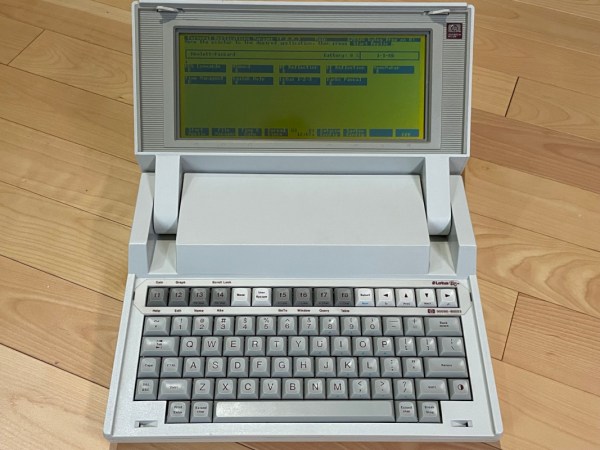
Unlike the today’s consumer computer market, the 1980s were the wild west in comparison. There were all kinds of different, incompatible operating systems, hardware, and programs, all competing against one another, and with essentially no networking to tie everything together. Some of these products were incredibly niche as well, only running one program or having a limited use case to keep costs down. Such was the Convergent WorkSlate, a computer that ran only a spreadsheet with any programs also needing to be built into a spreadsheet.

Upon booting the device, the user is presented with a fairly recognizable blank spreadsheet, albeit with a now-dated LCD display (lacking a backlight) and a bespoke keyboard and cursor that wouldn’t have allowed for easy touch typing. The spreadsheet itself is quite usable though, complete with formatting tools and the capability to use formulas like a modern spreadsheet program would. It also hosted a tape deck for audio and data storage, a modem for communicating with other devices, and an optional plotter-style printer. The modem port is how [Old VCR] eventually interfaces with the machine, although as one can imagine is quite a task for a piece of small-batch technology from the 80s like this. After learning how to send and receive information, a small game is programmed into the machine and then a Gopher interface is built to give the device limited Internet connectivity.

The investigation that [Old VCR] goes into on this project to get this obsolete yet unique piece of hardware running and programmed to do other tasks is impressive, and worth taking a look at especially because spreadsheets like this aren’t Turing-complete, leading to a few interesting phenomenon that most of us wouldn’t come across in the modern computing world. Since only around 60,000 units were ever made it’s difficult to come across these machines, but if you want to take a look at the spreadsheet world of the 80s without original hardware you can still run Lotus 1-2-3 natively in Linux today.

Thanks to [Cameron] for the tip!

A Clean Linux Installation For An Android TV Box

Although Android technically runs on top of Linux, generally most Android devices abstract away the underlying Linux-ness of these machines. In theory this is a good thing; we wouldn’t necessarily want to live in a world where we have to log in to a command-line interface just to make a phone call. But too much abstraction often needlessly restricts the capabilities of the underlying hardware. [Murray] a.k.a [Green Bug-Eyed Monster] has an Android TV box with just such a problem, as the Android OS included with it allows for watching TV just fine, but with a few tweaks it can run a full Linux installation instead, turning it into a much more versatile machine.

This specific Android TV box is based on the Rockchip 3566, a popular single-board computer used in a wide array of products. As such it is one of the easier targets for transforming a limited TV machine into a fully capable desktop computer. The first step is to compile an Armbian image for the machine, in this case using an x86 installation of Ubuntu to cross-compile for the ARM-based machine. With a viable image in hand, there’s an option to either solder on a microSD slot to the included pins on the computer’s PCB or to flash the image directly to the on-board eMMC storage by tricking the machine into thinking that the eMMC is missing. Either option will bring you into a full-fledged Linux environment, with just a few configuration steps to take to get it running like any other computer.

[Murray] began this process as an alternative to paying the inflated prices of Raspberry Pis over the past few years, and for anyone in a similar predicament any computer with the Rockchip 3566 processor in it could be a potential target for a project like this. You might need to make a few tweaks to the compile options and hardware, but overall the process should be similar. And if you don’t have an RK3566, don’t fret too much. We’ve seen plenty of other Android TV boxes turned into similar devices like this one which runs RetroPie instead.