Adding Crush Ribs To 3D Printed Parts For A Better Press Fit

[Dan Royer] shared a tip about how to get a reliably tight fit between 3D printed parts and other hardware (like bearings, for example.) He suggests using crush ribs, a tried-and-true solution borrowed from the world of injection molding and repurposed with 3D printing in mind. Before we explain the solution, let’s first look at the problem a little more closely.

Imagine one wishes to press-fit a bearing into a hole. If that hole isn’t just the right size, the bearing won’t be held snugly. If the hole is a little too big, the bearing is loose. Too small, and the bearing won’t fit at all. Since a 0.1 mm difference can have a noticeable effect on how loose or snug a fit is, it’s important to get it right.

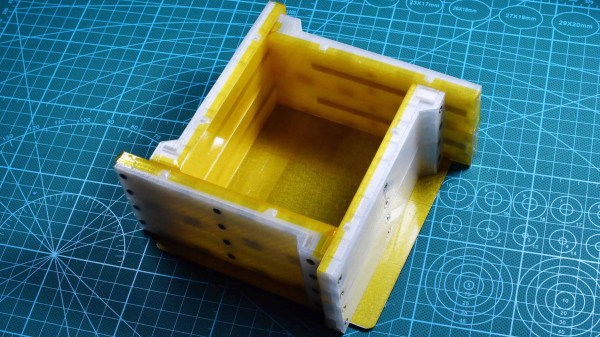
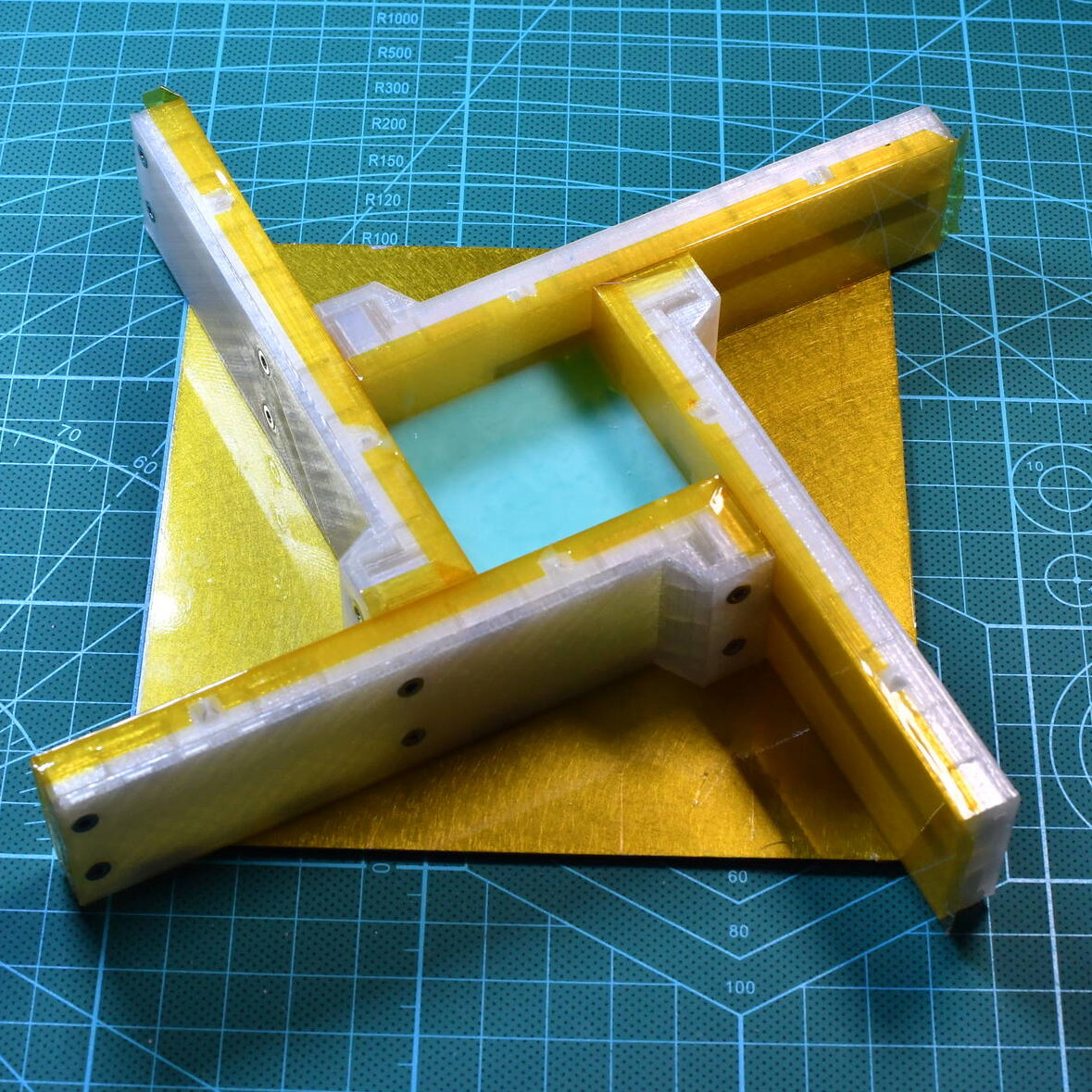
Crush rib locations highlighted with blue arrows.

For a 3D printed object, a hole designed with a diameter of 20 mm (for example) will come out slightly different when printed. The usual way around this is to adjust printer settings or modify the object until the magic combination that yields exactly the right outcome is found, also known as the Goldilocks approach. However, this means the 3D model only comes out right on a specific printer, which is a problem for a design that is meant to be shared. Since [Dan] works on robots with 3D printed elements, finding a solution to this problem was particularly important.

The solution he borrowed from the world of injection molding is to use crush ribs, which can be thought of as a set of very small standoffs that deform as a part is press-fit into them. Instead of a piece of hardware making contact with the entire inside surface of a hole, it makes contact only with the crush ribs. Press fitting a part into crush ribs is far easier (and more forgiving) than trying to get the entire mating surface exactly right.

Using crush ribs in this way is a bit of a hack since their original purpose in injection molding is somewhat different. Walls in injection-molded parts are rarely truly flat, because that makes them harder to eject from a mold. Surfaces therefore have a slight cant to them, which is called a draft. This slight angle means that press fitting parts becomes a problem, because any injection-molded hole will have slanted sides. The solution is crush ribs, which — unlike the walls — are modeled straight. The ribs are small enough that they don’t have an issue with sticking in the mold, and provide the mating surface that a press-fit piece of hardware requires. [Dan] has a short video about applying this technique to 3D printed objects, embedded below.

Continue reading “Adding Crush Ribs To 3D Printed Parts For A Better Press Fit”

Art of 3D printer in the middle of printing a Hackaday Jolly Wrencher logo

3D Printering: Wash Parts Better And Make Solvent Last Longer

SLA printing in resin is great, but part washing can be a hassle. The best results come from a two-stage wash, but that also means more material and more processing steps. Fortunately, there are ways to make it easier and more effective. One such way is to use a part washing machine, and I’ll cover a DIY option to make your own, but despite what the advertising implies for the commercial ones, a wash machine isn’t a cure-all.

Let’s go through how to get the best results from part washing, how to make the solvent last as long as possible, and how to dispose of the eventual waste.

Resin-Printed Parts Need Washing

All parts printed in resin emerge from the printer coated in syrupy, uncured goop. This needs to be removed completely, or the print ends up sticky and no amount of drying or additional UV curing will change that. (There is a way to fix sticky prints, but it’s better to avoid the situation in the first place.)

Simple part washing can be done with nothing more than a jar in which to rinse and soak a small part for about ten minutes, but agitation and a secondary wash will go a long way toward better and more consistent results. As mentioned, part washing machines like to present themselves as a one-appliance solution, but best results still come from a two-stage wash, and that means some additional steps.

Continue reading “3D Printering: Wash Parts Better And Make Solvent Last Longer”

Spare SMD Storage, With Stacking SMT Tape Reels

[Kadah]’s solution for storing short tapes of SMT parts is as attractive as it is clever. The small 3D-printed “tape reels” can double as dispensers, and stack nicely onto each other thanks to the sockets for magnets. The units come in a few different sizes, but are designed to stack in a consistent way.

We love the little touches such as recessed areas for labels, and the fact that the parts can print without supports (there are a couple of unsupported bridges, but they should work out fine.) Also, the outer dimensions of the units are not an accident. They have been specifically chosen to nestle snugly into the kind of part drawers that are a nearly ubiquitous feature of every hardware hacker’s work bench.

STLs are provided for handy download but [Kadah] also provides the original Fusion 360 design file, with all sizes defined as easily-customized parameters. In addition, [Kadah] thoughtfully provided each model in STEP format as well, making it easy to import and modify in almost any 3D CAD program.

Providing 3D models in STEP format alongside STLs is nice to see, because it gives more options to people if things need some tweaking, because editing the STL file can be done if needed, but isn’t optimal. Thankfully the ability to export STEP files is still open to hobbyists using Fusion 360, since Autodesk decided to leave that feature available to personal use licenses.

Vizy “AI Camera” Wants To Make Machine Vision Less Complex

Vizy, a new machine vision camera from Charmed Labs, has blown through their crowdfunding goal on the promise of making machine vision projects both easier and simpler to deploy. The camera, which starts around $250, integrates a Raspberry Pi 4 with built-in power and shutdown management, and comes with a variety of pre-installed applications so one can dive right in.

The Sony IMX477 camera sensor is the same one found in the Raspberry Pi high quality camera, and supports capture rates of up to 300 frames per second (under the right conditions, anyway.) Unlike the usual situation faced by most people when a Raspberry Pi is involved, there’s no need to worry about adding a real-time clock, enclosure, or ensuring shutdowns happen properly; it’s all taken care of.

‘Birdfeeder’ application can automatically identify and upload images of visitors.

Charmed Labs are the same folks behind the Pixy and Pixy 2 cameras, and Vizy goes further in the sense that everything required for a machine vision project has been put onboard and made easy to use and deploy, even the vision processing functions work locally and have no need for a wireless data connection (though one is needed for things like automatic uploading or sharing.) For outdoor or remote applications, there’s a weatherproof enclosure option, and wireless connectivity in areas with no WiFi can be obtained by plugging in a USB cellular modem.

A few of the more hacker-friendly hardware features are things like a high-current I/O header and support for both C/CS and M12 lenses for maximum flexibility. The IR filter can also be enabled or disabled via software, so no more swapping camera modules for ones with the IR filter removed. On the software side, applications are all written in Python and use open software like Tensorflow and OpenCV for processing.

The feature list looks good, but Vizy also seems to have a clear focus. It looks best aimed at enabling projects with the following structure:

Detect Things (people, animals, cars, text, insects, and more) and/or Measure Things (size, speed, duration, color, count, angle, brightness, etc.)

Perform an Action (for example, push a notification or enable a high-current I/O) and/or Record (save images, video, or other data locally or remotely.)

The Motionscope application tracking balls on a pool table. (Click to enlarge)

A good example of this structure is the Birdfeeder application which comes pre-installed. With the camera pointed toward a birdfeeder, animals coming for a snack are detected. If the visitor is a bird, Vizy identifies the species and uploads an image. If the animal is not a bird (for example, a squirrel) then Vizy can detect that as well and, using the I/O header, could briefly turn on a sprinkler to repel the hungry party-crasher. A sample Birdfeeder photo stream is here on Google Photos.

Motionscope is a more unusual but very interesting-looking application, and its purpose is to capture moving objects and measure the position, velocity, and acceleration of each. A picture does a far better job of explaining what Motionscope does, so here is a screenshot of the results of watching some billiard balls and showing what it can do.

Xbox Controller Gets Snap On Joystick From Clever 3D-Printed Design

Ball and socket linkages make for smooth operation.

People making DIY controls to enhance flight simulators is a vibrant niche of engineering and hackery, and it sure looks like Microsoft Flight Simulator is doing its part to keep the scene lively. [Akaki Kuumeri]’s latest project turns an Xbox One gamepad into a throttle-and-stick combo that consists entirely of 3D printed parts that snap together without a screw in sight. Bummed out by sold-out joysticks, or just curious? The slick-looking HOTAS (hands on throttle and stick) assembly is only a 3D printer and an afternoon away. There’s even a provision to add elastic to increase spring tension if desired.

The design looks great, and the linkages in particular look very well thought-out. Ball and socket joints smoothly transfer motion from one joystick to the other, and [Akaki] says the linkages accurately transmit motion with very little slop.

There is a video to go with the design (YouTube link, embedded below) and it may seem like it’s wrapping up near the 9 minute mark, but do not stop watching because that’s when [Akaki] begins to go into hacker-salient details about of how he designed the device and what kinds of issues he ran into while doing so. For example, he says Fusion 360 doesn’t simulate ball and socket joints well, so he had to resort to printing a bunch of prototypes to iterate until he found the right ones. Also, the cradle that holds the Xbox controller was far more difficult to design than expected, because while Valve might provide accurate CAD models of their controllers, there was no such resource for the Xbox ones. You can watch the whole video, embedded below.

Continue reading “Xbox Controller Gets Snap On Joystick From Clever 3D-Printed Design”

Watch A Fast Sand Plotter Plow Patterns At Speed

[Mark]’s sand table wisely has a glass top.
Most of us have probably seen a video of a sand drawing table at work, in which a steel ball — magnetically-coupled to a gantry under a layer of sand — lazily draws geometric patterns with utter precision and zen-like calmness. That’s all well and good, but [Mark Rehorst] thinks it can also be interesting to crank up the speed and watch the ball plow through sand just as physics intended. There’s a deeper reason [Mark] is working at this, however. Faster drawing leads to less crisp results, but by how much, exactly? To answer this, [Mark] simply ran his table (which is named The Spice Must Flow) at both fast and slow speeds and documented the results.

These two images show the difference between running the table at 100 mm/s versus 500 mm/s. The slower speed is noticeably crisper, but on the other hand the faster speed completed the pattern in about a fifth of the time. [Mark] says that as the ball aggressively accelerates to reach target speeds, more sand is thrown around over existing lines, which leads to a loss of detail.

Crisper detail, or a faster draw? Which is “better” depends on many things, but it’s pretty clear that [Mark]’s cat finds the fast version more exciting. You can see [Mark]’s table at high speed and the cat’s reaction in the video, embedded below.

Continue reading “Watch A Fast Sand Plotter Plow Patterns At Speed”

Custom Keyboard Goes Split, Gets Thin, Acquires Stained Wood

The hardware and software required to make DIY keyboards happen has gotten more and more accessible, and that means it’s easier than ever to make one’s ideal input device a reality from the ground up. For [Cameron Sun], his Ellipsis Split mechanical keyboard buildlog details his second effort, refining his original design from lessons learned the first time around. The new keyboard is slim, split into two, and has integrated wrist supports made from stained wood. The painting and wood treatment took a lot of work and patience, but it certainly paid off because the result looks amazing!

Small integrated OLED screen shows the current mode.

When we saw [Cameron]’s first custom keyboard, we admired the unique aluminum case and some nice touches like the physical toggle switches. Those tactile switches allow changing the keyboard to different modes, while also serving as a visual indicator. [Cameron] liked those switches too, but alas they just didn’t fit into the slim new design. However, he’s very happy with swapping modes in software and using a small OLED display as an indicator. What kind of different modes does his keyboard have? There’s Windows mode and Mac mode (which changes some hotkeys) as well as modes that change which keys in the thumb clusters do what (moving the space key to the left for easier gaming, for example.) After all, it’s not just the physical layout that can be customized with a DIY keyboard.

Interested in making your own custom keyboard? Be sure to look into this breakaway keyboard PCB concept before you start, because it just might make your custom build a lot easier.