A Custom Saw Designed For Close Quarters Making

It probably goes without saying that we’d all love to have a huge, well-appointed, workshop. But in reality, most of us have to make do with considerably less. When trying to fit tools and equipment into a small space you need to get creative, and if you can figure out a way to squeeze multiple functions out of something, all the better.

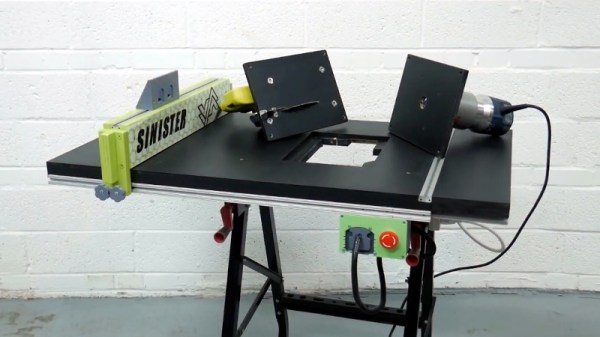
Wanting to get as much use out of his space as possible, [Chris Chimienti] decided that his best bet would be to design and build his own folding combination table. Using interchangeable inserts it can switch between being a table saw and a router, and with its extendable arms, also serves as a stand for his miter saw. Of course when not cutting, it makes a handy general purpose work surface.
In the videos after the break, [Chris] takes viewers through the design and construction of what he calls the “Sinister Saw”, which is made somewhat more complicated by the fact that he obviously doesn’t have a table saw to begin with. Cutting out the pieces for the table itself and the panels that would eventually become home to the router and circular saw took some careful work with clamps and saw horses to make sure they were all perfectly square.

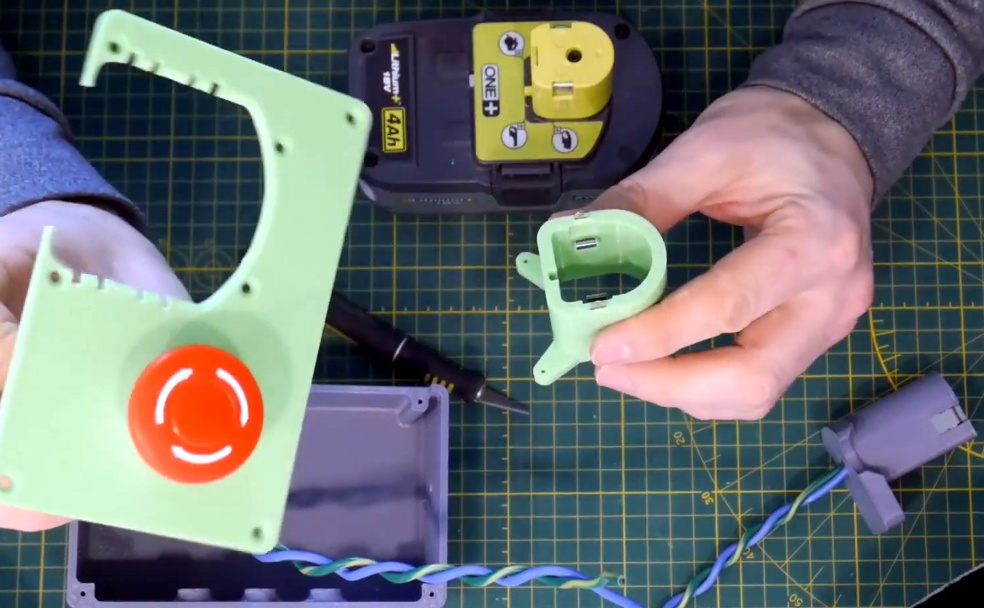
But the wooden components of the Sinister Saw are only half of the story. The table is able to extend by way of an aluminum extrusion frame, and there are numerous 3D printed parts involved for which [Chris] has provided the STL files. We particularly like the box that holds the emergency stop button and relocates the tool’s battery to the front panel, which looks to be an evolution of his previous work in 3D printing cordless tool adapters. We could certainly see this part being useful on other projects that utilize these style of batteries.

In the other extreme, where you want to build your own tools and have plenty of space, you could try making everything out of giant slabs of stone.

Continue reading “A Custom Saw Designed For Close Quarters Making”
Get Your Microcontroller Online At The Speed Of Light

When developing a network-enabled project with the ESP8266 or ESP32, the easiest way to handle WiFi credentials is to just hardcode the access point and encryption key into the program. But that means recompiling the firmware if you ever want to use it on a different network, which isn’t really an option if you’re trying to make something that other people can easily use. If you’re expecting grandma to bust out the UART cable, we’ve got bad news for you.

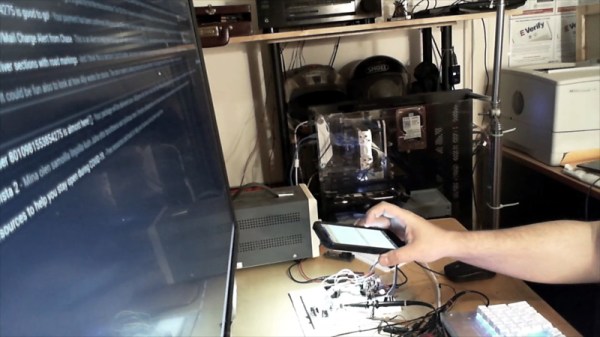
There are various ways around this problem, but we think the one developed by [Pekka Lehtikoski] is particularly clever. With a simple application, network credentials can be literally “flashed” to the waiting microcontroller by rapidly blinking the flash LED on an Android device. This allows the information to be transferred quickly and easily regardless of the user’s technical proficiency. One could even make the argument that it’s more secure than some of the other methods of doing initial setup, since an eavesdropper would literally need to see you do it if they wanted to steal your encryption key.

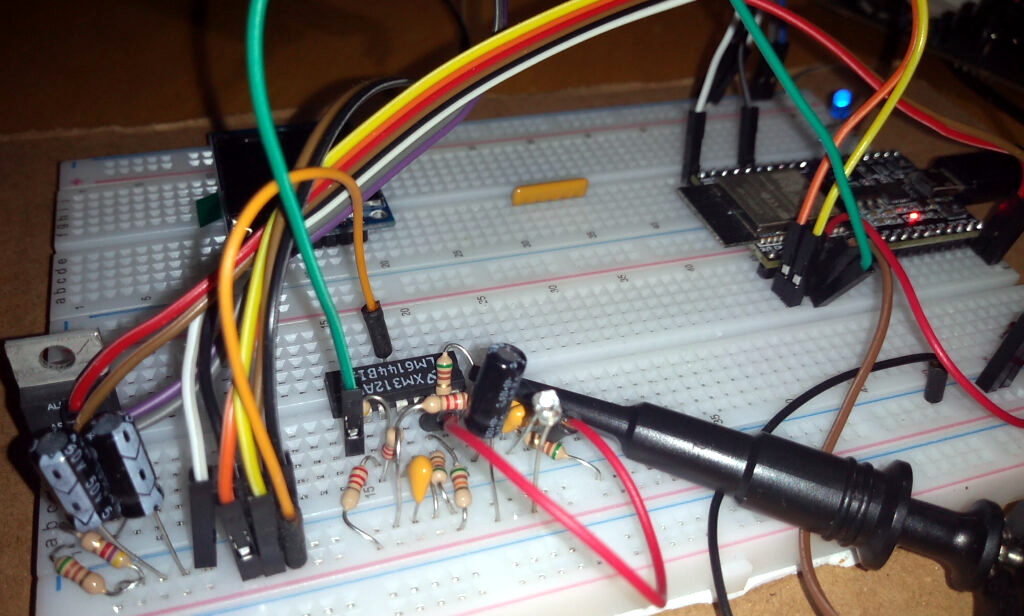
[Pekka] has made the source code for the Android application and the “Gazerbeam” library open for anyone who wants to include the capability in their own projects. To pick up the blinking light you just need to add a phototransistor, an opamp, and a handful of passives to your circuit; making this solution cheap enough that you could even use it in a small-scale production run. The concept isn’t limited to network credentials either. Whenever we can hold conferences again, it could be an interesting way to let attendees customize their badge.

Of course, [Pekka] isn’t the first person to use this trick. Hackers well versed in the history of WiFi MCUs may recall that the Electric Imp used a very similar method of configuration called BlinkUp. If you ever come across a device that asks you to put your phone’s screen down on a little window to perform the initial setup, there’s a good chance it has an Imp inside.

NASA Readies New Electric X-Plane For First Flight

Since 1951, NASA (known in those pre-space days as NACA) and the United States Air Force have used the “X” designation for experimental aircraft that push technological boundaries. The best known of these vehicles, such as the X-1 and X-15, were used to study flight at extreme altitude and speed. Several fighter jets got their start as X-planes over the decades, and a number of hypersonic scramjet vehicles have flown under the banner. As such, the X-planes are often thought of as the epitome of speed and maneuverability.

So the X-57 Maxwell, NASA’s first piloted X-plane in two decades, might seem like something of a departure from the blistering performance of its predecessors. It’s not going to fly very fast, it won’t be making any high-G turns, and it certainly won’t be clawing its way through the upper atmosphere. The crew’s flight gear won’t even be anything more exotic than a polo and a pair of shorts. As far as cutting-edge experimental aircraft go, the X-57 is about as laid back as it gets.

But like previous X-planes, the Maxwell will one day be looked back on as a technological milestone of its own. Just as the X-1 helped usher in the era of supersonic flight, the X-57 has been developed so engineers can better understand the unique challenges of piloted electric aircraft. Before they can operate in the public airspace, the performance characteristics and limitations of electric planes must be explored in real-world scenarios. The experiments performed with the X-57 will help guide certification programs and government rule making that needs to be in place before such aircraft can operate on a large scale.

Continue reading “NASA Readies New Electric X-Plane For First Flight”

Washing Your Hands With 20,000 Volts

These last few weeks we’ve all been reminded about the importance of washing our hands. It’s not complicated: you just need soap, water, and about 30 seconds worth of effort. In a pinch you can even use an alcohol-based hand sanitizer. But what if there was an even better way of killing bacteria and germs on our hands? One that’s easy, fast, and doesn’t even require you to touch anything. There might be, if you’ve got a high voltage generator laying around.

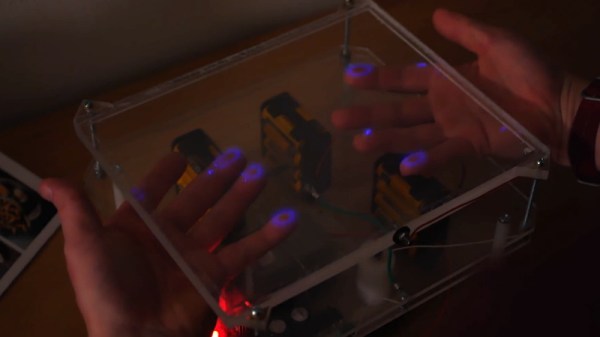
In his latest video, [Jay Bowles] proposes a novel concept: using the ozone generated by high-voltage corona discharge for rapid and complete hand sterilization. He explains that there’s plenty of research demonstrating the effectiveness of ozone gas a decontamination agent, and since it’s produced in abundance by coronal discharge, the high-voltage generators of the sort he experiments with could double as visually striking hand sanitizers.

Looking to test this theory, [Jay] sets up an experiment using agar plates. He inoculates half of the plates with swabs that he rubbed on his unwashed hands, and then repeats the process after passing his hands over the high-voltage generator for about 15 seconds. The plates were then stored at a relatively constant 23°C (75°F), thanks to the use of his microwave as a makeshift incubator. After 48 hours, the difference between the two sets of plates is pretty striking.

Despite what appears to be the nearly complete eradication of bacteria on his hands after exposing them to the ozone generator, [Jay] is quick to point out that he’s not trying to give out any medical advice with this video. This simple experiment doesn’t cover all forms of bacteria, and he doesn’t have the facilities to test the method against viruses. The safest thing you can do right now is follow the guidelines from agencies like the CDC and just wash your hands the old fashioned way; but the concept outlined here certainly looks worthy of further discussion and experimentation.

Regular viewers of his channel may notice that the device in this video as actually a modified version of the hardware he used to experiment with electrophotography last year.

Continue reading “Washing Your Hands With 20,000 Volts”

Teardown: VTech Whiz Kid Luggable Computer

Back in the early 1980s, hotshot business types on the go would have used what were referred to at the time as portable computers from companies like Osborne or Kaypro. Due to the technical limitations of the era these so-called “luggables” were only slightly smaller and lighter than contemporary desktop computers, but they had integrated displays and keyboards so they were a bit easier to move around. A few years later the first generation of laptops would hit the market, and the portables predictably fell out of favor. Today they’re relatively rare collectors items; a largely forgotten first step in the steady march towards true mobile computing.

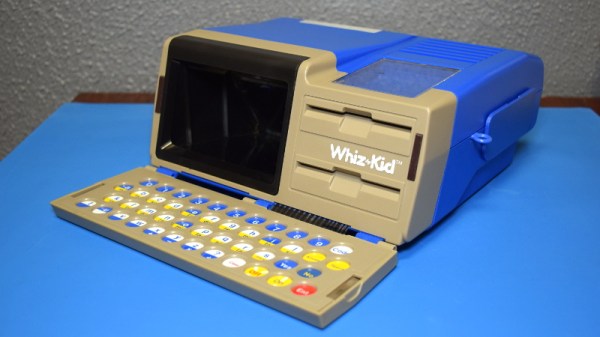
Which makes the 1984 edition of VTech’s “Whiz Kid” educational computer an especially unique specimen. The company’s later entries into the series of popular electronic toys would adopt (with some variations) the standard laptop form factor, but this version has the distinction of being what might be the most authentic luggable computer ever made for children. When this toy was being designed it would have been a reflection of the cutting edge in computer technology, but today, it’s a fascinating reminder that the latest-and-greatest doesn’t always stick around for very long.

The classic luggable hallmarks are all here. The flip down keyboard, the small and strangely offset display, there’s even lugs on the side to attach an included strap so the youngster can sling it over their shoulder. On the other hand, the fact that it’s just a toy allowed for some advantages over the real thing: it can actually run on battery power, and is quite lightweight relative to its size.

When we last took a peek inside one of VTech’s offerings, we found a surprisingly powerful Z80 machine that was more than deserving of its PreComputer moniker. But that BASIC-compatible design hailed from the late 80s, and was specifically marketed as a trainer for the next generation of computer owners. Will the 1984 Whiz Kid prove to have a similar relationship to its adult counterparts, or does the resemblance only go skin deep? Let’s find out.

Continue reading “Teardown: VTech Whiz Kid Luggable Computer”

Adapter Brings M.2 WiFi Cards To The Pinebook Pro

The Pinebook Pro is a considerably more capable machine than the $99 Pinebook released in 2017, but the open source laptop still isn’t exactly a powerhouse by modern standards. The system is intended to compete with mid-range Chromebooks, and to that end, few would argue it’s not worth the $199 price tag. But there’s still room for improvement, and at this price point that makes it a hardware hacker’s delight.

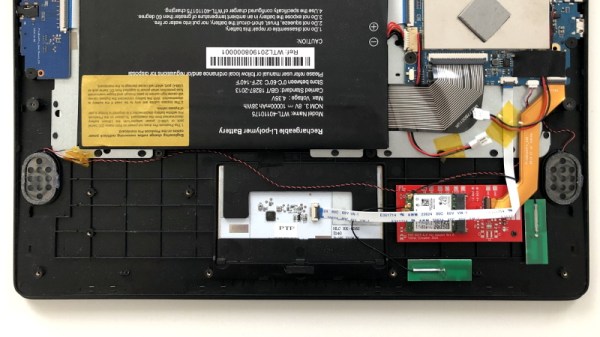
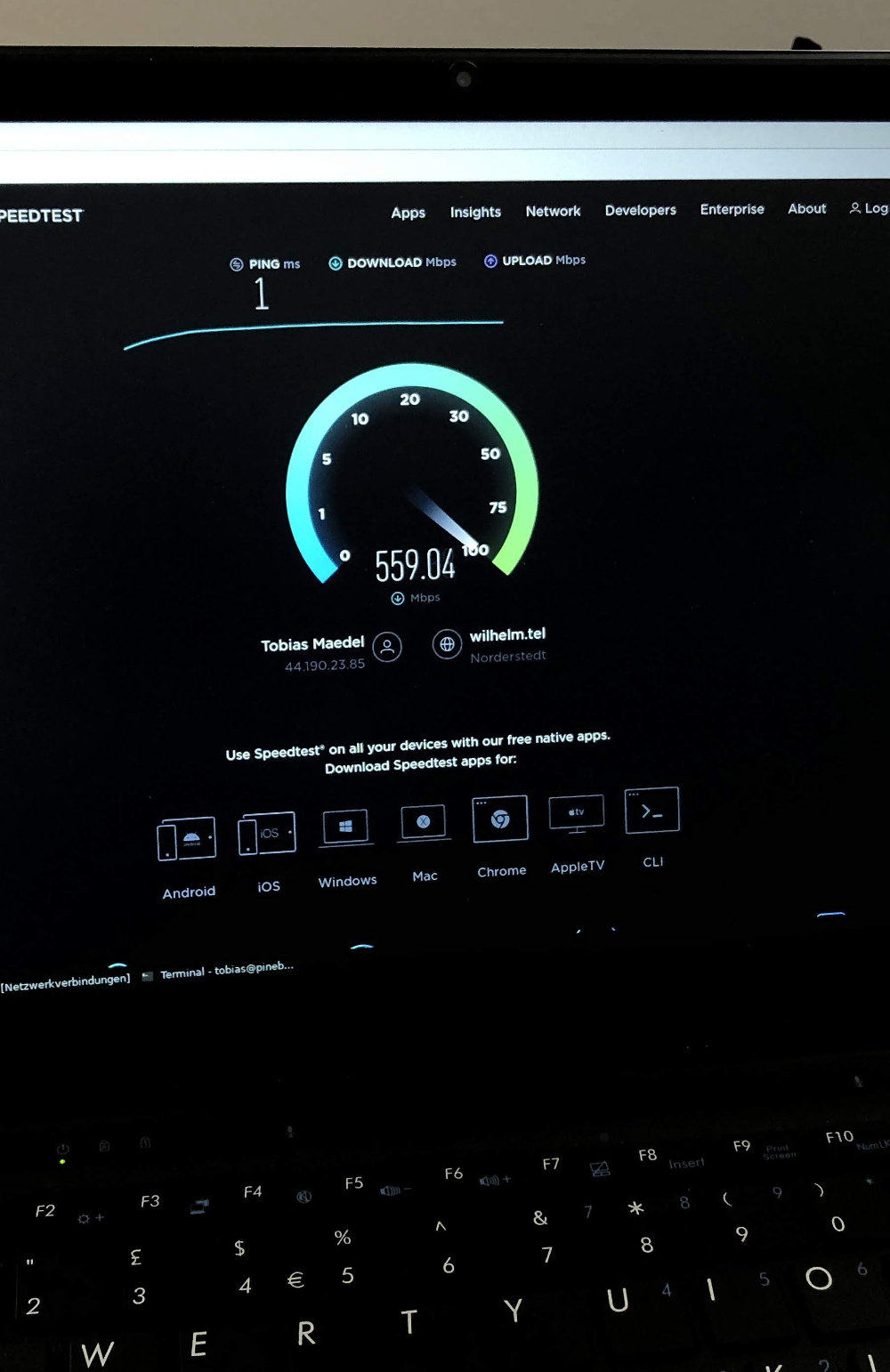
[TobleMiner] has recently released the design files for a drop-in adapter that allows you to install M.2 wireless cards like the Intel AX200 in the Pinebook Pro. With the latest-and-greatest WiFi 6 technology onboard, transfer rates as high as 600 Mbps have been demonstrated on this relatively low-cost Linux laptop. It sounds like there’s a possibility the adapter will be offered officially through the Pine store at some point in the future, but in the meantime, you can always spin up your own copy if you feel the need for speed on your Pinebook Pro.

The adapter takes the place of the official M.2 SSD upgrade board, which means users will need to choose between expanded storage and an upgraded wireless card. But [TobleMiner] hints that a version of the adapter with a second M.2 slot should be possible in the future. The design also features pads to install an optional voltage regulator, as testing has shown that the Pinebook Pro’s 3.3 V line can fluctuate a bit depending on battery level.

We took a close look at the original Pinebook when it was released, and came away cautiously optimistic. The Pro model appears to be an improvement in every way imaginable, and upgrades like this show just what’s possible when users are free to explore their hardware.

Custom Bluetooth Joystick In A Nunchuk Shell

With the Wii’s unique controller, Nintendo not only provided new gaming experiences to players, but gave hardware hackers a platform for experimentation that’s still going strong. Case in point, this modification of a third party Wii “Nunchuk” by [Giliam de Carpentier] that turns the accessory into a stand-alone wireless controller powered by a ATtiny44A.

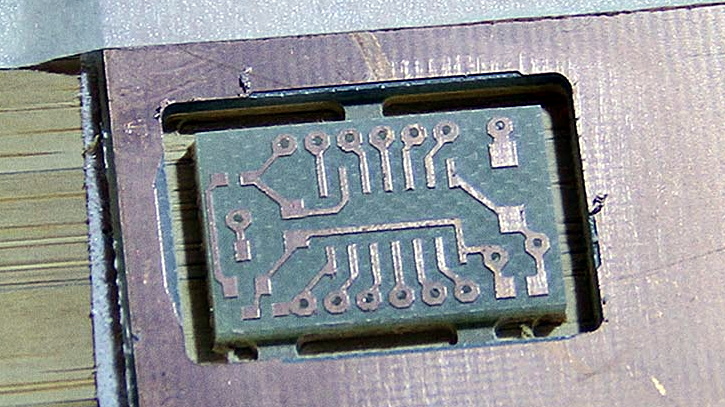
Milling a new home for the AVR

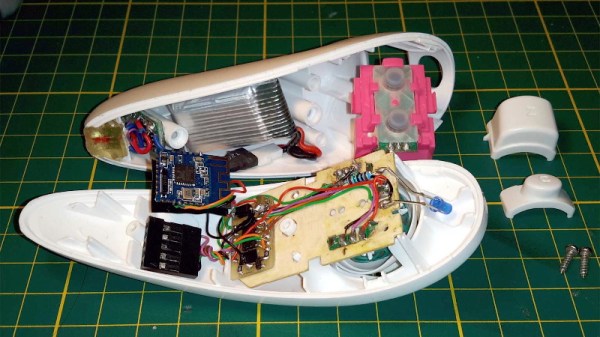
It turns out there’s a considerable amount of free space inside the Nunchuk case, so [Giliam] found adding in the new hardware wasn’t nearly as difficult as you might expect. Of course, it helps that the diminutive SMD ATtiny44A and its support hardware are housed on a very neatly milled PCB that attaches to the back of the original board.

Most of the other hardware comes in the form of modular components, like the Bluetooth transmitter and TP4056 charge controller for the 300 mAh battery. A micro USB charging port is mounted where the original Nunchuk cable entered the case, making the whole thing look very professional.

Even if you aren’t interested in making your own controller, [Giliam] covers many interesting topics in this write-up such as handling different methods of Bluetooth connectivity and various power management techniques to eke out as much life from the relatively small battery as possible. It’s not only a fascinating read, but a great example of what thorough project documentation should look like.

In the past we’ve seen Bluetooth conversions for the Wii Nunchuck, but traditionally they left the original electronics in place. On the other side of the spectrum, we’ve also seen the internals get replaced with something as powerful as the Raspberry Pi Zero.

Continue reading “Custom Bluetooth Joystick In A Nunchuk Shell”