A Hard Rocking Arduino Visualization Shield

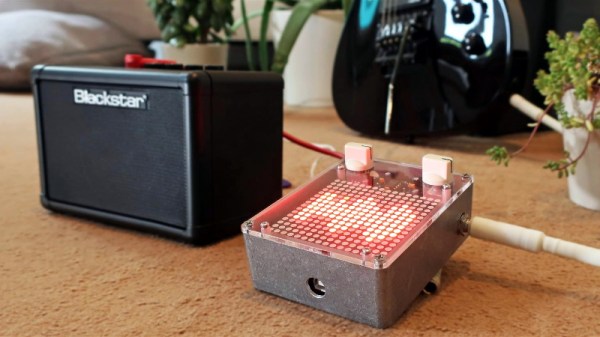
Over the summer [ElectroSmash] put the finishing touches on the Arduino Audio Meter, a shield for the Arduino Uno that visualizes various aspects of an incoming audio signal on a set of four 8×8 LED dot matrices. Obsentisibly it’s for use on a guitar pedalboard, but thanks to the incredible documentation and collection of example code provided by the team, the project promises to be an excellent platform for all sorts of audio experimentation.
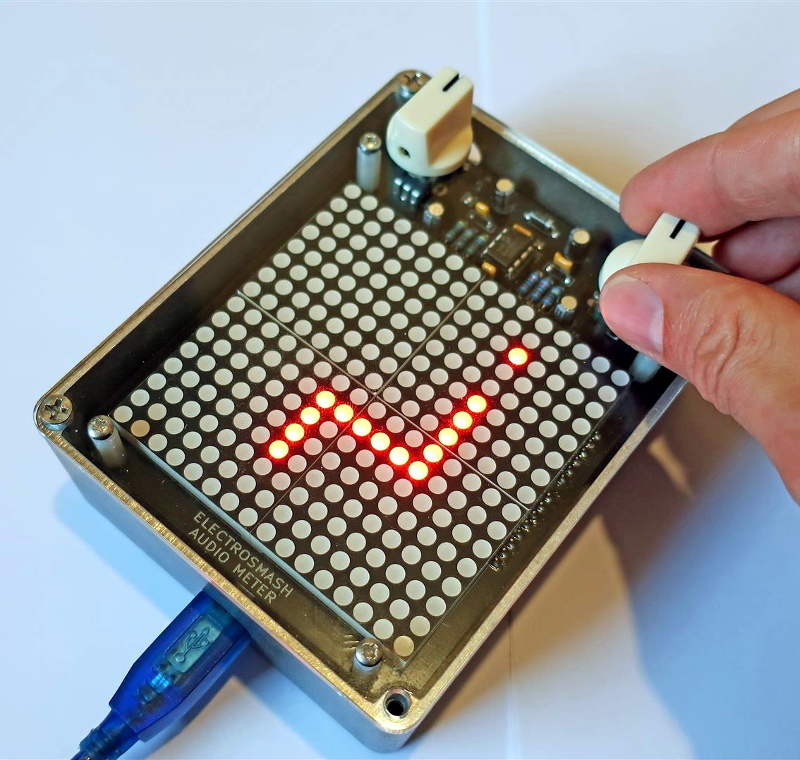
Incoming audio is amplified with an MCP6002 and fed into the Uno’s Analog to Digital Converter, where it’s processed via whatever Sketch the user has uploaded. User input is provided by a digital encoder with push-button. A set of four MAX7219 chips control the entire 256-pixel matrix with just three pins on the Arduino. The resolution of the display allows the Arduino Audio Meter to show more than just a simple VU meter, it can even do text and basic graphics.

[ElectroSmash] provides various Sketches for use with the Arduino Audio Meter that provide the expected repertoire of audio visualizations, but they also provide a number of interesting Sketches to expand the capabilities of the device in unexpected ways. Some of them could be useful for a stage musician, such a tool to tune your guitar, whereas others are fun uses of the hardware such as a game of “Snake”.

With the entire project released as open source, users are free to run wild with the Arduino Audio Meter. Writing your own custom software is an obvious first step to making the project your own, but adding additional hardware features and functions certainly aren’t out of the question either.

Our very own [Lewin Day] once walked us through the effort involved in building boutique guitar pedals, and while the Audio Audio Meter’s capabilities are somewhat limited as it doesn’t have the ability to change the audio going through it, we’re still interested in seeing what the community will come up with once they have an easy way to bring their ideas to life.

Continue reading “A Hard Rocking Arduino Visualization Shield”
RGB Lamp With Micro:Bit Powered Gesture Control

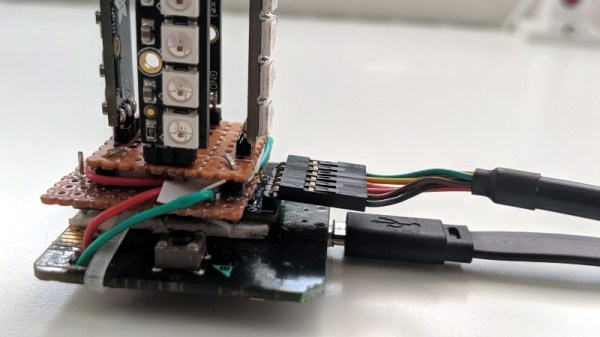
The Micro:bit is a very neat piece of hardware that, frankly, we don’t see enough of. Which made us all the more interested when [Manoj Nathwani] wrote in to tell us about the gorgeous 3D printed RGB LED lamp he created that uses the BBC-endorsed microcontroller to perform basic gesture detection. Purists will likely point out that an Arduino Pro Mini is tagging along to handle interfacing with the LEDs, but it’s still a good example of how quick you can get a project up and running with MicroPython on the Micro:bit.

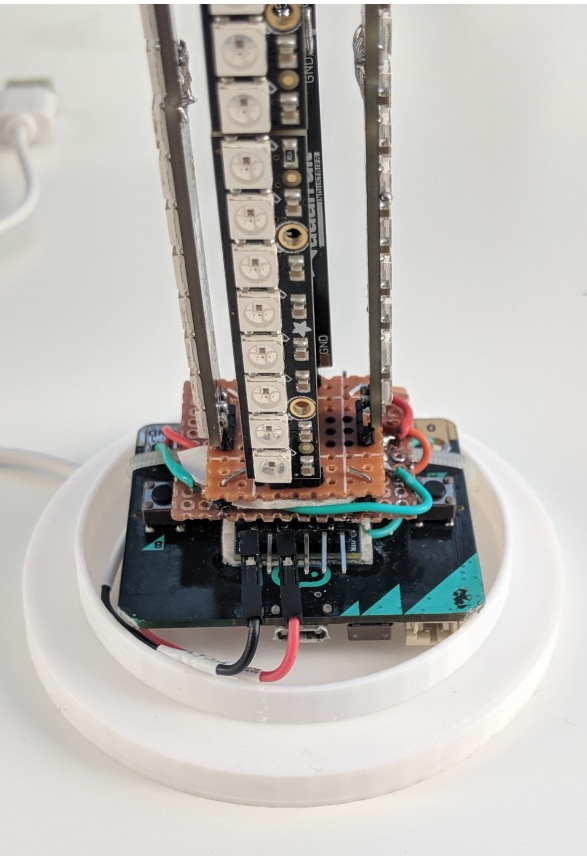
[Manoj] used eight NeoPixel Sticks, a NeoPixel Ring, and a few scraps of perfboard to construct a three dimensional “bulb” to fill the void inside the printed diffuser. They’re chained together so all the elements appear as a single addressable strip, which made the rest of the project a bit easier to implement. It might not be pretty, but it gets the job done and it’s not like you’ll ever see it again once installed in the lamp anyway.

The Micro:bit and Arduino co-pilot live in the base of the lamp, and the single USB cable to provide power (and the ability to update the device’s firmware) is run out the bottom to give the whole thing a clean and professional look. For those wondering why the Arduino has tagged along, [Manoj] says he couldn’t get the NeoPixel libraries to play nicely with the Micro:bit so he’s using the Arduino essentially as a mediator.

Right now the only gesture that’s detected on the Micro:bit is a simple shake, which tells the Arduino to toggle the light show on and off. But in the future, [Manoj] plans to implement more complex gestures which will trigger different animations. As he explains in the blog post, gesture recognition with the Micro:bit is incredibly simple, so it should be easy to come up with a bunch of unique ways to interface with the lamp.

Color changing LED lamps are a favorite project of hackers, and we’ve seen examples built with everything from glass and copper to laser-cut pieces of wood and veneer. While you might prefer to skip the gesture control for an ESP8266 and UDP, we think this project is another strong entry into this popular genre.

A Stylish Home For Your Next ESP Project

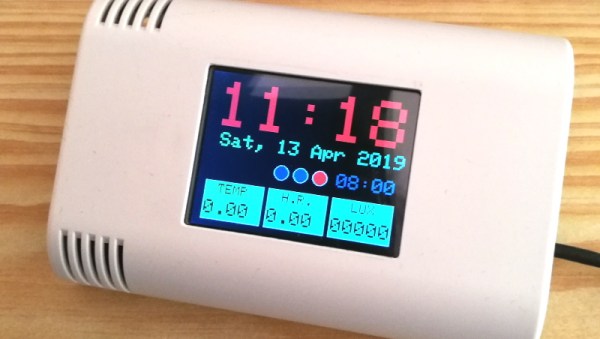
The ESP8266 and ESP32 are fast becoming the microcontroller of choice for, well, everything. But one particular area we’ve seen a lot of activity in recently is home automation; these boards make it so incredibly easy and cheap to get your projects online that putting together your own automation system is far more appealing now than it’s ever been. Capitalizing on that trend, [hwhardsoft] has been working on a ESP enclosure that’s perfect for mounting on the living room wall.

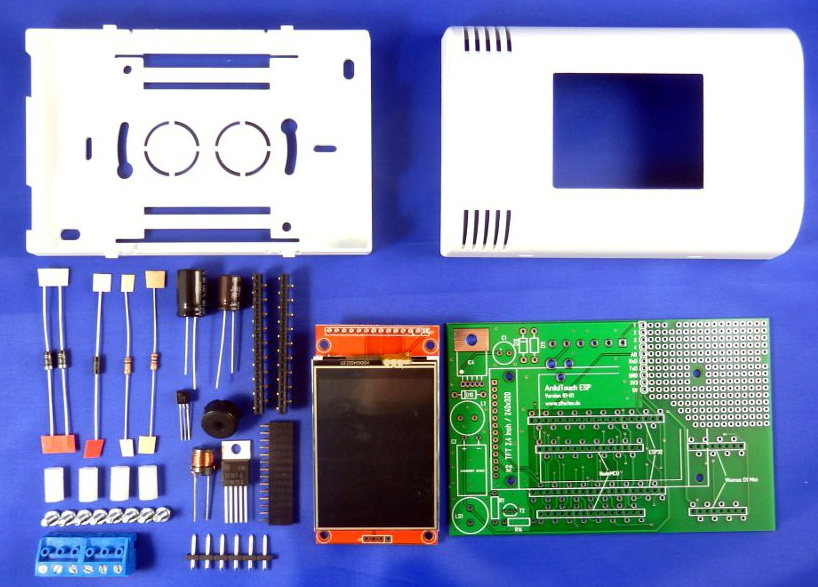
Of course, there’s more to this project than an admittedly very nice plastic box. The system also includes a ILI9341 2.4 inch touch screen LCD, an integrated voltage regulator, and even a section of “perfboard” that gives you a spot to easily wire up ad-hoc circuits and sensors. You don’t even need to switch over to the bare modules either, as the PCB is designed to accommodate common development boards such as the Wemos D1 Mini and NodeMCU.

Despite its outward appearance, this project is very much beginner friendly. Utilizing through hole components, screw down terminals, and a impeccably well-labeled silkscreen, you won’t need to be a hardware expert to produce a very slick gadget the whole family can appreciate.

Much like the HestiaPi project we covered a few months back, this project takes a cheap and readily available development board and turns it into something that has all the trappings of a commercial offering. These projects are reminders that the line between built and bought is only getting blurrier as time goes on.

Continue reading “A Stylish Home For Your Next ESP Project”

3D Printed VirtuScope Is A Raspberry Pi 4 Cyberdeck With A Purpose

William Gibson might have come up with the idea for the cyberdeck in 1984, but it’s only recently that technology like desktop 3D printing and powerful single board computers have enabled hackers and makers to assemble their own functional versions of these classic cyberpunk devices. Often the final product is little more than a cosplay prop, but when [Joe D] (better known on the tubes as [bootdsc]) started designing his VirtuScope, he wanted to create something that was actually practical enough to use. So far, it looks like he’s managed to pull it off.

Many of the cyberdeck builds we see are based around the carcass of a era-appropriate vintage computer, which looks great and really helps sell the whole retro-future vibe. Unfortunately, this can make the projects difficult and expensive to replicate. Plus there’s plenty of people who take offense to gutting a 30+ year old piece of hardware just so you can wear it around your neck at DEF CON.

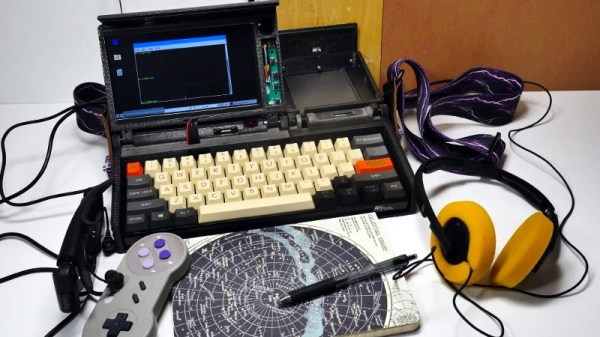
[bootdsc] deftly avoided this common pitfall by 3D printing the entire enclosure for the VirtuScope, and since he’s shared all of the STLs, he’s even made it so anyone can run off their own copy. The majority of the parts can be done on any FDM printer with a 20 x 20 x 10cm build area, though there are a few detail pieces that need the resolution of an SLA machine.

Under the hood the VirtuScope is using the Raspberry Pi 4, which [bootdsc] says is key to the build’s usability as the latest version of the diminutive Linux SBC finally has enough computational muscle to make it a viable for daily computing. Granted the seven inch LCD might be a tad small for marathon hacking sessions, but you could always plug in an external display when you don’t need to be mobile. For your wireless hacking needs, the VirtuScope features an internal NooElec SDR (with HF upconverter) and a AWUS036AC long-range WiFi adapter; though there’s plenty of room to outfit it with whatever kind of payload you’d find useful while on the go.

Documentation for this project is still in the early stages, but [bootdsc] has already provided more than enough to get you started. He tells us that there are at least two more posts coming that will not only flesh out how he built the VirtuScope, but explain why it’s now become his portable SDR rig of choice. We’re excited to see more details about this build, and hope somebody out there is willing to take on the challenge of building their own variant.

In the past we’ve seen partially 3D printed cyberdecks, and at least one that also went the fully-printed route, but none of them have been quite as accessible as the VirtuScope. By keeping the geometry of the printed parts simple and utilizing commonly available components, [bootdsc] may well have laid the groundwork for hackerdom’s first “mass produced” cyberdeck.

Continue reading “3D Printed VirtuScope Is A Raspberry Pi 4 Cyberdeck With A Purpose”

Pew Pew In The Palm Of Your Hand

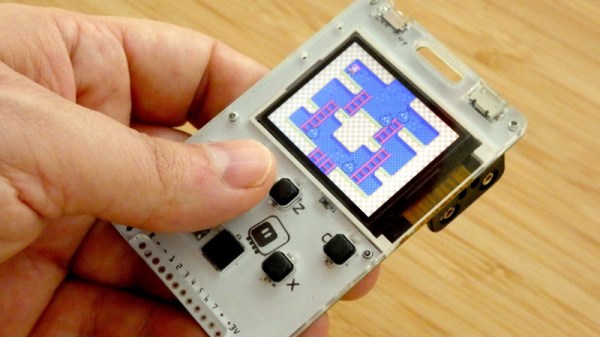
It’s often said that “getting there is half the fun”, and we think that can be just as true when building hardware as it is during the roadtrip to your favorite hacker con. Many of us enjoy the process of planning, designing, and building a new gadget as much as playing with it when it’s done. We get the impression [Radomir Dopieralski] feels the same way, as he’s currently working on yet another iteration of his PewPew project.

For the uninitiated, [Radomir] has already created a number of devices in the PewPew line, which are designed to make programming games on “bare metal” easier and more approachable for newcomers by using CircuitPython.

The original version was a shield for the Adafruit Feather, which eventually evolved into a standalone device. The latest version, called the M4, includes many niceties such as a large TFT screen and an acrylic enclosure. It’s also switched over to the iconic Game Boy layout, to really drive home that classic gaming feel.

As [Radomir] explains, previous versions of the PewPew were designed to be as cheap and easy to manufacture as possible, since they were to be used in game programming workshops. But outside of that environment, they left a little something to be desired. With the M4, he’s created something that’s much closer to a traditional game system. In that respect it’s a bit like the Arduboy: you can still use it to learn game development, but it’s also appealing enough that you might just play other people’s games on it instead.

A Curiously Strong Z80 In Your Pocket

Like many hackers, [Tom Szolyga] has soft spot for the venerable Z80. The number of instructions and registers made it relatively easy to program in ASM, and he still has fond memories of the refreshingly straightforward CP/M operating system he used to run on them back in the day. In fact, he loves Z80 computers so much he decided to build one that he could carry around in his pocket.

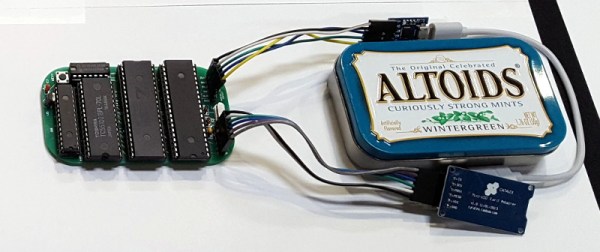
The result is the Minty Z80, so-called because it lives inside a tin formerly inhabited by every hacker’s favorite curiously strong mint. But the goal of this build wasn’t just to make it small, but also make it convenient to work with. [Tom] is using a ATmega32A to help interface the Z84C0008 microprocessor with the modern world, which allows for niceties such as support for a micro SD card. There’s no onboard USB-to-serial capability, but with an external adapter connected to the Minty’s header, it’s easy to use log into this microcosm of classic computing with a terminal emulator running on a computer or mobile device.

[Tom] has provided the schematics and Bill of Materials for the Minty Z80 on the project’s Hackaday.io page, but as of the latest update, he’s holding off on releasing the board files until he’s sure that all the bugs have been worked out. There’s no word yet if he found any show stoppers in the first iteration of the board design, but he’s posted a picture of the fully assembled miniature retrocomputer in all its glory which seems like a good sign.

The design of the Minty Z80 is similar to that of the Z80-MBC2 by [Just4Fun], but on an even smaller scale. It’s encouraging to see several projects leveraging modern design and components to prevent classic computing from becoming little more than a distant memory.

India’s Moon Mission Is Far From Over

India’s Chandrayaan-2 mission to the Moon was, in a word, ambitious. Lifting off from the Satish Dhawan Space Centre on July 22nd, the mission hoped to simultaneously deliver an orbiter, lander, and rover to our nearest celestial neighbor. The launch and flight to the Moon went off without a hitch, and while there were certainly some tense moments, the spacecraft ultimately put itself into a stable lunar orbit and released the free-flying lander so it could set off on its independent mission.

Unfortunately, just seconds before the Vikram lander touched down, an anomaly occurred. At this point the Indian Space Research Organisation (ISRO) still doesn’t know exactly what happened, but based on the live telemetry stream from the lander, some have theorized the craft started tumbling or otherwise became unstable between three and four kilometers above the surface.

Telemetry indicates a suboptimal landing orientation

In fact, for a brief moment the telemetry display actually showed the Vikram lander completely inverted, with engines seemingly accelerating the spacecraft towards the surface of the Moon. It’s unclear whether this was an accurate depiction of the lander’s orientation in the final moments before impact or a glitch in the real-time display, but it’s certainly not what you want to see when your craft is just seconds away from touchdown.

But for Chandrayaan-2, the story doesn’t end here. The bulk of the mission’s scientific goals were always to be accomplished by the orbiter itself. There were of course a number of scientific payloads aboard the Vikram lander, and even the Pragyan rover that it was carrying down to the surface, but they were always secondary objectives at best. The ISRO was well aware of the difficulties involved in making a soft landing on the Moon, and planned their mission objectives accordingly.

Rather than feel sorrow over the presumed destruction of Vikram and Pragyan, let’s take a look at the scientific hardware aboard the Chandrayaan-2 orbiter, and the long mission that still lies ahead of it.

Continue reading “India’s Moon Mission Is Far From Over”