Digital Cribbage Board Saves Scores, Marriage

When [ccooper] told his parents he was gonna start up his electronics habit again, the last thing he expected was to save his parents’ marriage in the process. But as soon as he dropped this news, they made a special request: build us something to replace the multi-purpose manual cribbage board. It’s too ambiguous and starts too many arguments.
Cribbage is a card game that involves scoring based on hands. Traditionally, the score is kept with pegs on a wooden board with two or three sets of 60 holes. To build a digital cribbage board, [ccooper] decided to represent the positions on a field made from chained-together RGBW matrices.

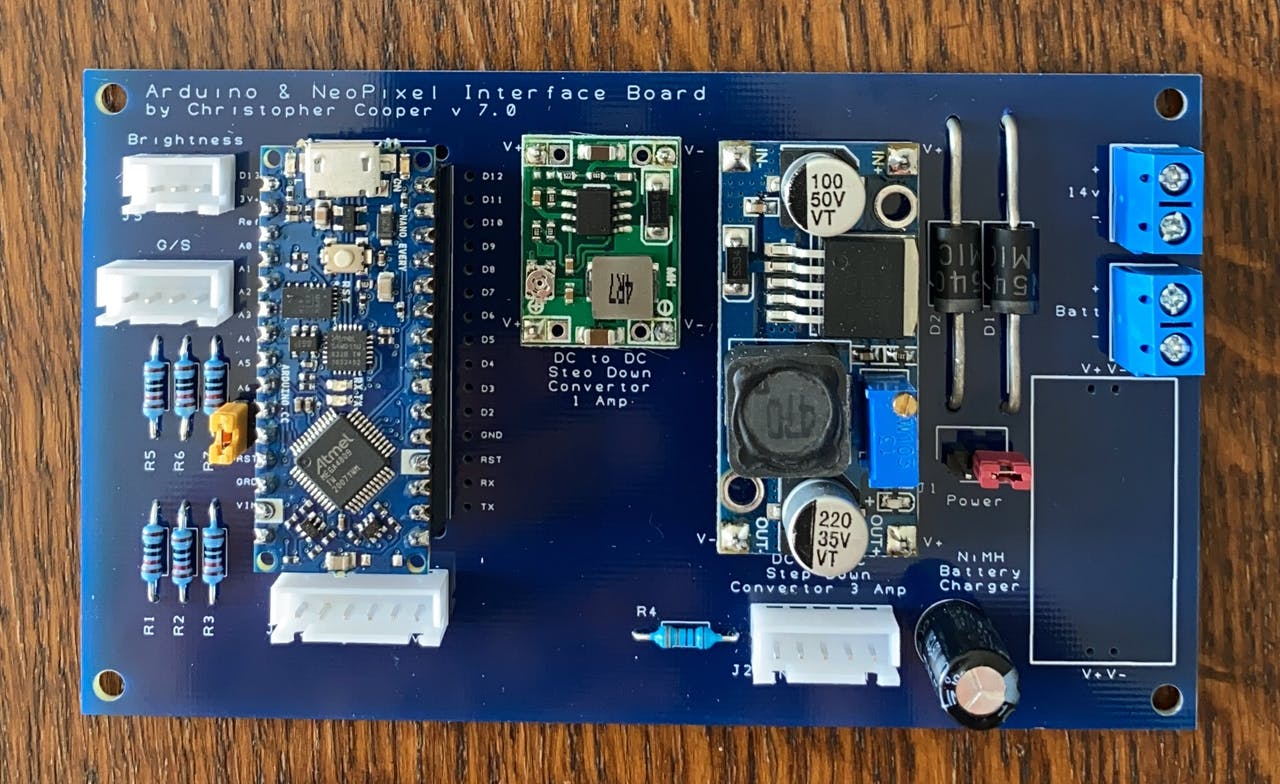
These four matrices are run by an Arduino Nano Every and will display one of three scoring schemes that the parents usually play. A set of eight AA batteries ensures that Mum and Dad can play out in bright daylight and still see the LEDs. You can see how the brightness rivals the sun in the demo after the break. The code and Gerber files for the custom board are there if you want to make one for yourself, or know of another marriage that needs saving.

Every game deserves tidy record-keeping. If you’re more the RPG type, check out this amazing stat tracker made of stacked-up FR4 boards.

Continue reading “Digital Cribbage Board Saves Scores, Marriage”

The Most Expensive D20 You’ll See Today

Roll your negotiation skill, because this d20 is a hefty one. The Tweet is also below. We are charmed by [Greg Davill]’s twenty-sided LED contraption, but what do we call it? Is it a device? A sculpture? A die? Even though “d20” is right on his custom controller PCB, we don’t think this will grace the table at the next elf campaign since it is rather like taking a Rolls Royce to the grocery store. Our builder estimates the price tag at $350 USD and that includes twenty custom PCB light panels with their components, a controller board, one battery pack, and the 3D printed chassis that has to friction-fit the light faces.

Power and communication for all the panels rely on twenty ribbon cables daisy-chained throughout the printed scaffolding, which you can see in the picture above. [Greg] made a six-sided LED cube last year, and there are more details for it, but we suspect he learned his lesson about soldering thousands of lights by hand. There are one-hundred-twenty LEDs per panel, times twenty, that is over two-thousand blinkenlights. We don’t yet have specs on the controller, but last time he used a SAMD51 processor to support over three-thousand lights. We don’t know where he’ll go next, but we’re game if he wants to make a chandelier for Hackaday’s secret underground lair.

(Editor’s Note: If you were at Supercon last year, and you got to play with this thing in the flesh, it’s worth it!)

Continue reading “The Most Expensive D20 You’ll See Today”

Otis Boykin’s Precision Passives Propelled The Pacemaker

The simplest ideas can be the ones that change the world. For Otis Boykin, it was a new way to make wirewound precision resistors. Just like that, he altered the course of electronics with his ideas about what a resistor could be. Now his inventions are in everything from household appliances and electronics to missile guidance computers.

While we like to geek out about developments in resistor tech, Otis’ most widely notable contribution to electronics is the control unit he designed for pacemakers, which regulate a person’s heartbeat. Pacemakers are a real-time clock for humans, and he made them more precise than ever.

Street Smarts and Book Smarts

Otis Frank Boykin was born August 29th, 1920 in Dallas, Texas to Sarah and Walter Boykin. Otis’ father was a carpenter who later became a preacher. His mother Sarah was a maid, and she died of heart failure when Otis was only a year old.

Continue reading “Otis Boykin’s Precision Passives Propelled The Pacemaker”

A Walking Robot With A Single Servo

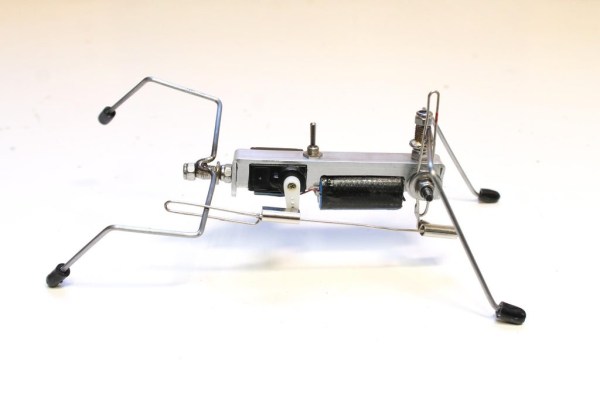
We’ve all been there — you see somebody do something cool on YouTube and you just have to give it a go. For [lonesoulsurfer], the drop-everything-and-build happened to be a little four-legged walker robot that runs on a single servo. Though it may be simple, there really is nothing like seeing a robot you created take its first steps.

[lonesoulsurfer]’s walker is made mostly from scrap aluminium and other scavenged parts like coat hangers, paper clips and the metal bits and bobs from banana jacks. The Dremeled and bent body would likely be the hardest to imitate for a first-time builder, but any sturdy chassis that allows for things screwed and bolted to it should work. Also, don’t expect it to work right away. It will take a bit of tuning to get the gait right, but it’s all part of the fun. So is modifying a 180° servo for continuous rotation.

We really like the way this robot walks — it saunters around like a long bulldog and looks like it can handle almost any terrain. Watch it walk after the break, and stick around for the build video.

There’s just something about simple robots without microcontrollers. If you’ve never heard of BEAM robots, cut your teeth on this ‘bot with circular legs.

Continue reading “A Walking Robot With A Single Servo”

Decoding The Netflix Announcement: Explaining Optimized Shot-Based Encoding For 4K

Netflix has recently announced that they now stream optimized shot-based encoding content for 4K. When I read that news title I though to myself: “Well, that’s great! Sounds good but… what exactly does that mean? And what’s shot-based encoding anyway?”

These questions were basically how I ended up in the rabbit hole of the permanent encoding optimization history, in an effort to thoroughly dissect the above sentences and properly understand it, so I can share it with you. Before I get into it, lets take a trip down memory lane. Continue reading “Decoding The Netflix Announcement: Explaining Optimized Shot-Based Encoding For 4K”

Improving More Leaf Design Flaws

[Daniel] was recently featured here for his work in improving the default charging mode for the Nissan Leaf electric vehicle when using the emergency/trickle charger included with the car. His work made it possible to reduce the amount of incoming power from the car, if the charging plug looked like it might not be able to handle the full 1.2 kW -3 kW that these cars draw when charging. Thanks to that work, he was able to create another upgrade for these entry-level EVs, this time addressing a major Leaf design flaw that is known as Rapidgate.

The problem that these cars have is that they still have passive thermal management for their batteries, unlike most of their competitors now. This was fine in the early ’10s when this car was one of the first all-electric cars to market, but now its design age is catching up with it. On long trips at highway speed with many rapid charges in a row the batteries can overheat easily. When this happens, the car’s charging controller will not allow the car to rapid charge any more and severely limits the charge rate even at the rapid charging stations. [Daniel] was able to tweak the charging software in order to limit the rapid charging by default, reducing it from 45 kW to 35 kW and saving a significant amount of heat during charging than is otherwise possible.

While we’d like to see Nissan actually address the design issues with their car designs while making these straighforward software changes (or at least giving Leaf owners the options that improve charging experiences) we are at least happy that there are now other electric vehicles in the market that have at least addressed the battery thermal management issues that are common with all EVs. If you do own a Leaf though, be sure to check out [Daniel]’s original project related to charging these cars.

Continue reading “Improving More Leaf Design Flaws”

Rapid Charging Supercapacitors

Battery technology is the talk of the town right now, as it’s the main bottleneck holding up progress on many facets of renewable energy. There are other technologies available for energy storage, though, and while they might seem like drop-in replacements for batteries they can have some peculiar behaviors. Supercapacitors, for example, have a completely different set of requirements for charging compared to batteries, and behave in peculiar ways compared to batteries.

This project from [sciencedude1990] shows off some of the quirks of supercapacitors by showing one method of rapidly charging one. One of the most critical differences between batteries and supercapacitors is that supercapacitors’ charge state can be easily related to voltage, and they will discharge effectively all the way to zero volts without damage. This behavior has to be accounted for in the charging circuit. The charging circuit here uses an ATtiny13A and a MP18021 half-bridge gate driver to charge the capacitor, and also is programmed in a way that allows for three steps for charging the capacitor. This helps mitigate the its peculiar behavior compared to a battery, and also allows the 450 farad capacitor to charge from 0.7V to 2.8V in about three minutes.

If you haven’t used a supercapacitor like this in place of a lithium battery, it’s definitely worth trying out in some situations. Capacitors tolerate temperature extremes better than batteries, and provided you have good DC regulation can often provide power more reliably than batteries in some situations. You can also combine supercapacitors with batteries to get the benefits of both types of energy storage devices.