3D Printer Time Lapse Videos Ditch The Blur

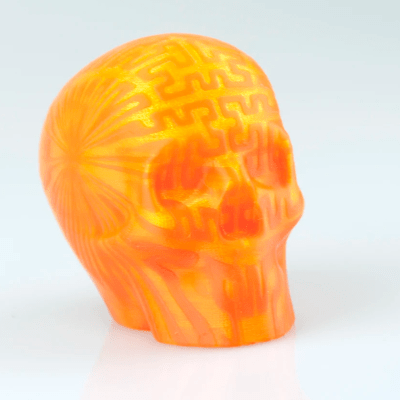
Example output of Octolapse with the print head absent from the images.

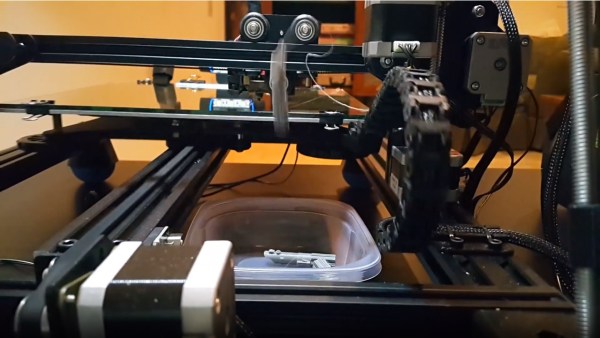
Most time-lapse videos of 3D prints show a steadily growing print with a crazy blur of machine movement everywhere else. This is because an image is captured at a regular time interval, regardless of what’s physically going on with the machine. But what if images were captured at consistent machine positions instead? [FormerLurker]’s Octolapse plugin for OctoPrint came out of beta recently and does exactly that, and the results are striking. Because OctoPrint knows where a 3D printer’s print head is at all times, it’s possible for a plugin to use this information to create time-lapse videos where the print head position is consistent instead of a crazy blur, or even have the print head absent from the shot altogether.

[FormerLurker] had originally created stabilized time lapses by hand editing G-code, which had great results but was inefficient and time-consuming. This plugin is the result of his work at automating and enhancing the process, and is also his first serious open source programming project. We’ve covered upgrading a 3D printer with OctoPrint before, and the plugins functionality of OctoPrint means features can be added independently from the core system, which itself largely remains a one-woman effort by creator and maintainer [Gina Häußge].


3D-Printer Gets Hot-Swappable Hot-Ends

3D printers can be hacked into a multitude of useful machines, simply by replacing the filament extruder with a new attachment such as a laser engraver or plotter.

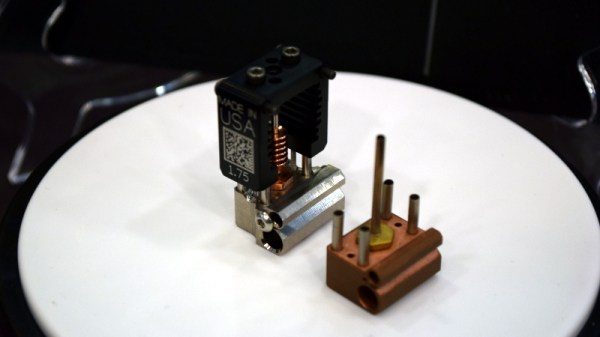
However, [geggo] was fed up with re-wiring and mounting the printhead/tool every time he wanted to try something new, and set out to design a modular printhead system for next-level convenience. The result? A magnetic base-plate, allowing a 3D printer to become a laser engraver within a matter of seconds. This new base-plate mounts onto the existing ball bearings and provides a sturdy place for attachments to snap to – with room for two at once.

Using neodymium magnets to mount the printhead to the base-plate provides enough force to keep the attachment in place and compress 30 pogo pins, which make the electrical connections. These carry the lines which are common to all attachments (heater, thermistor and fan), as well as custom connections for certain attachments – for example the extruder stepper motors.  A Flexible Flat Cable (FFC) is used to connect the pogo pin PCB to the main controller.

So far, the list of tools available for fitting includes an MK8 extruder, a E3D v6 hotend (for Bowden extrusion), a laser, a micrometer dial indicator, and a pen plotter (used for writing a batch of wedding invitations!). There was even some success milling wood.

For some automated extruder switching action we’ve shown you in the past, check out the 3d-printer tool changer.

Continue reading “3D-Printer Gets Hot-Swappable Hot-Ends”

A Victrola For The 21st Century

We’ve lost something tangible in our listening to music, as we made the move from physical media through MP3 players to streaming services on our mobile devices. A 12″ vinyl disc may be slightly cumbersome, but there is an undeniable experience to pulling it from the sleeve and placing it on the turntable. Would you like to recreate that? [Castvee8] would, because he’s created a 21st-century version of a wind-up gramophone, complete with a turntable and horn.

Under the hood is an Arduino-controlled MP3 player, while on the surface is a 3D-printed turntable and horn. On the turntable is placed a CD, and a lead screw moves the horn across it during play to simulate the effect of a real turntable. An Arduino motor controller shield drives the turntable and lead screw, and at the end of each song, the horn is automatically returned to the start of the CD as if it were a record.

The effect is purely aesthetic but should make for an unusual talking point if nothing else. Surprisingly this project is not the first of its type, in the past, we’ve shown you another one that played a real CD in the place of the record on the turntable.

Art Deco Radio Gets FM Reception

Taking a vintage radio and cramming it full of modern, Internet-connected, guts has long been a staple of the hacking and making scene. While some might see it as a crime to take what’s arguably a legitimate piece of history and turn it into nothing more than a slipshod case for the Raspberry Pi, we have to admit there’s a certain appeal to the idea. Taking the beauty of classic design and pairing it with more modern capabilities is getting the best of both worlds.

But this project by [Nick Koumaris] is a somewhat unique take on the concept. Rather than sacrificing a real vintage piece of hardware to house the electronics, he’s designed a 3D printable case that looks like a classic 1936 AWA Radiolette. But what’s really interesting to us is that he then puts a basic FM radio inside of it.

That’s right, no Internet radio streaming or smartphone Bluetooth compatibility here. It’s just a regular FM radio, not entirely unlike the kind of hardware you’d expect to be inside of a classic radio. Of course, it’s much more modern, and [Nick] actually built it himself from a TEA5767 FM radio module and an Arduino Pro Mini.

While functionally it might not be terribly exciting, we do appreciate that he went through the trouble to make a vintage-looking user interface for the radio. While physical buttons would arguably have been more appropriate given the era, the art deco inspired font and graphics that show on the device’s Nokia 5110 LCD do look really slick.

Purists will surely be happy to see another project where a piece of vintage piece of audio equipment wasn’t sacrificed at the Altar of Hack, but we’ve also played host to many projects which weren’t nearly as concerned with historical preservation.

Continue reading “Art Deco Radio Gets FM Reception”

Can You 3D Print An Axe?

3D printers hit the scene in a big way in the last decade, and thanks to the constant improvements that we’ve seen since then you can now get a decent one, assembled or as a kit, for a reasonable price. The one major drawback is that almost all of these printers are limited to printing in plastic, which has its obvious limitations. Printing in metal seems like the next logical step, and a group from Michigan Tech has created something that is accessible to most of us. Spoiler: they used plastic and metal printing to print a functioning axe.

Untill now, most metal printers have used a process like laser sintering to achieve the desired effect. This group uses a much more common tool: a MIG welder. MIG welders work by passing a wire through the welding handle, which would normally used as the filler material for the weld. If you use the wire for laying down material rather than for welding specifically, you can build up material on a surface in essentially the same way that a printer that prints plastic would.

From there, all that’s needed is to attach the MIG welder to a CNC machine and get to printing. The team has produced some great results so far, including some metal braces and farm implements, so hopefully their work leads to another revolution in 3D printing for the masses. We think it’s high time.

Handheld Arduino Light Painter

Light painting is a technique which allows you to “draw” on a photograph by moving a light past the camera during a long exposure shot. While it can be difficult to master, light painting allows for some incredible effects such as text and images that appear to be hovering in mid-air. Think of it like a very slow but much cooler version of an augmented reality app.

[Reven] recently wrote in to tell us about the Arduino light painter he put together, and while DIY (and even commercial) light painting gear isn’t exactly new at this point, we think he’s raised the bar a bit with his design. With the addition of a slick 3D printed enclosure and on-board display and menu system, his light painter looks exceptionally professional for being built out of hardware he had on hand.

On his blog, [Reven] has done a phenomenal job of documenting the build from start to finish. Not only does he include a detailed Bill of Materials and the STL files so you can build your own version of his light painter, he walks the reader though his design process and explains why he did the things he did. Even if you aren’t interested in building a light painter, there’s almost certainly something of interest for anyone who’s ever looked at a pile of parts on their workbench and wondered how they were going to turn it into a functioning device.

Powered by an Arduino Uno, the light painter provides a user interface on a 16×2 LCD which allows control over not only the brightness of the WS2812 LED strips but selecting and loading different images from the micro SD card. The case was designed in FreeCAD, and while [Reven] mentions there are a number of issues which could be improved, satisfies all his design goals.

We covered the original Adafruit project that [Reven] based his code all the way back in 2013, though there’s certainly been more modern interpretations of the idea since then.

A True 3D Printed Weather Station

If the term “3D printed weather station” makes you think of a printed enclosure for off-the-shelf sensors, don’t feel bad. We thought the same thing when we first read the message [Rob Ward] sent in about his latest project. Surely he couldn’t mean that he actually printed all the principal parts of a serious weather station setup, such as the wind vane, anemometer, or rain gauge?

Except, on closer inspection, that’s exactly what he did. Every part of the weather station is designed in OpenSCAD, printed out, and infused with various vitamins to turn them into functional pieces of hardware. Interestingly enough, most of the magic is done with simple reed switches and magnets.

For example, the wind vane uses eight reed switches and an embedded magnet to communicate the current wind direction to the Arduino Uno which handles the user interface. Wind speed, on the other hand, it done with a single reed switch as it just needs to count rotations to calculate speed.

[Rob] did “cheat” by using an off-the-shelf barometric pressure sensor, but we’ll give him a pass for that one. Unless somebody wants to hit the tip line with a design for a printable barometer, we’ll consider this the high water mark in printable weather stations.

This isn’t the first time we’ve seen a DIY anemometer or rain gauge, of varying degrees of complexity. But the clean look of the final version, completely open nature of the OpenSCAD source, and the low part count make this an extremely compelling option for anyone looking to up their home forecasting game.