Cracking The Case Of Capcom’s CPS2 Security

We love a good deep-dive on a specialized piece of technology, the more obscure the better. You’re getting a sneak peek into a world that, by rights, you were never meant to know even existed. A handful of people developed the system, and as far as they knew, nobody would ever come through to analyze and investigate it to find out how it all went together. But they didn’t anticipate the tenacity of a curious hacker with time on their hands.

[Eduardo Cruz] has done a phenomenal job of documenting one such system, the anti-piracy mechanisms present in the Capcom CPS2 arcade board. He recently wrote in to tell us he’s posted his third and final entry on the system, this time focusing on figuring out what a mysterious six pin header on the CPS2 board did. Hearing from others that fiddling with this header occasionally caused the CPS2 board to automatically delete the game, he knew it must be something important. Hackaday Protip: If there’s a self-destruct mechanism attached to it, that’s probably the cool part.
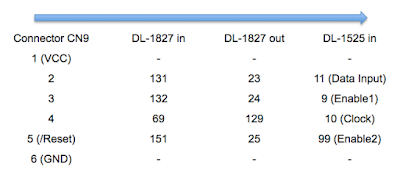
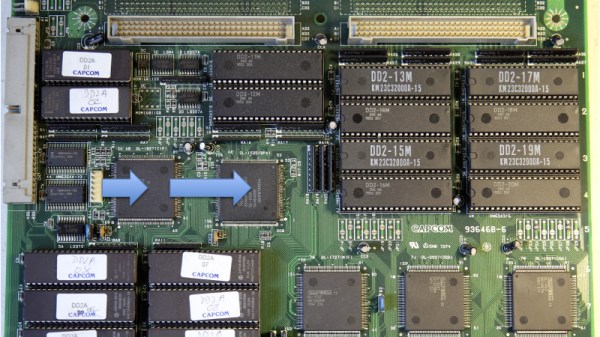
He followed the traces from the header connector, identified on the silkscreen as C9, back to a custom Capcom IC labeled DL-1827. After decapping the DL-1827 and putting it under the microscope, [Eduardo] made a pretty surprising discovery: it wasn’t actually doing anything with the signals from the header at all. Once the chip is powered up, it simply acts as a pass-through for those signals, which are redirected to another chip: the DL-1525.

[Eduardo] notes that this deliberate attempt at obfuscating which chips are actually connected to different headers on the board is a classic trick that companies like Capcom would use to try to make it harder to hack into their boards. Once he figured out DL-1525 was what he was really after, he was able to use the information he gleaned from his earlier work to piece together the puzzle.

This particular CPS2 hacking journey only started last March, but [Eduardo] has been investigating the copy protection systems on arcade boards since 2014.

[Thanks to Arduino Enigma for the tip.]

Convert A Curbside CRT TV Into An Arcade Monitor

While an old CRT TV may work well enough on a MAME cabinet project, the real arcade purists are quick to point out that a proper arcade monitor and a TV aren’t the same thing. A real arcade board uses RGB to connect to the monitor, that is, direct control over the red, green, and blue signals. Conversely video over coax or composite, what most people associate with old CRT TVs, combine all the video information down into an analog signal. Put simply, RGB allows for a much cleaner image than composite.

Many in the arcade restoration scene say that trying to convert a bog standard CRT TV into a RGB monitor isn’t possible, but [Arcade Jason] had his doubts. Over on his YouTube channel, he’s recently posted a tutorial on how to go from a trashed CRT TV to a monitor worthy of proper arcade gaming with relatively little work. As real arcade monitors are becoming increasingly rare, these kind of modifications are likely to get more common as coin-op gamers look to keep the old ways alive.

Now obviously every TV is going to do be different inside. All CRT TVs contain high voltages, and on some the circuit boards aren’t even mains-isolated, so take care if you try this. [Jason] certainly doesn’t claim that the method he demonstrates will work on whatever old TV you happen to have kicking around. But the general idea and some of the techniques he shows off are applicable to most modern TVs, and can help you tailor the method to your particular piece of gear. It all starts with a wet finger. Seriously.

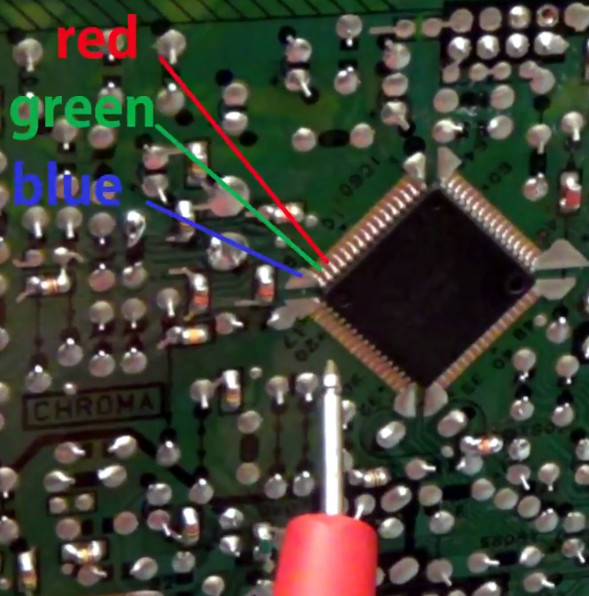
[Jason] demonstrates a rather unique way of determining which pins on the TV’s control chip are responsible for the individual color signals by wetting his finger and sliding it over the pins. When a change in color is seen on the displayed image, you know you’re getting close. We can’t say it’s the most scientific or even the safest method, but it worked for him.

He then follows up with a jumper wire and resistor to find the precise pins which are responsible for each color, and solders up his actual RGB connection for the arcade board. In addition to the three color wires, a sync signal is also needed. This is the same sync signal used in composite video, so all that’s needed is to solder to the pad for the original composite video jack. Add a ground signal, and you’ve got yourself a proper RGB monitor.

Interestingly, this one has come full circle, as [Jason] says his attempt was inspired by an old post on Hackaday. It’s the Circle of Hacker Life.

[Thanks to Seebach for the tip]

Continue reading “Convert A Curbside CRT TV Into An Arcade Monitor”

Open Gaming To Everyone With A Controller Meant To Be Hacked

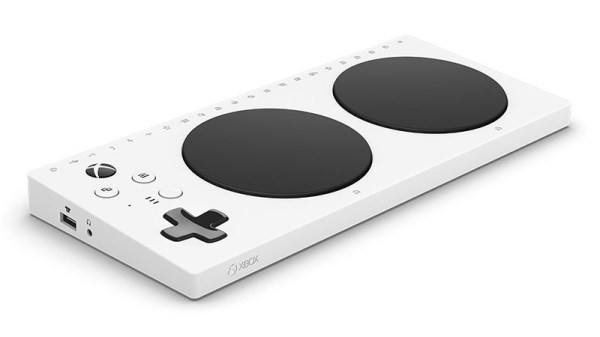
Gaming controllers have come a long way from an Atari 2600’s single button and digital joystick. As games grew more sophisticated, so did the controllers. This development had a dark side – controllers’ growing complexity have made it increasingly difficult for different-abled bodies to join in the fun. Microsoft has extended an invitation to this audience with their upcoming Xbox Adaptive Controller.

Creative minds have been working on this problem for a while, building an ecosystem of controller hacks to get more people into gaming. These projects require solving problems in two broad categories: the first is to interface with input devices that match a specific user’s needs, the second is then integration into target game device’s control infrastructure.

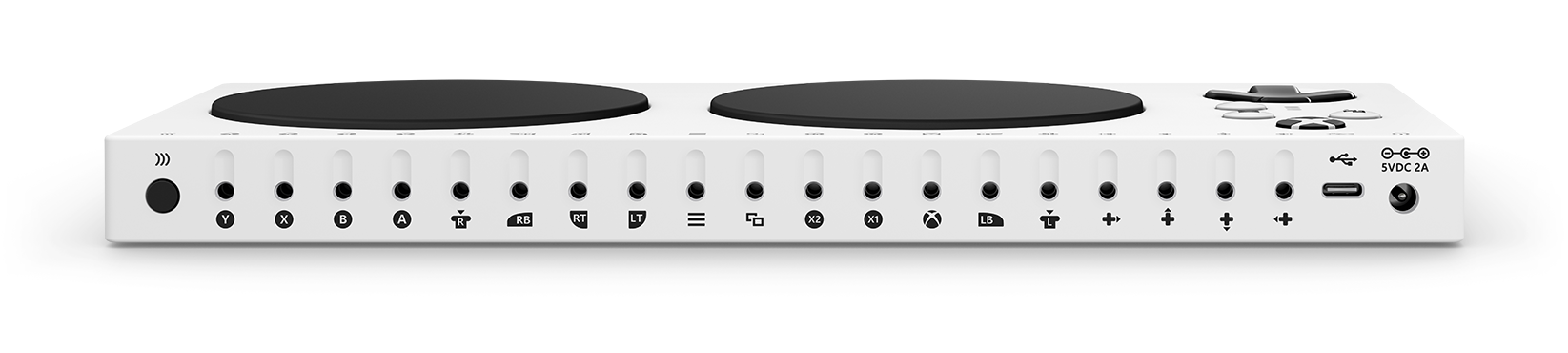
The value of XAC is eliminating the second category of work and making it reliable: it takes care of all the housekeeping overhead of creating a custom Xbox controller, from power management to wireless communication. As for input device interface, every control needed to play on a Xbox is individually mapped to a standard 3.5 mm jack. Some are pure digital ports, others can transfer an analog value. A 3.5mm plug is a proven consumer-friendly interface that’s easy to work on by anyone who wants to pick up a soldering iron, making this array of jacks a wide-open gateway to limitless possibilities. The 3.5 mm jacks make it easy to build specific configurations, and make it easy for less-technical people to reconfigure for a different player or different game.

We love to see our hacker creativeness applied to help people live normal lives. Making it easy to hack up a custom gaming controller may not be earth shattering, but don’t underestimate the importance of letting people feel included. It does transform lives, one at a time. Plus, it looks like fun to play with.

Continue reading “Open Gaming To Everyone With A Controller Meant To Be Hacked”

Neural Networks Using Doom Level Creator Like It’s 1993

Readers of a certain vintage will remember the glee of building your own levels for DOOM. There was something magical about carefully crafting a level and then dialing up your friends for a death match session on the new map. Now computers scientists are getting in on that fun in a new way. Researchers from Politecnico di Milano are using artificial intelligence to create new levels for the classic DOOM shooter (PDF whitepaper).

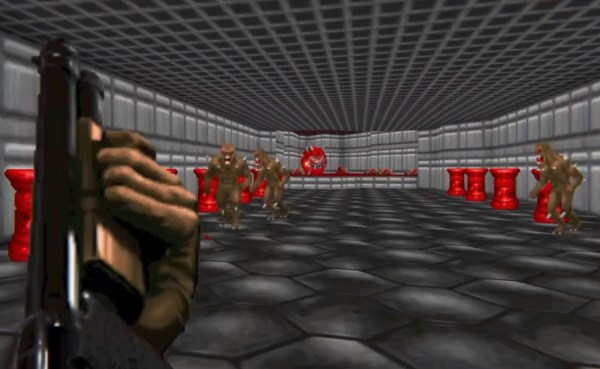
While procedural level generation has been around for decades, recent advances in machine learning to generate game content (usually levels) are different because they don’t use a human-defined algorithm. Instead, they generate new content by using existing, human-generated levels as a model. In effect they learn from what great game designers have already done and apply those lesson to new level generation. The screenshot shown above is an example of an AI generated level and the gameplay can be seen in the video below.

The idea of an AI generating levels is simple in concept but difficult in execution. The researchers used Generative Adversarial Networks (GANs) to analyze existing DOOM maps and then generate new maps similar to the originals. GANs are a type of neural network which learns from training data and then generates similar data. They considered two types of GANs when generating new levels: one that just used the appearance of the training maps, and another that used both the appearance and metrics such as the number of rooms, perimeter length, etc. If you’d like a better understanding of GANs, [Steven Dufresne] covered it in his guide to the evolving world of neural networks.

While both networks used in this project produce good levels, the one that included other metrics resulted in higher quality levels. However, while the AI-generated levels appeared similar at a high level to human-generated levels, many of the little details that humans tend to include were omitted. This is partially due to a lack of good metrics to describe levels and AI-generated data.

Example DOOM maps generated by AI. Each row is one map, and each image is one aspect of the map (floor, height, things, and walls, from left to right)

We can only guess that these researcher’s next step is to use similar techniques to create an entire game (levels, characters, and music) via AI. After all, how hard can it be?? Joking aside, we would love to see you take this concept and run with it. We’re dying to play through some gnarly levels whipped up by the AI from Hackaday readers!

Continue reading “Neural Networks Using Doom Level Creator Like It’s 1993”

Tiny Pinball Emulator Is Hugely Impressive

We were wondering what [Circuitbeard] has been up to lately. Turns out he’s been building a mini pinball cabinet to add to his arcade of self-built games.

[Circuitbeard] was forced to break out of his Raspi comfort zone this time. We’re glad he did because this is one impressive build. Finding the pinball emulation community lacking for Linux, he turned to the LattePanda, a tiny Windows 10 SBC with a built-in Arduino Leonardo. This was really the perfect board because he needed to support multiple displays with a minimum of fuss. That Leonardo comes in handy for converting button presses to key presses inside the Visual Pinball emulator.

The 3mm laser-cut plywood cabinet was designed entirely in Inkscape and sized around the two screens: a genuine 7″ LattePanda display for the playfield, and a 5″ HDMI for the back glass. The main box holds the Lattepanda, two Pimoroni mini speakers, and a fan to keep the board cool.

There’s a lot to like about this little cabinet thanks to [Circuitbeard]’s fantastic attention to detail, which you can see for yourself in the slew of pictures. Look closer at the coin drop—it’s really an illuminated button with a custom graphic. If you want to have a go at emulating this emulator, all the code is up on GitHub. Tilt past the break to watch some modern pinball wizardry in action, and then check out his mini Outrun machine.

If pinball emulators don’t score any points with you, here’s one that’s all wood and rubber bands.

Continue reading “Tiny Pinball Emulator Is Hugely Impressive”

NeoPixel Game Rewards Button Mashing

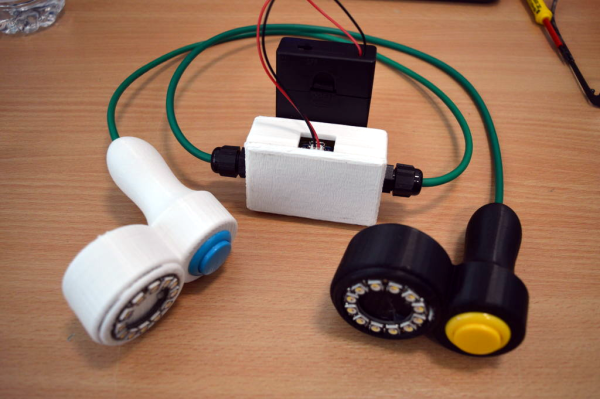
Who has the fastest thumbs at Maker Faire UK? That’s the question [wellsey1972] sought to answer when he created this simple game using little more than two NeoPixel rings, two chunky arcade buttons, and a Trinket.

The idea is simple: each button push lights up one NeoPixel. The first one to fill up their ring is the winner, and is treated to a ring of flashing green lights. The loser, of course, gets flashing red. Both controllers are hard-wired to a box containing a Trinket, a custom PCB with pull-up resistors, and two sets of solderless terminals. [wellsey1972] smartly re-purposed a cat 5 cable for sleeker wiring.

He has a few ideas for the future, like going wireless, printing smaller controllers, and making winning more difficult via potentiometer. We humbly suggest that the loser be taunted by the cry of a sad tuba. Mash past the break for a brief demo.

If you like lights and simplicity but find this build less than challenging, try building a minimal secret maze game.

Continue reading “NeoPixel Game Rewards Button Mashing”

8-bit Game Uses Our Favourite IC And Zero Lines Of Code

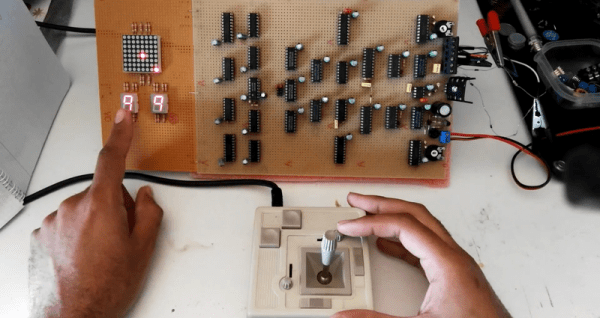
If a hacker today wanted to build a simple game, he or she could whip it up using an Arduino board and a few other bits and pieces in about an hour, only to be greeted with “where’s the hack?” But when you look at [OiD]’s SPEBEG (Single Player Eight Bit Electronic Game), you’ll understand why building anything using old-skool 70s tech is so awesome and educational.

The SPEBEG is a simple 8-bit game where you aim with the joystick at the target and fire to gain points. As your score increases, so does the game speed. It doesn’t need a single line of code, since the whole design is completely hardware based. And it uses the venerable 555. The display is an 8×8 LED matrix while score and levels are displayed on two 7-segment LED displays.

An 8-bit bus forms the backbone of the game and it is all held together by lots of 74-series TTL logic. The 555 provides a 47 kHz secondary clock, while the 100 Hz signal after the rectifier diodes is used to introduce the essential “randomness” that every game requires. [OiD] does a good job of describing the whole circuit by breaking it down into byte-sized chunks and walking us through each. For something so simple to build using modern technology, he needed over 25 different chips to build it, and ended up setting himself back by almost 200 €.

But there’s one more part of this project that amazes us, and that is its construction technique. [OiD] purchased IC sockets with extra long pins and a lot of thin, enamel (insulated) copper wire. A soldering station with a fine tip and high temperature setting allowed him to heat the end of the copper wire to melt its enamel insulation, so it could be soldered to the long pin sockets. Using this method, he assembled the circuit using point-to-point soldering, pretty much like wire wrapping. Only, instead of wrapping the wires, he soldered them.

Despite all of his efforts, the game was pretty much unplayable when he first built it almost five years back. He recently pulled it out of storage, swatted all the hardware bugs, and fixed it nicely. Check out the video after the break. [OiD]’s project is decidedly more simple compared to this game that was Fabricated from the Original Arcade Pong Schematics.

Continue reading “8-bit Game Uses Our Favourite IC And Zero Lines Of Code”